UK AI Policy Template: From ICO and NCSC Guidance to a Pilot in 90 Days

Use this ready-to-adapt AI policy template to name an owner, build an approved-tools register and lock down what must never be put into external models. It comes with a short adoption checklist, so you can move from blank page to signed-off policy without stalling the business. Your first step is simple: appoint a director-level owner, set an annual review date and open the register.
TL;DR:
- Keep credentials, payment details, sensitive personal data, confidential material, unpublished results, and unshared source code out of external models; free chatbots get public data only.
- Require human sign off on customer facing content, regulatory submissions, and significant decisions about people; the person who sends any AI draft remains accountable.
- Before an agent acts, assign an accountable person, limit its scope and access, require approval for consequential actions, and provide a usable kill switch.
- Require a data protection impact assessment before piloting tools that process personal data at scale, profile people, or inform decisions about them.
- Review the policy annually at minimum, and sooner after major tool changes, incidents, near misses, or new regulator guidance; larger organizations should report quarterly.
Table of Contents
- What goes into each clause of the policy template?
- How do you build an approved tools register and govern new tools?
- What should staff never put into an AI tool?
- How should you control AI agents that act in your systems?
- When must a person review AI output?
- Who owns the policy and who signs it off?
- What security and incident rules should the policy include?
- How do you adopt the policy in 90 days?
- What UK regulation and guidance should you read before finalising?
- A governance-first view: why named owners beat long policies
- How we help you put the policy into practice
- FAQ
- Sources
What goes into each clause of the policy template?
Keep the parent policy short and stable, then attach living registers and checklists. The government’s own policy statement favours outcome-focused policy statements such as “no personal data in public models”, because lists of technical bans go out of date quickly. Write every clause as an outcome you can check.
The template skeleton runs in this order:
- Purpose and scope: who and what the policy covers, including contractors, volunteers and AI features built into tools you already use.
- Definitions: AI system, agent, external model, confidential data.
- Approved Tools Register: a pointer to the live register, not a list of tools in the policy itself.
- Permitted and prohibited uses: what staff may do, and what they must never do.
- Human review: who signs off which outputs.
- AI agents: extra controls for systems that act.
- Incidents: what counts, who is told, how fast.
- Training: what staff learn and when.
- Roles: owner, data protection lead, security owner, approvers.
- Review cadence: annual at minimum, plus defined triggers.
Three items need your own inputs: the named owner, the review date and your data tiers. Everything else can be reused almost word for word, then tightened after your first pilot.
Use plain placeholders in the first draft, for example “Owner: [Director of Operations]” and “Next review: [date, set according to your review policy]”. For board sign-off, one sentence is enough: “The board approves this policy and delegates its operation to the named AI owner, who reports at least annually.” A membership body or charity can adopt that wording unchanged and spend its effort on the data tiers, which are the part that differs most between organisations.
How do you build an approved tools register and govern new tools?
The register is what keeps the policy from going stale. Tools change monthly, but your policy should not. Each entry should record the vendor, the account tier (free, business or enterprise), the data classes the tool may handle, a named owner, the retention period and whether the vendor can train on your inputs.
Keep the approval flow light enough that people use it rather than work around it:
- Request: the member of staff explains the task and the data involved.
- AI owner review: is there a real business case, and is a tool already on the register?
- Data protection and security check: your data protection lead and security owner look at the vendor’s terms and data flows.
- Time-limited pilot: a small group, non-sensitive data, a fixed end date.
- Full approval: the tool is added to the register with its tier and owner.
Ask every vendor the same questions: how long is data retained, can admins see usage logs, can training on your inputs be switched off, and who are the sub-processors? An answer of “we don’t know” is an answer. Put a short vendor questionnaire in your register template so the questions are never improvised.
Pro Tip: Give every register entry a review date as well as an owner. A tool with no owner and no date is the first sign the register is drifting out of use.
What should staff never put into an AI tool?
Spell out a short, blunt list. Staff remember “never” lists far better than paragraphs of nuance. Under this policy, the following must never be entered into an external model:
- Passwords, API keys and other credentials.
- Payment card data.
- Special-category personal data, such as health, ethnicity or biometric information.
- Material covered by a non-disclosure agreement.
- Unpublished financial results.
- Source code you do not intend to share.
- Anything marked “Confidential”.
Then explain why, using tiers. A simple tiered model can distinguish public information, internal information, and restricted information. Public and some internal data may go into approved business or enterprise accounts. Restricted data stays out of external tools altogether, or goes only into a tool hosted in your own environment. Free consumer chatbots sit at the bottom: public information only.
A recruitment firm, for instance, would put candidate CVs in the restricted tier. A trade association might treat member contact lists the same way. Map each tier to the account types on your register, so staff can see at a glance which tool is allowed for which task.
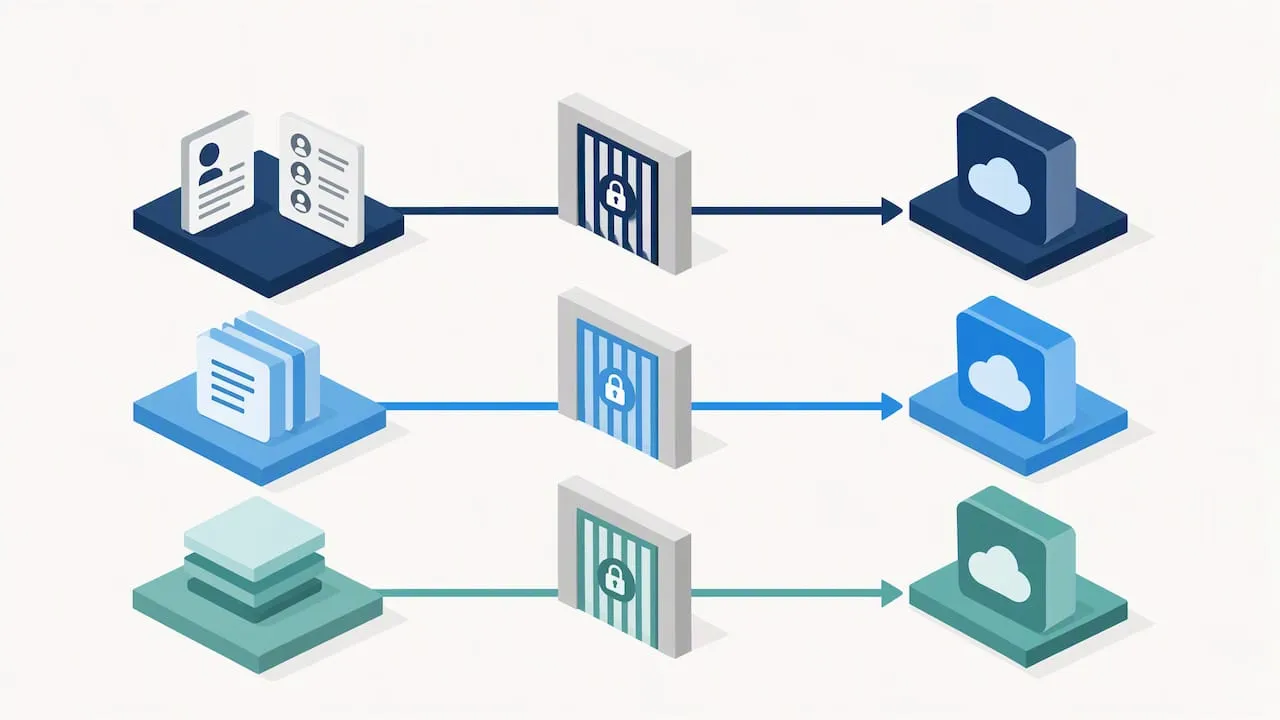
A data protection impact assessment is likely to be needed where an AI tool processes personal data at scale, profiles individuals or supports decisions about people. Your data protection lead signs it off before the pilot begins. The ICO publishes its own guidance on AI and data protection, which is the right place to check your wording against.
The policy should also say where AI must not be used at all: final decisions on hiring, disciplinary action or benefits, and anything where a wrong answer harms a person without a human catching it first.
The government’s own position is that AI assurance is a core part of operationalising regulatory principles, so keep evidence that your data rules are followed, not just written down.
How should you control AI agents that act in your systems?
An agent is a system that does more than answer questions: it takes actions in your software, such as updating a CRM record, sending an email or changing a permission. That is a different risk from a chatbot, and your policy needs its own clause for it.
Actions that must need human approval:
- Creating or updating records in a business system.
- Sending any external communication.
- Moving money or approving payments.
- Changing user permissions or access.
Before an agent goes live, require four things in writing: a named human who is accountable for it, a defined scope of what it may and may not do, a service account with the least access that still lets it work, and a kill switch that someone can use without asking permission. Start with approval-for-writes, meaning the agent drafts and a person confirms, and relax that only after the logs show it behaving.
Operational rules keep the control alive after launch. Log every action the agent takes. Review those logs monthly. Set spend limits where the agent calls paid services. Decide in advance what happens when it fails: who does the work by hand, and how quickly. For a worked example of this approach, see our internal assistant guide on governance-first assistants, and our note on what to deploy first in CRM AI automation when you are choosing where an agent should start.
When must a person review AI output?
Make human sign-off non-negotiable in three places: anything customer-facing, anything that goes to a regulator, and any significant decision about a person. Outside those, scale the checking to the risk.
Practical verification methods:
- Sampling: check a set percentage of routine outputs each week, and raise it after any error.
- Two-person review: high-risk outputs, such as a contract summary or a safeguarding note, get a second reviewer.
- Simple checklists: for standard outputs, a short list of checks (facts, names, figures, tone, source) that the reviewer ticks.
The point of logging is accountability. Record who reviewed what, when, and what they changed. A shared sheet or a field in your existing workflow tool is enough, provided it links back to the policy clause that required the review. If an output is ever challenged, you can show who was responsible and what they checked.
State plainly that AI output is a draft. The person who sends it owns it.
Pro Tip: Count corrections, not just approvals. If reviewers never change anything, either the tool is excellent or nobody is really reading.
Who owns the policy and who signs it off?
Governance fails when everyone is responsible, so name people. The policy should require a director-level AI owner and board-level sign-off, with reporting at least annually and, for larger organisations, quarterly.
Define these roles in the policy:
- AI owner: accountable for the policy, the register and the annual report to the board.
- Data protection lead (DPO): signs off DPIAs and advises on UK GDPR questions.
- Security owner: checks vendors, access and incident readiness.
- Business-unit approvers: decide whether a use case fits their team’s work.
- HR: owns the workforce rules, training and any disciplinary consequences.
Then list the triggers that force an early review: a major tool change, an incident or near miss, and new regulator guidance. Without triggers, an annual date is the only prompt, and a lot happens in a year. State the next review date in the policy itself, and have the AI owner confirm it at every board report.
What security and incident rules should the policy include?
Align the security clause with NCSC guidance. The NCSC’s secure deployment guidance recommends securing infrastructure, protecting models continuously, developing incident management procedures and releasing AI responsibly. Its wider guidelines also treat logs and model artefacts as sensitive assets, which is worth copying into your wording.
Practical clauses for your template:
- Keep test and live environments separate, and protect any model assets you hold.
- Monitor for prompt injection and unexpected data leaving your systems.
- Define an AI incident: harmful output reaching a customer, data entered into a prohibited tool, an agent acting outside its scope, or a near miss.
- Say who reports, to whom and how quickly, and keep offline backups and forensic logs.
The NCSC also advises that cyber security must be integrated across AI projects, with leaders understanding accountability and critical assets. For suppliers, ask for model documentation, a sub-processor list, signed or hashed model files where available and evidence of testing. Where you need independent testing of a model, a specialist such as Solusec’s AI model security assessment is one route.
How do you adopt the policy in 90 days?
You do not need to stop the business to adopt this. Run it in three stages.
- Initial stage: map where AI is already used, including features switched on inside existing software. Appoint the AI owner, set the review date and open the Approved Tools Register.
- Next stage: enforce the “never put” rules, set up the human-review workflows, update supplier contracts and train staff, with short sessions built around real examples from your own teams.
- Final stage: test the agent controls in a small pilot, run an incident tabletop exercise, publish the policy and embed monitoring into your normal reporting.
A good first pilot touches a real system but carries low risk. Our AI CRM data-entry pilot is an example of one, with approval gates and logging built in from day one.
Pro Tip: Publish the policy only after the tabletop. The exercise will expose unclear wording, and it is cheaper to fix it before everyone has read it.
What UK regulation and guidance should you read before finalising?
The UK takes a principles-based approach, so there is no single AI statute to copy from. Sector regulators interpret the principles within their own remits, which is why your wording should follow the regulators that already oversee you.
- The government describes its approach as voluntary and pro-innovation, with regulators expected to apply five cross-sectoral principles and issue sector guidance over time.
- Read the ICO’s AI and data protection guidance before finalising your data clauses.
- Read the NCSC guidelines for secure AI system development before finalising security wording.
- Read the government’s response to its AI regulation consultation for the regulatory roadmap.
- Check whether UK GDPR or the Data (Use and Access) Act triggers a DPIA or safeguards for automated decisions in your use cases.
A governance-first view: why named owners beat long policies
Most AI policies I see fail the same way: a long document, written once, with a list of tools that was out of date within a quarter. The ones that last are short, name a person, and point to a register that someone updates. That is why I put so much weight on the owner and the Approved Tools Register.
This approach suits membership bodies, charities, recruitment firms and professional services particularly well, because they hold sensitive personal data and cannot afford a bad week. Keep the policy to a few pages, then attach checklists and registers as living documents. Be sceptical of any policy that tries to predict every tool. You are better off with clear outcomes, a named owner and a habit of reviewing.
— Rob
How we help you put the policy into practice
A policy only matters once it governs real work. We help established UK organisations run governance-first pilots that connect AI to the systems they already use, with human approval points built in.
- A CRM data-entry pilot, with logging and review gates.
- Internal assistants grounded in your approved documents, with control gates before anything is sent.
- A working agent or assistant with named owners, logging and an Approved Tools Register.
If you would like to align your policy with your business systems and compliance needs, book a short scoping call through our AI automation services page and tell us which process you want to start with.
FAQ
What should be in an AI policy?
A good AI policy covers its purpose and scope, an approved tools register, permitted and prohibited uses, data rules, human review, rules for agents, incident reporting, training, roles and a review date. Keep it short and put the changing detail in registers. The government favours outcome-focused statements over lists of technical bans.
Does the UK have an AI policy?
The UK has a principles-based, pro-innovation approach rather than one AI law. Regulators are asked to apply five cross-sectoral principles within their own remits. Your organisation should follow the guidance of the regulators that already oversee it.
Can you provide a template for an AI use policy?
Yes. The clause-by-clause structure above is the template: purpose, definitions, register, permitted and prohibited uses, human review, agents, incidents, training, roles and review cadence. Replace the placeholders for owner, review date and data tiers, and have a legal adviser review it for any high-risk use.
How do you write a policy with AI?
You can use AI to draft the first version, but a named person must check every clause against your real data, tools and regulators. Treat the output as a draft, run it past your data protection lead and have the board sign it off.