How to automate invoice creation with AI, step by step

To automate invoice creation, connect the system that knows what you have sold (your CRM, booking system, timesheets, shop or membership database) to the system that issues invoices (your accounting software), and let rules generate and send each invoice when a trigger fires. AI earns its place around the edges: reading messy inputs, spotting anomalies and drafting the covering message. It should not decide what a customer owes without a person able to check it.
This guide is for finance, operations and digital leads at established UK organisations. It covers what to automate first, where AI adds something that plain rules cannot, where it should stay out, and what UK rules on VAT records and e-invoicing mean for the design.
TL;DR
- Invoice creation is mostly a data-connection problem. Fix the flow from your CRM or operational system to your accounts package before you add any AI.
- Use rules for anything deterministic (fixed fees, subscriptions, membership renewals). Use AI for unstructured inputs such as emails, purchase orders and free-text job notes.
- Keep a person in control of exceptions, credit notes, unusual amounts and anything a customer might dispute. Use approved data sources only, and keep personal data within clear UK GDPR boundaries.
- The UK government has said VAT invoices must be structured e-invoices from 1 April 2029, so a PDF generated by a script is a stopgap, not a destination.
- Start with one invoice type, run it alongside the manual process for a few billing cycles, then widen.
Table of Contents
- What “automating invoice creation” actually covers
- Why the source data matters more than the software
- A practical way to decide what to automate first
- Step by step: building an automated invoice flow
- Where AI should not be used
- Keeping a person in control without slowing everything down
- UK rules that shape the design
- What good looks like: a worked example
- Our perspective
- How Cloud 9 can help
- A checklist before you start
- Frequently asked questions
- Sources
What “automating invoice creation” actually covers
People use the phrase for three quite different jobs, and mixing them up is the most common reason projects stall.
- Creation: building the invoice from source data (who, what, how much, which tax treatment, which PO number).
- Delivery and follow-up: sending it, reminding, recording payment and reconciling it.
- Processing incoming invoices: the accounts payable side, where you receive supplier invoices and have to read, match and approve them.
This article is mainly about the first, with a note on the second. Much of what ranks for this topic is about the third, accounts payable, and the benchmarks quoted there are worth knowing about but should not be read across to your outgoing billing. One benchmark from an accounts payable efficiency guide puts best-in-class processing at around $2.88 per invoice against $12.88 in low-automation environments, with cycle times of about 3.1 days against 17.4. Those are US-dollar figures for processing invoices, not creating them, so treat them as a sense of scale rather than a forecast for your business.
Why the source data matters more than the software
Most invoicing delays we see in conversations with operations teams are not caused by typing the invoice. They come from finding out what should be on it.
Consider how billing really happens in a few types of organisation:
- A membership body or trade association. Renewals depend on the membership tier in the database, any discount agreed with a chapter or regional group, event bookings in a separate system and sponsorship deals tracked in a spreadsheet. The invoice is simple. Assembling the facts is not.
- A recruitment firm. Permanent placement fees depend on the candidate’s agreed salary, the contract terms with that client and the start date. Contract and temporary billing depends on approved timesheets. The facts sit in the CRM or applicant tracking system, and the invoice is raised by hand in accounts.
- A professional services firm. Fixed-fee retainers are easy. Time-based work needs approved hours, disbursements and sometimes a client reference that only exists in an email.
- An ecommerce business. Consumer orders usually invoice themselves through the shop platform. Trade accounts, pro-forma invoices and monthly consolidated statements often do not.
- A security services company. Billing follows rotas, call-outs and contract schedules, with variations agreed by phone.
In each case the useful question is not “which invoicing tool should we buy?” but “where does the approved fact that triggers this invoice live, and can another system read it reliably?” That is a systems integration question first and an AI question second.
A practical way to decide what to automate first
Sort your invoice types by two measures: how predictable the content is, and how costly a mistake would be.
| Invoice type | Predictability | Cost of a mistake | Sensible approach |
|---|---|---|---|
| Subscriptions, membership renewals, fixed monthly retainers | High | Low to medium | Fully rule-based generation, with sampling checks |
| Invoices triggered by a CRM stage (deal won, placement started) | High, if the CRM data is clean | Medium | Rule-based generation, held for approval before sending |
| Time and materials, rota-based billing | Medium | Medium to high | Automated draft from approved records, human review before issue |
| Invoices built from emails, purchase orders or call notes | Low | High | AI extracts the details, a person confirms every one |
| Credit notes, disputes, one-off negotiated amounts | Low | High | Keep manual, with AI limited to drafting the message |
Start at the top of the table. The first two rows typically cover most of the volume in a recurring-revenue business and need no AI at all. That is a good thing: a deterministic rule is cheaper, faster and easier to audit than a model.
Step by step: building an automated invoice flow
1. Map the current process as it really happens
Sit with whoever raises invoices today and watch. Note every system they open, every field they copy, and every time they message someone to check a figure. The informal checks are the ones that automation silently removes, so list them and decide which must be kept.
2. Name the trigger and the system of record
For each invoice type, write one sentence: “When X happens in system Y, an invoice for Z is created.” If you cannot say which system holds X with confidence, fix that before building anything. Duplicate or conflicting customer records are the usual culprit, and they are a data-quality problem that AI will not solve for you.
3. Connect the systems through their APIs
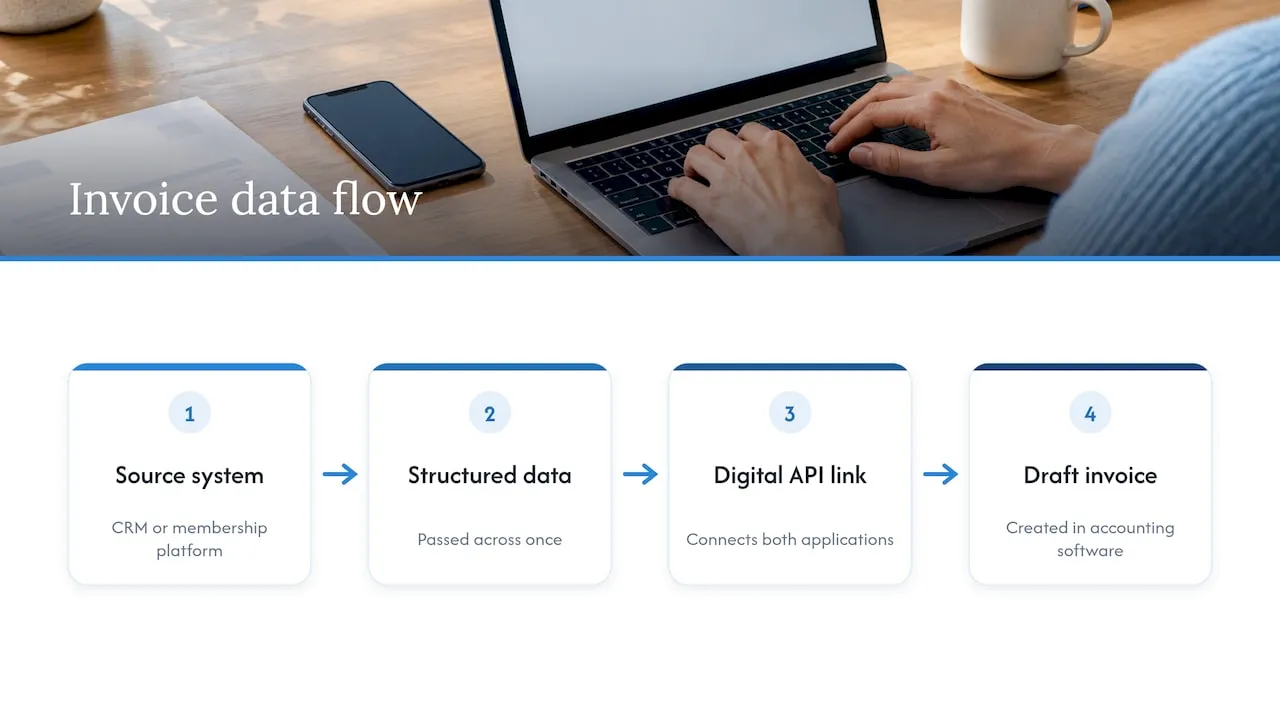
Most modern CRMs, membership platforms and accounting packages expose APIs that let one system create a draft invoice in another. The aim is to pass structured data across once, rather than having someone re-key it. This also matters for compliance: under Making Tax Digital for VAT, HMRC says that where you use more than one application, digital links between them are required and manual copying or cut and paste is not allowed. The same guidance sets out penalties for non-compliance, so a joined-up flow is not only convenient.
4. Generate drafts, not final invoices
Let the automation create invoices in draft or “awaiting approval” status at first. A finance team member reviews a batch, approves it and the system sends. After several clean cycles, you can move the lowest-risk invoice types to automatic issue and keep the rest on approval.
5. Add AI only where inputs are unstructured
This is the stage where AI is genuinely useful. Examples:
- Reading a client’s purchase order that arrives as a PDF or email and extracting the PO number, line items and billing address.
- Turning free-text job notes into proposed invoice lines, flagged for review.
- Flagging an invoice that looks unlike previous ones for that customer, such as an amount far above normal or a missing PO reference.
- Drafting the covering email in your organisation’s tone, using approved templates.
Each of these produces a suggestion that a person can accept or correct. None should silently write to your ledger.
6. Run in parallel, then measure
For two or three billing cycles, run the automated flow alongside the manual process and compare. Track the number of invoices that needed correction, the time from trigger to invoice sent, and the number of queries from customers. Widen scope only when the numbers are boring.
Where AI should not be used
A sceptical position is the right one here, because invoices are legal and financial records and errors are expensive.
- Deciding what a customer owes. Prices, discounts and contract terms should come from an approved source such as your price list, contract record or CRM field. A language model that “works out” the amount from context can produce a plausible and wrong figure.
- Tax treatment without rules and review. VAT rates, reverse charge and exemptions should be driven by configured rules in your accounting software and checked by someone who understands them, ideally your accountant.
- Credit notes and disputes. These involve judgement and relationships. AI can summarise the history, but a person decides.
- Changing bank details. Any request to alter payment details should go through a manual verification step, however convincing the email looks. Invoice and mandate fraud is a real UK problem: UK Finance figures cited in a 2024 survey release put losses at £49 million in 2024, and the same release reports that 31% of UK firms were victims in the previous 12 months. The release comes from a procurement software vendor, so read it as a pointer to the risk rather than a neutral measurement.
- Sending personal data to tools you have not assessed. If invoices include names, addresses or other personal data, check where a tool processes it, what it retains and whether it trains on your inputs. Document the decision for UK GDPR purposes.
Keeping a person in control without slowing everything down
Human review fails when it is either missing or a rubber stamp. Good design makes review quick and meaningful. A write-up of Uber’s document processing approach describes this pattern: the model extracts data and applies business logic, while the interface puts inconsistencies and alerts next to the source document so a reviewer can validate rapidly.
The same principle works at SME scale:
- Show the proposed invoice beside the source (the PO, the timesheet, the CRM record).
- Highlight what changed from last time for this customer.
- Route only exceptions to a person, and sample a small percentage of routine invoices.
- Log who approved what and when, so you can answer an auditor or a customer.
- Give the reviewer an easy way to reject and say why, and feed those reasons back into the rules.
UK rules that shape the design
VAT invoices and record keeping
If you are VAT registered, GOV.UK says you must keep copies of all invoices you issue, alongside other records. Whatever you automate, make sure each generated invoice is stored in a retrievable form and linked to the transaction that produced it.
Making Tax Digital
HMRC’s guidance on Making Tax Digital for VAT explains that VAT-registered businesses must keep records digitally and file returns using compatible software. If your invoicing flow feeds that software, the link between them needs to be digital end to end. You can check the government’s list of compatible software before you choose or change tools.
E-invoicing from April 2029
The government confirmed a mandatory e-invoicing regime at Budget 2025. According to this explainer from an accountancy firm, from 1 April 2029 VAT invoices will need to be structured, machine-readable data, and PDFs, Word files and OCR-based images will not qualify. Check the current position on GOV.UK before you commit to a design, as details can change.
The practical implication: build your flow so that invoice data is held as structured fields in your systems, and the PDF is just one rendering of it. That makes a later move to structured e-invoices much easier than a flow built around generating and emailing documents.
What good looks like: a worked example
Take a hypothetical trade association with 1,200 members, annual renewals falling across the year, and a separate events system.
- Trigger: a membership record reaches 30 days before renewal date.
- Data: tier, price list, any agreed discount and billing contact are read from the membership database. Event fees come from the events system by booking reference.
- Draft: the integration creates a draft invoice in the accounts package with the correct tax code and the membership number as the reference.
- AI step: when a member replies to a renewal email asking to be invoiced to a different department with a PO number, an assistant extracts the details and proposes an update to the billing contact. A membership officer approves it.
- Control: standard renewals send automatically after a weekly sample check. Anything with a discount, a changed billing entity or an amount over a set threshold waits for approval.
- Follow-up: payment status flows back to the membership record, so the member services team sees who has paid without opening the accounts package.
This is an illustration, not a client case, but it shows the shape: most of the work is plumbing, a small piece is AI, and people review the exceptions.
Our perspective
When organisations ask us about automating invoices, they often start with the AI question and the real problem turns out to be fragmented systems. The CRM says one thing, the membership database another and finance works from a spreadsheet. Putting a model on top of that produces faster confusion.
Our background is more than 20 years of connecting websites, databases, CRMs, APIs and membership systems, and that shapes our advice. Make the data reliable and connected first. Use plain rules wherever the answer is known. Bring in AI for the reading and drafting jobs where inputs are untidy, and keep a named person responsible for anything that changes what a customer is asked to pay. We would rather tell you a particular invoice type should stay manual than build something clever that your finance team does not trust.
We also think the best first project is small: one invoice type, one trigger, a clear business case and a defined way to measure whether it worked. If it saves time without increasing errors, extend it. If it does not, you have learned that cheaply.
— Rob
How Cloud 9 can help
We design, build and support AI automations that connect to the systems you already run. For invoicing, that usually means AI and systems integration between your CRM, databases and finance tools, plus assistants for the unstructured parts, with approved sources, review points and UK GDPR boundaries agreed up front. If you are not sure where to start, our AI strategy and automation services begin with a look at how the work actually happens. Our guide to what to deploy first in CRM AI automation is a good companion if your invoice triggers live in the CRM, and the pilot for AI CRM data entry shows how we approach keeping data clean under UK data rules.
A checklist before you start
- Do you know which system holds the approved fact that triggers each invoice type?
- Are customer records de-duplicated, with a single billing contact and a PO field where needed?
- Is your accounting software on the list of MTD-compatible software, and does it accept invoices through an API?
- Have you decided which invoice types are never sent without approval?
- Is there a log of who approved what?
- Have you checked how any AI tool handles personal data, and written down the decision?
- Do you have a rule for changes to bank details that requires verification outside email?
- Can you export invoice data as structured fields, ready for the 2029 e-invoicing regime?
Frequently asked questions
Can I automate invoice creation without AI?
Yes, and for predictable invoices you should. Subscriptions, renewals and fixed-fee retainers can be generated by rules and integrations alone. AI becomes useful when the input is unstructured, such as a purchase order arriving by email, or when you want anomaly flags and drafted messages.
Is an automatically generated invoice valid for VAT?
It can be, provided it contains the details a VAT invoice requires and you keep copies of the invoices you issue, as GOV.UK sets out. Check the tax treatment configured in your accounting software with your accountant before switching on automatic issue.
Will automation break Making Tax Digital compliance?
Not if the systems are linked digitally. HMRC’s rules prohibit manual copying between applications in the VAT chain, so a well-built integration helps rather than hinders. Confirm that your software is on the government’s compatible list.
Should AI be allowed to send invoices automatically?
Only for low-risk, rule-driven invoice types after a proven period of running alongside manual checks. Anything involving judgement, changed amounts, new billing details or disputes should wait for a person’s approval.
How long does it take to set up?
It depends on how clean your data is and how many systems are involved, so we would not quote a number without looking at your set-up. A single invoice type with one trigger is a sensible first project, and the services we offer start with scoping that.
Sources
- Your cheat sheet to boosting invoice processing efficiency
- Compliance checks: How to avoid penalties for Making Tax Digital for VAT (CC/FS69), GOV.UK
- Ledger Larceny Looms Large: 31% of UK Businesses Victim of Invoice Fraud, Ivalua
- Uber’s GenAI document processing, InfoQ
- Keeping VAT records, GOV.UK
- VAT Notice 700/22: Making Tax Digital for VAT, GOV.UK
- Find software that’s compatible with Making Tax Digital for VAT, GOV.UK
- The UK e-invoicing mandate: what it means for your business, THP