A small business website redesign process is a structured project that converts your existing site into a functional business tool, built around measurable goals rather than aesthetic preferences. Most small business owners treat a redesign as a visual refresh. The ones who get results treat it like a product development cycle, with clear KPIs covering lead generation, conversion rates, and user engagement. This guide walks you through every phase of the process, from the initial audit to post-launch iteration, so your redesign delivers real business outcomes rather than just a new coat of paint.
What does the small business website redesign process actually involve?
A website redesign is not simply updating your colour scheme or swapping out photos. Experts define it as a managed project cycle with defined objectives, measurable success criteria, and structured phases covering strategy, design, build, and launch. That distinction matters because businesses that treat redesign as a purely visual exercise routinely end up with a site that looks better but performs no differently.
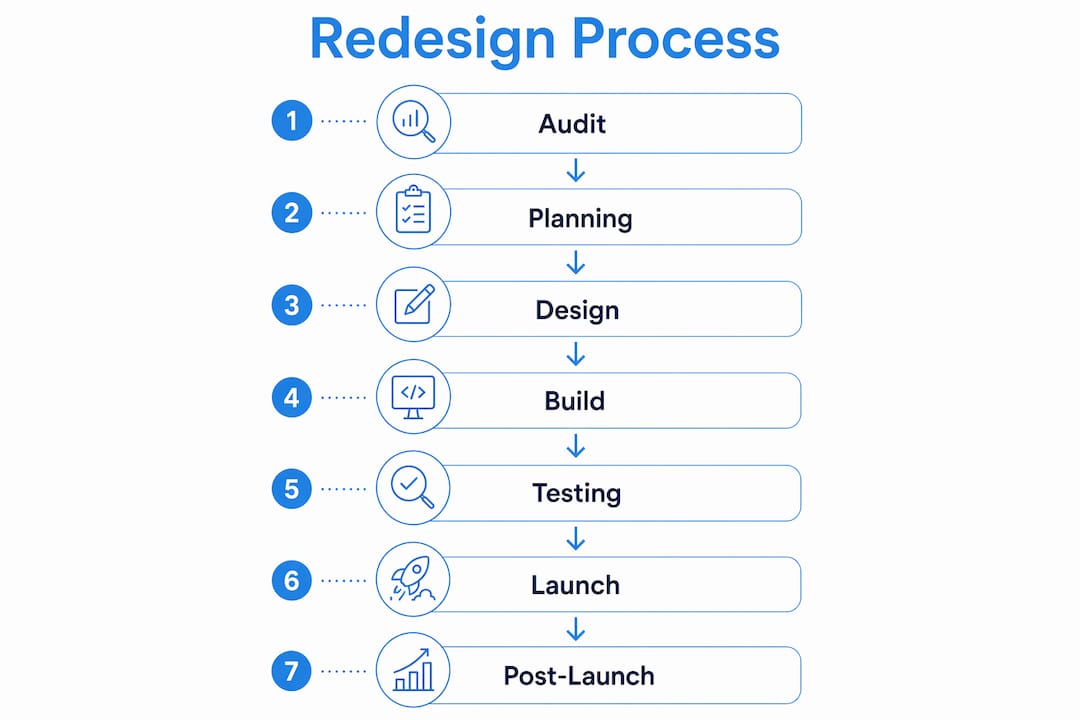
The process of redesigning a website typically covers six to eight distinct phases. Each phase has its own deliverables and decision points. Skipping phases, particularly the audit and planning stages, is the single most common reason small business site revamps fail to hit their targets.

Redesign cycles last three to six months for most small businesses, with dedicated time built in for testing and post-launch stabilisation. That timeline assumes adequate preparation. Businesses that start building before completing their audit and planning phases almost always extend that timeline significantly.
What preparation steps do you need before starting?
Preparation is the phase most small business owners rush, and it is the phase that determines whether the rest of the project succeeds. A thorough audit of your current site’s performance, content gaps, and user behaviour is the correct starting point. Without it, you are making design decisions based on opinion rather than evidence.
Your audit should cover four areas:
- Traffic and conversion data: Which pages attract visitors and which pages lose them? Where do users drop off before completing a desired action?
- Content quality and gaps: Which pages are outdated, thin, or missing entirely? Which topics do your customers search for that your site does not address?
- Technical performance: Page load speed, mobile responsiveness, broken links, and crawl errors all affect both user experience and search visibility.
- Competitor benchmarking: Review how similar businesses present their services, structure their navigation, and handle calls to action. Use generic category observations rather than copying any single approach.
Once the audit is complete, set your success criteria. Define specific KPIs before a single wireframe is drawn. Typical KPIs for a small business web update include contact form submissions, phone call click-throughs, time on page, and organic search rankings for target terms.
Pro Tip: Involve your sales or customer-facing team in the audit phase. They know which questions customers ask most often, which objections appear repeatedly, and which pages they currently send prospects to. That intelligence shapes better content decisions than analytics data alone.
A useful preparation tool set for small businesses includes Google Analytics 4 for behavioural data, Google Search Console for SEO performance, and a spreadsheet-based content inventory to catalogue every existing page. For detailed briefing guidance, Cloud 9 publishes a practical preparation guide covering stakeholder alignment and scope definition.
How should you plan structure, wireframes, and visual design?
Planning the structure of your new site is a separate activity from designing it visually. Information architecture redesign based on user research and SEO best practices improves both usability and search visibility. The two disciplines reinforce each other: a logical page hierarchy helps search engines understand your site and helps visitors find what they need.
Building your information architecture
Start by mapping the pages your redesigned site needs, grouped by user intent. A professional services firm, for example, might organise pages around service categories, client types, and geographic areas rather than internal department names. The navigation should reflect how your customers think, not how your business is structured internally.
Once the page map is agreed, create wireframes for the key templates: homepage, service pages, contact page, and any conversion-critical landing pages. Wireframes are low-fidelity layouts that show content placement and user flow without committing to visual design. They are far cheaper to revise than finished designs.
Aligning visual design with brand and accessibility
Visual design should follow wireframe approval, not precede it. At this stage, apply your brand colours, typography, and imagery to the agreed layouts. Accessibility standards, specifically the Web Content Accessibility Guidelines (WCAG) 2.1 at AA level, set the minimum requirement for colour contrast, text sizing, and keyboard navigation. Meeting WCAG 2.1 AA is not optional for UK businesses with public-facing websites.
Design systems, which are reusable component libraries covering buttons, forms, cards, and typography, save significant time during build and make future updates far more consistent. Building one during the design phase pays dividends throughout the site’s life.
Pro Tip: Test wireframes with three to five real users or stakeholders before moving to visual design. A thirty-minute session where you ask participants to complete a task on a printed or clickable wireframe will surface navigation problems that no amount of internal review catches.
What are the key production steps for build, content, and analytics?
The production phase is where planning becomes a live website. Build order matters: structure and templates first, then content population, then analytics instrumentation.
- Build responsive, performance-focused templates. Every template must render correctly on mobile devices. 60% of global web traffic now originates from mobile devices. A site that performs poorly on a phone is failing the majority of its visitors before they read a single word.
- Migrate and update content with SEO in mind. Carry over high-performing existing content with updated metadata, headings, and internal linking. Write new content to target the search terms identified during your audit. Avoid publishing thin or placeholder pages at launch.
- Instrument analytics before go-live. Integrating analytics during production, rather than as an afterthought, means your KPI tracking is validated before the first visitor arrives. Set up goal tracking for every conversion event: form submissions, phone clicks, file downloads, and any other action that signals business intent.
- Run quality assurance across devices and browsers. Test every page on iOS and Android, across Chrome, Safari, Firefox, and Edge. Check all forms, all links, and all interactive elements. Accessibility testing using a screen reader and automated tools such as Axe catches issues that visual review misses.
Pro Tip: Use version control throughout the build phase. Git-based workflows mean you can roll back any change that introduces a problem without losing progress. Combine this with daily backups of your database and file system.
For businesses integrating CRM and marketing automation into their redesigned site, the production phase is also when form-to-CRM connections, lead scoring rules, and email sequences should be configured and tested.
How do you handle testing, launch, and the post-launch period?
Testing before launch is not a formality. Acceptance testing must cover functional checks, responsive behaviour, performance benchmarks, accessibility compliance, and security validation. Each category catches a different class of problem.
A pre-launch checklist for a small business website overhaul should include:
- All 301 redirects from old URLs to new URLs are in place and tested
- SSL certificate is active and all pages load over HTTPS
- XML sitemap is updated and submitted to Google Search Console
- Page speed scores meet acceptable thresholds on both mobile and desktop
- All forms route to the correct destination and trigger the correct automated responses
- Analytics and conversion tracking are firing correctly on every key page
- A full site backup exists and is stored off-server
Pro Tip: Brief every internal stakeholder on the launch date at least two weeks in advance. Sales teams, customer service staff, and any team members who reference the website in client communications need to know what is changing and when.
After launch, plan for a stabilisation period of two to four weeks. This is not downtime. It is a structured phase of monitoring, bug fixing, and performance tuning based on real user behaviour. The website redesign ROI data that matters most starts accumulating during this window.
What common challenges arise and how do you avoid them?
The most damaging mistakes in a small business site revamp are predictable. Common pitfalls include underestimating scope, ignoring mobile performance, and failing to maintain stakeholder communication throughout the project.
Four challenges appear repeatedly:
- Scope creep: New feature requests arrive mid-project and extend timelines without extending budgets. A documented scope agreement, signed off before build begins, is the only reliable defence.
- Aesthetics over function: Redesigns driven by “I want it to look more modern” without supporting KPIs produce sites that win design awards and generate fewer enquiries than the old version.
- Mobile neglect: Designing for desktop first and adapting for mobile second produces compromised experiences on the device that carries the majority of traffic.
- Poor SEO continuity: Changing URLs without implementing redirects, removing content that ranked well, or restructuring navigation without considering crawl paths can cause significant drops in organic traffic immediately after launch.
“A website redesign that ignores measurable business goals is an expensive exercise in personal taste. The businesses that see genuine returns treat every design decision as a hypothesis to be tested against real user behaviour.”
Pro Tip: If a full rebuild is not feasible within your current budget or timeline, adopt a phased approach. Redesign and launch the highest-traffic, highest-conversion pages first, then iterate. A phased rollout reduces risk and delivers measurable improvements faster than waiting for a complete overhaul.
Key takeaways
A successful small business website redesign process requires clear KPIs, a thorough audit, structured planning, and a disciplined post-launch monitoring period to deliver measurable business results.
| Point | Details |
|---|---|
| Start with an audit | Analyse traffic, content gaps, and technical performance before making any design decisions. |
| Set KPIs before design begins | Define conversion goals such as form submissions and call click-throughs upfront to measure success objectively. |
| Mobile performance is non-negotiable | With 60% of web traffic on mobile devices, responsive and fast-loading templates are a baseline requirement. |
| Test acceptance before launch | Cover functional, responsive, performance, accessibility, and security checks as separate, structured phases. |
| Plan for post-launch iteration | A two-to-four-week stabilisation period after go-live is where real performance data shapes your next improvements. |
What I have learned from managing website redesigns
The most consistent mistake I see small business owners make is treating the launch date as the finish line. A website is not a brochure you print and distribute. It is a live system that needs governance, prioritisation, and regular iteration to keep performing.
The businesses that get the best results from a site revamp are the ones that set KPIs before the first wireframe is drawn and then actually review those KPIs every month after launch. They treat the redesign as the beginning of a product development cycle, not the end of a project. That mindset shift changes everything: it means the post-launch period gets resourced properly, and it means design decisions are made on the basis of data rather than preference.
The other thing I would say plainly: do not let visual ambition outrun functional clarity. A site that clearly explains what you do, who you do it for, and how to get in touch will outperform a visually impressive site with confusing navigation every single time. Aesthetics matter, but they are the last thing to optimise, not the first.
How Cloud 9 supports your website redesign
Cloud 9 works with established UK businesses that need a website redesign to function as a genuine business asset, not just a digital presence.

Cloud 9’s web design and development service covers the full process: audit, information architecture, design, build, and launch, with SEO services and digital marketing integrated from the start rather than bolted on afterwards. The team replaces the need for multiple fragmented suppliers, managing the entire project under one roof. If your current site is underperforming and you want a redesign built around measurable outcomes, Cloud 9 is the partner to speak to.
FAQ
What is a website redesign process for small businesses?
A small business website redesign process is a structured project covering audit, planning, design, build, testing, and launch phases. The goal is to improve user experience, search visibility, and conversion performance against defined KPIs.
How long does a small business website redesign take?
Redesign projects typically last three to six months, including dedicated time for testing and post-launch stabilisation. Businesses that complete thorough preparation phases tend to stay within that range.
What KPIs should I track after a website redesign?
Track contact form submissions, phone call click-throughs, organic search rankings, page load speed, and bounce rate on key landing pages. Set baseline figures from your audit so you have a clear before-and-after comparison.
Why does mobile optimisation matter so much in a redesign?
60% of global web traffic now comes from mobile devices. A site that loads slowly or displays poorly on a phone is failing the majority of its visitors, regardless of how well it performs on desktop.
What is the biggest mistake to avoid in a website redesign?
The most damaging mistake is underestimating scope and ignoring measurable goals. Redesigns driven by aesthetics alone, without defined KPIs, consistently underperform compared to those built around specific business outcomes.