

An M365 security baseline is Microsoft’s tested, pre-packaged set of configuration settings for Microsoft 365 Apps and tenant controls, built to close common gaps before attackers find them. Baselines span two layers: tenant-wide controls through Baseline Security Mode, and workload or endpoint policies deployed via Intune or Office cloud policies. Your first move today: check whether Baseline Security Mode is switched on, then run a Zero Trust Assessment to see what’s actually missing.
TL;DR:
- Enabling Baseline Security Mode is crucial to enforce tenant-wide defaults like MFA for admins and blocking legacy authentication protocols, but it is only a starting point for comprehensive security.
- The most critical controls to deploy first include privileged account protection, tenant-wide legacy authentication blocks, and device enrollment in Intune for effective risk reduction.
- Most updates to baselines occur twice a year, requiring careful testing, staged rollouts, and rollback plans to prevent disruptions and resolve compatibility issues.
- Merging cloud policies, Intune configurations, and GPOs in the correct order is essential, with cloud policies typically overriding local settings to ensure consistent enforcement.
- A successful baseline deployment emphasizes proper change management, pilot testing with impact simulations, and ongoing monitoring to maintain security effectiveness over time.
Table of Contents
- Why security baselines matter for a Zero Trust approach
- What’s in the Microsoft 365 Apps security baseline?
- What does Baseline Security Mode actually control?
- How do you deploy an M365 security baseline?
- How do you roll out baseline changes without breaking things?
- Which controls should you apply first?
- How do you keep baselines effective over time?
- How Cloud9 runs a baseline pilot in practice
- What actually separates a good baseline rollout from a bad one?
- Need a hand deploying and testing your baseline?
- Where to go for the official baseline documentation
- FAQ
Why security baselines matter for a Zero Trust approach
Baselines exist because most tenants never touch their default settings, and defaults are rarely built for an “assume breach” world. Microsoft ships a pretested bundle of configurations precisely so admins don’t have to reinvent secure defaults from scratch, which saves weeks of policy research and testing.
The bigger payoff is containment. When legacy protocols, unsigned macros, and weak authentication are switched off by default, a single compromised credential or malicious attachment has far less room to move. That’s the “assume breach” logic behind Microsoft’s Zero Trust prioritisation guidance: you build the foundation first, then layer detection and response on top.
A baseline is not a finished security programme, though. Think of it as the ground floor:
- It gives you consistent, vendor-tested defaults instead of ad hoc settings
- It reduces the blast radius of a phishing click or stolen token
- It’s the starting point Microsoft expects you to build detection, monitoring, and Conditional Access on top of
What’s in the Microsoft 365 Apps security baseline?
The baseline for Microsoft 365 Apps for enterprise focuses on the settings most likely to be exploited if left at default. A handful of them will genuinely change how staff work, so it’s worth knowing what to expect before you deploy.
- Blocking insecure protocols for file opens and FPRPC stops apps from silently fetching files over legacy, unauthenticated connections. It closes a quiet but real attack path, though it can break old intranet file shares that were never migrated to secure protocols.
- Macro controls and mandatory macro signing stop unsigned VBA code running automatically. This is one of the highest-value settings in the whole bundle, but finance and operations teams with legacy macro-driven spreadsheets will need a signing process or an exception path.
- Blocking OLE/DDE and legacy JScript shuts a well-worn route for embedding malicious objects inside Office documents. Expect friction only where old system integrations still rely on DDE links.
- Legacy browser and client authentication restrictions, plus EWS controls, cut off older Outlook add-ins and third-party mail clients that never adopted modern authentication.
Microsoft distributes the full package, including importable GPOs, ADMX/ADML templates, a Policy Analyzer rules file, and settings spreadsheets, through the Security Compliance Toolkit.
What does Baseline Security Mode actually control?
Baseline Security Mode (BSM) is a tenant-wide switch, not a per-device policy. You’ll find it in the Microsoft 365 admin centre under Org Settings, then Security and Privacy, then Baseline Security Mode.
Once enabled, BSM enforces a set of tenant-level defaults that apply regardless of device or app:
- Phishing-resistant MFA required for administrator roles
- Legacy authentication protocols blocked tenant-wide
- Adding new password credentials to service principals blocked
- Exchange Web Services (EWS) disabled by default
- Legacy browser protocols blocked for mail access
Treat BSM as your security floor, not your ceiling. As one analysis of the feature puts it, BSM sets the minimum bar; Intune and endpoint baselines are what get you to the ceiling. If you’re only enabling BSM and calling it done, you’re covering identity and tenant defaults but leaving device compliance and app-level policy untouched.
How do you deploy an M365 security baseline?
You have three realistic deployment paths, and most tenants end up using two of them together.
- Office cloud policy service pushes HKCU-level user settings to any device running Microsoft 365 Apps, cloud-managed, no on-prem infrastructure required. Best for organisations that are fully cloud-first.
- Intune security baselines and settings catalog enforce device-side policy, including the Microsoft 365 Apps baseline profile, and integrate with Conditional Access for compliance checks.
- Group Policy import using the GPOs and ADMX files from the Security Compliance Toolkit, for organisations still running Active Directory on-premises or in a hybrid state.
Precedence matters here: cloud policies generally override ADMX/GPO settings, which in turn override anything a user sets locally. If you’re deploying both Intune and GPO for the same tenant, map out which layer wins before you enable anything in production.
Pro Tip: Import the baseline GPOs into a test organisational unit first, using Policy Analyzer to compare against your current settings, rather than applying directly to a production security group.
How do you roll out baseline changes without breaking things?
Microsoft ships updated baselines roughly twice a year, in June and December, and each release can quietly flip settings that break specific workflows. Treat every release as a change management event, not a silent update.
A handful of settings cause the most support tickets: DDE blocking (legacy system integrations), macro signing requirements (finance spreadsheets), and insecure file-protocol blocks (old intranet shares). Each has a workaround, whether that’s a signing certificate process or a scoped exception group, but you need to find the affected users before enforcement, not after.
- Pilot the new baseline on a small group covering your highest-risk and highest-complexity users first.
- Run an impact simulation or report-only mode where available, particularly for Conditional Access and legacy auth blocks.
- Open a short enforcement window with rollback ready, and monitor helpdesk tickets closely.
- Expand in stages across departments, prioritising by risk rather than convenience.
Keep a rollback script or GPO version ready for at least the first week after any wider rollout.
Which controls should you apply first?
Not every baseline setting carries equal weight. If you’re working through a backlog, this is the order that closes the most exposure per hour of effort.
- Protect privileged accounts first: phishing-resistant MFA plus Privileged Identity Management for any global admin role.
- Block legacy authentication tenant-wide, but test critical line-of-business apps before enforcing.
- Turn on Defender for Office 365 preset security policies at Standard as a minimum, and confirm SPF, DKIM, and DMARC records are correctly configured before layering on Strict.
- Enrol devices in Intune and deploy the Apps baseline so Conditional Access can require compliant devices.
Microsoft’s own guidance backs this ordering: attackers routinely exploit the absence of basic controls, and broad coverage across identity, devices, and data closes more risk than perfecting a single pillar. Check your Secure Score and run a Zero Trust Assessment once these four are live. Both tools give you a scored, prioritised list of what’s left rather than a guessing game.
How do you keep baselines effective over time?
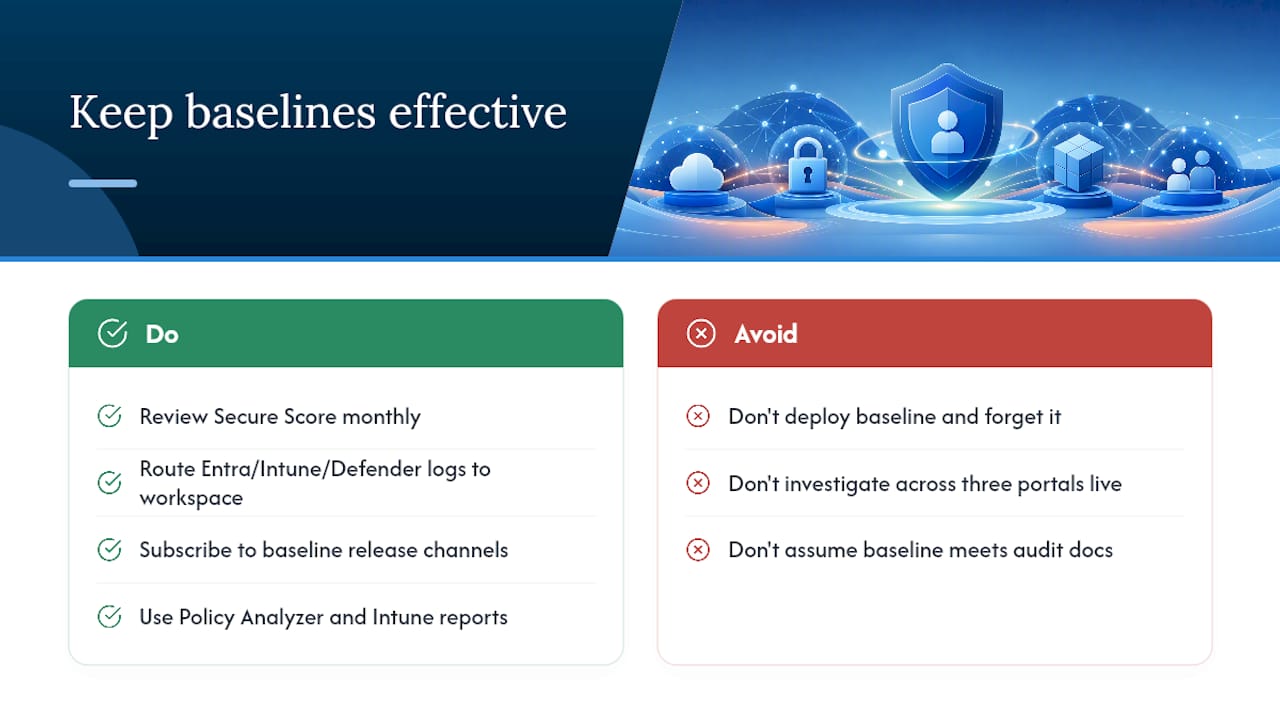
A baseline you deploy once and never revisit degrades quietly. Secure Score and the Zero Trust Assessment both give you a running measure of where gaps are reopening, and either should be reviewed monthly, not just at rollout.
Route diagnostic logs from Microsoft Entra ID, Intune, and Defender into a queryable workspace so you can investigate incidents without stitching together three admin portals during a live event. Subscribe to Microsoft’s baseline release channels so the June and December updates land on your calendar, not as a surprise ticket queue.
Finally, use Policy Analyzer against Group Policy environments and Intune’s built-in reporting to catch configuration drift, the slow reintroduction of insecure settings as new devices, apps, and exceptions get added over time.
If you’re aligning this against a broader framework such as ISO 27001 or SOC 2, the baseline maps well onto access control and technical vulnerability management domains, but it won’t satisfy documentation or audit requirements on its own.
How Cloud9 runs a baseline pilot in practice
Deploying a baseline properly means testing against your specific mix of legacy apps, add-ins, and integrations, not just applying Microsoft’s defaults and hoping. Cloud9’s One Week Pilot for Office 365 phishing protection follows a similar phased pattern: stakeholder mapping, pilot group enrolment, compatibility testing against real business apps, staged enforcement, then handover with documentation.
That structure matters more than the tooling. If your team has the time and Intune expertise to run pilot groups, impact simulations, and staged rollouts internally, do it in-house. If baseline changes keep getting prioritised behind other IT work, a managed pilot gets the foundational controls live without the trial-and-error costing you a support ticket backlog.
What actually separates a good baseline rollout from a bad one?
The conventional advice on M365 security baselines treats them as a checkbox: enable Baseline Security Mode, import the GPOs, done. That undersells how much of the real work is change management, not configuration.
Most of the damage from baseline rollouts doesn’t come from the settings being wrong. It comes from enabling macro signing or legacy auth blocks tenant-wide on a Friday afternoon with no pilot group and no rollback plan. The technical decision is usually simple; the sequencing is where teams get it wrong.
If you take one thing from this, prioritise privileged account protection and legacy authentication blocks before anything else. They close the two attack paths responsible for the overwhelming majority of real M365 compromises, and both are visible in your Secure Score within days. Everything else, macro policy, EWS restrictions, browser blocks, matters, but it matters less urgently than locking down the accounts that can undo every other control you apply.
— Rob
Need a hand deploying and testing your baseline?
An alternative to muddling through baseline rollouts with a stretched internal IT team is to use a single partner who handles the pilot testing, compatibility checks, and staged enforcement. Rather than importing GPOs into production and firefighting the fallout, a structured rollout can catch legacy app conflicts before users do.

Our Microsoft 365 support service covers exactly this kind of baseline deployment and ongoing tenant management, alongside broader managed cloud services for teams that would rather not own the whole security stack alone. If phishing protection and email authentication are your immediate concern, the One Week Pilot for Office 365 phishing protection is built to get Standard-tier Defender policies and SPF/DKIM/DMARC validated fast. Get in touch to scope your pilot and find out what your current baseline gaps actually are.
Where to go for the official baseline documentation
For the settings themselves rather than the strategy, go straight to Microsoft’s own references. The Security baseline for Microsoft 365 Apps for enterprise page hosts the downloadable GPO and ADMX package. The Baseline Security Mode settings guide covers tenant controls, and the list of Intune baseline settings documents device-side enforcement and version history.
FAQ
Is the Microsoft Baseline Security Analyzer still available?
The Microsoft Baseline Security Analyzer (MBSA) was retired years ago and no longer receives updates or support. Current baseline work runs through Baseline Security Mode, the Security Compliance Toolkit, and Intune security baselines instead.
What is the Microsoft Windows 11 security baseline?
The Windows security baseline is a separate, OS-level counterpart to the M365 Apps baseline, covering settings like BitLocker, Credential Guard, and firewall defaults. Both baselines are distributed through the same Security Compliance Toolkit and can be deployed together via Intune or Group Policy.
What is an example of a security baseline?
A practical example is the Microsoft 365 Apps security baseline itself: a tested bundle that blocks insecure file protocols, enforces macro signing, and disables legacy authentication and DDE by default. Baseline Security Mode is a second example, applying tenant-wide MFA and legacy-auth controls rather than app-level settings.
What is a security baseline document?
A security baseline document lists the specific configuration settings, their recommended values, and the rationale behind each one, usually alongside deployment files like GPOs or spreadsheets. Microsoft’s own baseline packages include exactly this: a settings spreadsheet plus importable policy files for direct deployment.
How often should we test new baseline releases before enforcing them?
Plan for testing windows around Microsoft’s twice-yearly release cadence in June and December, since new baseline versions can change defaults that affect legacy workflows. A pilot group and short enforcement window, rather than a tenant-wide switch, catches most compatibility issues before they reach the wider organisation.