

A Xero–CRM integration syncs contacts, invoices and payment status so sales and finance work from one shared customer record rather than two conflicting ones. Most small and medium businesses need this the moment invoicing volume outgrows manual re-entry, or when sales staff keep asking finance “has this client paid yet?” Follow the setup order below and it stays reliable through month-end.
TL;DR:
- Most small businesses should start with a one-way sync from CRM to Xero to avoid duplicate contacts and ensure data consistency.
- Batch invoicing, multi-entity billing, and complex tax rules typically require custom API builds for reliable, long-term automation.
- Proper setup involves cleaning contacts, confirming default tax and payment settings, and creating drafts for review before going live.
- Using email as the primary key for contacts prevents duplicates, and starting with a one-directional sync reduces conflicts and errors.
- Managed integration services provide ongoing monitoring and testing, reducing the risk of reconciliation issues at month-end.
Table of Contents
- What does a Xero CRM integration actually sync?
- Native connector, middleware or custom API build?
- Setting up the sync: a step-by-step checklist
- Why syncs fail: duplicates, tax mapping and timing conflicts
- Choosing the right route: a decision checklist
- How Cloud9 delivers a managed Xero CRM integration
- What the setup guides don’t tell you
- Get your Xero CRM integration built properly, once
- Where these figures and steps come from
- Sources
- FAQ
What does a Xero CRM integration actually sync?
Every working Xero CRM integration is built from three canonical data flows, and understanding them matters more than any specific vendor’s feature list.
- CRM to Xero: new contacts and draft invoices are created in Xero once a deal closes in the CRM.
- Xero to CRM: invoice status (sent, paid, overdue) and payment records flow back so sales sees the real financial picture.
- Product and item sync: shared price lists and item codes keep quotes and invoices consistent across both systems.
The payoff is concrete. A well-configured setup automates contact creation on deal closure, pushes invoice status back to the CRM, and syncs totals or line items so sales can see a customer’s billing history without ever logging into Xero, according to HubSpot’s integration documentation. That single change removes the double entry that eats hours every week in a growing sales team, and it stops finance fielding “have they paid?” emails.
Pro Tip: Don’t sync every field just because you can. Two-way contact sync is one of the most common sources of duplicate records, so start with one direction and add complexity only once it’s stable.
One-way sync (CRM pushes, Xero reports back) is usually more reliable than full two-way sync for most SMEs, because it gives every field a single owner and removes the guesswork around which system wins when both get edited at once.
Native connector, middleware or custom API build?
You have three realistic routes into Xero, and each trades speed against control.
- Native connectors: listed on the Xero App Marketplace, these connect in minutes but vary widely in which fields they actually map, so check the supported field list before assuming custom data will travel with it.
- Middleware (Zapier, Make and similar tools): flexible enough to bridge almost any CRM to Xero, but it’s another subscription to maintain, and cost tends to scale with the number of automated tasks rather than staying flat.
- Custom API build: built against Xero’s developer documentation, this handles batch invoicing, conditional tax logic and complex mapping that off-the-shelf connectors can’t, at a higher upfront cost.
The decision usually comes down to volume and complexity. If you send fewer than a few hundred invoices a month with standard tax treatment, a native connector or middleware setup will do the job. Once you’re dealing with multi-entity billing, bulk batch invoicing or non-standard tax rules, a custom build against the Xero API earns its cost within a couple of accounting cycles, simply because it stops the manual corrections that eat up a bookkeeper’s time.
Setting up the sync: a step-by-step checklist
Skipping the prework is the single biggest reason integrations misbehave in month one. Work through this order, not the reverse.
- Clean up contacts first. Merge duplicates and agree which system is the source of truth for customer data (usually the CRM) before you connect anything.
- Set your template ledger and defaults in Xero. New contacts created by the integration inherit payment terms, tax settings and tracking categories from a nominated template contact; get this wrong and invoice creation fails or needs manual fixing, according to Prospect CRM’s sync documentation.
- Sync contacts, then products and items, then invoices, in that order. Invoices reference both a contact and an item code, so creating them before the other two exist is what causes the most failed syncs.
- Create invoices as drafts first, not approved ones, so your bookkeeper can review tax codes and account postings before anything hits real financial reports, a step Xero’s own marketplace guidance also recommends before going live.
- Check sync timing before you judge something “broken.” Changes pushed from CRM to Xero typically appear within minutes, but the reverse direction may only poll every 30 minutes depending on the connector, per HubSpot’s own sync documentation.
- Agree a reconciliation routine with your bookkeeper: who checks the sync log, how often, and what “resolved” looks like.
Pro Tip: Run a full billing cycle in draft-invoice mode before switching on live posting. It’s the cheapest insurance you’ll buy against a month-end reconciliation headache.
Why syncs fail: duplicates, tax mapping and timing conflicts
Most integration problems trace back to one of four causes, and all four are preventable.
- Duplicate contacts: matching on name alone creates duplicates constantly; use email address as the primary key wherever the connector allows it.
- Missing or wrong template ledger defaults: if tax rates, payment terms or account codes aren’t preset on the template contact, the integration can fail outright or create records finance has to fix by hand, a point Prospect CRM’s documentation flags directly.
- Concurrent edits: a contact updated in both systems at once needs a rule for who wins, decided before go-live, not during a dispute.
- Payment reconciliation drift: part-payments, credit notes and refunds don’t always map cleanly back to CRM deal values, so build a manual spot-check into your monthly close.
The practical advice from integration specialists is blunt: start with one-directional sync, validate it for a full cycle, then extend to two-way sync only for the fields that genuinely need it, according to Automation Solutions’ implementation guide. Bolting on every field from day one is exactly how duplicate records and BAS reporting errors get introduced.
Choosing the right route: a decision checklist
Match the integration route to what your business actually needs, not to what looks most impressive on a sales call.
- Simple contact and invoice status sync with standard tax treatment: a native connector from the Xero Marketplace is usually enough, and it can be live within days.
- Multiple systems, conditional logic or batch invoicing: middleware or a custom build makes more sense, with setup running from days to several weeks.
- Complex, multi-entity or high-volume billing: a custom API project is the right call, typically weeks to a few months depending on scope.
- Check admin permissions early. Field-level mapping on some connectors sits behind paid tiers, and you’ll need Xero admin rights plus CRM admin access to configure it properly.
- Bring finance and IT in before you pick a tool, not after. The CRM admin can choose software; only your bookkeeper knows whether the tax mapping is actually correct.
How Cloud9 delivers a managed Xero CRM integration
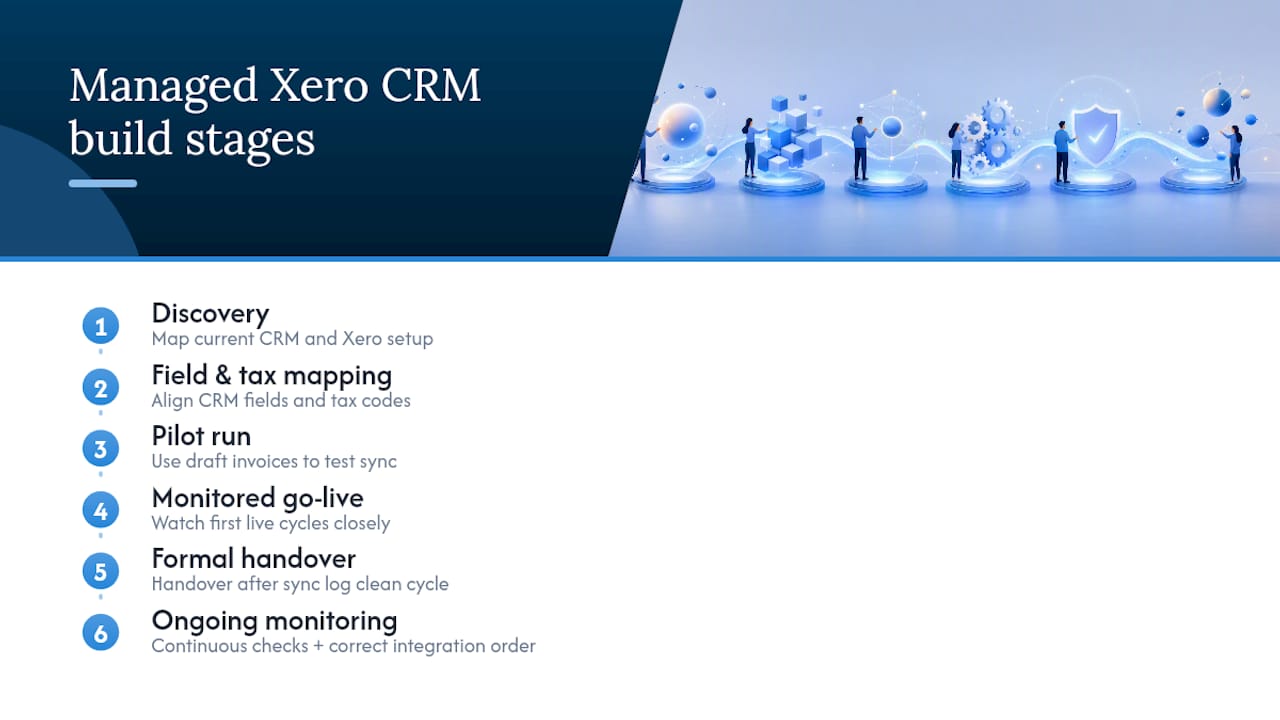
Some providers run these projects as a single managed engagement rather than handing you a connector and walking away. A typical build moves through discovery (mapping your current CRM and Xero setup), field and tax mapping, a pilot run using draft invoices, a monitored go-live, and a formal handover to your bookkeeper or finance team once the sync log shows a clean cycle. That last step matters: an integration that “works” on day one but nobody monitors is the one that quietly breaks BAS reporting three months later. Our CRM and marketing automation work covers exactly this kind of build, including the correct integration order for HubSpot and Xero that most guides skip. Managed services often include ongoing monitoring, not just the initial setup.
What the setup guides don’t tell you
Most integration advice treats this as a one-off technical task: connect the two systems, tick the sync box, move on. That’s the wrong mental model. A Xero CRM integration is closer to a standing agreement between two departments about who owns which piece of data, and the technical setup is just the part that enforces it.
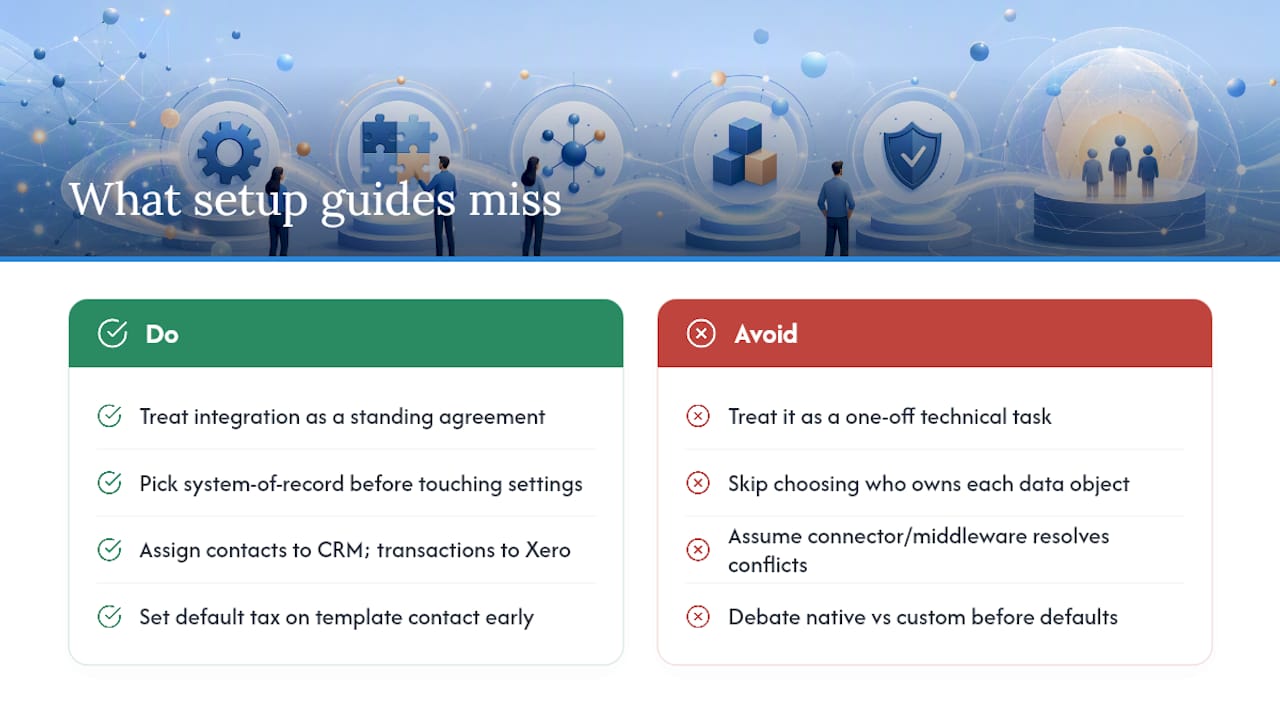
The overlooked failure point isn’t the connector, the API, or even the middleware pricing. It’s the template ledger. Businesses spend weeks debating native versus custom, then lose a week of finance time because nobody set the default tax rate on the template contact before the first invoice ran. Developer documentation flags this explicitly, and it’s still the most common support ticket in practice.
If you take one thing from this: pick your system of record for each object before you touch any settings screen. Contacts belong to the CRM. Financial transactions belong to Xero. Every conflict resolution rule follows from that one decision, and skipping it is what turns a two-day setup into a month of manual corrections.
— Rob
Get your Xero CRM integration built properly, once
Some providers replace the patchwork of connector subscriptions, freelance developers and unanswered support tickets with one team that scopes, maps, tests and monitors your Xero CRM integration from start to finish. They may build the mapping, run the draft-invoice pilot, and hand over to your bookkeeper only once the sync log proves it’s clean.

If you’re weighing up a native connector against a custom build, or you’ve already had a sync break your month-end reconciliation once, a discovery call is the sensible next step. Our Systems, Finance & Workflow Integration service covers exactly this kind of project, and our wider CRM and marketing automation work builds the lead-handling process around it. Get in touch to scope your setup before you commit to a tool.
Where these figures and steps come from
The integration order and template ledger guidance above draw on Xero’s own developer integration guide, the Xero App Marketplace’s CRM listings, HubSpot’s Xero data sync documentation, and Prospect CRM’s practitioner notes on two-way sync. For broader automation tooling context, see this roundup of marketing automation tools.
Sources
- Connect HubSpot and Xero (Data Sync)
- CRM integration guide — Xero Developer
- CRM Software – CRM Systems that Integrate with Xero
FAQ
Does Xero have a built-in CRM system?
No. Xero is accounting software, not a CRM, so it has no native pipeline, lead tracking or deal management. It connects to dedicated CRM platforms through native marketplace apps, middleware, or a custom API build, which is why choosing the right connection method matters.
What is CRM integration, exactly?
CRM integration means connecting your CRM to another business system, in this case Xero, so data moves between them automatically instead of being entered twice. For Xero specifically, that typically means contacts flowing one way and invoice or payment status flowing the other.
Can Xero be integrated with Salesforce?
Yes. Salesforce is one of the CRM platforms listed on the Xero App Marketplace with native and third-party connector options, alongside middleware routes like Zapier or Make for teams needing more custom field mapping.
What should I look for in the best CRM for Xero integration?
The best fit depends on your invoice volume and tax complexity rather than brand reputation alone. Check the connector’s supported field list on the Xero Marketplace before committing, since native apps vary widely in what they actually sync, and involve your bookkeeper in the decision.
How much does a managed Xero CRM integration cost?
Cloud9 doesn’t publish a fixed price for integration projects because scope varies by CRM, invoice volume and mapping complexity. Current pricing is available by getting in touch through the CRM and marketing automation page for a scoped quote.