Integration Platform as a Service (iPaaS) is a cloud-based model that connects applications, data and processes through a central control plane, replacing the custom middleware code that once made enterprise integration so expensive and brittle. If your business runs more than a handful of cloud tools and you are tired of data living in silos, iPaaS is the category worth understanding.
Three reasons decision-makers pay attention to it:
- Speed to integration: prebuilt connectors and low-code builders cut weeks of development time down to days.
- Centralised governance: one console to monitor, secure and audit every data flow across your estate.
- Hybrid connectivity: cloud-to-cloud, cloud-to-on-premises, and multi-cloud patterns all handled from a single platform.
If you are running a growing business on Microsoft 365, a CRM, an ERP and a handful of SaaS tools, iPaaS is worth serious evaluation. If you are a solo operator with two apps, a simple automation tool will do the job for less.
Key takeaways
iPaaS is the cloud-native integration control plane that replaces custom middleware, and the right evaluation starts with connector coverage, governance requirements and a realistic total cost of ownership.
| Point | Details |
|---|---|
| iPaaS definition | A cloud-based platform that connects apps, data and processes through a central control plane, replacing custom middleware code. |
| When to adopt iPaaS | When your estate spans multiple cloud and on-premises systems and manual data handling or point-to-point integrations are creating operational friction. |
| Evaluation priorities | Assess connector coverage for your critical systems, data residency options, governance features, SLA commitments and total cost at scale. |
| Build vs managed | If integration is infrastructure rather than a core differentiator, a managed service often delivers faster time-to-value at lower total cost than in-house operation. |
| Cloud 9 as next step | Cloud 9 provides managed cloud services and integration support for established businesses that want integration outcomes without building an internal platform team. |
Table of Contents
- What is iPaaS? Architecture and core components
- How iPaaS works in practice: from connector to runtime
- Key features of iPaaS and the benefits they deliver
- Common enterprise use cases where iPaaS is typically used
- How iPaaS differs from ESB, middleware, API management and PaaS
- How to evaluate and choose an iPaaS platform
- Emerging trends shaping the future of iPaaS
- When to build in-house versus hire a specialist
- Managed integration support without the overhead
- Sources
- FAQ
What is iPaaS? Architecture and core components
iPaaS provides prebuilt connectors, low-code visual builders, an orchestration engine and a governance console that together replace bespoke point-to-point integration code. Understanding the architecture helps you ask the right questions before committing to a platform.
The five layers you need to know
Control plane. The management layer where you design, configure and monitor integrations. Think of it as the cockpit: you see every active flow, every error, every throughput metric from one place.
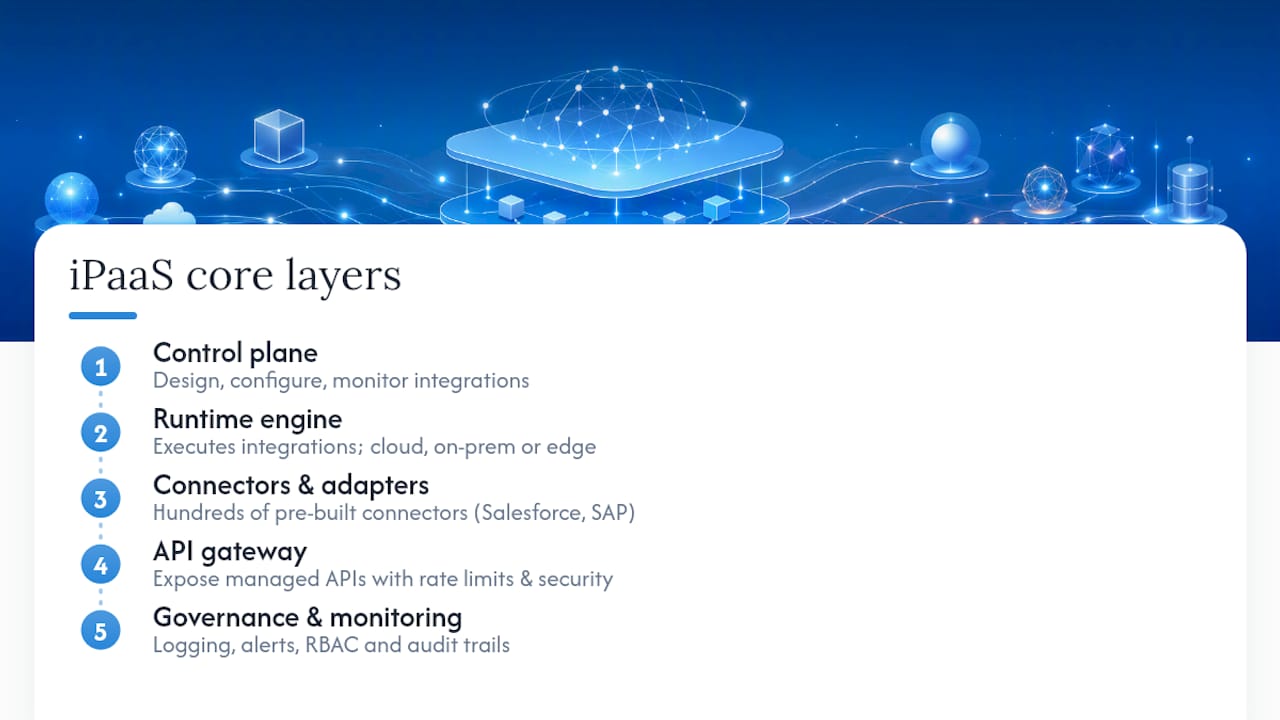
Runtime engine. Where integrations actually execute. The runtime processes messages, applies transformation logic and routes data between endpoints. Some platforms run this in the vendor’s cloud; others let you deploy it on your own infrastructure or at the edge.
Connectors and adapters. Pre-built modules that handle the authentication, API calls and data-format quirks of specific systems. A mature iPaaS ships with hundreds of connectors covering Salesforce, SAP, Workday, Shopify and many others. Writing your own connector from scratch is the old way.
API gateway. Many iPaaS platforms include or integrate tightly with an API management layer, letting you expose internal services as managed APIs with rate limiting, security policies and versioning.
Governance and monitoring console. Centralised logging, alerting, role-based access control and audit trails. IBM describes iPaaS as a suite of self-service, cloud-based tools for integrating applications and data across diverse IT environments, and the governance layer is what makes “self-service” safe at enterprise scale.
Hybrid support fits into this picture through secure gateways: lightweight agents deployed on-premises or in a private cloud that tunnel traffic to the iPaaS runtime without exposing internal systems directly to the internet.
Pro Tip: Before shortlisting platforms, map your ten most critical systems and check whether each vendor ships a certified connector for them. A platform with 500 connectors that misses your ERP is still a problem.
How iPaaS works in practice: from connector to runtime
The best way to understand how an iPaaS works is to follow a single integration from trigger to completion.
-
Connect. A connector authenticates with a source system, such as a CRM, and listens for a trigger. That trigger can be event-driven (a new contact is created) or batch-scheduled (every night at 2 AM, pull all orders from the previous day).
-
Ingest and transform. The platform receives the raw payload and applies data-mapping rules. A field called
customer_emailin Salesforce might need to becomeContactEmailin your ERP. Transformation logic handles type conversions, lookups, conditional routing and enrichment from reference data. -
Orchestrate. The orchestration engine sequences the steps: call the ERP to check whether the customer already exists, branch on the result, create or update the record, then trigger a downstream notification. Complex flows can fan out to multiple systems in parallel.
-
Run. The runtime executes the flow, managing connection pooling, retries on transient failures and dead-letter queuing for messages that cannot be delivered. Oracle notes that an iPaaS creates an integration layer between endpoints and can absorb ETL-like functionality, synchronising data across cloud, legacy and on-premises applications in a single pass.
-
Monitor. Every execution is logged. The governance console shows success rates, latency, error types and volume trends. Alerts fire when error rates breach a threshold, and the audit trail records who changed what and when.
Where API management fits: if you want external partners or internal teams to consume your integrations as APIs, the API gateway layer sits in front of the runtime and enforces policies before a request ever reaches your core systems. Event streams and data lakes connect at step 3 or 4, either as destinations for enriched data or as sources that feed the orchestration engine in near-real time.
Key features of iPaaS and the benefits they deliver
SAP frames iPaaS as the mechanism for standardising integrations, reusing connectors and centralising governance so that adding a new application or partner does not mean writing new integration code from scratch. That reuse principle is where the ROI argument becomes concrete.

Prebuilt connectors cut integration build time significantly. Instead of reverse-engineering an API and handling OAuth flows manually, a developer configures a connector in minutes.
Low-code visual builders open integration design to business analysts and operations teams, not just developers. Drag-and-drop flow designers let non-engineers prototype integrations, which reduces the backlog pressure on technical staff.
Scalable runtimes handle volume spikes without manual infrastructure work. A batch job that processes 10,000 records overnight and a real-time event stream processing thousands of messages per second can coexist on the same platform.
Centralised security and compliance means encryption, role-based access, data masking and audit logging are configured once and applied consistently. For regulated industries, that consistency is the difference between passing an audit and failing one.
Observability tools give operations teams a single view of integration health. Mean time to resolution drops when engineers can see exactly which step in which flow failed, rather than trawling through logs across five separate systems.
The trade-off worth naming: iPaaS platforms simplify the common 80% of integration patterns, but highly complex custom logic, proprietary protocols or extreme low-latency requirements can push you toward bespoke middleware or direct API development. Vendor lock-in is also real: migrating away from a mature iPaaS deployment is a significant project. Pricing models, often based on message volume or connector count, can escalate sharply as usage grows.
Common enterprise use cases where iPaaS is typically used
iPaaS earns its place across a wide range of integration scenarios. The following are the patterns that appear most consistently across enterprise deployments.
- SaaS-to-SaaS data synchronisation: keeping a marketing platform, CRM and customer support tool in sync so that every team sees the same customer record. Without integration, the same contact exists in three systems with three different email addresses.
- CRM and ERP synchronisation: when a sales order is won in Salesforce, the ERP needs to know immediately to trigger fulfilment, invoicing and inventory updates. Manual re-keying is slow and error-prone; an iPaaS flow makes it automatic.
- B2B partner integrations: exchanging order data, invoices or shipment notifications with suppliers and customers via EDI or API. iPaaS handles the format translation and routing so your internal systems stay clean.
- Real-time event routing: feeding clickstream data, IoT sensor readings or transaction events into analytics platforms or data lakes as they happen, rather than in overnight batches.
- Cloud migration and data lake feeds: during a migration from on-premises systems to cloud equivalents, an iPaaS acts as the data shuttle, transforming and loading records while both environments run in parallel.
- Post-purchase automation: connecting an ecommerce platform to a fulfilment system, a CRM and an email tool so that order confirmation, dispatch notification and review request all fire without manual intervention. This kind of end-to-end post-purchase automation is a practical example of what joined-up integration delivers for SMEs.
The scale question matters here. A two-system sync between a CRM and an email tool is a departmental concern, solvable with a lightweight automation tool. When the same data needs to flow reliably across eight systems, with audit trails, error handling and compliance requirements, that is when iPaaS becomes the right architectural choice rather than an over-engineered one.
How iPaaS differs from ESB, middleware, API management and PaaS
This is where buyers often get confused, and the confusion is expensive. Choosing the wrong integration approach means either over-engineering a simple problem or under-engineering a complex one.
| Dimension | iPaaS | ESB / Traditional middleware | API management | PaaS |
|---|---|---|---|---|
| Primary use case | Cloud-first app and data integration, hybrid connectivity | Heavy on-premises orchestration, message brokering | Exposing, securing and governing APIs | Building and hosting custom applications |
| Deployment model | Cloud-native, with optional hybrid gateways | Predominantly on-premises or private cloud | Cloud or on-premises | Cloud |
| Ease of use | Low-code builders, prebuilt connectors | Developer-heavy, XML/proprietary config | Developer-focused, policy configuration | Developer-focused |
| Security and compliance | Centralised policies, audit logging, data masking | Mature but complex to configure | Strong API-level security, rate limiting | Varies by provider |
| Scalability | Elastic, managed by vendor | Manual scaling, hardware-dependent | Elastic for API traffic | Elastic |
| Governance | Unified console across all integrations | Siloed per deployment | API-level governance only | Application-level |
| Pricing shape | Per message volume, connector count, or subscription | Licence plus infrastructure | API call volume or subscription | Compute and storage consumption |
Where ESB still makes sense: if your estate is predominantly on-premises, you have deep investment in an existing ESB, and your integration patterns are stable and well-understood, replacing it with iPaaS is a costly migration for limited gain. ESBs built on platforms like IBM MQ or IBM App Connect remain appropriate for high-throughput, on-premises message brokering where latency requirements are strict.
Where iPaaS wins: cloud-first or hybrid estates, rapid connector deployment, multi-cloud patterns, and organisations that need governance without a dedicated integration engineering team.
Vendor illustrations worth knowing:
- AWS offers integration services including Amazon EventBridge and AWS Step Functions, which together provide event routing and workflow orchestration as managed cloud services.
- MuleSoft (Anypoint Platform) is one of the most widely cited iPaaS examples, combining API management, integration and a large connector marketplace in a single platform.
- IBM provides App Connect and related services that address both cloud-native integration and hybrid scenarios connecting legacy mainframe systems to modern cloud applications.
The distinction between iPaaS and PaaS is simpler than it looks: PaaS gives you a platform to build applications; iPaaS gives you a platform to connect them. They solve adjacent but different problems.
How to evaluate and choose an iPaaS platform
The shortlist stage is where most procurement processes go wrong. Vendors demo their strengths and bury their limitations. A structured checklist keeps the conversation honest.
Checklist for evaluation:
- Connector coverage for your ten most critical systems, including legacy and on-premises applications
- Security certifications relevant to your industry (ISO 27001, SOC 2, GDPR data residency options)
- Governance features: role-based access, audit logging, environment promotion (dev to test to production)
- SLA commitments for runtime uptime and support response times
- Observability: built-in dashboards, alerting, integration with your existing monitoring stack
- Scalability: how the platform handles peak loads and what the cost implications are at higher volumes
- Pricing transparency: understand the unit of billing (messages, connectors, flows) and model your expected costs at 2x and 5x current volume
- Support model: is there a dedicated technical account manager, or is support community-based?
- Ecosystem and marketplace: are there certified connectors, community-built templates and partner integrations?
Questions to ask vendors:
- Where is our data processed and stored? Can we enforce data residency within the UK or EU?
- What is the maximum throughput your runtime supports, and how does it degrade under load?
- How does error handling work? Can we configure retry policies, dead-letter queues and alerting per flow?
- What is the upgrade path? Are breaking changes communicated in advance, and how long is the deprecation window?
- Can we export our integration definitions if we decide to migrate away?
For internal stakeholders, the right questions are different: what is the cost of the integration backlog today, measured in developer hours? How many manual data-transfer tasks does the operations team perform each week? A digital ecosystem integration checklist can help scope these questions before you go to market.
Pro Tip: Run a proof-of-concept against your hardest integration first, not your easiest. Vendors will always succeed on a simple demo. The complex, legacy-touching scenario is where platform limits show up.
Emerging trends shaping the future of iPaaS
The iPaaS category is not standing still. Three developments are reshaping what these platforms do and how buyers should evaluate roadmaps.
AI-assisted mapping and observability. Gartner highlights AI-assisted capabilities as an evolving area within integration platforms, particularly for automating field mapping and diagnosing errors. Instead of manually mapping 200 fields between two schemas, AI tooling suggests mappings based on field names, data types and historical patterns. Error diagnosis is moving in the same direction: rather than reading stack traces, engineers get a plain-language explanation of what failed and why.
Event-driven architectures and serverless runtimes. Batch integration is giving way to event-driven patterns where data moves the moment something happens, not on a schedule. iPaaS platforms are integrating with event streaming infrastructure and offering serverless execution models where you pay per invocation rather than for always-on runtimes. Cloud 9’s AI automation services sit naturally alongside this shift, extending integration logic into business process automation.
The composability signal to watch: the next phase of iPaaS is integration marketplaces where pre-packaged integration templates, industry-specific accelerators and partner-built connectors are shared and reused across organisations. Buying a connector is already faster than building one; buying a pre-tested integration pattern for a specific industry use case is the logical next step. Evaluate whether your shortlisted vendor has an active marketplace and a partner ecosystem that publishes to it.
Practically, this means asking vendors not just what they support today but what their published roadmap looks like for AI tooling and event-driven capabilities. A platform that is strong today but has no credible AI roadmap may require replacement sooner than expected.
When to build in-house versus hire a specialist
Most organisations reach the iPaaS decision with an implicit assumption that they will run it themselves. That assumption deserves scrutiny.
Building and operating an iPaaS deployment in-house requires integration architects, platform engineers and ongoing governance effort. If integration is a core differentiator for your business, that investment makes sense. If integration is infrastructure, a means to an end rather than a competitive advantage, the calculus shifts.
The indicators that favour outsourcing or a managed service are fairly consistent: limited internal integration skills, a need for rapid time-to-value, governance overhead that would distract engineering teams from product work, and a preference for predictable monthly costs over capital expenditure on licences and headcount.
The total cost of ownership argument is often underestimated. Licence costs are visible; the cost of the engineer who manages the platform, handles upgrades, responds to incidents at 2 AM and maintains connector versions is less visible but often larger.
Managed integration support without the overhead
The iPaaS market offers powerful platforms, but the real cost is rarely the licence. It is the internal capacity to configure, govern and evolve integrations as your business changes.
Cloud 9 works with established businesses that want the outcomes of good integration without building an internal platform team. Through managed cloud services and cloud migration support, Cloud 9 handles the integration architecture, connector configuration and ongoing governance so your team stays focused on the work that actually moves the business forward. Whether you are connecting a CRM to your finance system, migrating data to a new cloud platform, or automating a customer journey end-to-end, Cloud 9 provides the technical depth and the ongoing support model that a one-off implementation project rarely delivers. Get in touch to scope what a managed integration approach would look like for your business.
Sources
- What is iPaaS? – Integration platform as a service (AWS)
- What is iPaaS? Integration Platform as a Service Explained | MuleSoft
- What Is iPaaS (Integration Platform as a Service)? | IBM
- What Is iPaaS? | SAP
FAQ
What is the purpose of iPaaS?
iPaaS connects applications, data and processes across cloud and on-premises environments through a single managed platform, replacing the custom integration code that would otherwise need to be written and maintained for each connection.
How does an iPaaS work?
An iPaaS uses prebuilt connectors to authenticate with source and target systems, applies transformation and orchestration logic to route data correctly, then executes flows through a managed runtime while logging every step for governance and monitoring.
What is the difference between PaaS and iPaaS?
PaaS (Platform as a Service) provides infrastructure and tools for building and hosting applications; iPaaS (Integration Platform as a Service) is specifically designed to connect existing applications and data sources to each other, solving a different problem entirely.
Is MuleSoft an iPaaS?
Yes. MuleSoft’s Anypoint Platform is one of the most widely referenced iPaaS examples, combining API management, a large prebuilt connector library, a low-code integration builder and a governance console in a single platform.
When does iPaaS make more sense than a simple automation tool?
iPaaS becomes the right choice when integrations span multiple systems with compliance requirements, need robust error handling and audit trails, or must scale reliably beyond what lightweight point-to-point automation tools can support.