Microsoft Copilot for Business: Free chat or a governed pilot?

Microsoft Copilot for business is an AI assistant built into Microsoft 365 that speeds up drafting, analysis and search, and for most organisations it is worth adopting through a governed pilot. The free web version suits individuals. Business licences add grounding in your own data, agents and admin controls. Start small, keep a person reviewing the output, and fix permissions first.
TL;DR:
- Free Copilot works for web based drafting, but app level grounding in organizational data, agents, analytics, and tenant controls require a business license.
- Copilot only surfaces information a person can already access, so review shared files, sensitivity labels, retention, and component specific data residency before enabling a pilot.
- Copilot Business requires an annual commitment, supports tenants with up to 300 seats, and agent or Cowork workloads can add usage based charges.
- Keep a person approving agent actions and reviewing regulated, legal, financial, human resources, or customer facing outputs; measure time saved, adoption, errors, and feedback.
Table of Contents
- What does Copilot for business actually include?
- How do the Copilot editions and licences differ?
- Is free Copilot enough, or do you need a business licence?
- Which security and governance checks should IT complete before rollout?
- How do Copilot Studio, agents and connectors link to your business systems?
- What should you know about pricing, commitments and buying routes?
- Who benefits most from Copilot?
- How should you run a Copilot pilot?
- Where consultancy shortens time to value
- How we can help you pilot Copilot
- FAQ
- Sources
What does Copilot for business actually include?
Microsoft describes Microsoft 365 Copilot as a bundle of in-app assistance, chat, search and agents. In practice, you get:
- Copilot in Word, Excel, PowerPoint, Outlook and Teams: drafting and rewriting documents, summarising long email threads, analysing spreadsheet data and producing meeting notes.
- Copilot Chat and Copilot Pages: a conversational search tool, plus shared pages where you and colleagues refine AI output together.
- Pre-built agents: Microsoft names Researcher, Analyst and Facilitator, alongside Copilot Notebooks for organising material on a project.
- Copilot Studio: the low-code tool for building custom agents that connect to your data and carry out business processes.
- Usage analytics and model choice: so you can see who is using what.
Microsoft also states that Copilot reaches over 100 connectors for Microsoft 365, on-premises tools and business apps. Treat that as a headline. Connector availability and capability should be validated for your own tenant before you plan a workflow around any of them.
How do the Copilot editions and licences differ?
Microsoft’s licensing notes separate three tiers, and the differences matter for procurement:
- Copilot Chat (Basic): the baseline. It works mainly from web data and makes only limited automatic use of your organisational data.
- Microsoft 365 Copilot (Basic): brings Copilot into your apps with grounding in your organisational context.
- Microsoft 365 Copilot (Premium): adds priority access, deeper Microsoft Graph and Work IQ grounding, and usage-based billing for agent features such as Cowork.
- Copilot Business: an add-on aimed at smaller organisations on Microsoft 365 Business plans, with a cap of up to 300 seats.
On the control side, administrators can use the AI Administrator role to manage Copilot, and Enterprise Data Protection (EDP) applies to business use. Ask your IT lead which roles will own these settings before licences are assigned.
Is free Copilot enough, or do you need a business licence?
The free web experience is adequate for individual productivity and informal chat: drafting a note, explaining a concept, brainstorming. It becomes insufficient the moment the work depends on your organisation’s information or needs to be accountable.
Business licences change the picture in three ways:
- Grounded answers: responses draw on Microsoft Graph and Work IQ, so Copilot can reflect your documents, emails and meetings rather than only the public web.
- Agents and analytics: you can build or deploy agents and see how the tool is being used.
- Enterprise protections: prompts and responses sit inside your tenant’s policies, which supports auditability, logging and retention rules that a free consumer tool cannot offer.
The practical point for leaders: if staff are already pasting company material into free tools, that is a governance problem a business licence helps solve, because business use can be governed by your organisation’s policies.
Which security and governance checks should IT complete before rollout?
Microsoft’s security documentation states that Copilot follows your tenant data policies and works on a permission basis. It grounds answers in data the user can already reach rather than granting new access. That cuts both ways: if permissions are loose, Copilot will surface what loose permissions expose. Microsoft’s privacy guidance makes the same point.
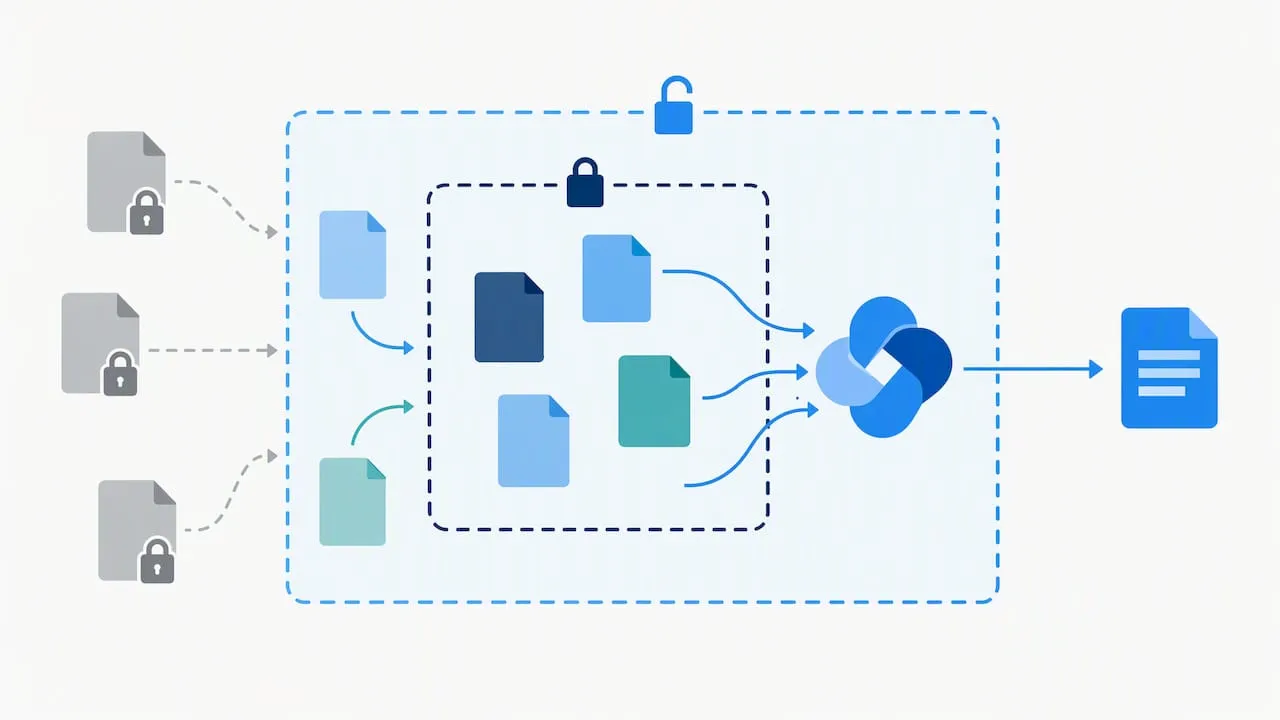
Data residency varies by component. Microsoft’s residency guidance lists countries where Copilot Cowork commits to store prompts and responses at rest, and the UK is named among them. Confirm which parts of your intended setup store what. For a wider view, this piece on vendor questions for data residency is a useful companion.
Before a pilot, work through this list:
- Review identity and access, and remove over-shared sites and files.
- Check sensitivity labels and retention settings.
- Confirm where prompts and responses are stored for each component you plan to use.
- Review the contractual position, including the data processing agreement and UK GDPR obligations.
- Name an owner for Copilot administration.
Pro Tip: Fix access controls before switching Copilot on. AI makes poorly governed content easier to find, not safer.
Our security baseline for administrators covers the underlying controls.
How do Copilot Studio, agents and connectors link to your business systems?
Copilot Studio is where Copilot stops being an assistant and starts doing work. Microsoft positions it as a place to build agents that search, reason and execute multi-step tasks, connected to your data. A sensible pattern:
- Connect to the systems people already use: a CRM, a membership database, a knowledge store or a helpdesk, with each connector checked in your tenant.
- Scope each agent narrowly: one job, one set of approved sources, no wider access than the task needs.
- Build in approvals and audit trails: an agent may draft a CRM update, but a person approves it.
- Start assistive, then add actions: introduce automated actions only where approvals and auditability are clear.
Agent workloads can be billed on a usage basis, so model likely volumes before you scale. We connect Copilot to CRMs and membership systems through AI and systems integration.
What should you know about pricing, commitments and buying routes?
Procurement should plan around the commercial shape as much as the unit price:
- Annual commitment: Microsoft’s Copilot Business FAQ confirms it is sold as an annual commitment even when billed monthly. Set a renewal and exit decision date at the start of the pilot.
- Seat cap: Copilot Business is for tenants of up to 300 users. Larger organisations should look at enterprise plans.
- Usage-based billing: applies to Cowork and agent workloads, so budget for variable cost alongside licences.
- Buying routes: the Microsoft admin centre, an authorised partner (CSP) or Microsoft sales. Current plans and per-user prices are on Microsoft’s pricing page.
If a tenant change is coming first, our Microsoft 365 migration playbook is worth reading before you buy.
Who benefits most from Copilot?
Fit depends on the problem, not the sector label. Examples we see:
- Membership bodies and trade associations: an internal knowledge assistant that answers staff questions from approved policy and guidance documents.
- Sales operations: drafting CRM data entry from emails and call notes, which we cover in our CRM data entry pilot.
- Professional services: meeting summaries and first drafts of client documents.
- Security teams: research assistants that collate threat reports for an analyst to judge.
Where a person must stay in control: anything regulated, legal, financial, HR-related or customer-facing needs human review before it leaves the building. Microsoft’s own documentation says AI output is probabilistic and needs factual checking. Copilot can assist with drafts and summaries, not sign off decisions.
Measure impact with time saved, adoption, error rates and stakeholder feedback. This guide to AI feature adoption metrics suits small teams.
How should you run a Copilot pilot?
- Define the scope, seat numbers, success metrics and a short timebox.
- Choose representative teams, not only enthusiasts.
- Configure identity, permissions and data scopes, then enable logging and eDiscovery for prompts and responses.
- Require human sign-off for regulated outputs.
- Document rollback, escalation and retention settings.
- Hold a renewal or exit decision meeting when the pilot ends, using the measured results.
Pro Tip: Book the renewal decision meeting before the pilot starts, so the annual commitment never arrives by default.
For Teams-specific decisions, see our governance checklist.
Where consultancy shortens time to value
In our experience, the pilots that go well are governance-first: connectors checked early, one measurable use case, and a named person accountable. We design pilots, build agents, integrate Microsoft 365 with the systems around it and provide managed support afterwards. A person stays in control throughout, and we keep data boundaries explicit so your UK GDPR position stays clear. Copilot is a capable tool, but it rewards preparation far more than enthusiasm.
— Rob
How we can help you pilot Copilot
We help established organisations turn Copilot from a licence into working processes. That means AI strategy and readiness, AI agent development, Microsoft 365 integration and managed AI support retainers. A typical route is a discovery call, then a time-limited pilot with a procurement checklist for your board.
If you are weighing up Copilot, see our AI services and book a conversation about your pilot today.
FAQ
What is included in Microsoft 365 for enterprise?
Microsoft 365 plans and Copilot licensing vary. Check Microsoft’s pricing page for current plan details. Check Microsoft’s pricing page for the current plan details.
Does Microsoft Office include Copilot?
Not automatically. Copilot Chat is available as a baseline, while Copilot inside Word, Excel, PowerPoint, Outlook and Teams needs a Microsoft 365 Copilot or Copilot Business licence, as set out in Microsoft’s licensing overview.
What is the difference between Microsoft Copilot and Copilot for business?
The free Copilot works mainly from web data and suits individual use. Copilot for business adds grounding in your organisational data, agents, analytics and admin controls, all operating under your tenant’s data policies.
What’s new in Copilot?
Microsoft is moving Copilot beyond summarising towards agents that search, reason and carry out multi-step work. Features change often, so check Microsoft’s business page for the current list.
Sources
- Microsoft Copilot for Business: Enterprise AI Solutions | Microsoft Copilot
- Microsoft Copilot Business FAQ | Microsoft Learn
- What is Microsoft Copilot? | Microsoft Learn