Website hosting is the service that stores your website’s files on a physical server connected to the internet 24/7, making your site accessible to anyone in the world. Every functional website relies on this service. Without it, your domain name points to nothing and visitors see only an error. Web hosting is the foundation of your online presence, whether you run a personal blog, a local trade business, or a growing e-commerce shop. Understanding what is website hosting gives you the knowledge to make smarter decisions about your site from day one.
How does website hosting work to make your site accessible?
Web hosting works by storing all your website’s files, databases, and assets on a server. A server is simply a powerful computer that stays switched on and connected to the internet at all times. When someone types your domain name into their browser, the DNS system translates it into the server’s IP address. The server then delivers your web files to that person’s browser, which assembles them into the page they see.
Think of it like a postal address. Your domain name is the address people write on the envelope. The DNS system is the sorting office that finds the right building. The server is the building itself, holding everything inside. The browser collects the contents and displays them for the visitor.

The server must stay online continuously. Any downtime means visitors cannot reach your site. This is why hosting providers advertise uptime guarantees, typically measured as a percentage of time the server remains operational each month. A server that is offline even 1% of the time loses roughly seven hours of availability per month. That matters enormously for a business that depends on its website for enquiries or sales.
Pro Tip: Check that any hosting plan you consider states its uptime guarantee clearly in writing. A reputable provider will commit to at least 99.9% uptime and offer compensation if they fall short.
What are the main types of web hosting?
Understanding the types of web hosting helps you match the right solution to your actual needs and budget. Each type differs in how server resources are allocated, who manages the infrastructure, and what level of performance you can expect.
Shared hosting
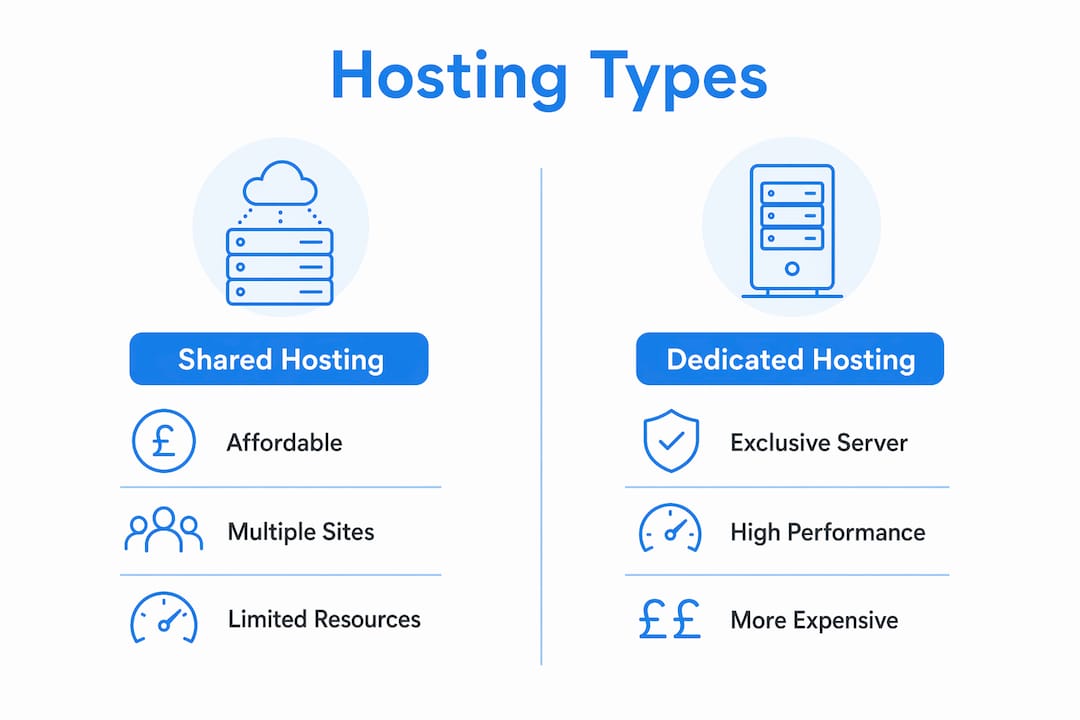
Shared hosting is the most affordable entry point. Multiple websites share the same physical server and its resources, including processing power, memory, and storage. Costs are low because the provider splits them across many customers. The trade-off is that a traffic surge on one site can slow down others on the same server. Shared hosting suits personal websites, small blogs, and new business sites with modest visitor numbers.
VPS hosting
A Virtual Private Server (VPS) gives you a dedicated portion of a physical server’s resources. The server is still shared physically, but software divides it into isolated virtual environments. Your allocation of memory and processing power is yours alone. VPS hosting suits growing businesses that need more reliability than shared hosting provides but are not yet ready for the cost of a dedicated server.
Dedicated hosting
Dedicated hosting gives you exclusive use of an entire physical server. No other websites share its resources. This delivers maximum performance and control, making it the right choice for high-traffic sites, large e-commerce platforms, and businesses with strict security requirements. The cost is significantly higher than shared or VPS options.
Cloud hosting
Cloud hosting uses a network of connected virtual and physical servers rather than a single machine. If one server experiences a problem, others in the network pick up the load automatically. This makes cloud hosting particularly reliable during traffic spikes and periods of rapid growth. Many growing businesses choose cloud hosting because it scales up or down without requiring a server upgrade.
Managed vs. self-managed hosting
The distinction between managed and self-managed hosting cuts across all the types above. Self-managed hosting gives you full control but requires technical knowledge to handle updates, security patches, and backups yourself. Managed hosting handles all of that for you. The provider takes responsibility for server maintenance, security, and performance monitoring. For small business owners without a dedicated IT team, managed hosting removes a significant operational burden.
| Hosting type | Typical cost | Best suited for | Key advantage |
|---|---|---|---|
| Shared | Low | Beginners, personal sites | Affordable entry point |
| VPS | Mid-range | Growing businesses | Dedicated resources, more control |
| Dedicated | High | High-traffic, large businesses | Maximum performance |
| Cloud | Variable | Scaling businesses | Flexibility and reliability |
| Managed | Premium | Non-technical users, SMEs | Provider handles maintenance |
Why does choosing the right hosting matter for small businesses?
The hosting choice you make affects nearly every aspect of your website’s performance. Loading speed and traffic handling are directly tied to the quality of your hosting plan. A slow site frustrates visitors and damages your position in search engine results. Google treats page speed as a ranking signal, which means poor hosting can cost you organic traffic before a visitor even arrives.
Security is equally critical. Reliable hosting providers offer SSL certificates, firewalls, and automated backups as standard features. SSL certificates encrypt data between your site and your visitors, which browsers now flag as a trust signal. Without one, Chrome and other browsers display a “Not Secure” warning that drives visitors away immediately.
Scalability is the factor most beginners overlook. A site that handles 200 visitors a month comfortably may buckle under 2,000 if you run a promotion or get press coverage. Choosing a host that allows you to upgrade your plan quickly, without migrating your entire site, protects you from that scenario. Cloud hosting and VPS plans typically offer this flexibility; shared hosting rarely does.
The website speed impact on user experience and rankings makes hosting one of the highest-leverage decisions you make for your site.
Key factors to check before choosing a host:
- Uptime guarantee: Look for 99.9% or higher, stated in the service agreement.
- SSL certificate: Confirm it is included, not an optional paid add-on.
- Backup frequency: Daily automated backups are the minimum acceptable standard.
- Customer support: 24/7 support via live chat or phone matters when something breaks.
- Scalability: Check whether upgrading your plan requires a full site migration.
- Data centre location: Servers closer to your audience deliver faster load times.
Pro Tip: Avoid choosing a host based on the introductory price alone. Many providers offer heavily discounted first-year rates, then charge two or three times as much on renewal. Always check the renewal price before you commit.
How to set up your website hosting and connect your domain
Setting up hosting for the first time is more straightforward than most beginners expect. The process follows a clear sequence, and most managed hosting providers offer step-by-step guidance or handle the technical steps on your behalf.
- Choose a hosting plan. Assess your site’s likely traffic, the type of content you will publish, and your technical confidence. A new small business site typically starts well on a managed shared or VPS plan.
- Register or transfer your domain. Your domain name and your hosting account can sit with the same provider or different ones. Keeping them together simplifies management, though it is not required.
- Upload your website files. Most hosting control panels include a file manager for uploading files directly. Alternatively, you can use an FTP client such as FileZilla to transfer files from your computer to the server.
- Configure your DNS settings. Proper DNS configuration points your domain name to your hosting server’s IP address. Your hosting provider will supply the nameserver addresses you need to enter in your domain registrar’s control panel. DNS changes typically take between a few minutes and 48 hours to propagate globally.
- Install an SSL certificate. Most reputable hosts include a free SSL certificate through Let’s Encrypt. Activate it immediately after your site goes live.
- Test your site. Visit your domain from multiple devices and browsers. Check that pages load correctly, images display, and contact forms submit without errors.
- Set up automated backups. Confirm that your host runs daily backups and that you know how to restore from one if needed. Do not assume this is active by default; verify it in your control panel.
Managed hosting services handle steps three through seven on your behalf, which is why they suit business owners who want a live, reliable site without becoming a server administrator.
Key takeaways
Website hosting is the single technical decision that underpins everything else about your site’s performance, security, and reliability.
| Point | Details |
|---|---|
| Hosting stores your files | A server holds all your website’s files and delivers them to visitors’ browsers on demand. |
| DNS links domain to server | The DNS system translates your domain name into a server IP address every time someone visits. |
| Hosting type affects performance | Shared hosting suits beginners; VPS and cloud hosting suit growing businesses with higher traffic. |
| Managed hosting reduces burden | Providers handle updates, security, and backups, freeing you to focus on your business. |
| Renewal price matters | Always check the post-introductory renewal cost before committing to any hosting plan. |
What I have learned from watching small businesses choose hosting
The most common mistake I see small business owners make is treating hosting as an afterthought. They spend weeks agonising over logo colours and font choices, then pick a hosting plan in three minutes based on whoever appeared first in a search result. The hosting decision shapes everything that follows: how fast the site loads, how often it goes down, and how exposed it is to security threats.
Managed hosting is the right starting point for the vast majority of small business owners. The argument against it is usually cost. But the hidden cost of self-managed hosting is the time you spend dealing with failed updates, plugin conflicts, and security incidents. That time has a real value, and for most business owners it far exceeds the monthly premium for managed care.
The second thing I would tell anyone starting out is to define what your website actually needs to do before you pick a plan. A five-page brochure site for a local accountancy firm has completely different requirements from a membership platform handling hundreds of logins per day. Shared hosting is perfectly adequate for the former. The latter needs VPS or cloud infrastructure from day one.
Security and support are non-negotiable. A host that does not include SSL as standard in 2026 is not a serious option. And if their support team is only reachable by email ticket with a 48-hour response window, you will regret that choice the first time your site goes down on a Friday evening. Ask about support before you sign up, not after.
— Rob
How Cloud 9 can help with your website hosting and development
Getting hosting right from the start saves you from costly migrations and performance problems later. Cloud 9 works with established UK businesses to provide professional web design and development alongside managed hosting that removes the technical complexity entirely.
Cloud 9’s managed cloud services cover server maintenance, security monitoring, and regular backups, so your team focuses on running the business rather than managing infrastructure. Whether you need a new site built from scratch or want to move an existing one onto more reliable hosting, Cloud 9 provides a single point of contact for the whole process. No fragmented suppliers, no technical headaches, and no guessing whether your site is secure and up to date.
FAQ
What is website hosting in simple terms?
Website hosting is a service that stores your website’s files on an internet-connected server, making your site accessible to visitors around the world at any time.
What is shared hosting and who should use it?
Shared hosting places multiple websites on one server, sharing its resources. It suits beginners, personal sites, and small business sites with low to moderate traffic volumes.
How does managed hosting differ from standard hosting?
Managed hosting means the provider handles server updates, security patches, and backups on your behalf. Standard hosting gives you the server space but leaves all maintenance to you.
Does my hosting choice affect my Google rankings?
Yes. Hosting quality affects page loading speed and uptime, both of which Google uses as ranking signals. A slow or frequently unavailable site ranks lower in search results.
Can I change my hosting provider after my site is live?
You can migrate to a new host at any time, though the process requires transferring files, databases, and DNS settings. Managed hosting providers typically handle migrations for you as part of their service.