A website content migration workflow is the structured process of moving digital content from one site or system to another without losing SEO rankings, organic traffic, or usability. Get it wrong and you risk months of ranking recovery. Get it right and your new site launches with its full authority intact. The industry benchmark is a 10–15% traffic dip for two to four weeks post-launch. Anything beyond that signals a process failure, not a normal transition. This guide covers every stage, from pre-migration audits through to post-launch monitoring, with the pitfalls that catch even experienced teams off guard.
What does a website content migration workflow involve?
A content migration process is more formally known in technical SEO circles as a site migration. The term covers any significant change to a site’s URL structure, platform, domain, or content architecture. Digital marketing managers often treat it as a web design handover task. It is not. It is a coordinated operation that touches SEO, development, content strategy, and analytics simultaneously.

The core goal is to preserve link equity, the accumulated ranking power built up through backlinks and internal links over time. 301 redirects with one-to-one URL mapping are the single most critical mechanism for doing that. Without them, every old URL that disappears takes its ranking signals with it.
A well-run migration also protects Core Web Vitals scores, maintains metadata integrity, and keeps Google Search Console reporting clean throughout the transition. These are not optional extras. They are the baseline for a professional handover.
What prerequisites and audits are essential before starting?
The preparation phase determines whether your migration succeeds or fails. Teams that skip it spend weeks firefighting after launch. The foundation is a full site crawl that exports every URL, HTTP status code, page title, meta description, and canonical tag currently live on the site.
Tools like Screaming Frog SEO Spider produce this export in minutes. The output becomes your master reference document. Without it, you cannot build an accurate redirect map or confirm that every page has a destination on the new site.
What to capture before you touch anything
- All live URLs and their HTTP status codes (200, 301, 404, and so on)
- Existing redirect chains already in place, which need resolving before migration
- Baseline organic traffic by page exported from GA4 and Google Search Console
- Backlink profiles for your highest-traffic pages, pulled from a reputable link analysis tool
- Current XML sitemap and robots.txt contents
- Third-party integrations such as CRM forms, tracking scripts, and payment gateways that reference specific URLs
The table below shows the key data points to collect and why each matters.
| Data point | Why it matters |
|---|---|
| URL inventory with status codes | Identifies orphaned pages and existing redirect issues |
| GA4 traffic by page | Sets the baseline to measure post-launch performance against |
| Google Search Console export | Captures indexed URLs and any pre-existing crawl errors |
| Backlink profile by page | Flags high-value pages where redirect accuracy is critical |
| Existing redirects | Prevents redirect chains from compounding during migration |
| Robots.txt and sitemap | Confirms what search engines can currently access and index |
Pro Tip: Prioritise your top 20% of pages by organic traffic and backlink count. These pages carry the most SEO value and deserve the most careful redirect mapping.
A thorough site crawl is the foundation for every decision that follows. Skipping it is the equivalent of moving house without an inventory. You will only discover what is missing after the van has left.
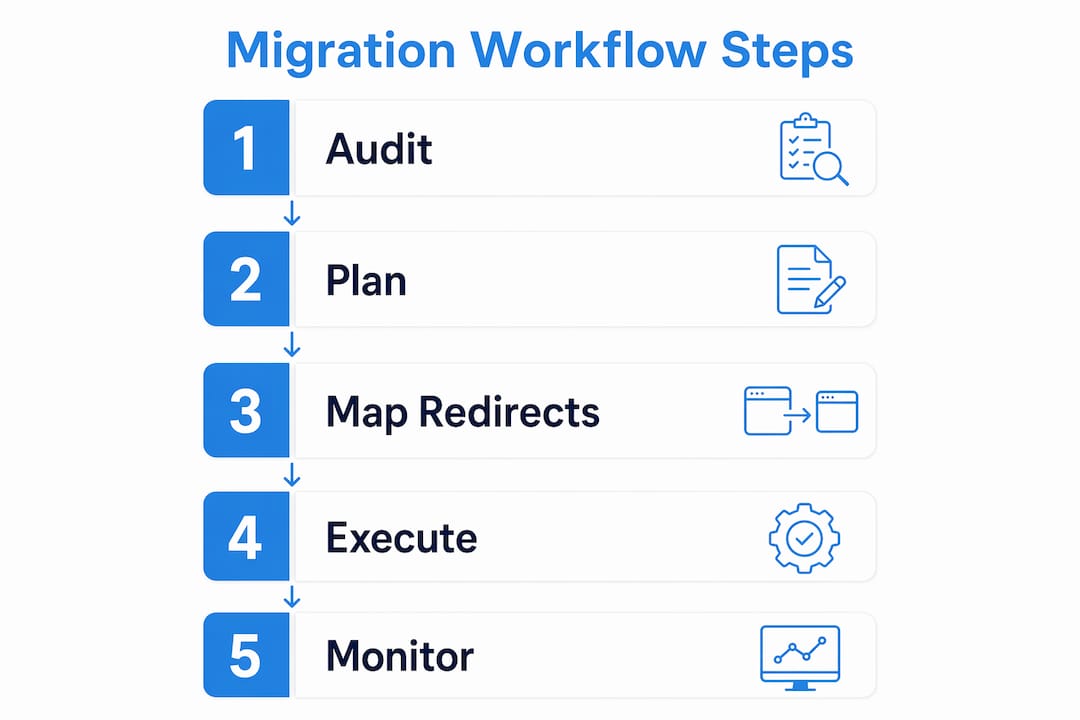
How to plan and execute the migration process effectively
Execution without a plan produces chaos. The steps below follow the sequence that professional teams use to move content safely from a staging environment to a live site.
-
Build a one-to-one URL redirect map. Every old URL must point to its closest equivalent on the new site. Use a spreadsheet with three columns: old URL, new URL, and redirect type (301 for permanent moves). This document is your migration bible.
-
Resolve redirect chains before launch. A redirect chain occurs when URL A points to URL B, which points to URL C. Each hop dilutes the link equity passed along. Flatten all chains so every old URL points directly to its final destination in a single step.
-
Rewrite or consolidate content with SEO in mind. If you are merging two pages into one, the new page must target the combined keyword intent of both originals. Preserve title tags, H1 headings, and meta descriptions unless there is a specific reason to change them.
-
Migrate images and media with metadata intact. Alt text, file names, and image dimensions should carry over exactly. Missing alt text on migrated images is a common oversight that harms both accessibility and image search rankings.
-
Set up a staging environment with a carefully managed robots.txt. The staging site must block search engines using
Disallow: /in robots.txt. This prevents Google from indexing duplicate content before launch. The critical step is removing that directive the moment the site goes live. -
Run a pilot migration on a small section of the site first. Migrate ten to twenty pages, test every redirect, check metadata, and confirm analytics tracking fires correctly. Fix what breaks before running the full migration.
-
Plan your DNS cutover for a low-traffic period. Tuesday to Thursday mornings tend to see lower traffic for B2B sites. Switching DNS during a quiet window reduces the number of users affected by any brief instability.
-
Submit an updated XML sitemap to Google Search Console immediately after launch. This signals to Google that the new site is ready to be crawled and prompts faster reindexing.
Pro Tip: Run your redirect map through a bulk redirect checker before launch day. Catching a broken redirect in staging costs minutes. Catching it a week after launch costs rankings.
The role of site architecture in how Google crawls and values your pages makes structural decisions during migration as consequential as the redirects themselves.
What are the key post-launch monitoring steps?
The first 30 days after launch are the most critical period in any content migration. Problems that were invisible in staging often surface only when real users and search engine bots interact with the live site.
- Monitor Google Search Console daily for the first two to four weeks. Watch the Coverage report for spikes in 404 errors, soft 404s, and pages excluded from indexing. A sudden rise in errors needs same-day investigation.
- Track organic traffic against your GA4 baseline every 48 hours. A traffic dip of 10–15% is expected and normal. A drop exceeding 15% that persists beyond two weeks requires immediate diagnosis.
- Recrawl the live site at the end of week one and week three. Compare the crawl output against your pre-migration URL inventory to identify any pages that failed to migrate or are returning unexpected status codes.
- Update backlinks to point directly to new URLs. Contact referring domains where possible and ask them to update their links. This eliminates redirect hops and preserves the full PageRank value of each backlink.
- Confirm the staging robots.txt disallow rule has been removed. This check belongs on your launch-day checklist and your week-one audit. A forgotten
Disallow: /directive on the live site will cause Google to drop every page from its index. - Plan to retire temporary redirects after stable indexing is confirmed. Once Google has indexed the new URLs and traffic has stabilised, permanent 301 redirects can remain in place indefinitely. They carry negligible performance cost and protect against any residual inbound links to old URLs.
Teams that follow a disciplined migration checklist lose only 0–8% of organic traffic and recover within 60 days. That outcome is not luck. It is the direct result of structured monitoring and fast corrective action.
A website performance audit run at the 30-day mark gives you a definitive view of whether the migration has settled cleanly or whether residual issues need attention.
What are the most common content migration mistakes?
The mistakes that cause the most damage are rarely technical mysteries. They are process failures that a checklist would have caught.
- Leaving
Disallow: /in the live robots.txt. This is the single most catastrophic error in any migration. Forgotten staging directives block Google from crawling the entire site, causing complete de-indexing within days. Check it on launch day and again on day three. - Building redirect chains instead of direct redirects. Every additional hop in a redirect chain reduces the link equity passed to the final destination. Map old URLs directly to new URLs with no intermediate steps.
- Incomplete URL mapping. Missing even a small percentage of URLs creates 404 errors that erode user experience and waste crawl budget. Your URL inventory from the pre-migration audit is the only reliable way to confirm completeness.
- Ignoring deep content pages. Blog posts, resource articles, and product detail pages often hold significant backlink value. Focusing only on top-level navigation pages during mapping is a common and costly oversight.
- Insufficient testing on staging before launch. Clicking through a few pages is not testing. A proper staging test includes a full crawl, redirect verification, form submission tests, and analytics event confirmation.
A migration without a documented checklist is not a workflow. It is a series of assumptions. Every assumption that turns out to be wrong costs you rankings, traffic, and time to recover. The teams that migrate cleanly are the ones who treat the checklist as non-negotiable, not as a suggestion.
The steps for website migration that matter most are the ones done before a single file moves. Preparation is where migrations are won or lost.
Key takeaways
A successful website content migration workflow depends on thorough pre-launch auditing, precise redirect mapping, and active post-launch monitoring for a minimum of 30 days.
| Point | Details |
|---|---|
| Audit before you act | Export all URLs, traffic data, and backlinks before touching the site. |
| Map every redirect directly | Use one-to-one 301 redirects with no chains to preserve link equity. |
| Test on staging first | Run a pilot migration and full crawl before the live launch. |
| Monitor daily post-launch | Check Google Search Console for errors every day for the first four weeks. |
| Remove staging directives | Confirm robots.txt Disallow: / is removed from the live site on launch day. |
What I have learned from watching migrations go wrong
Working with digital marketing managers and website administrators across a range of redesign projects, I have noticed one consistent pattern. The migrations that go badly are almost never caused by technical complexity. They are caused by compressed timelines and the assumption that “someone else” has checked the critical items.
The most damaging example I have seen was a mid-sized professional services firm that launched a redesigned site on a Friday afternoon. The staging robots.txt directive was still in place. By monday morning, Google had begun dropping pages from its index. It took three weeks to fully recover, and the firm lost a significant volume of enquiry traffic during that window.
The lesson is not that Friday launches are forbidden. The lesson is that a signed-off checklist, reviewed by both the SEO lead and the developer, would have caught it in under two minutes.
I am also sceptical of the idea that speed and thoroughness are in conflict during a migration. In my experience, the teams that move fastest are the ones with the clearest documentation. When every team member knows exactly which URLs they are responsible for and what “done” looks like, the process accelerates rather than stalls.
The first 30 days post-launch deserve the same intensity as the launch itself. Traffic data, crawl reports, and Search Console alerts should be reviewed on a fixed schedule, not when someone remembers to look. Migrations do not end at go-live. They end when the data confirms stability.
— Rob
How Cloud 9 supports website content migrations
Website migrations carry real commercial risk, and the margin for error is narrow. Cloud 9 works with established UK businesses to plan and execute web design and development projects that protect SEO performance throughout the transition.

Cloud 9’s approach covers the full migration lifecycle: pre-launch content audits, redirect mapping, staging environment management, and post-launch monitoring. Every project is built around a documented workflow, not ad hoc decisions made under deadline pressure. If you are planning a redesign and want to protect the organic traffic you have already earned, Cloud 9’s SEO services are built to keep your rankings intact from day one of the new site.
FAQ
What is a website content migration workflow?
A website content migration workflow is the structured process of auditing, mapping, transferring, and verifying digital content when moving between platforms, domains, or site structures. Its primary goal is to preserve SEO rankings and user experience throughout the transition.
How long does it take to recover traffic after a site migration?
A traffic dip of 10–15% for two to four weeks post-launch is normal. Teams that follow a disciplined checklist typically recover within 60 days, with losses limited to 0–8% of organic traffic.
What is the most important technical step in a content migration?
One-to-one 301 redirect mapping is the most critical technical step. It preserves the link equity of every old URL by passing ranking signals directly to the equivalent new URL.
How do I avoid de-indexing my site after migration?
Remove the Disallow: / directive from your robots.txt file the moment the site goes live. This directive is required on staging environments but causes complete de-indexing if left in place on the live site.
When should I submit a new XML sitemap after migration?
Submit an updated XML sitemap to Google Search Console immediately after launch. This signals to Google that the new site structure is ready to be crawled and accelerates the reindexing process.