Email automation is defined as software that sends personalised emails automatically, triggered by user behaviour, schedules, or predefined rules, replacing manual sends with consistent, timely communication. The role of email automation has expanded well beyond marketing campaigns. Sales teams, support desks, and executive functions now rely on it to handle routine communication without human intervention. Triggered automated emails achieve a 76% higher open rate and a 152% higher click-through rate than non-automated campaigns. Those numbers reflect a structural advantage, not a marginal one. Businesses that treat email automation as a marketing-only tool are leaving significant operational efficiency on the table.
How does email automation enhance customer engagement and business efficiency?
Automated emails consistently outperform manual campaigns on every measurable engagement metric. The performance gap exists because automation sends the right message at the exact moment a contact takes a meaningful action, rather than at a time chosen by a marketer’s schedule.
The revenue impact is equally striking. Automated emails generate 320% more revenue than non-automated ones and accounted for 31% of all email-driven orders in 2024, despite representing a fraction of total send volume. That ratio tells you something important: it is not the volume of emails that drives results, it is the precision of the trigger.
Common automated email types that deliver the strongest results include:
- Welcome sequences triggered at sign-up, which carry an average open rate of around 50% compared to 20–25% for standard promotional sends
- Cart abandonment emails sent within an hour of a customer leaving a checkout without purchasing
- Re-engagement campaigns targeting contacts who have not opened or clicked in 90 days or more
- Post-purchase follow-ups that request reviews, offer related products, or confirm delivery timelines
- Lead nurture sequences that move prospects through a buying decision over days or weeks
Automation delivers timely messages that engage customers during their active decision-making moments. A welcome email sent two hours after sign-up performs very differently from one sent two days later.
Pro Tip: Audit your automation sequences every quarter. Remove contacts who have not engaged in six months, update copy that references outdated offers, and test new subject lines on at least 20% of your list before rolling out changes.

What operational roles beyond marketing benefit from email automation?
Email automation has expanded beyond marketing and is now a core operational tool for sales, support, and executive teams. This shift matters because it changes how businesses should think about the technology. It is not a campaign tool. It is closer to a virtual assistant that handles repeatable communication tasks at scale.
Sales teams use automation to send instant responses to inbound enquiries, ensuring no lead waits more than a few minutes for acknowledgement. Support desks trigger ticket confirmation emails the moment a customer submits a request, setting expectations on response times without any manual effort. Executive assistants use automated follow-ups after meetings to distribute notes, action items, and next steps to all attendees.
The practical benefits across these teams include:
- Consistency: every contact receives the same quality of communication regardless of workload or time of day
- Responsiveness: automated replies land within seconds of a trigger, which improves the customer’s first impression
- Internal coordination: automated notifications keep cross-functional teams aligned on project milestones and client updates
- Reduced repetitive workload: staff focus on complex tasks rather than composing the same email for the twentieth time that week
AI-assisted drafting has added another layer to this. Cloud 9’s AI automation services help businesses generate personalised email content at scale, maintaining a natural tone without requiring a human to write each message individually. The result is communication that feels considered rather than templated.
The main pitfall to avoid is over-standardisation. When every email sounds identical, contacts notice. Personalisation tokens, conditional content blocks, and role-specific messaging all help preserve authenticity within an automated workflow.
Pro Tip: Reserve at least one email per month as a hand-crafted broadcast from a named individual in your business. It creates contrast that makes your automated sequences feel more personal by comparison.
What are the technical essentials for effective email automation?
Every email automation system rests on three core components: data ingestion, decision logic, and delivery mechanisms. Data ingestion pulls in contact behaviour from your website, CRM, and purchase history. Decision logic applies rules to determine which email to send and when. Delivery mechanisms handle the actual send and track what happens afterwards.
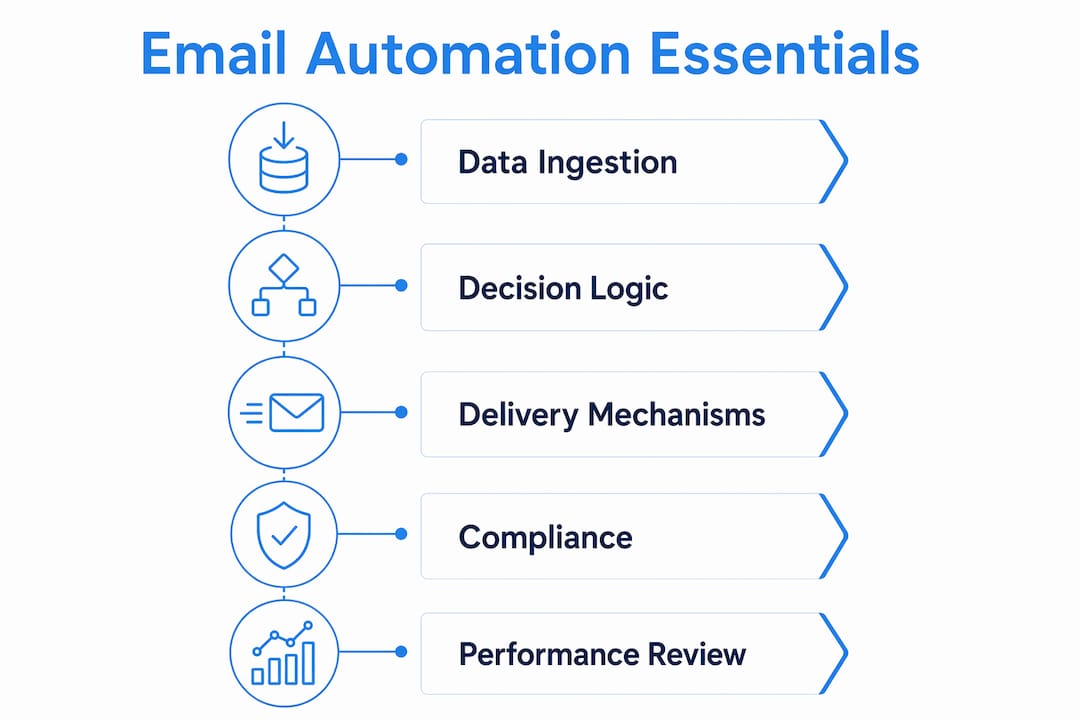
Compliance and deliverability
Compliance is not optional. GDPR in the UK and EU, alongside US state privacy laws, requires explicit consent before sending automated marketing emails. Gmail and Yahoo enforce deliverability standards that compel businesses to maintain domain authentication, low spam complaint rates, and functioning unsubscribe mechanisms. Ignoring these standards risks the entire sending domain being flagged, which affects every email the business sends, not just marketing messages.
Domain authentication through SPF, DKIM, and DMARC records is the technical foundation. Suppression list management, which removes bounced and unsubscribed contacts automatically, keeps complaint rates below the thresholds that trigger spam filters.
Segmentation and role-specific messaging
Modern automation workflows use first-party signals mapped to buying-committee roles, delivering content that matches where each contact sits in the purchase decision. A finance director evaluating a software purchase needs different information from an IT manager assessing the same product. Sending both the same email wastes the opportunity.
Segmentation strategies that consistently improve performance include behavioural triggers (pages visited, content downloaded), firmographic data (company size, industry), and engagement history (last open, last click, purchase frequency).
Metrics that actually matter
| Metric | Why it matters |
|---|---|
| Click-to-reply rate | Shows genuine engagement beyond passive opens |
| Conversion per workflow | Measures revenue or goal completion tied to a specific sequence |
| Unsubscribe rate per send | Flags irrelevant content or over-sending before it damages deliverability |
| Spam complaint rate | Must stay below 0.1% to protect domain reputation |
| List growth rate | Indicates whether acquisition is keeping pace with churn |
Open rates are often inflated by privacy features such as Apple Mail Privacy Protection, which pre-loads tracking pixels regardless of whether a human opened the email. Conversion and reply metrics give a far more accurate picture of actual engagement.
How can businesses implement email automation strategies for maximum impact?
Effective implementation starts with mapping the customer journey before touching any software. Identify the moments where a contact’s behaviour signals intent, then design a workflow that responds to each signal with relevant content.
A practical sequence for getting started:
- Map your key contact touchpoints: sign-up, first purchase, repeat purchase, inactivity, and renewal or cancellation
- Define the trigger for each touchpoint: what action or inaction starts the workflow?
- Write the email content: keep each message focused on one outcome, with a single clear call to action
- Set timing rules: test different delays between emails to find the interval that maximises clicks without increasing unsubscribes
- Connect your CRM: align automation data with your sales pipeline so both teams work from the same contact record
- Measure and iterate: review conversion per workflow monthly and replace underperforming sequences
Ongoing refinement and list hygiene are what separate businesses that sustain automation performance from those that see results plateau after the first few months. Automation is not a set-and-forget system. It requires the same attention as any other business process.
Integration with CRM and sales systems is particularly important for businesses with longer sales cycles. When a sales rep can see that a prospect opened a nurture email and clicked through to a pricing page, they can time a phone call to coincide with that moment of active interest. That kind of alignment between automated communication and human follow-up is where the real commercial value sits.
Pro Tip: Balance automated sequences with occasional manual broadcasts. Automation should complement direct messaging rather than replace it entirely. A well-timed personal email from a named account manager can re-engage a prospect that an automated sequence has failed to move.
Key takeaways
Email automation delivers its greatest commercial impact when it combines precise behavioural triggers, compliance-grade deliverability practices, and continuous refinement across every department that communicates with contacts.
| Point | Details |
|---|---|
| Triggered emails outperform manual sends | Automated emails achieve 76% higher open rates and 152% higher click-through rates than standard campaigns. |
| Revenue impact is disproportionate | Automated emails generated 31% of all email-driven orders in 2024 despite low send volume. |
| Automation spans the whole business | Sales, support, and executive teams all benefit from automated communication workflows, not just marketing. |
| Compliance protects your domain | GDPR, domain authentication, and suppression list management are non-negotiable foundations for any automation programme. |
| Measure conversion, not just opens | Click-to-reply and conversion per workflow give a more accurate picture of automation performance than open rates alone. |
Email automation is an operational discipline, not a marketing shortcut
I have worked with businesses that built impressive-looking automation setups and then wondered why results stalled after three months. The pattern is almost always the same. They treated the initial build as the finish line rather than the starting point.
The “set-and-forget” mentality is the single biggest mistake I see. Automation sequences age. The offer in your welcome email from eighteen months ago may no longer reflect your current pricing. The re-engagement campaign you wrote for a different market segment is now going to contacts who have moved on entirely. Without regular audits, these sequences quietly erode trust rather than build it.
What I find genuinely interesting about where email automation sits in 2026 is how thoroughly it has become an operational tool rather than a purely marketing one. The businesses getting the most from it are the ones where the CRM, the support desk, and the sales team all feed into the same automation logic. When a support ticket closes, a satisfaction email goes out automatically. When a sales call is logged, a follow-up sequence starts. That kind of cross-team coordination used to require a dedicated operations manager. Now it runs in the background.
The other thing worth saying plainly: automation does not replace good writing or genuine relationship-building. It creates the conditions for those things to happen at scale. The businesses that understand this distinction consistently outperform those that treat automation as a way to avoid thinking about communication altogether. If you want to explore how CRM and marketing automation can be structured to support your whole business rather than just your marketing team, that is where the real conversation starts.
— Rob
Cloud 9’s CRM and marketing automation services
Cloud 9 works with established UK businesses to design, implement, and manage email automation systems that go beyond standard marketing campaigns.
Cloud 9’s CRM and marketing automation service covers workflow design, CRM integration, compliance setup, and ongoing performance management, so your team focuses on the work that requires human judgement rather than repetitive sends. For businesses that want AI-assisted content generation built into their automation, Cloud 9’s digital marketing services bring that capability together with campaign strategy and measurement. Get in touch with Cloud 9 to discuss what a well-structured automation system could do for your business.
FAQ
What is the role of email automation in business?
Email automation handles routine, trigger-based communication across marketing, sales, and support functions without manual effort. Its primary role is to deliver the right message to the right contact at the right moment, improving both efficiency and engagement.
How does email automation work technically?
Automation systems ingest contact data, apply decision logic based on predefined triggers or behaviours, and send emails through a delivery mechanism that tracks responses. Integration with a CRM ensures that automated sends and human follow-ups are coordinated from a single contact record.
What are the main benefits of automating emails?
Automated emails generate significantly higher open rates, click-through rates, and revenue per send compared to manual campaigns. They also reduce repetitive workload across teams and improve response consistency for sales enquiries and support requests.
Does email automation require GDPR compliance?
Yes. Any automated marketing email sent to UK or EU contacts requires explicit consent under GDPR. Domain authentication, functioning unsubscribe links, and suppression list management are also required to maintain deliverability and avoid spam penalties.
How often should email automation sequences be reviewed?
Sequences should be audited at least quarterly. Review copy for outdated offers, remove disengaged contacts, and test new subject lines to maintain relevance and deliverability performance over time.