A WordPress maintenance plan is a paid monthly service that keeps your site’s software updated, backed up and secure, with someone accountable when something breaks. If your site takes payments, holds member data, or generates leads through forms, you need one. Expect to pay roughly £30 to £1,000+ a month depending on scope. A basic brochure site with no forms can often manage without one.
TL;DR:
- Most small business sites need a maintenance plan that includes staging-tested updates, offsite backups, active security monitoring, and monthly performance reports.
- Pricing varies from about £30 to over £1,000 per month, with higher costs justified by requirements like WooCommerce, custom integrations, or SLA commitments.
- Matching the maintenance tier to your site’s actual risk, such as basic hosting for static sites and full care for mission-critical stores, helps avoid overspending or gaps in protection.
- Critical tasks like major WordPress upgrades must be tested on staging, with a rollback plan, to prevent site-breaking issues and protect revenue.
- Choosing a provider should involve assessing their backup retention, restore times, update workflow, security response, and support SLA, rather than relying solely on price or vague promises.
Table of Contents
- What should a WordPress maintenance plan include?
- Which maintenance tier actually fits your site?
- What does a WordPress maintenance plan really cost?
- How do you choose the right provider?
- What maintenance tasks happen daily, weekly and monthly?
- Managed hosting or a maintenance plan: where’s the line?
- Cloud 9’s approach to WordPress maintenance
- Legal and compliance considerations for WordPress maintenance
- Compatibility checks before a major WordPress upgrade
- A practical buying rule of thumb
- Get your WordPress maintenance sorted with Cloud 9
- Sources
- FAQ
What should a WordPress maintenance plan include?
Plenty of providers sell “maintenance” that amounts to little more than clicking the update button once a month. A plan worth paying for does considerably more, and it does it in a specific order.
Updates come first, but not blindly. Core, plugin and theme updates should be tested on a staging copy of your site before they touch the live version. Auto-updating everything on production is how a plugin conflict takes your checkout page offline on a Saturday morning. A properly run plan updates on staging, checks nothing has broken, then pushes to live, with a rollback ready if something slips through. Staging-tested updates and rollback procedures separate cheap plans from reliable ones more than any other single practice.
Backups need frequency and distance. Daily backups are the baseline; stores with constant order activity often need incremental, near real-time backups instead. The distance matters as much as the frequency: backups stored on the same server as the site itself offer weak protection because a server-level failure or hack takes both copies down together. Ask any provider how often they actually test a restore, not just how often they run the backup job. A backup nobody has restored in a year is a hope, not a safeguard.
Security has to be active, not just reactive. That means firewall rules (often called a WAF), monitoring for suspicious file changes, and a clear commitment to malware cleanup if the worst happens. Security research consistently finds outdated software behind the majority of compromised WordPress sites, which is the strongest argument for the staging discipline above.
Performance work should be ongoing, not a one off tune-up. Caching, image compression and database housekeeping keep pages fast; tools like WP-Optimize handle all three from a single plugin. Core Web Vitals, Google’s speed and stability metrics, deserve a monthly check rather than an annual panic.
A credible plan typically bundles:
- Uptime monitoring with alerts sent within minutes of downtime, not hours
- A fixed number of included support edit hours each month, with clear rates for anything beyond
- Defined ticket response times, including a separate faster tier for emergencies
- A monthly report showing what was updated, what was backed up, and how the site performed
Skip any of these and you are paying for a partial service while assuming it is complete.
Which maintenance tier actually fits your site?
Not every site needs the same level of cover, and matching tier to risk is where most small businesses either overspend or leave dangerous gaps.
- Hosting only. Your host handles server security and infrastructure, and that is genuinely enough for a static portfolio or a hobby blog with no forms, no logins and nothing to lose if it goes down for a day.
- Managed hosting with basic automation. Automated backups and update notifications suit a small informational site with an occasional contact form, where downtime is annoying rather than costly.
- Maintenance only services. Regular updates, tested backups and monitoring, without a full development team behind it, fit a lead-generation site or a small business site with moderate traffic and real, if not urgent, consequences from an outage.
- Full stack care. Staging environments, SLA backed response, and developer hours on tap are for anything mission critical: WooCommerce stores, membership sites, or any site where an hour of downtime costs real money.
Match the tier to what breaking actually costs you, not to what looks impressive on a sales page.
What does a WordPress maintenance plan really cost?
Price bands vary widely because “maintenance” means different things to different providers, and that ambiguity is exactly what lets some of them undercharge for a service that barely functions.
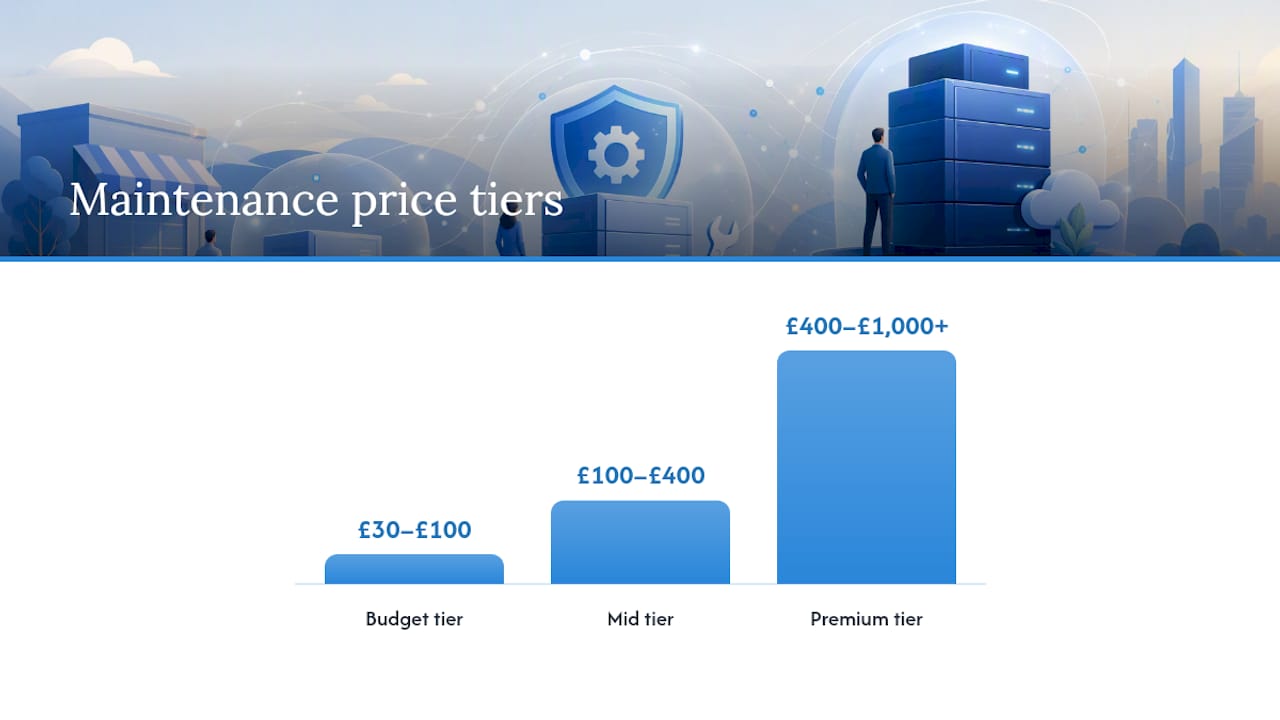
- Budget tier (roughly £30 to £100 a month): automated backups, automated updates, basic uptime checks. Fine for low-risk sites, thin on human oversight.
- Mid tier (roughly £100 to £400 a month): staging-tested updates, some included support hours, proper monitoring and monthly reporting. This is where most small business sites with a lead form or a small shop should sit.
- Premium tier (£400 to £1,000+ a month): SLA backed response times, dedicated developer hours, extensive backup retention, and priority emergency handling. Justified for stores, membership platforms and anything with continuous revenue at stake.
Care-plan pricing across the industry generally falls somewhere between $30 and $1,000+ a month depending on exactly this kind of scope, which is a wide enough range that the label on a tier tells you almost nothing on its own.
What pushes the price up:
- Running WooCommerce or another store platform, which raises both the backup frequency needed and the stakes of any downtime
- Bespoke integrations (custom booking systems, CRM syncs, membership logic) that a generic update script can break
- Any contractual SLA, since guaranteed response times cost the provider real staffing hours
- Longer backup retention windows, since 90 days of stored backups costs more to hold than seven
Pro Tip: Work out your total cost of ownership before comparing monthly fees. If an hour of downtime costs your business £500 in lost orders, a £150 a month plan that includes a two-hour response SLA is far cheaper than a £60 plan with no SLA at all, even though the invoice looks larger.
Annual billing commonly offers a discount of roughly 10 to 15% off the monthly rate 15%, and providers managing several sites for one client often offer a multi-site discount worth asking about directly.
How do you choose the right provider?
Most buyers compare maintenance plans on price and a checklist of buzzwords. A better method scores providers against what actually prevents disasters, because a structured scoring approach beats relying on checklist labels alone when a sales page can call almost anything “premium”.
Weight the criteria roughly like this:
- Backups (30%): frequency, offsite retention, and proven restore times
- Update workflow (20%): staging tested, with a documented rollback process
- Security and response (20%): active monitoring plus a stated malware cleanup policy
- SLA and support (15%): written response times, not vague promises
- Performance (15%): regular monitoring against Core Web Vitals, not a one off audit
Ask every provider these questions directly, and press for specifics rather than accepting a shrug:
- How many days of backups do you retain, and where are they stored?
- What is your average restore time if my site goes down right now?
- Do you test updates on staging before pushing to my live site?
- What exactly happens if my site is hacked? Is cleanup included or billed separately?
- How many support hours are included, and what happens once I use them up?
Watch for these red flags, because each one predicts a bad experience later:
- Backups stored on the same server as the live site
- “Unlimited edits” with no stated time cap, which usually means slow turnaround in practice
- No written SLA of any kind, just a promise to “get to it quickly”
- Vague answers about restore times, which usually means nobody has tested a restore recently
Score each provider out of 100 using those weightings. A basic brochure site can reasonably accept a score around 60. A store or membership site handling payment data should not go near anything scoring below 80.
What maintenance tasks happen daily, weekly and monthly?
A maintenance plan is a routine as much as a service, and the routine is what actually prevents most problems before they become emergencies.
- Daily: uptime checks running continuously, with security alerts triaged the same day they fire. This catches the small stuff, a plugin throwing errors, a spike in failed login attempts, before it becomes a big problem.
- Weekly: plugin and theme updates, tested on staging first for anything running commerce or membership logic. Backup verification happens here too, confirming the backup job actually ran and produced a usable file rather than assuming silence means success.
- Monthly: a full performance audit against Core Web Vitals, alongside a written report covering what changed and how the site performed. Tools like Query Monitor help pinpoint slow database queries or plugin conflicts feeding into that audit.
Escalation to an emergency restore or direct developer intervention should happen the moment a site goes fully down, a security scan flags malware, or an update breaks core functionality like checkout or login. Anything short of that fits the normal weekly or monthly rhythm.
Managed hosting or a maintenance plan: where’s the line?
Managed hosting and a maintenance plan sound interchangeable and are not, and providers who sell both sometimes blur the boundary on purpose.
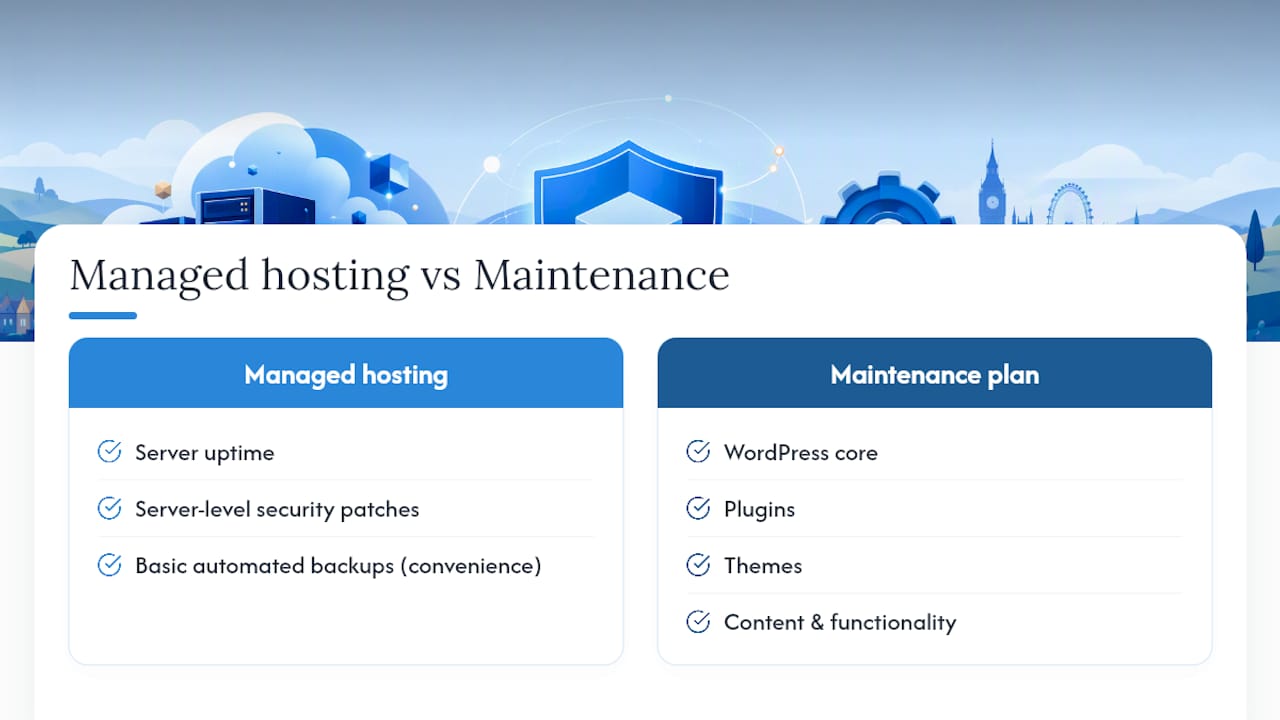
Hosting covers the infrastructure: server uptime, server-level security patches, and often a basic automated backup as a convenience feature. That is where its responsibility ends. It has no opinion on whether your plugins are compatible with each other, whether your checkout still works after an update, or whether your images are slowing your homepage down.
A maintenance plan operates at the application layer, above the server: WordPress core, plugins, themes, and the actual content and functionality your visitors interact with. It is the difference between a landlord maintaining the building and someone actually looking after what happens inside your shop.
The pitfall to watch for is a bundled package that lists “backups” and “security” under both hosting and maintenance, without clarifying which layer each one actually operates on. Ask precisely what’s covered at the server level versus the application level before assuming you are protected twice, because you are quite possibly protected once.
Cloud 9’s approach to WordPress maintenance
Maintenance plans can be built around staging-tested updates, daily monitoring and offsite backups with SLA backed response times, rather than a single automated script running in the background. The aim is to remove the need for a business to juggle separate suppliers for hosting, security and support.
A typical scope moves from basic monitoring and backups at entry level, up to dedicated developer hours and priority response for stores and membership platforms. Full detail sits on the managed hosting and website care page, and the backup, security and recovery services page covers the specifics of retention and restore practice.
Legal and compliance considerations for WordPress maintenance
Running a WordPress site that collects any personal data, names in a contact form, email addresses for a newsletter, payment details for a store, brings UK GDPR and the Data Protection Act 2018 into play, and maintenance is where a lot of that obligation actually gets discharged in practice.
Backups containing personal data need to be held securely and only for as long as genuinely necessary; a maintenance provider retaining years of backups by default, with no retention policy, is a compliance risk sitting quietly on your server. Security monitoring is not just good practice here either. If a breach occurs and personal data is exposed, you may have a legal duty to report it, which means a maintenance provider without proper monitoring in place can directly increase your regulatory exposure.
Contact forms, cookie consent tools, and any plugin handling customer data should be included in the update and audit cycle, not treated as separate from “the website”. A maintenance provider should be able to tell you, plainly, where backups are stored, who can access them, and how long they are kept. If they cannot answer that clearly, treat it as a red flag alongside the others already covered.
None of this requires a lawyer on retainer for a small business site. It does require asking your maintenance provider the same data handling questions you would ask about any other supplier touching customer information.
Compatibility checks before a major WordPress upgrade
Major WordPress version upgrades are the single most common cause of a maintenance emergency, because a plugin built for one major version can behave unpredictably, or fail outright, on the next.
A properly run plan tests a pending major upgrade on a staging copy first, checking every active plugin and the theme against the new version before anything touches the live site. That includes checking plugin changelogs for known compatibility issues, and confirming the theme’s own developer has released a compatible version rather than assuming it will simply keep working.
The check should cover functionality that is easy to overlook until it breaks: checkout flows, membership logins, contact form submissions, and any custom code snippets added outside the standard plugin ecosystem. A visually fine site can still have a broken payment gateway underneath, and that is precisely the kind of fault a staging test catches before customers do.
Where a plugin has no compatible update available for the new WordPress version, the sensible move is to hold the upgrade, find an alternative plugin, or commission a small fix, rather than upgrade regardless and hope. This is also where a step-by-step performance audit earns its keep, since a major upgrade is a natural point to check nothing has quietly slowed the site down too.
A practical buying rule of thumb
The instinct to choose the cheapest plan that ticks the same boxes as the expensive one is understandable, and it is usually the wrong call. Automated-only plans are fine for a site where downtime is an inconvenience. The moment your site earns money or holds data that matters, you need a human accountable for the response, not just a script that ran on schedule.
My rule of thumb: match plan level to what a bad day actually costs you, not to what the provider’s homepage claims to include. A £60 plan and a £150 plan can look identical on paper. Only one of them has someone who answers the phone when your checkout breaks at 11pm.
— Rob
Get your WordPress maintenance sorted with Cloud 9
Using a single supplier instead of juggling a hosting company, a freelance developer and a security plugin separately can simplify management for a small business website. One supplier, staging-tested updates, and SLA backed response instead of three invoices and nobody clearly responsible when something breaks.
Three things that come with a Cloud 9 care plan: updates tested on staging before they ever touch your live site, offsite backups you can actually rely on being restorable, and support with a defined response time rather than a vague promise to “get to it”. If your site currently runs on a patchwork of half-remembered logins and a backup you have never actually tested, that is worth fixing before it becomes urgent.
Take a look at managed hosting and website care and request an assessment of your current setup. If your site also needs a rebuild rather than just upkeep, the web design and development team can scope that alongside it.
Sources
For hands-on optimisation, WP-Optimize handles caching and image compression directly in WordPress. Query Monitor diagnoses slow queries and plugin conflicts, while WebPageTest gives detailed Core Web Vitals data for a proper speed audit.
- WordPress
FAQ
Is WordPress outdated in 2026?
No. WordPress remains one of the most widely used content management systems, and most “outdated” complaints actually describe poorly maintained sites rather than the platform itself.
Why are people moving away from WordPress?
Where businesses do move away, it is usually because of accumulated technical debt: unpatched plugins, no staging process, and years without proper maintenance, not a fundamental flaw in WordPress itself.
What should a WordPress maintenance plan include?
At minimum, staging-tested updates, offsite backups with tested restores, active security monitoring, uptime alerts, and a monthly report covering what changed. Cloud 9 and similar providers build their care plans around exactly this structure.
How much does WordPress maintenance typically cost?
Plans generally range from roughly £30 a month for basic automated cover to £1,000 or more for premium, SLA backed care with dedicated developer hours, depending on site complexity and risk.
Do I need a maintenance plan if I already have managed hosting?
Usually yes. Hosting covers server infrastructure and basic security, but it will not test plugin updates on staging, monitor application level performance, or take responsibility when your checkout breaks after an update.