

Automated appointment scheduling is the software-enabled process that allows clients to self-book, reschedule, or cancel appointments without human intervention. The role of automated appointment scheduling has shifted from a convenience feature to a core operational requirement for businesses that want to protect revenue and serve clients around the clock. Businesses using AI-powered booking systems experience up to 3.2 times higher conversion rates and reduce time-to-book from several days to under 30 minutes. That single shift in speed changes how prospects experience your brand before they ever speak to a member of staff.
How does automated appointment scheduling improve efficiency?
Manual scheduling consumes an average of 4.8 hours per week per professional. Automation eliminates 70–85% of that friction, which means a five-person team collectively reclaims the equivalent of two full working days every week. That time does not vanish into thin air. It redirects to client work, sales conversations, and the kind of leadership activity that actually grows a business.
The no-show problem is where the financial case becomes undeniable. Automated scheduling with intelligent reminders reduces no-show rates by 34–60%, and businesses report a 312% first-year return on investment from the combined effect of labour savings and revenue protection. A single missed appointment in a professional services firm can represent hundreds of pounds in lost billing time. Multiply that across a month and the cost of inaction becomes obvious.
Off-hours demand is a factor most business owners underestimate. 40% of all bookings occur outside traditional business hours. A client who wants to book at 10:30 PM on a Tuesday will not wait until 9:00 AM the next morning. They will book with whoever makes it easy. A 24/7 self-service booking interface captures that demand without requiring a single additional staff member.
The customer experience benefit is equally significant. Real-time availability, instant confirmation, and automated reminders set a professional tone from the very first interaction. Clients who receive a smooth booking experience are more likely to show up, more likely to return, and more likely to refer others.

Pro Tip: Connect your booking confirmation emails to a short pre-appointment questionnaire. You collect useful client information before the meeting and reduce the time spent on admin during the appointment itself.
What features make automated scheduling systems work?
The technology behind appointment booking automation is more layered than most business owners expect. The visible part, the booking page a client sees, is only the front end of a system that coordinates multiple data sources simultaneously.
The core features that deliver real value are:
- Real-time calendar synchronisation that reflects actual availability across multiple staff members, locations, or resources without manual updates.
- Multi-channel automated reminders sent via email, SMS, or WhatsApp at defined intervals before the appointment, reducing no-shows without requiring staff involvement.
- Self-service rescheduling and cancellation that lets clients manage their own bookings, freeing your team from handling routine change requests.
- CRM and workflow integration that triggers pre- and post-appointment actions, such as sending intake forms, updating contact records, or routing leads based on appointment type.
- Resource and staff matching that assigns the right person, room, or equipment to each booking based on configurable rules.
Successful adoption at the more advanced level relies on what practitioners call Tier 3 intelligent integration. This goes beyond basic calendar syncing to include real-time validation, referral checks, and complex resource matching. For a professional services firm, that might mean automatically verifying a client’s membership status before confirming a slot. For a clinic, it means checking insurance eligibility in real time. The difference between basic and intelligent integration is the difference between a booking page and a genuine operational system.
CRM integration expands the value further by enabling conditional routing and analytics. When a new lead books a discovery call, the system can automatically assign them to the right sales contact, send a tailored confirmation sequence, and log the interaction in your CRM without anyone touching a keyboard.
What are the challenges of implementing scheduling automation?
Implementation is where many businesses stall. The technology is rarely the obstacle. The real barriers are integration depth, change management, and configuration discipline.
The most common pitfalls are:
- Underestimating integration complexity. Connecting a booking system to an existing CRM, payment processor, or calendar infrastructure takes time. Expect a 3–6 month window before the system reaches full ROI as workflows calibrate and staff build new habits.
- Skipping staff communication. Businesses must explain automation’s benefits to their teams clearly. When staff do not understand why the system exists, engagement with the technology drops and the business loses most of the efficiency gains.
- Over-automating complex bookings. High-value or sensitive appointments often need a human touch. The best implementations use automation for routine bookings and route complex cases to a staff member automatically.
- Misconfiguring reminder frequency. Sending exactly three automated reminders before an appointment provides the best balance between reducing no-shows and avoiding opt-outs. A fourth reminder adds only 3% improvement while increasing the risk of clients unsubscribing from communications entirely.
Pro Tip: Before going live, map every booking scenario your business handles. Identify which ones can be fully automated, which need a screening step, and which should always involve a human. Build your configuration around that map, not around the software’s default settings.
The interface your clients see matters as much as the logic behind it. A booking page that loads slowly or looks unprofessional on a mobile device will lose bookings regardless of how well the back-end system works. Website speed and mobile usability directly affect whether clients complete a booking or abandon the process.
What is the broader impact on business growth and workforce management?
Automated scheduling does more than save time on individual bookings. Its broader impact on business growth and workforce management is where the real strategic value accumulates.
| Area | Impact |
|---|---|
| Labour law compliance | Automated systems flag scheduling conflicts with working time regulations before they become violations |
| Shift fairness | Data-driven shift distribution reduces bias and improves team morale |
| Managerial capacity | Removing repetitive admin frees managers to focus on leadership and growth |
| Demand forecasting | Predictive scheduling uses historical booking data to anticipate busy periods and staff accordingly |
| Customer retention | Consistent, professional booking experiences increase repeat bookings and referral rates |
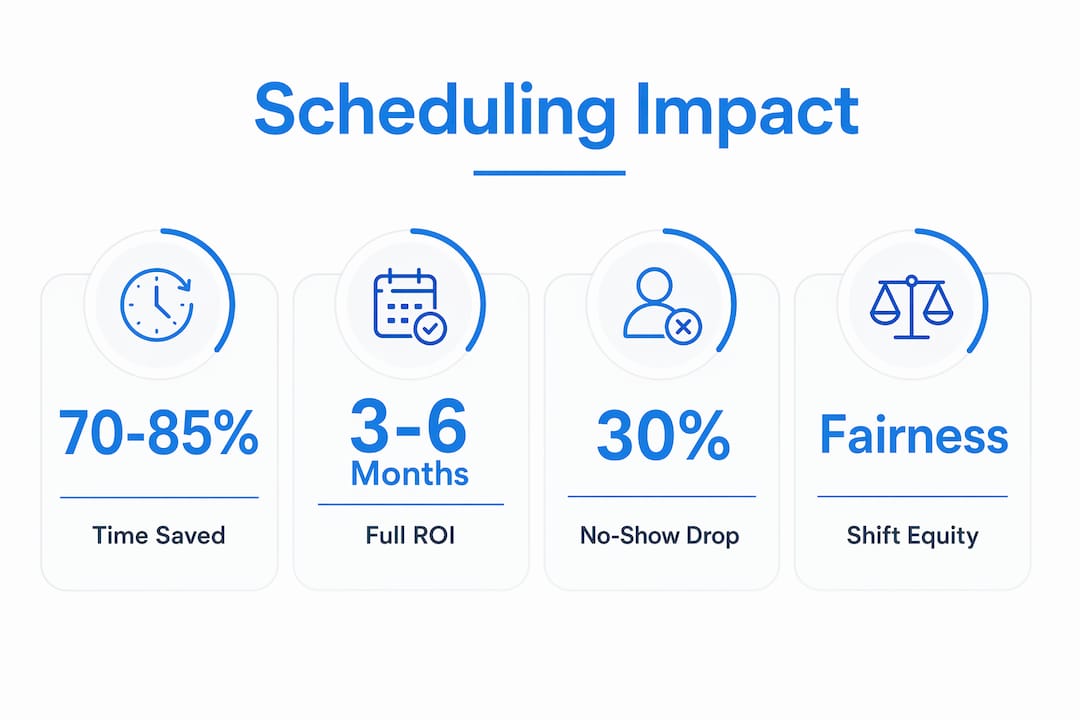
True automated scheduling blends operational demand, compliance constraints, and human availability with predictive analytics to reduce labour costs and avoid under-staffing. For a business with variable demand, that capability alone can prevent the twin problems of overstaffing quiet periods and scrambling to cover busy ones.
The workforce fairness dimension is often overlooked. Automated scheduling tracks shift equity and ensures fair distribution across team members. That consistency reduces turnover risk and builds a culture where staff trust that rotas are built on data rather than favouritism. Lower turnover means lower recruitment costs and a more experienced team serving your clients.
Automation also refines rather than removes the human element. When staff are no longer fielding routine booking calls or chasing confirmations, they have more capacity for the personalised service that clients actually value. The booking distractions removed by automation create space for the kind of client relationship that drives long-term retention. That is the compounding benefit most businesses do not account for when they calculate ROI.
AI automation services that connect scheduling to broader business workflows extend this impact further, turning a booking system into a data source that informs marketing, capacity planning, and client communications simultaneously.
Key takeaways
Automated appointment scheduling delivers its greatest value when it is integrated deeply into business operations, not treated as a standalone booking tool.
| Point | Details |
|---|---|
| Efficiency gains are immediate | Automation eliminates 70–85% of manual scheduling time, freeing staff for higher-value work. |
| No-show reduction drives ROI | Intelligent reminders cut no-shows by 34–60%, with businesses reporting 312% first-year returns. |
| Off-hours capture is critical | 40% of bookings happen outside business hours, requiring 24/7 availability to avoid lost revenue. |
| Three reminders is the optimal number | A fourth automated reminder adds minimal benefit and increases opt-out risk. |
| Integration depth determines success | Tier 3 intelligent integration, not basic calendar syncing, is what separates effective systems from basic ones. |
Why I think most businesses implement scheduling automation the wrong way
The most common mistake I see is treating scheduling automation as a technology project rather than an operational one. A business invests in a booking platform, connects it to a calendar, and considers the job done. Six months later, staff are still manually confirming appointments and the system is running at a fraction of its potential.
The fastest way to destroy automation value is overriding the AI-generated schedule excessively. When managers constantly override the system because it does not match their intuition, they are usually fighting the data rather than fixing the inputs. The right response to a schedule that does not look right is to examine the rules and data feeding the system, not to bypass it.
The businesses that see the strongest results are the ones that treat the implementation period as a learning phase. They monitor what the system produces, refine the configuration based on real booking patterns, and communicate clearly with their teams about why the change is happening. Automation without culture change is just expensive software.
The other thing I would push back on is the assumption that automation is only for large businesses. A two-person consultancy that automates its discovery call bookings and follow-up sequences gets the same proportional benefit as an enterprise with a dedicated operations team. The technology scales down as effectively as it scales up.
— Rob
How Cloud9 can support your scheduling setup
Effective appointment booking automation does not sit in isolation. It works best when it connects to your website, your CRM, and your client communications in one joined-up system.
Cloud9 builds exactly that kind of integrated digital infrastructure for established UK businesses. From web design and development that gives clients a fast, professional booking experience, to CRM and marketing automation that turns every booked appointment into a managed client relationship, Cloud9 replaces the need for multiple fragmented suppliers with a single partner. If your current booking process relies on manual steps, email chains, or disconnected tools, Cloud9’s team can map a cleaner path forward. Get in touch to discuss what an integrated scheduling setup would look like for your business.
FAQ
What is automated appointment scheduling?
Automated appointment scheduling is a software-enabled process that allows clients to book, reschedule, or cancel appointments without staff involvement. The system manages availability, confirmations, and reminders automatically.
How much time does scheduling automation save?
Manual scheduling takes an average of 4.8 hours per week per professional. Automation eliminates 70–85% of that time, returning the equivalent of several working days per month to a small team.
What is the best number of automated reminders to send?
Three automated reminders before an appointment is the optimal number. A fourth reminder adds only 3% improvement in attendance while increasing the risk of clients opting out of communications.
How long does it take to see a return on investment?
Most businesses reach full ROI within 3–6 months as the system calibrates to workflows and staff adopt new habits. First-year ROI of 312% has been reported when no-show reduction and labour savings are combined.
Does automated scheduling work for small businesses?
Automated scheduling delivers proportional benefits regardless of business size. A small firm that automates discovery call bookings and follow-up sequences gains the same efficiency advantages as a larger operation, with no requirement for a dedicated operations team.