

Live chat is one of the most direct revenue levers available to an ecommerce business. Buyers who use it are significantly more likely to complete a purchase, it rescues carts that would otherwise be lost, and every transcript is a free window into what your customers actually struggle with.
Three immediate business benefits worth noting:
- Conversion uplift: buyers who use live chat are 40% more likely to complete a purchase, and revenue per chat hour can be 48% higher.
- Faster resolution: live chat resolves queries much faster than email, cutting support cost and customer frustration simultaneously.
- Qualitative feedback: transcripts surface product confusion, pricing objections and UX friction that analytics alone never reveal.
TL;DR: If your store gets meaningful traffic, carries products that need any explanation, or serves customers aged 18–34, a 30-day pilot will almost certainly pay for itself. If you sell purely commodity goods with zero pre-purchase questions, the case is weaker but still worth testing.
Table of Contents
- Why live chat matters for ecommerce businesses
- How does live chat increase conversions?
- What features should ecommerce teams prioritise?
- How to implement live chat on your ecommerce site
- Which KPIs should you track to measure ROI?
- In-house, outsourced, or hybrid: which staffing model works?
- GDPR and ICO compliance for UK live chat deployments
- Common ecommerce use cases and example conversation flows
- What does the research say about proactive chat and who it works for?
- Common pitfalls and how to avoid them
- Is live chat right for your ecommerce business?
- Key takeaways
- An operator’s perspective on what actually matters
- Cloud9 helps UK ecommerce teams deploy live chat and AI chatbots
- Useful sources and further reading
- FAQ
Why live chat matters for ecommerce businesses
The business case for live chat rests on four pillars: revenue, retention, cost per contact, and customer experience. Each one is measurable, which is why chat has moved from a “nice to have” to a standard fixture on serious ecommerce sites.
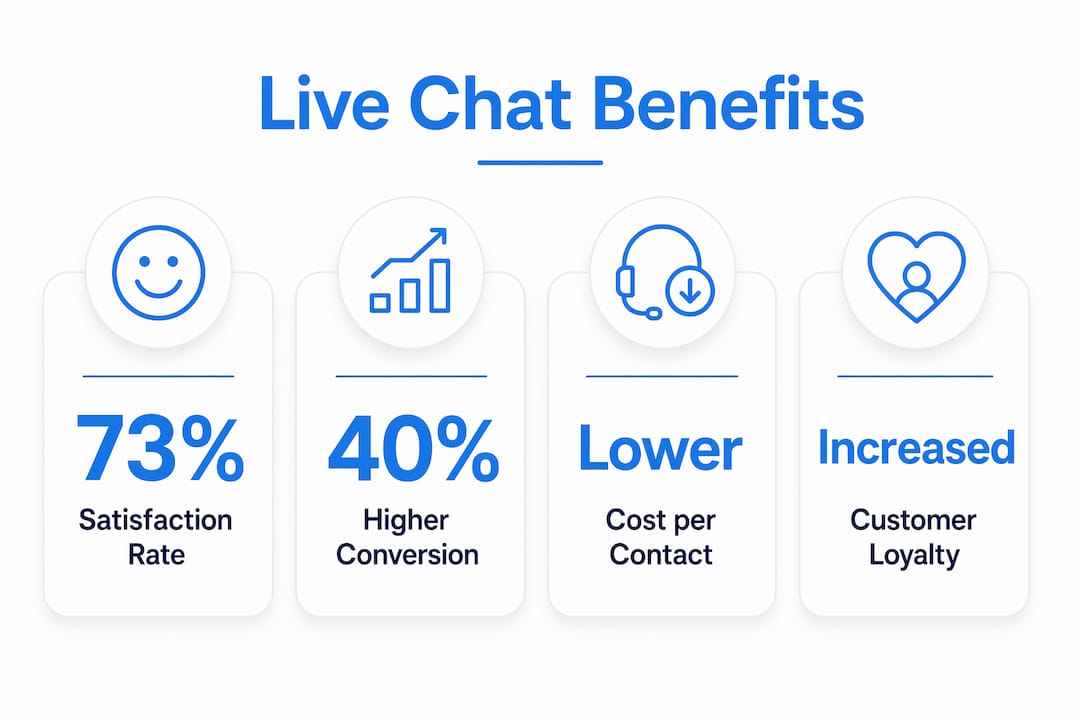
Conversion uplift and average order value. The purchase-completion lift cited above is not a ceiling. When agents use chat to recommend complementary products or clarify sizing and compatibility, average order value tends to rise alongside conversion rate. A visitor who might have bought one item often leaves with two once a well-timed question is answered.
Cart abandonment reduction. Most carts are abandoned at the payment or delivery-cost stage, precisely where a single reassuring message can tip the decision. Proactive chat triggered at that moment intercepts hesitation before the tab closes.

CSAT and loyalty. Live chat satisfaction is 73% in aggregated industry data, compared to 61% for email and 44% for phone. Customers who get a fast, helpful answer tend to come back. Those who wait 48 hours for an email reply often do not.
Cost per contact. Chat typically costs less per interaction than phone, largely because one agent can handle multiple conversations simultaneously. That efficiency gain compounds as volume grows.
Chat also functions as a trust signal, particularly for newer or lesser-known brands. Seeing a live chat widget tells a first-time visitor that a real team is behind the site. For established brands with strong reviews, it reinforces a decision already close to being made. The mechanism differs, but the outcome is the same: fewer exits.
How does live chat increase conversions?
The conversion pathways are specific, and understanding them helps you configure chat for maximum effect rather than just switching it on and hoping.
Real-time objection handling is the most direct mechanism. A visitor unsure about a return policy, delivery time, or product specification will either find the answer or leave. Chat intercepts that moment. An agent who answers “yes, free returns within 30 days” in under 40 seconds removes the last barrier to purchase.

Proactive chat invitations take this further. Visitors proactively invited to chat are 6.3 times more likely to purchase than those left to browse unaided, and 94% of proactively reached customers report satisfaction. The key word is “proactively.” Waiting for a visitor to click the widget is reactive; triggering an invite based on behaviour is where the real uplift lives.
Cart rescue is a specific application of proactive outreach. A visitor who has added items and then stalled on the checkout page for 90 seconds is showing a clear signal. A message that says “Need help with delivery options or payment?” at that moment converts a meaningful proportion of those sessions.
Product discovery and guided checkout work well for stores with large catalogues. A bot or agent that asks “What size are you looking for?” or “Is this a gift?” can surface the right product faster than search, increasing both conversion and satisfaction.
Pro Tip: Place proactive triggers at friction points — checkout and product comparison pages — rather than firing a universal prompt on every page. Use behavioural signals: time on page above 60 seconds, cart value above a threshold you set, or repeated navigation between two product pages. Blanket triggers annoy visitors; targeted ones help them.
Measurement points for each mechanism: track conversion rate for sessions that included chat versus those that did not, AOV for chat-assisted orders, and time-to-purchase for proactively invited visitors. These three figures tell you which mechanism is working hardest.
What features should ecommerce teams prioritise?
Not all live chat platforms are equal, and the gap between a basic widget and a properly integrated system is significant. Here is how to think about prioritisation.
Must-have features
- Intelligent routing: direct queries to the right agent or bot based on page, product category, or query type. Without this, a returns question lands with a sales agent and vice versa.
- CRM and order system integration: agents need to see order history, previous contacts, and account status in the same view. Integrations that surface order history and previous contacts increase first-contact resolution and reduce handling time.
- Bot-to-human handover: a bot should handle FAQs and status checks; a human should take over for complex or high-value conversations. The handover must be smooth, with full context passed across.
- Proactive chat rules: configurable triggers based on URL, time on page, cart value, and device type.
- Basic analytics: response time, resolution rate, CSAT, and chat volume by hour.
Should-have features
- AI-assisted responses: suggestions for agents, or autonomous responses for common queries as explained in The Role of AI in Website Creation for Small Businesses. Autonomous AI connected to your product catalogue can guide a shopper from discovery to purchase.
- Canned responses and knowledge base integration: speeds up agents and keeps answers consistent.
- Mobile-optimised widget: a significant share of ecommerce traffic is mobile; a widget that obscures content or fails to load quickly will cost you conversions.
- Session transcripts stored in CRM: every chat becomes a contact record, feeding your CRM and marketing automation workflows.
Nice-to-have features
- Co-browsing: useful for complex products or accessibility needs, but adds cost and complexity.
- Payments in chat: emerging capability; valuable for high-AOV or subscription products.
- Sentiment analysis: flags frustrated customers for priority handling.
For a phased approach: launch with must-haves in month one, add AI-assisted responses and CRM transcript sync in month two, and evaluate co-browsing and payments in chat after you have three months of data.
How to implement live chat on your ecommerce site
A structured rollout avoids the most common failure mode: switching chat on without the workflows, integrations, or training to back it up.
- Discovery and requirements (Week 1–2). Map your top five customer query types, identify the pages with highest exit rates, and define your coverage hours. Decide whether you need 24/7 coverage or business-hours-only to start.
- Vendor selection (Week 2–3). Evaluate platforms against your must-have feature list. Confirm API availability for your ecommerce platform and CRM. Tools like JivoChat offer omnichannel integration across chat, social, and messaging apps. Check ICO-compliant data processing agreements before signing.
- Integrations (Week 3–5). Connect the chat platform to your order management system and CRM. This is where most projects stall — budget time for CRM integration and test data flows thoroughly before go-live.
- Agent workflows and bot design (Week 4–6). Write conversation flows for your top query types. Define escalation rules: which queries go to a bot, which to a human, and at what point a chat becomes a phone call or a ticket. Cloud9’s AI chatbot design service covers this end to end.
- Privacy review (Week 5). Complete a Data Protection Impact Assessment (DPIA) if processing sensitive data. Confirm your cookie banner covers chat tracking triggers. Document your lawful basis and retention schedule.
- Test plan (Week 6). Set acceptance criteria: target first response time under 40 seconds, bot resolution rate above 60%, and CSAT above 70% in the pilot period.
- Soft launch (Week 7–8). Go live on one or two high-traffic pages only. Monitor volume, response times, and agent load in real time.
- Iterate and scale (Day 60–90). Review pilot KPIs, adjust triggers and workflows, then roll out site-wide.
Timeline summary: 30 days to integration and soft launch; 60 days to first performance review; 90 days to full deployment decision.
On cost: most SaaS chat platforms charge per agent seat per month, with bot usage sometimes metered separately. A custom-built solution is rarely justified unless your integration requirements are genuinely unusual. Engineering time for integrations is typically the largest variable cost in the first 90 days.
Which KPIs should you track to measure ROI?
Primary KPIs
| KPI | Formula / Definition | Benchmark |
|---|---|---|
| Chat conversion rate | Orders from chat sessions ÷ total chat sessions | Typically higher than site average |
| Revenue per chat hour | Total revenue attributed to chat ÷ agent hours | 48% uplift vs non-chat reported |
| First response time | Time from visitor message to first agent reply | average under 40 seconds |
| CSAT | Post-chat survey score | 73% industry average |
| Cost per interaction | Total chat operating cost ÷ number of chats | — |
| Resolution rate | Chats resolved without escalation ÷ total chats | Target 70%+ in pilot |
| Cart rescue rate | Abandoned-cart chats that converted ÷ total cart-rescue triggers | Set your own baseline in month one |
ROI calculation (simplified): take the incremental revenue from chat-assisted orders (revenue you would not have had without chat), subtract the total cost of operating chat (platform fees, agent time, integration maintenance), and divide by that cost. A positive figure in month three of a pilot is a strong signal to scale.
Instrumentation: tag chat sessions with a UTM parameter or a custom event in your analytics platform. Link chat session IDs to order IDs in your CRM so attribution is clean. Be aware that last-click attribution will undercount chat’s contribution — a visitor who chatted and then purchased two days later via email is still a chat-influenced conversion.
Web analytics integration is worth setting up before go-live so you have a clean baseline from day one.
In-house, outsourced, or hybrid: which staffing model works?
The right model depends on your volume, hours, and how much control you need over quality.
Comparison of staffing models
| Dimension | In-house | Outsourced | Hybrid |
|---|---|---|---|
| Cost | Higher fixed cost | Lower variable cost | Moderate; blended |
| Control | Full | Limited | Partial |
| Quality | Highest (product knowledge) | Variable | Good if handover is clean |
| Scalability | Slow | Fast | Moderate |
| Best fit | Complex products, high AOV | High volume, simple queries | Seasonal peaks, 24/7 coverage |
Agents typically handle 4–6 concurrent chat sessions, which is the key figure for headcount modelling. If your peak hour generates 30 simultaneous chats, you need 5–8 agents on shift, not 30. That ratio is what makes chat so much more cost-efficient than phone, where one agent handles one call.
For 24/7 coverage without a large in-house team, a hybrid model is usually the most practical answer: in-house agents during business hours for complex queries, an outsourced or bot-first layer overnight for FAQs and status checks.
Training needs are often underestimated. Agents need product knowledge, escalation rules, tone guidelines, and familiarity with your CRM view. A knowledge base integrated into the chat interface reduces training time and keeps answers consistent. AI automation services can handle triage and routing, freeing human agents for conversations that genuinely need them.
Shift scheduling for 24/7 coverage adds HR complexity. If you are not ready for that, start with business-hours-only chat and a bot for out-of-hours queries. Measure demand before committing to overnight staffing.
GDPR and ICO compliance for UK live chat deployments
The short answer: live chat involves personal data processing, and UK GDPR applies from the moment a visitor types their name or email into the chat widget.
Practical compliance checklist
- Lawful basis: document your lawful basis for processing chat data. For sales queries, legitimate interests is often appropriate; for marketing follow-up from chat leads, you will need consent.
- Cookie consent: if your chat widget fires tracking cookies or behavioural triggers before consent is given, your cookie banner must cover this. The ICO’s guidance on cookies is the primary reference for UK businesses.
- Privacy notice: update your privacy notice to include chat data, how long transcripts are retained, and who processes them (your chat platform provider is a data processor).
- Processor agreement: you must have a Data Processing Agreement (DPA) in place with your chat platform provider. Most reputable SaaS providers supply a standard DPA; check it covers UK GDPR, not just EU GDPR.
- Data minimisation: only collect what you need. If a query can be resolved without capturing an email address, do not require one.
- Retention schedule: decide how long you keep transcripts and enforce it. Ninety days is a common default; longer retention requires a clear justification.
- Subject access rights: a customer can request their chat transcripts. Your system must be able to retrieve and export them by individual.
- DPIA trigger: if you process sensitive categories of data via chat (health, financial details), a Data Protection Impact Assessment is required before go-live.
- Audit logging: maintain logs of who accessed transcripts and when, particularly if agents can view historical conversations.
Pro Tip: When using chat transcripts for agent training or AI model improvement, anonymise them first. Strip names, email addresses, order numbers, and any other identifiers before the data enters a training pipeline. This satisfies data minimisation and reduces your risk profile considerably.
Cloud9 can assist with compliance documentation and implementation review as part of a live chat deployment project.
Common ecommerce use cases and example conversation flows
These are the scenarios that generate the most chat volume on ecommerce sites, along with the flows that resolve them efficiently.
Checkout help
- Trigger: visitor on checkout page for more than 90 seconds.
- Bot opener: “Need help completing your order? I can answer questions about delivery, payment, or discount codes.”
- Flow: bot handles delivery and payment FAQs; escalates to human if the query involves a failed payment or account issue.
- Outcome: sale saved or ticket created for follow-up.
Product guidance
- Trigger: visitor navigating between two or more product pages.
- Bot opener: “Not sure which option is right for you? Tell me what you need it for and I can help.”
- Flow: bot asks two or three qualifying questions (use case, size, budget), then recommends a product with a direct link.
- Outcome: visitor lands on the right product page with higher purchase intent.
Returns and refunds
- Trigger: visitor on returns policy page or typing “return” or “refund” in chat.
- Bot opener: “I can help with a return. Do you have your order number handy?”
- Flow: bot captures order number and reason, creates a return ticket, and sends confirmation. Human agent handles exceptions (damaged goods, missing items).
- Outcome: return initiated without a phone call; agent time saved.
Order status
- Trigger: visitor typing “where is my order” or similar.
- Bot flow: capture order number, query order management system, return status automatically.
- Outcome: query resolved in under 60 seconds with no agent involvement.
Cart-rescue proactive invite (sample script)
This works best sent 2–3 minutes after a visitor has stalled on the cart page. Keep it short, low-pressure, and specific to the action (the basket, not a generic “can I help?”).
Chat transcripts from these flows are also a qualitative feedback loop for UX and product improvement. Teams that analyse them regularly identify friction points and convert those into content or UX changes that reduce future contact volume.
What does the research say about proactive chat and who it works for?
The research picture is more nuanced than “add chat, get more sales,” and the nuance matters for how you deploy it.
That shift is the central finding from Marvyn’s ecommerce live chat analysis. The implication is that a chat widget sitting in the corner waiting to be clicked is leaving most of its value on the table.
Substitution versus reinforcement. Research published in Information Systems Research identifies two distinct effects. For sellers with weaker review profiles or lower brand recognition, chat substitutes for trust that reviews and reputation would otherwise provide. For well-known brands, chat reinforces a decision already close to being made. The practical implication: if you are a newer or smaller seller, chat is more important, not less, and should be deployed more aggressively on product and checkout pages.
Demographic effects. 56% of shoppers aged 18–34 prefer live chat over phone for support. For stores where that cohort is a significant share of buyers, not offering chat is a genuine channel gap. It also affects hours of coverage: younger shoppers browse in the evening, which means business-hours-only chat misses a disproportionate share of that segment.
Implementation tips from the research:
- Deploy proactive triggers on product and checkout pages, not site-wide.
- If your review rating is below 4.0, treat chat as a trust-building tool and prioritise human agents over bots for first contact.
- If your audience skews 18–34, extend chat coverage to at least 8 PM and consider a bot for overnight queries.
- Measure proactive invite acceptance rate separately from reactive chat volume; they have different conversion profiles.
Common pitfalls and how to avoid them
Most live chat failures are operational, not technical. The widget works fine; the process around it does not.
Pitfalls to avoid
- Slow response times. A first response over two minutes is worse than no chat at all. Visitors who wait that long leave with a worse impression than if chat had not been offered.
- Over-aggressive proactive invites. Firing an invite within five seconds of a page load, or on every page, trains visitors to dismiss them. Targeted triggers convert; blanket ones annoy.
- Robotic scripts. Canned responses are useful for speed; they become a problem when agents use them regardless of context. A customer describing a complex issue does not want a templated reply.
- Data silos. Chat that does not connect to your CRM or order system means agents ask customers to repeat themselves, and you lose the attribution data needed to measure ROI.
- No measurement. Running chat without tracking conversion rate, CSAT, and response time means you cannot improve it or justify the cost.
Best practices
- Set a maximum first response time (40 seconds is the industry benchmark) and monitor it daily in the first month.
- Use canned responses for FAQs, but train agents to personalise the opening and closing of every conversation.
- Define escalation rules clearly: what triggers a handover to phone, what creates a ticket, and who owns follow-up.
- Review transcripts weekly in the first 90 days. Patterns in customer language reveal product and UX issues faster than any survey.
- Monitor agent chat load. An agent handling eight simultaneous chats will produce lower quality than one handling four. Keep concurrent sessions within the 4–6 range and use bot triage to protect that ceiling.
Pro Tip: Combine canned responses with AI triage so human agents handle complex or high-value conversations while bots handle FAQs and simple status checks. This preserves quality and reduces agent burnout without sacrificing coverage.
Is live chat right for your ecommerce business?
Short verdict: yes for most ecommerce businesses with meaningful traffic and any product complexity; conditional for pure commodity sellers; worth a 30-day pilot before committing to a full deployment.
Decision checklist
Use this to decide whether to proceed:
- Does your site receive enough traffic that even a small conversion uplift would cover the cost of chat? (A rough threshold: if 1% of your monthly visitors converting at your average order value covers your monthly chat cost, the maths works.)
- Do customers regularly ask pre-purchase questions about your products? (Check your email inbox or phone logs for the last 30 days.)
- Is a significant share of your audience aged 18–34?
- Do you sell internationally or to customers in different time zones?
- Is your cart abandonment rate above 60%? (The UK ecommerce average is well above that.)
If you answered yes to three or more, proceed to a pilot.
30-day pilot template
- Goal: establish baseline conversion rate for chat-assisted sessions versus non-chat sessions.
- Scope: deploy on checkout and top three product pages only.
- Coverage: business hours, human agents, one bot flow for order status.
- Success thresholds: first response time under 40 seconds; CSAT above 70%; at least one chat-assisted conversion per 20 chat sessions.
- Review date: day 30; decision to expand, adjust, or pause based on data.
Key takeaways
Live chat converts browsers into buyers, cuts support costs, and gives ecommerce teams a direct window into customer friction — but only when it is properly integrated, staffed, and measured.
| Point | Details |
|---|---|
| Conversion impact | Chat users are 40% more likely to complete a purchase; revenue per chat hour can be 48% higher. |
| Speed and cost | Live chat resolves queries much faster than email and costs less per interaction than phone. |
| Proactive triggers | Visitors proactively invited to chat are 6.3x more likely to purchase; target checkout and product pages, not every page. |
| GDPR compliance | UK deployments require a documented lawful basis, a DPA with your chat provider, and a transcript retention schedule. |
| Cloud9 implementation | Cloud9 provides AI chatbot design, CRM integration, and managed deployment for UK ecommerce teams as a single partner. |
An operator’s perspective on what actually matters
The gap between a live chat deployment that pays for itself and one that quietly drains budget usually comes down to two things: integration and expectation-setting.
Teams that treat chat as a standalone widget — switched on, left to run, checked occasionally — rarely see the conversion numbers the research promises. The uplift comes from connecting chat to your order system so agents have context, from configuring proactive triggers based on real behavioural data, and from reviewing transcripts regularly enough to act on what customers are telling you.
The substitution versus reinforcement finding from the research is the one I would urge every ecommerce manager to sit with. If your brand is not yet well-known, chat is doing more heavy lifting than you might realise. It is standing in for the trust that reviews and reputation provide for established players. That means the quality of your chat interactions matters more, not less, for newer brands.
Cloud9’s approach to live chat deployments starts with integration: CRM, order management, and analytics connected before the widget goes live. The result is that every chat session is attributable, every transcript is a CRM record, and every proactive trigger is based on data rather than guesswork. That is the version of live chat that actually moves the revenue needle.
The TL;DR remains: if your store has meaningful traffic and any product complexity, a 30-day pilot will tell you everything you need to know.
Cloud9 helps UK ecommerce teams deploy live chat and AI chatbots
Most live chat projects stall not because the technology is hard, but because the integrations, compliance documentation, and agent workflows are left to figure out mid-deployment. Cloud9 removes that problem entirely.
As a single UK-based partner, Cloud9 handles AI chatbot design, CRM and order system integration, GDPR compliance documentation, and managed deployment for established ecommerce businesses. You get a chat system that is connected to your existing stack from day one, not bolted on as an afterthought. Whether you need a fully managed AI chatbot, a CRM-integrated chat workflow, or a complete web design and chat implementation as part of a site build or redesign, Cloud9 covers the full scope.
To find out what a 90-day live chat pilot would look like for your business, book a consultation with the Cloud9 team.
Useful sources and further reading
- Kayako: Live Chat Pros and Cons — the primary source for conversion uplift, response time, cost, and demographic preference statistics used throughout this article.
- Kayako: What Is Live Chat? — source for CSAT benchmarks (73% for chat vs 61% for email vs 44% for phone).
- Kayako: Ecommerce Live Chat and Sales — source for integration benefits, concurrent handling ratios, and transcript-as-feedback-loop insights.
- Marvyn: Live Chat on a Website — source for the proactive sales engine framing and autonomous AI assistant capabilities.
- Information Systems Research: Substitution vs Reinforcement — academic source for the substitution versus reinforcement effect; essential reading for brand-positioning decisions around chat deployment.
- ICO: UK GDPR Guidance — the primary compliance reference for UK businesses processing personal data via live chat; covers lawful basis, cookies, and subject access rights.
- JivoChat — omnichannel live chat platform referenced for concurrent handling and bot integration capabilities.
FAQ
What is the purpose of live chat in ecommerce?
Live chat serves as a real-time sales and support channel that reduces friction at the point of purchase, rescues abandoning carts, and resolves queries faster than email or phone. Its primary purpose is to convert browsers into buyers by answering questions at the exact moment they arise.
How does live chat affect conversion rates?
Buyers who use live chat are 40% more likely to complete a purchase, revenue per chat hour can be 48% higher than for non-chat sessions, and proactively invited visitors are 6.3 times more likely to purchase than those who browse unaided.
What is the ecommerce chat process?
A typical flow starts with a behavioural trigger (time on page, cart value, exit intent), which fires a proactive invite or makes the chat widget prominent. A bot handles the opening query and FAQs; a human agent takes over for complex or high-value conversations. The session is logged to the CRM with the order context attached.
What are the main benefits of live chat for customers?
Customers get faster answers (average first response under 40 seconds versus hours for email), a less intrusive channel than phone, and help at the exact moment they need it. Live chat satisfaction is 73% in industry data, higher than both email (61%) and phone (44%).
Can Cloud9 handle the full live chat implementation for a UK ecommerce business?
Yes. Cloud9 provides AI chatbot design, CRM and order system integration, GDPR compliance documentation, and managed deployment as a single partner, removing the need to coordinate multiple suppliers for a live chat project.