

Google Ads works for B2B lead generation, but only when campaigns are built around buyer intent and judged on pipeline rather than form fills. The single change that matters most is capturing the GCLID at every form submission and feeding CRM outcomes back into Google Ads, so bidding optimises for revenue rather than cheap leads. Layer that with tightly segmented search campaigns and staged retargeting, and the platform earns its budget.
TL;DR:
- The most effective B2B Google Ads campaigns focus on pipeline-driven metrics like revenue and closed deals, not just form fills or clicks.
- Segmenting campaigns by buyer intent and stage, with dedicated structures for branded, high-intent, and retargeting, enhances bid efficiency and reporting clarity.
- Capturing GCLID data and importing offline conversions into CRM is essential for the algorithm to optimize based on actual revenue outcomes rather than lead quantity.
- B2B accounts require at least 60 to 90 days to stabilize, with search campaigns targeting high-intent terms making the most immediate impact on pipeline metrics.
- Scaling success depends on starting with focused search campaigns, consistent offline conversion tracking, and refining retargeting based on visitor page segments to improve lead quality.
Table of Contents
- How the B2B funnel maps to Google Ads
- Account and campaign structure: segment by intent and role
- Keyword strategy and match types for B2B search
- Audience targeting and ABM-friendly tactics
- Measurement and bidding: feeding pipeline data back to Google Ads
- Budget allocation and rules for scaling B2B campaigns
- Creative and landing-page tactics to improve lead quality
- Optimisation cadence, A/B tests and common pitfalls to avoid
- Best practices for integrating Google Ads with multiple CRM systems often used in B2B
- Advanced tracking: CAC and LTV modelling for B2B
- Aligning sales and marketing to improve lead qualification
- Using competitive analysis and auction insights in B2B
- Cloud9’s practical perspective on running this playbook
- Get your Google Ads structured for pipeline, not clicks
- Sources
- FAQ
How the B2B funnel maps to Google Ads
Most wasted B2B ad spend comes from running one campaign type for every stage of the buying journey. A director researching a category-level problem is not ready for a demo request, and hitting them with a “Book a Call” ad usually just burns budget.
Top-of-funnel (TOFU) buyers are problem-aware, not solution-aware. Display, YouTube, and broad informational search terms work here, and the goal is engagement, not conversion. Watch time, content downloads, and return visits are the metrics that matter, not cost per lead.
Mid-funnel (MOFU) prospects know the category and are comparing approaches. This is where non-branded search on comparison and “best X for Y” terms earns its keep, alongside remarketing to TOFU engagers. The metric shifts to marketing-qualified leads (MQLs), not raw clicks.
Bottom-of-funnel (BOFU) buyers are close to a decision. Branded search, high-intent commercial terms (“[category] pricing”, “[category] for [industry]”), and demo-request retargeting all sit here. This is the only stage where cost per sales-qualified lead (SQL) and pipeline value should drive optimisation decisions.
A realistic flow looks like this:
- A prospect searches a broad category term, lands on a guide, and downloads a resource (TOFU capture).
- Remarketing nudges them towards a comparison page or webinar over the following weeks (MOFU nurture).
- Once they visit a pricing or “book a demo” page, a BOFU retargeting campaign with a tighter, more direct offer closes the loop.
Paid search performs well for B2B specifically because it captures active demand rather than manufacturing it, provided the campaign accounts for the longer B2B sales cycle instead of judging every click against a same-day conversion. Skip that distinction and you’ll spend TOFU budget chasing BOFU metrics, which is how most B2B accounts convince themselves the channel doesn’t work.
Account and campaign structure: segment by intent and role
A defensible B2B account isn’t one sprawling campaign with fifty ad groups. It’s a small set of deliberately separated campaigns, each with its own budget, bidding logic, and conversion event. A workable structure, drawn from common B2B campaign-stack practice, uses five tiers:
- Branded defence — protects your name against competitors bidding on it. Cheap clicks, high intent, small budget, but non-negotiable if rivals are active in your space.
- High-intent non-branded search — exact and phrase match on terms that signal active buying (“[category] software”, “[service] for [industry]”). This carries the biggest share of budget and the tightest conversion tracking.
- Mid-intent search — broader category and educational terms that build the remarketing pool for later stages.
- Retargeting — segmented by page visited (pricing, case studies, demo request), not lumped into one generic audience.
- Performance Max expansion — added only once the search tiers produce reliable, repeatable conversion signal.
This tiered structure, similar to the five-campaign B2B stack recommended by Vehnta, matters because Google’s algorithm learns from whatever conversion event you feed it. Mix a demo request with a whitepaper download in the same campaign and you’ll get an average of two very different buyer intents, which confuses bidding and muddies reporting.
Name campaigns and conversion actions consistently: [Tier]_[Region]_[Offer] for campaigns, and separate conversion actions for “Demo Request,” “Content Download,” and “SQL Created” rather than one blanket “Lead” event. This sounds pedantic until your CRM data disagrees with your Google Ads dashboard six months in, and nobody can work out why.
Keyword strategy and match types for B2B search
Broad match feels efficient until it starts spending your budget on job seekers, students, and people researching a Wikipedia definition of your category. For B2B accounts, phrase and exact match discipline is the safer starting point, with broad match reserved for later testing once negative lists are mature and Smart Bidding has enough conversion data to interpret intent correctly.
A practical build looks like this:
- Start every new ad group on phrase and exact match only; hold broad match back until you have at least 30 to 50 conversions feeding the campaign.
- Review the search terms report weekly for the first two months, then fortnightly once the account settles.
- Build a shared negative keyword list covering job-related terms (“careers”, “salary”, “jobs”), free/DIY terms, and any consumer-facing language that doesn’t match your offer.
- Group keywords by buyer intent and offer, not just by topic. “Enterprise CRM pricing” and “what is a CRM” belong in different ad groups with different landing pages, even though they share a root term.
- Add competitor names to a separate, closely watched campaign rather than folding them into your main structure, since click-through and conversion rates usually behave differently there.
Pro Tip: *Set a recurring calendar reminder to review your search terms report every Monday morning for the first quarter.
Audience targeting and ABM-friendly tactics
Search captures people actively looking. Audience layering is what turns that capture into a sequenced buying experience for the handful of people who actually sit on a purchasing committee.
Customer Match lets you upload a list of existing contacts, such as a target account list or a segment from your CRM, and either exclude them from cold prospecting campaigns or serve them a different message entirely. For account-based marketing, this is the closest Google Ads gets to true account-level targeting: build a list of named accounts, match it against Google’s identifiers, and run a distinct campaign that speaks to that specific buying committee rather than the broader market.
Retargeting should never be one audience with one ad. Segment by the page a visitor last viewed and sequence the creative accordingly:
- Pricing-page visitors see a direct, low-friction offer (“Get a quote” or “See a live demo”).
- Case-study readers see proof-driven creative featuring results similar to what they were reading.
- Blog or resource-page visitors get nurtured towards a mid-funnel asset, not pushed straight to a sales call.
Google Ads is rarely the only channel doing this work. Common practice pairs Google for active demand capture with LinkedIn for firmographic targeting and Microsoft Advertising for cheaper incremental desktop volume, particularly when a buying committee includes roles that spend more time on LinkedIn than in a Google search bar. Getting the ideal customer profile right before splitting budget across channels avoids the common trap of running the same generic message everywhere and wondering why nothing lands.
Measurement and bidding: feeding pipeline data back to Google Ads
This is the section that separates B2B accounts that scale from ones that plateau at “lots of leads, no sales.” A form submission is not a conversion worth bidding on; a closed deal is.
The mechanics are straightforward even if most accounts skip them: capture the GCLID (Google Click Identifier) at the point of form submission, store it against the contact record in your CRM, and map that contact through every pipeline stage from Lead to SQL to Opportunity to Closed Won. Once a deal closes, that outcome gets imported back into Google Ads as an offline conversion, and the algorithm starts learning which clicks actually turn into revenue, not just which clicks fill in a form.
You’ve got two practical ways to do this:
- Enhanced Conversions for Leads matches hashed contact data (email, phone) between your CRM and Google Ads automatically, giving faster, near-real-time signal with less manual work, though it depends on consistent data hygiene between systems.
- Manual offline conversion uploads give you more granular control over exactly which CRM stage counts as a conversion and when, but require a recurring export and upload process, which someone has to actually own.
On bidding: don’t touch Target CPA or Maximise Conversion Value until the account has a stable volume of the right conversion event flowing in. Feeding closed-won revenue back into the platform is widely cited as the single change that most improves bid efficiency in B2B accounts, more than any keyword or ad copy tweak. Switch bidding strategy before that data exists and you’re just asking the algorithm to guess.
Budget allocation and rules for scaling B2B campaigns
Start bottom-up, not top-down. The instinct to launch broad awareness campaigns alongside high-intent search is understandable, but it’s backwards for B2B: awareness spend without a proven conversion baseline just tells you nothing works, when in fact nothing was measured properly.
- Weight the first 70 to 80% of budget towards high-intent and branded search. This is where buying signal is strongest and where you’ll get your first reliable read on cost per SQL.
- Hold retargeting at a modest, always-on spend. It doesn’t need much budget to be effective, but it needs to never switch off, since buying committees take weeks or months to move.
- Only add Performance Max or broader reach campaigns once search has produced consistent conversion signal, typically once you’re seeing repeatable weekly conversions rather than sporadic one-offs. This staged approach, echoed in Vehnta’s guidance on B2B campaign planning, protects budget from being spent on reach before you know what a good lead even looks like.
- Judge performance on cost per SQL and pipeline value, not cost per lead. A campaign generating leads at half the cost of another isn’t cheaper if none of those leads ever reach a sales conversation.
Proving the unit economics of demand capture before investing in broader formats isn’t caution for its own sake. It’s how you know, with actual data, whether wider spend will produce more pipeline or just more noise.
Creative and landing-page tactics to improve lead quality
The ad and the landing page are doing more work than most B2B marketers give them credit for; they’re the first filter on lead quality, long before sales ever picks up the phone.
Ad copy that speaks to a role and an outcome outperforms generic feature lists. “Cut invoice processing time for finance teams” beats “Powerful automation software” because it tells the exact reader, in their own language, what changes for them. Pair role-led headlines with a specific proof point (a client result, a certification, a number) rather than a vague claim of quality.
On landing pages, the choice between a lead form and a click-through page depends entirely on where the visitor sits in the funnel. High-intent BOFU traffic can handle a short qualification form (company size, role, budget range) because that friction filters out unqualified fills before they reach sales. Mid-funnel traffic converts better against a click-through page that leads to a resource, because a form at that stage just suppresses volume without improving quality.
- Add one or two qualifying questions to BOFU forms; it costs you some volume but saves your sales team hours chasing dead ends.
- Place a relevant case study directly above the fold on pricing and demo pages, not buried further down.
- Match the call-to-action to intent: “See Pricing” for BOFU, “Get the Guide” for MOFU.
Pro Tip: If your sales team keeps calling leads “not a fit,” add a single disqualifying question to the form, such as company size or budget range, before touching the ad copy. It’s usually cheaper to fix than a full creative overhaul.
Optimisation cadence, A/B tests and common pitfalls to avoid
B2B accounts typically need 60 to 90 days to stabilise, since audiences and Smart Bidding signals take time to build against a lower, slower conversion volume than most B2C accounts see. Expect early weeks to look noisy and resist the urge to overhaul everything at day 14.
- Test one variable at a time: landing page headline first, then form field count, then audience exclusions, then bid strategy.
- Review search terms and negative keywords weekly for the first quarter, then fortnightly after that.
- Avoid the three failures that quietly wreck most B2B accounts: optimising towards raw lead volume instead of SQLs, switching to broad match before negative lists are mature, and forgetting to keep the offline conversion feed running after the initial setup.
A checklist of common PPC mistakes is worth a quick read before launch, since several of the errors that sink consumer accounts (thin negative lists, mismatched ad-to-landing-page messaging) hit B2B accounts just as hard.
Best practices for integrating Google Ads with multiple CRM systems often used in B2B
Most established B2B companies aren’t running a single, tidy CRM. Sales might live in one system, marketing automation in another, and a legacy database somewhere in the background nobody wants to migrate. Getting Google Ads conversion data to flow accurately through that mess is less about picking the “right” CRM and more about consistency of identifiers.
The GCLID has to survive every handoff. If a lead moves from a web form into a marketing automation platform, then gets synced into a sales CRM, the GCLID (or the hashed contact data used for Enhanced Conversions) needs to travel with it at every step. Break that chain once, and Google Ads loses the ability to attribute a closed deal back to the click that started it.
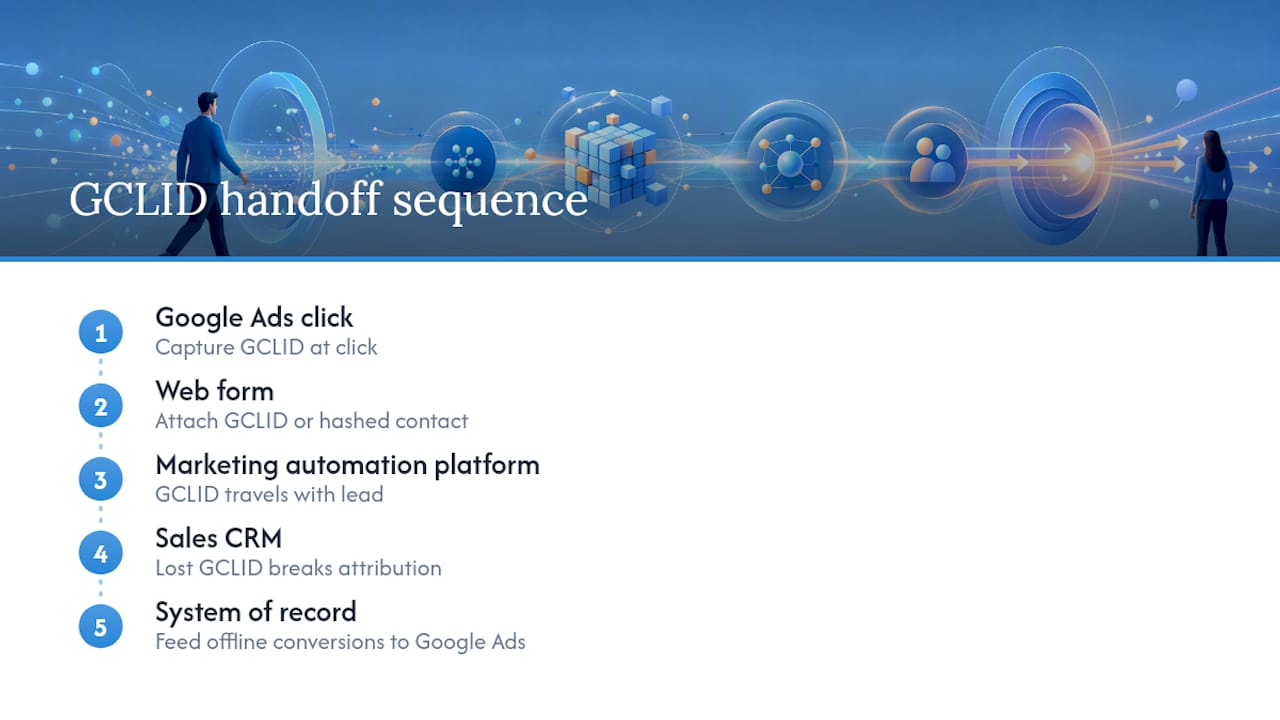
Where multiple CRMs are genuinely unavoidable, such as a parent company with separate systems per division, standardise on a single “system of record” for pipeline stage and feed offline conversions from that one source, rather than trying to reconcile conflicting stage definitions across platforms. It’s far easier to fix data consistency once, upstream, than to debug mismatched conversion counts every month.
For businesses without in-house technical resource to manage this, a CRM and marketing automation setup built around consistent lead handling removes most of this friction by design rather than patching it after the fact.
Advanced tracking: CAC and LTV modelling for B2B
Cost per lead and cost per SQL tell you what the top of the funnel costs. Customer Acquisition Cost (CAC) and Lifetime Value (LTV) tell you whether the business the funnel produces is actually worth having.
CAC, calculated as total sales and marketing spend divided by new customers won in a period, becomes far more useful in Google Ads once it’s segmented by campaign tier rather than blended across the account. A branded search campaign and a Performance Max expansion campaign rarely produce customers of equal value, and blending their CAC together hides which one is actually earning its budget.
LTV modelling adds the other half of the picture: if high-intent search brings in customers worth three times the average contract value, that campaign can sustain a materially higher CPA than a blended target would suggest. Most B2B accounts underspend on their best-performing segment because they’re capping bids against an average CAC target that doesn’t reflect the actual value of the leads that segment produces.
This only works if pipeline stage and deal value flow back from the CRM in the first place, which is why the GCLID capture and offline conversion setup described earlier isn’t optional infrastructure. It’s the prerequisite for CAC and LTV numbers meaning anything at all in a Google Ads context.
Aligning sales and marketing to improve lead qualification
Marketing can build the tightest campaign structure in the platform and still generate leads sales won’t touch, if the two teams disagree on what counts as qualified. The fix isn’t a slicker campaign. It’s a shared definition, written down, of what makes a lead sales-ready.
That definition needs specifics: role seniority, company size, budget signal, and timeline, agreed jointly rather than dictated by either side. Once it exists, feed it back into the account as a lead-scoring layer, so campaigns can be judged on how many qualified leads they produce, not just how many forms get filled.
A recurring, short feedback loop between the two teams matters more than any tool. A monthly review where sales flags which recent leads converted to opportunities, and which didn’t, and why, gives marketing the real signal needed to adjust targeting, ad copy, and landing-page qualification questions. Without that loop, marketing keeps optimising against assumptions that go stale within a quarter. Building a lead scoring model that both teams actually agree on turns this from a recurring argument into a shared, measurable process.
Using competitive analysis and auction insights in B2B
The Auction Insights report in Google Ads shows exactly who else is bidding on your terms, how often they outrank you, and how your impression share has moved over time. For B2B accounts, this is more useful than it first looks, because B2B categories often have a small, stable set of competitors rather than the churn you’d see in consumer retail.
Watch impression share trends on your branded and high-intent campaigns specifically. A competitor suddenly appearing in your branded auction is a direct signal they’re bidding on your company name, which usually justifies tightening your branded defence budget before it becomes a bigger problem.
Overlap rate and position-above-rate tell you whether you’re consistently losing the auction to the same rival on your highest-intent terms. If one competitor shows up repeatedly outranking you on your best-converting keywords, that’s worth a manual review of their landing page and offer, not just a bid increase, since outbidding them without understanding why they’re winning often just burns budget faster.
Auction Insights data updates over rolling periods, so treat single-week spikes cautiously and look for patterns across a month or more before reacting.
Cloud9’s practical perspective on running this playbook
Running Google Ads well for B2B is less about clever targeting and more about plumbing: making sure the data pipeline between ad click and closed deal actually works. Cloud9 builds that plumbing as part of its PPC and landing-page work, pairing campaign structure with the CRM automation needed to make offline conversion imports reliable rather than an afterthought.
The checklist that matters in practice: GCLID capture live before launch, CRM stages mapped to conversion events, an offline import cadence that someone actually owns, and reporting that shows pipeline, not just lead count.
— Rob
Get your Google Ads structured for pipeline, not clicks
We build B2B Google Ads accounts following best practices: intent-segmented campaigns, GCLID capture from launch, and CRM stages mapped so bidding learns from revenue outcomes rather than form fills.
That’s the practical advantage over running campaigns in isolation from your CRM: no guessing which leads actually became customers, because the data pipeline reports it directly. Cloud9’s PPC and landing-page service covers account structure, conversion tracking, and landing-page design as one connected setup rather than three separate suppliers passing data between each other badly. If your current campaigns generate leads but nobody can say which ones turned into revenue, that’s the gap worth fixing first. Get in touch for a practical audit of your current account and CRM setup, and see exactly where the pipeline is leaking before you spend another month’s budget guessing.
Sources
- B2B Google Ads campaign setup | COREPPC
- Is paid search effective for B2B? | Unbounce
- What is B2B PPC and How to Run Campaigns That Convert | PipeRocket
- B2B Google Ads Strategy: How to Plan Campaigns | Vehnta
FAQ
Is $10 a day enough for Google Ads in B2B?
It can fund a tightly focused branded or single high-intent campaign, but most B2B accounts need considerably more to generate the conversion volume required for Smart Bidding to learn effectively.
How much do Google Ads cost per 1,000 impressions in B2B?
Cost per thousand impressions varies enormously by industry and competition level, and B2B categories with fewer, higher-value competitors often see higher costs than consumer markets; there is no single reliable benchmark figure.
Is $500 a month enough for Google Ads for B2B?
It’s enough to test one or two high-intent search campaigns and start gathering conversion data, but it typically won’t support the branded defence, retargeting, and expansion tiers a full B2B account structure needs.
Are Google Ads worth it for small B2B businesses?
Yes, when campaigns target buyers actively searching with commercial intent and success is measured against pipeline and SQLs rather than raw click volume or cost per lead.
How long before a B2B Google Ads account shows results?
Most B2B accounts need roughly 60 to 90 days to stabilise, since audiences and bidding algorithms need time to build reliable signal from a naturally lower conversion volume than consumer accounts.
What’s the biggest mistake B2B companies make with Google Ads?
Optimising towards form fills instead of closed revenue, usually because the CRM and Google Ads account were never connected through GCLID capture or offline conversion imports in the first place.