

A successful CRM implementation follows a fixed sequence: assess, choose, plan, configure, migrate, test, train, go live, then optimise. Success is judged against three measurable outcomes: user adoption, data completeness and pipeline accuracy. Most projects run into trouble not from the software but from weak data quality and missing governance, so treat those two risks as the ones to manage hardest from day one.
TL;DR:
- Successful CRM deployment hinges on strong data governance and quality, as most issues stem from missing or inaccurate data rather than software flaws.
- Prioritize initial scope, process mapping, and core automations to avoid extensive rework caused by over-customization after launch.
- Regularly track key KPIs such as user login frequency, data completeness, pipeline accuracy, and support volume during hypercare and beyond.
- Maintain a single accountable sponsor, enforce scope control, and embed continuous measurement of adoption and data quality to sustain long-term value.
- Engage future users in testing and feedback during setup and post-launch reviews to improve system trustworthiness and ensure effective adoption.
Table of Contents
- The ten essential CRM implementation steps
- Data migration and testing that protect your go-live
- RACI, change control and the KPIs to track from day one
- Practical lessons from CRM rollouts for established businesses
- Change management and communication plan
- Risk assessment and mitigation strategies
- Post-implementation feedback and continuous improvement
- A leadership note on sponsorship and sustained value
- How Cloud 9 supports a managed CRM implementation
- Primary sources and templates referenced in the guide
- Sources
- FAQ
The ten essential CRM implementation steps
Every CRM project benefits from a written plan that names an owner for each stage, states what “done” looks like, and sets a realistic budget with room for the unexpected. The sequence below works as the backbone of a master project plan, whatever CRM platform you choose.
- Define scope, business outcomes and budget. Agree what the CRM must achieve (faster lead response, cleaner pipeline visibility, fewer manual handoffs) and set measurable KPIs before anyone touches a product demo. The sponsor signs this off, and sample KPIs might include lead response time, forecast accuracy and duplicate record rate.
- Assemble governance and the project team. Name a sponsor, project lead, IT lead, data owner, change lead and a handful of departmental champions before kickoff. Project management quality and the quality of any implementation partner are two of the strongest determinants of CRM success, so this is not a step to rush.
- Scope Phase 1 explicitly. Write down what is in and what is deliberately out for the first release, then hold back a contingency percentage of budget as contingency, in line with industry guidance on CRM deployment that flags frequent timeline and budget overruns are common.
- Map processes and the core data model. Agree how contacts, companies, deals and lifecycle stages relate to each other before building anything. Resisting the urge to customise every field at this stage saves months of rework later.
- Plan integrations and security requirements. List the systems that need to talk to the CRM (finance, email, the website, support tools) and the technical handovers each one needs: API credentials, single sign-on, data processing agreements. Where personal data changes hands between systems or suppliers, procurement guidance on data protection sets out the contractual clauses and technical measures organisations are expected to have in place.
- Configure for day-one value. Build the fields, pipelines and automations that support the Phase 1 scope, and no more. A short list of well-used automations beats a long list of ones nobody understands.
- Audit, clean and pilot-migrate data. Profile the existing dataset, fix what you can before it moves, and migrate a representative sample first so problems surface before the full cutover.
- Test end to end. Run unit, integration, end-to-end and user acceptance testing against clear pass and fail criteria, treating any failed critical test as a block on go-live.
- Train by role and deploy champions. Tailor training to what each role actually does in the system, brief champions to field day-one questions, and prepare a short cutover communication so nobody is caught off guard.
- Go live, then support and expand. Follow a written cutover checklist, run a hypercare period with daily check-ins, and open a Phase 2 backlog for everything you deliberately left out of scope.
Pro Tip: Print the ten steps as a one-page checklist and pin it to the project plan; every workstream lead signs off their row before the next stage starts.
Consultants and internal teams tend to perform better when future users help shape requirements and test the system themselves, a pattern confirmed by research on user involvement in CRM adoption. Build that involvement into steps 4 and 8 rather than treating it as a training afterthought. For any project that touches your website’s lead capture, it is worth reviewing how to integrate CRM with your business website before finalising the integration list in step 5.
Data migration and testing that protect your go-live
Before a single record moves, profile the existing dataset: total volume, percentage of complete fields, duplicate rate, and how many records have not been touched in over a year. This tells you whether you are migrating a working asset or several years of unmanaged clutter.
- Build a field-by-field mapping sheet that shows source field, destination field, transformation rule and who signed it off.
- Run a pilot migration on a subset first, validate the results against the source system, and only proceed once a rollback plan is documented and agreed.
- Follow the pilot with a pre-production run using the full dataset before the real cutover weekend.
- Set a minimum UAT pass threshold and treat any failed critical scenario as a go or no-go blocker, not a note for later.
- Cover unit, integration, end-to-end and user acceptance testing, plus basic security and performance checks before anything touches production.
Poor CRM data quality is common and costly: industry analysis of CRM deployments points to widespread incomplete or inaccurate records, with a measurable knock-on effect on revenue when sales teams work from bad data. A short deduplication checklist before migration, checking for matching emails, phone numbers and company names, catches most of the damage before it becomes permanent.
RACI, change control and the KPIs to track from day one
A RACI matrix, naming who is Responsible, Accountable, Consulted and Informed for every workstream, is the single cheapest way to stop a CRM project stalling. Without one, decisions drift and nobody notices scope creeping until the budget is gone.
- Use a change control intake form for every new request, then triage it into Phase 1 (if it blocks go-live) or Phase 2 (if it does not).
- Compare rollout options before choosing one: a pilot with one team limits risk but slows benefit realisation, a phased rollout by department balances speed and control, and a big-bang rollout suits smaller organisations with simple processes but carries higher single-day risk.
- Track four to six KPIs from launch: user login frequency, data completeness, pipeline accuracy, lead response time and support ticket volume.
- Review weekly during hypercare, then monthly once the system has settled.
| Deployment KPI | What it tells you | Review cadence |
|---|---|---|
| User login frequency | Whether adoption is real, not just mandated | Weekly in hypercare |
| Data completeness | Whether the team is filling in required fields | Weekly in hypercare |
| Pipeline accuracy | Whether forecasts reflect reality | Monthly |
| Support ticket volume | Where training gaps remain | Weekly in hypercare |
Hold contingency budget and a timeline buffer back from the outset. A project with no slack turns the first unexpected data problem into a crisis rather than a manageable delay.
Practical lessons from CRM rollouts for established businesses
The most common failure pattern is not a bad platform, it is over-customisation. Start with the core data model, contacts, companies, deals, lifecycle stages, and a small set of automations that solve real bottlenecks. Every extra custom field adds a row to your training material and a way for the data to become inconsistent.
Choose targeted workshops with a handful of representative users over broad staff surveys when defining requirements: workshops surface the detail you need to configure the system correctly, while surveys tend to generate long wish lists that are hard to prioritise.
Pro Tip: Run a 60 to 90 day validation phase after go-live before declaring the project finished. This gives champions time to surface real usage problems and gives you a clean dataset to judge success against.
A short hypercare runbook, daily check-ins for the first two weeks, a named on-call contact, and a monthly data quality review after that, keeps small problems from compounding into a system nobody trusts.
Change management and communication plan
Technical configuration is the easy part of a CRM rollout. The harder part is getting people to change how they work, which is why change management needs its own plan rather than a line item inside the project schedule.
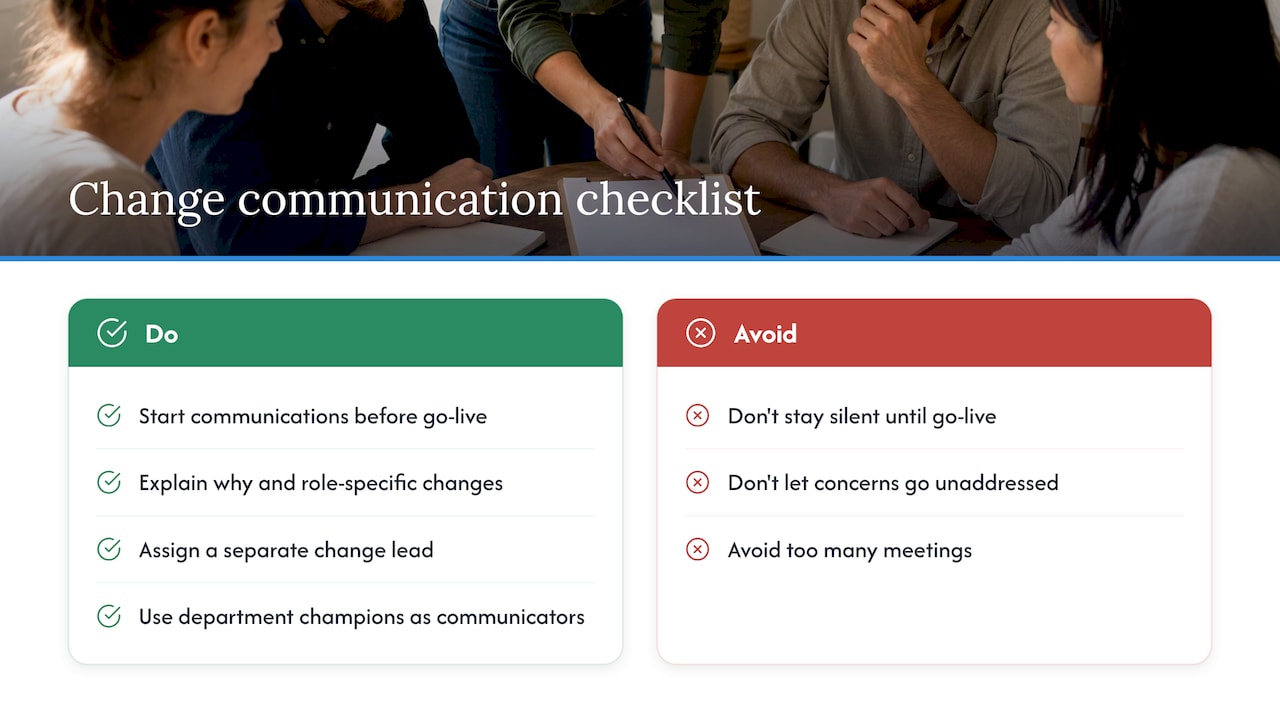
Start communicating before go-live, not on the day itself. Tell staff why the change is happening, what will be different for their specific role, and when they will be trained. Silence before a system change breeds resistance, while a clear timeline with named milestones gives people something concrete to plan around.
Assign a change lead separate from the technical project lead. Their job is to track sentiment, answer questions honestly, including where the new system will be harder than the old one at first, and feed concerns back into the project team before they harden into resistance. Champions in each department are the most effective communication channel: peer explanations land better than a message from IT.
Keep the communication plan simple: a short update at each project milestone, a one-page cutover guide before go-live, and an open channel for questions during hypercare. Overcomplicating this with too many meetings or lengthy documents defeats the purpose.
Risk assessment and mitigation strategies
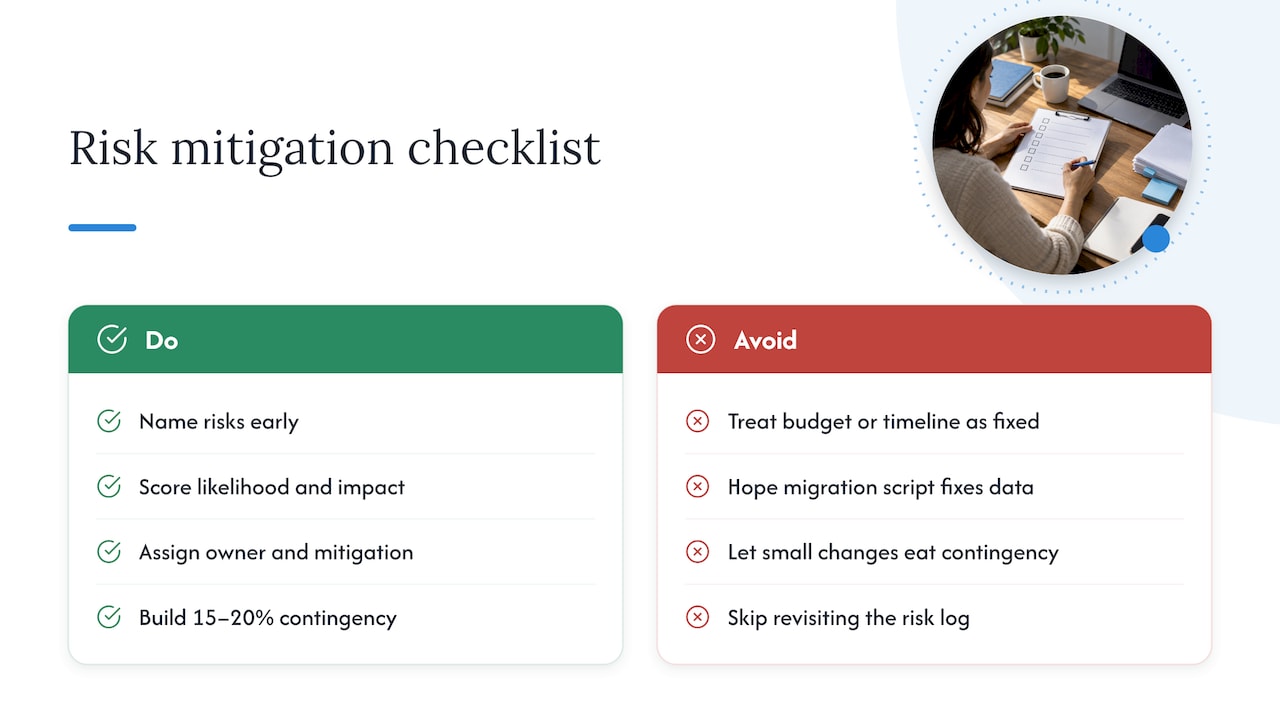
Every CRM project carries a similar set of risks, and naming them early is far cheaper than discovering them mid-migration. The main ones are data quality problems, scope creep, low user adoption, integration failures and vendor or resourcing delays.
Score each risk for likelihood and impact, then assign an owner and a mitigation action, not just a description of the problem. A data quality risk, for example, is mitigated by the profiling and deduplication work covered earlier, not by hoping the migration script will fix things automatically.
Build contingency into both budget and timeline rather than treating either as fixed. The 15 to 20% contingency allowance mentioned earlier in scoping exists precisely because CRM deployments commonly overrun on both fronts, and a change control process is what keeps small extra requests from eating that buffer before you need it for something serious.
Review the risk log at every governance meeting, not just at kickoff. Risks change shape as the project moves through configuration, migration and testing, and a risk log that nobody revisits is worth less than no log at all.
Post-implementation feedback and continuous improvement
Go-live is the midpoint of a CRM project, not the end. The system you launch with is a first draft that needs structured feedback to become genuinely useful.
Collect feedback through short, targeted check-ins with champions in the first month, rather than a single long survey sent to everyone at once. Champions can flag the specific fields nobody understands or the automation that fires at the wrong moment, detail that a general survey tends to miss.
Log every piece of feedback against the Phase 2 backlog created at go-live, and triage it the same way you triaged change requests during the build: does it block adoption now, or is it a genuine enhancement for later. Review this backlog monthly alongside your KPI dashboard, so decisions about what to build next are grounded in actual usage data rather than the loudest complaint in the room.
Treat the monthly data quality review as part of this same cycle. A CRM that was clean at go-live will drift as new users enter data their own way, and catching that drift early is far cheaper than a second clean-up project a year later.
A leadership note on sponsorship and sustained value
The projects that struggle are rarely the ones with the wrong software. They are the ones with no single accountable owner once the initial excitement fades. A sponsor who signs off scope at the start and then disappears leaves a vacuum that gets filled by whoever shouts loudest about their pet feature.
Hold the line on scope, keep one person accountable for the whole project, and measure adoption and data quality every month, not just in the first fortnight after launch. A CRM is judged by whether people still trust it a year on, not by how smoothly the launch weekend went. Build that habit of monthly measurement into the culture from day one, and the system earns its keep long after the project team has moved on.
— Rob
How Cloud 9 supports a managed CRM implementation
Running scoping, migration, integration and hypercare in-house is a real option, but it asks a lot of a team that also has a business to run. A provider can offer CRM and marketing automation as part of a joined-up managed service, where the team handling data migration also covers integrations, hosting, and ongoing support to keep the system reliable after go-live.
- Organisations such as SMEs, professional firms, and membership organisations often require cleaner lead and member data across systems. Many businesses benefit from having a single partner for CRM, integrations, and ongoing support instead of several suppliers.
A short discovery call is the usual starting point, where we look at your current setup and scope a realistic Phase 1. Visit CRM and marketing automation to see how this fits your business.
Primary sources and templates referenced in the guide
- CRM deployment: a step-by-step process for growing teams, for lifecycle stages, testing checklists and contingency guidance.
- CRM technology: implementation project and consulting services as determinants of success, for project management success factors.
- Marketing automation checklist for SMBs, a useful template reference for integration planning.
FAQ
What are the 7 components of CRM?
Definitions vary, but a common version covers customer data management, sales pipeline tracking, marketing automation, customer service tools, analytics and reporting, integration with other business systems, and mobile access. Not every CRM platform packages these identically, so check which components your chosen system covers natively versus through add-ons.
What is CRM implementation?
CRM implementation is the process of selecting, configuring, migrating data into and rolling out a customer relationship management system across an organisation. It covers everything from initial scoping through to go-live and the optimisation period afterwards, not just the technical setup.
What are the steps in the CRM process?
The core sequence is assess, choose, plan, configure, migrate, test, train, go live, then optimise, as set out in CRM deployment guidance. Each stage needs a named owner and a clear sign-off point before the project moves to the next one.
What are the stages of the CRM process?
The stages run from defining business requirements and choosing a platform, through governance and team setup, data migration, configuration and testing, to training, go-live and post-launch measurement. Treat user adoption, data completeness and pipeline accuracy as the three metrics that tell you whether each stage actually worked.