

Most small businesses with visitors spread across regions, or with image and video-heavy sites, see a real gain from a CDN: faster pages, fewer outages during traffic spikes, and lower origin load. If your audience is purely local and your site is a simple brochure with light traffic, the benefit shrinks fast. The sections below walk through the economics and the decision checklist so you can work out which camp you’re in.
TL;DR:
- CDNs significantly benefit sites with heavy images, videos, or widespread geographic audiences by improving load times, reducing outages, and lowering hosting costs.
- They are less effective for purely local, lightweight sites with minimal traffic or assets, where benefits are marginal.
- Proper configuration is crucial, especially for dynamic content and CMS integrations, to avoid caching issues that can impair site functionality.
- Flat-rate CDN plans with included security are suitable for predictable costs, while pay-as-you-go models fit seasonal or unpredictable traffic better.
- Regular monitoring and testing are essential when expanding CDN use as traffic and site complexity grow, ensuring optimal performance and cost efficiency.
Table of Contents
- What a CDN is and how it works
- Benefits of a CDN for small businesses
- Costs and ROI: what to expect and a simple formula
- When a small business needs a CDN: a decision checklist
- How to choose a CDN: practical evaluation criteria
- Quick implementation checklist for small business websites
- Cloud 9 perspective: how a managed partner simplifies CDN choice and rollout
- Comparison of popular CDN providers suitable for small businesses
- Common integration issues with typical small business platforms or CMS
- How to scale CDN usage as a small business grows
- Final recommendation and immediate next step
- Cloud 9’s approach to managed hosting, CDN setup and monitoring
- FAQ
- Sources
What a CDN is and how it works
A content delivery network is a layer of servers placed at various points around the world that store copies of your website’s static files: images, CSS, JavaScript, fonts, and sometimes cached snippets of API responses. Instead of every visitor pulling data from a single origin server, they get it from whichever edge location sits closest to them.
That distinction between static and dynamic content matters. A CDN reliably accelerates anything that doesn’t change per request: product photos, stylesheets, downloadable PDFs. Dynamic content, like a shopping basket total or a logged-in dashboard, usually still has to travel back to the origin server, though some CDNs can cache certain API responses under tight rules. Browser caching and CDN caching work together rather than competing: the browser avoids repeat requests on return visits, while the CDN shortens the physical distance data travels on first load, and using both is widely recommended as complementary practice.
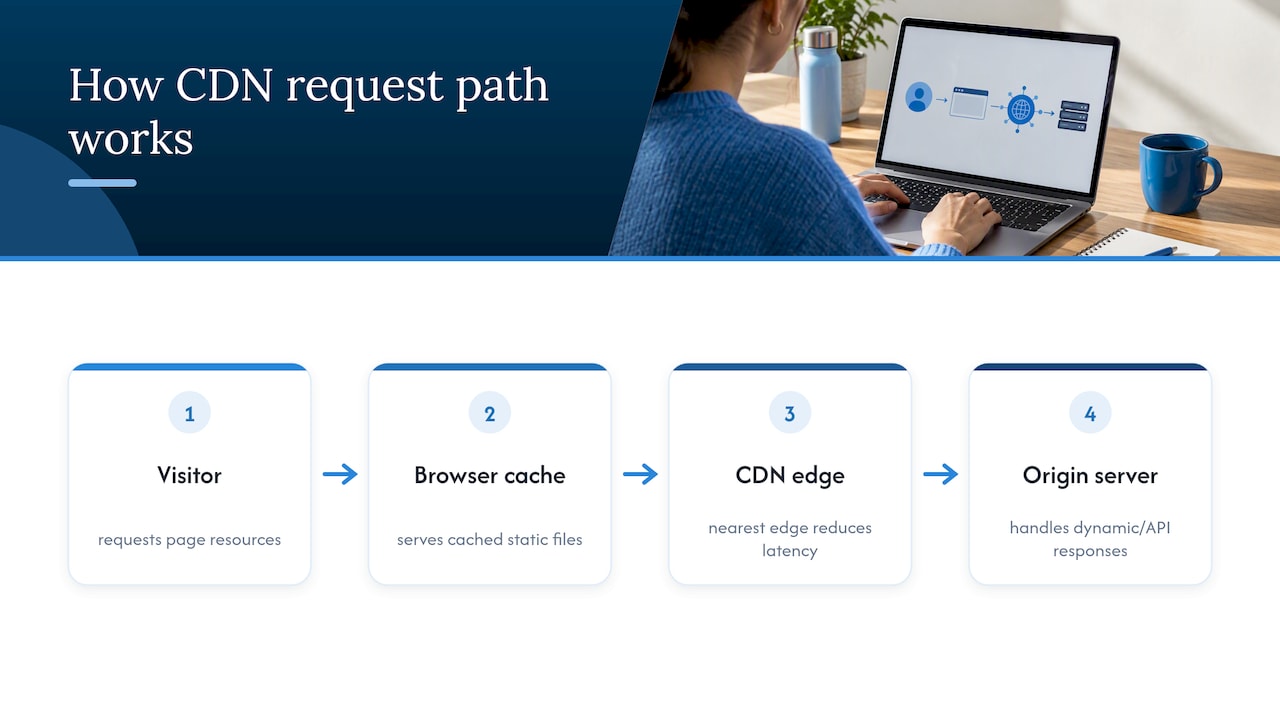
The proximity effect is the whole point. A server that’s physically closer to a visitor returns data with less delay, and that shaved time adds up across a page full of images, scripts, and fonts, which is exactly where conversion-sensitive moments like checkout and sign-up live.
Benefits of a CDN for small businesses
The case for a CDN rests on four practical gains that compound rather than operate in isolation.
- Speed and conversions: faster-loading pages tend to keep more visitors through to checkout, and this is one reason performance work is treated as a trust signal in Core Web Vitals reporting.
- Lower origin costs: offloading images, scripts, and downloads to the edge cuts the bandwidth your hosting plan has to serve directly.
- Resilience under pressure: a sudden spike from a marketing email or a viral mention is absorbed by distributed edge servers rather than hitting one origin box.
- Bundled security: many CDN providers include a web application firewall and basic DDoS mitigation as standard, which matters for SMEs without a dedicated security team.
A documented example of performance work paying off: Rakuten reported a 53.37% increase in revenue per visitor and a 33.13% increase in conversion rate after a round of performance optimisation that included CDN use alongside other techniques. The figure is specific to that case, but it shows the scale of gain that’s possible when speed work and delivery infrastructure are tackled together rather than in isolation.
Costs and ROI: what to expect and a simple formula
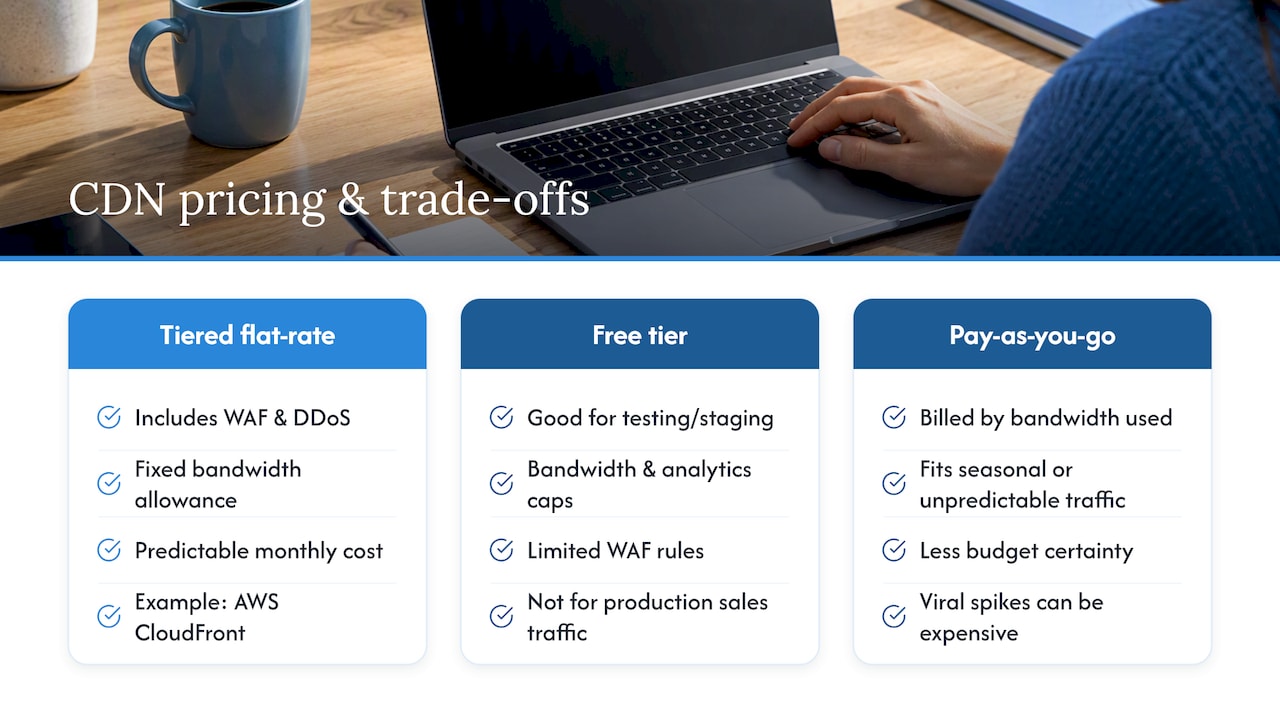
CDN pricing generally falls into two models. Pay-as-you-go plans charge per gigabyte of bandwidth and suit sites with unpredictable or low traffic. Flat-rate tiers bundle a fixed amount of bandwidth with features like a web application firewall and DDoS protection, which simplifies budgeting and avoids surprise overage charges during spikes. For a small business that wants predictable monthly costs, a flat-rate tier is usually the easier starting point.
Offload is where the saving shows up on your hosting bill: every image or script served from the edge is a request your origin server never has to handle, which can reduce egress charges on hosting plans that bill by bandwidth.
A simple way to estimate return:
- Estimate monthly visitors and your current conversion rate.
- Apply a conservative uplift (even a few percentage points) to that conversion rate, based on faster load times.
- Multiply the extra conversions by your average order value to get incremental revenue.
- Subtract the monthly CDN cost to get net return.
Say a site gets many visitors a month at a typical conversion rate and average order value, then applying a modest conversion uplift due to faster load times can significantly increase orders and revenue, well exceeding a typical CDN monthly cost. That’s a wide margin, even allowing for the fact that not every speed gain translates directly into sales.
The caveat: a CDN only accelerates what it can cache. If your slowness comes from unoptimised database queries or server-side code, a CDN won’t fix that, and you need field measurement, not guesswork, to know which is which.
When a small business needs a CDN: a decision checklist
Run through these points before deciding either way.
- Geographic spread: if visitors are concentrated in one city or region near your host, latency gains from a CDN will be modest.
- Asset weight: sites heavy with images, video, or large downloadable files benefit more than text-only pages.
- Traffic variability: if marketing campaigns or seasonal demand cause sharp spikes, a CDN helps absorb the load without origin strain.
- Security gaps: if your current host offers no web application firewall or DDoS protection, a CDN often closes that gap cheaply.
- Origin already optimised: if you’ve compressed images, minified code, and upgraded hosting and pages are still slow for distant visitors, a CDN is the logical next step rather than the first one.
If none of these apply, a CDN is unlikely to earn its keep yet. If two or more do, it’s worth testing.
How to choose a CDN: practical evaluation criteria
Treat this as a short interview you run with any provider or any plan you’re comparing.
- Edge coverage: does the provider have servers near where your actual customers are, not just a large global count?
- Pricing fit: does the plan handle traffic spikes without punitive overage fees, and does the billing model match your traffic pattern?
- Security inclusion: are a web application firewall and DDoS mitigation included, or sold as costly add-ons?
- Platform integration: does it have a straightforward plug-in for your CMS, or clean support for cloud storage origins and API access?
- Support and overhead: what’s the support model, and how much ongoing configuration will it realistically demand from you or your team?
- Measurement plan: can you track real-user monitoring and Core Web Vitals before and after rollout to prove the change worked?
On evaluation method, AWS’s own guidance to startups recommends weighing geographic distribution, cost against performance need, and included security features, then piloting two or three providers with real-user data before committing.
Pro Tip: Run the same monitoring setup across your control pages and your CDN pilot pages, so any difference you see is down to the CDN and nothing else.
Quick implementation checklist for small business websites
Getting a CDN live without breaking things follows a fairly fixed order.
- Audit the origin first: resize oversized images and minify JavaScript and CSS before adding a CDN layer on top.
- Choose a plan and set caching rules: configure cache duration for static assets like images, fonts, and stylesheets.
- Enable TLS and basic protection: turn on SSL/TLS, a starter web application firewall ruleset, and rate limiting.
- Deploy monitoring: set up real-user monitoring and track Core Web Vitals before and after the change.
- Pilot before a full rollout: run the CDN on a subset of pages first and judge success against conversion data, not just load-time numbers.
A step-by-step performance audit before any CDN work catches the origin problems a CDN can’t fix on its own.
Cloud 9 perspective: how a managed partner simplifies CDN choice and rollout
Picking a provider, setting caching rules, and watching the metrics afterwards is straightforward in theory and easy to get wrong in practice, especially alongside the rest of running a business. Cloud 9’s managed hosting and website care covers exactly this gap for established businesses that would rather hand the configuration and monitoring to someone else. A managed route makes sense when your team lacks the time or in-house skill to pilot providers and read the resulting data, or when downtime risk is too costly to experiment with directly. The priority in that kind of engagement is simple: faster pages, fewer outages, and one predictable monthly cost rather than several moving parts.
— Rob
Comparison of popular CDN providers suitable for small businesses
Provider shortlists for small businesses tend to cluster around a few shapes rather than a single winner. Flat-rate tiered providers bundle a web application firewall, DDoS protection, and a fixed bandwidth allowance into one price, which suits businesses that want predictable monthly costs and don’t want to negotiate usage charges after a traffic spike. AWS CloudFront’s published tiers are a clear example of this model, with a free entry tier alongside paid plans that add features as you move up.
Free tiers across the market are genuinely useful for testing a CDN on a staging site or a low-traffic project, but they typically cap bandwidth, limit analytics detail, or restrict how many WAF rules you can apply, which makes them a poor fit for a production site carrying real sales traffic.
Pay-as-you-go providers charge purely by bandwidth consumed, which suits sites with unpredictable or seasonal traffic better than a fixed monthly fee would. The trade-off is less budget certainty: a viral spike that’s good for sales can also be an expensive month.
Beyond pricing shape, regional edge presence varies by provider and matters more than a long list of total locations. If you want to check how a provider’s network maps against data-centre regions relevant to your customers, industry infrastructure news is a useful place to look before committing. Whichever shape you lean towards, the AWS startup guidance above still applies: pilot before you commit to a year of spend.
Common integration issues with typical small business platforms or CMS
Most friction shows up at the point where the CDN meets your existing platform rather than with the CDN itself. WordPress sites often need a dedicated caching plug-in configured correctly, and a misconfigured plug-in can serve stale pages to logged-in users or break a contact form that depends on dynamic session data. Ecommerce platforms built on Shopify, WooCommerce, or similar tools can run into the same issue around shopping baskets and account pages, which generally need to be excluded from aggressive caching rules.
Sites with origins on object storage, such as an S3 bucket serving product images, usually integrate more cleanly since that content is static by design, but DNS and SSL/TLS configuration still need to point correctly through the CDN rather than directly at the origin. Getting DNS and TLS routing configured correctly at the outset avoids a common failure mode where part of a site loads through the CDN and part doesn’t, creating mixed-content warnings or broken certificates.
API-driven sites and single-page applications built with frameworks like React or Vue need careful rules around which responses are cacheable, since caching a personalised API response for the wrong duration can show one customer’s data to another. The fix in every case is the same: test on a staging environment first, check that forms, logins, and checkouts still work with the CDN active, and only then move to production.
How to scale CDN usage as a small business grows
A CDN set up for a small, local audience doesn’t need to be rebuilt from scratch as traffic grows, but it does need revisiting. The first signal to watch is traffic composition: as visitor numbers climb and the geographic spread widens, check whether your current plan’s edge coverage still matches where customers actually are, rather than assuming the original setup still fits.
Pricing is the second lever. A business that started on a free or low pay-as-you-go tier often reaches a point where a flat-rate plan with bundled security becomes cheaper and more predictable than metered bandwidth charges, particularly once campaigns start driving recurring spikes. Reviewing the plan annually against actual usage avoids both overpaying for headroom you don’t use and getting caught by overage fees you didn’t expect.
Growth also tends to bring more dynamic functionality: personalised content, member logins, or a growing product catalogue with its own search and filtering. That’s the point to revisit which responses are cached and for how long, since rules that worked for a simple brochure site can misfire once logged-in areas or personalised recommendations are added. Expanding into cloud-based origin storage as data volumes grow often pairs naturally with scaling CDN rules at the same time, since both changes touch how content is served and cached.
Final recommendation and immediate next step
If your traffic spans regions or your pages lean on heavy images and video, a CDN is worth adopting now rather than later. The immediate next step is a performance audit followed by a small pilot on a handful of pages, measured with real-user data rather than a single speed-test score. If that sounds like more time than you have to spare, Services are available to cover the audit, setup, and ongoing monitoring for you.
Cloud 9’s approach to managed hosting, CDN setup and monitoring

Running your own CDN pilot takes time most small business owners don’t have spare: choosing a provider, configuring caching rules, watching the metrics, then doing it again when traffic patterns shift. Cloud 9’s Website as a Service folds hosting, performance, and ongoing care into one service, so a faster site doesn’t depend on you becoming a CDN administrator on top of running your business.
A typical engagement starts with an audit of your current site and hosting setup, moves to a pilot on key pages to confirm the gain is real, then rolls out fully with monitoring built in. From there it sits on a retainer, so costs stay predictable and someone is watching performance month to month. Managed hosting and website care covers that ongoing piece once the initial setup is done.
FAQ
Is there a free CDN available?
Yes, several providers offer free entry tiers, and AWS CloudFront includes a free tier suited to testing or low-traffic sites. Free tiers typically limit bandwidth, analytics detail, or the number of security rules you can apply, so most businesses outgrow them once real sales traffic arrives.
What are the disadvantages of a CDN?
A CDN only speeds up content it can cache, so it won’t fix slow database queries or unoptimised server-side code on its own. It also adds a layer of configuration around DNS, TLS, and caching rules that can introduce integration issues with CMS plug-ins or dynamic features like shopping baskets if set up carelessly.
How much does a CDN cost?
Pricing generally falls into pay-as-you-go bandwidth charges or flat-rate tiers, with some providers offering a free tier and paid plans that add bundled security features as you move up. The right choice depends on how predictable your traffic is and whether you value fixed monthly costs over metered billing.
How can I build my own CDN?
Building a genuine CDN from scratch means provisioning edge servers across multiple regions, which is impractical for almost any small business compared with using an established provider. A more realistic approach is to configure an existing CDN provider’s caching rules and edge settings around your specific site, rather than building the underlying network yourself.
What is the difference between CDN and caching?
Browser caching stores files on a visitor’s own device so repeat visits load faster, while a CDN stores copies on servers closer to each visitor to speed up first visits too. The two are complementary rather than competing, and best practice is to use both together.