

Customer Relationship Management (CRM) integration is defined as the process of connecting your CRM system directly to your business website so that customer data flows automatically between the two. When you integrate CRM with your business website, every enquiry form, contact request, and purchase feeds straight into a central database without anyone typing it in manually. The result is a unified record of every customer interaction, from first click to closed deal. For small to mid-sized businesses, this is the difference between chasing leads on spreadsheets and having your sales team respond within minutes, armed with full context.
What do you need before integrating a CRM with your website?
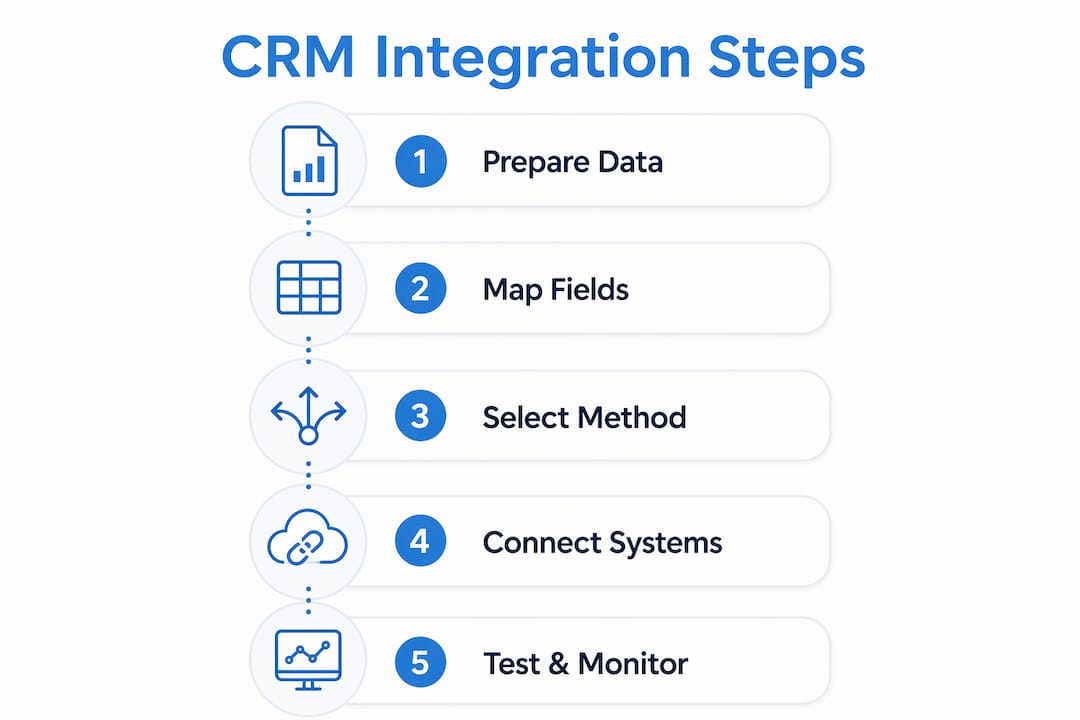
Preparation determines whether your integration holds up under real business conditions or breaks within weeks. Before connecting any systems, you need to assess three things: your website platform, your CRM’s connection capabilities, and your internal data structure.
Website and CRM compatibility

Your website platform must support outbound data connections. WordPress, for example, supports CRM connections through native plugins and REST APIs. Custom-built sites typically connect via API endpoints. The CRM side matters equally. Most modern CRM platforms expose a documented API, but the depth of that API varies considerably. A shallow API might only accept contact names and email addresses. A full API accepts deal stages, custom fields, tags, and activity history.
Tools and technical requirements
The three connection methods available to most businesses are:
- Native plugins or apps: Pre-built connectors that require minimal technical knowledge to configure. Best suited for popular platform combinations.
- REST APIs: Direct connections between your website and CRM. Flexible and powerful, but require developer input to set up correctly.
- Middleware automation tools: Platforms that sit between your website and CRM to route and transform data. Useful when the two systems do not connect directly.
Data mapping and workflow alignment
Before any technical work begins, map out exactly which data fields on your website correspond to which fields in your CRM. A contact form with a “Company Name” field must map to the correct CRM field, not a generic notes field. Mismatched mapping is the single most common cause of corrupted records after integration.
Pro Tip: Audit your existing CRM fields before integration. Remove duplicates and standardise naming conventions. Clean data going in means clean data coming out.
Security and compliance also apply here. Any integration that transfers personal data must comply with UK GDPR. Confirm that data in transit is encrypted and that your CRM provider meets the relevant data protection standards before you connect anything.
How to integrate your CRM with your website: a step-by-step process
A CRM integrated with a website enables automated lead capture and synchronised contact records, removing duplicate data entry and delays. Leads entered through website forms flow immediately into the CRM, giving your sales team real-time responsiveness. The process below applies whether you are connecting a contact form, an e-commerce checkout, or a membership sign-up page.
-
Audit your website forms. List every form on your site that collects customer data. This includes contact forms, quote request forms, newsletter sign-ups, and checkout pages. Each one is a potential data entry point into your CRM.
-
Configure form fields to match CRM fields. Rename or restructure form fields so they align precisely with your CRM’s data schema. If your CRM uses “First Name” and “Last Name” as separate fields, your form must split them accordingly.
-
Set up the connection method. Choose your connection approach based on your technical resources. A plugin is fastest for standard platforms. An API connection gives you the most control. Middleware sits in the middle and handles transformation logic automatically.
-
Map data flows and test with dummy submissions. Submit test entries through every form and confirm the data appears correctly in your CRM. Check that all fields populate, that no data is truncated, and that records are not duplicated.
-
Configure automated workflows. Once data flows correctly, build the automations that make integration valuable. Set up email automation workflows that trigger when a new lead arrives. Assign leads to the correct sales team member based on form source or geography.
-
Enable bidirectional synchronisation where needed. Bidirectional sync via webhooks ensures that project status updates flow back into the CRM, keeping sales teams informed about delivery progress for proactive client conversations. This is particularly valuable when you also integrate project management with CRM.
-
Document and maintain the integration. Record every connection point, field mapping, and automation rule. This documentation becomes critical when your CRM or website updates and something breaks.
Pro Tip: Schedule a monthly integration health check. Run a test submission through each form and confirm the data lands correctly in your CRM. Catching a broken connection early saves far more time than diagnosing it after weeks of lost leads.
The table below summarises the three main connection methods and their typical use cases.
| Connection method | Best for | Technical requirement |
|---|---|---|
| Native plugin or app | Standard platform combinations | Low |
| REST API | Custom or complex integrations | High |
| Middleware automation | Mismatched or legacy systems | Medium |
What are the most common pitfalls during CRM integration?
Even well-planned integrations run into problems. Knowing the most frequent failure points lets you address them before they cost you data or time.
- Data mismatches: Form fields that do not align with CRM fields produce incomplete or incorrectly filed records. A contact’s phone number landing in a notes field is useless for automated follow-up.
- Shallow integrations: Shallow integrations that only sync contact names are insufficient compared to deep integrations that map deal stages, custom fields, and automate workflows. Depth of integration directly determines workflow efficiency.
- API deprecation: Software platforms update their APIs regularly. API changes or data structure updates often break integrations, requiring dedicated ownership and maintenance to ensure system reliability. Assign a named person internally to monitor integration health.
- No error alerting: If a form submission fails to reach your CRM, you will not know unless you have set up error notifications. Configure alerts so that failed data transfers surface immediately.
- Over-automation without testing: Automating workflows before confirming data accuracy means errors propagate at scale. Always validate data quality before switching on automated sequences.
“The primary goal of CRM-website integration is continuity of client context, ensuring data flows from sales capture to delivery without manual re-entry. Businesses that treat integration as a one-time setup rather than an ongoing system consistently lose data at the points where their tools update or change.”
When problems exceed your internal capability, managed services provide a practical alternative. A managed integration partner monitors connection health, handles API updates, and resolves failures before they affect your sales pipeline. For businesses without a dedicated technical team, this is often the more reliable path.
How does an integrated CRM improve overall business operations?
A well-integrated CRM and website eliminate fragmented workflows and improve communication across sales, marketing, and project delivery. The operational benefits extend well beyond faster lead capture.
- Unified customer profiles: Every interaction, from the first website visit to the most recent support request, sits in one record. Your team sees the full picture before picking up the phone.
- Reduced manual data entry: Removing manual re-entry cuts the error rate on customer records significantly. Your team spends time acting on data rather than correcting it.
- Improved sales-to-delivery handover: When you integrate project management with CRM, client records, deal history, and project tasks share data in real-time. The delivery team inherits full client context the moment a deal closes.
- Real-time analytics: Integrated systems feed live data into your reporting dashboards. You can see which website pages generate the most qualified leads and adjust your marketing spend accordingly.
- Scalable operations: Unified platforms that automate client onboarding and provide real-time project visibility improve team coordination without adding headcount.
The strategic value compounds over time. A business running on integrated systems accumulates clean, structured customer data that informs every future decision. Businesses running on disconnected tools accumulate noise.
Pro Tip: Start with the highest-volume data entry point on your website, typically your main contact or enquiry form. Get that connection working perfectly before adding complexity. One reliable integration beats five unreliable ones.
Key takeaways
Integrating your CRM with your business website is the single most effective way to eliminate manual data entry and give your team a real-time, accurate view of every customer relationship.
| Point | Details |
|---|---|
| Prepare before connecting | Map data fields and audit CRM structure before any technical work begins. |
| Choose the right connection method | Plugins suit standard setups; APIs and middleware handle complex or custom environments. |
| Prioritise deep integration | Syncing only contact names delivers little value; map deal stages, custom fields, and workflows. |
| Maintain the integration actively | Assign ownership and schedule regular health checks to catch API changes early. |
| Measure the business impact | Use integrated analytics to identify which website sources generate the most qualified leads. |
Why process alignment matters more than tool choice
Most businesses I speak with approach CRM integration as a technology problem. They want to know which tool to use. The real question is whether their internal processes are ready to support an integrated system.
I have seen businesses connect a capable CRM to a well-built website and still end up with corrupted data six months later. The reason is almost always the same. Nobody owns the integration. Forms get updated by the marketing team without checking the field mapping. The CRM gets a new custom field that nobody maps back to the website. Small gaps accumulate until the data is unreliable.
The businesses that get the most from CRM integration treat it like infrastructure, not a project. They assign a named owner. They document every connection point. They run monthly checks. They involve the sales team in decisions about what data to capture, because the sales team are the ones who will use it.
Starting with an integrated platform is efficient for moderate needs, but complex environments benefit from specialised connected stacks with maintained APIs. That distinction matters for growing businesses. What works at ten enquiries a week may not hold at one hundred.
My practical advice: start with one form, one CRM pipeline, and one automated workflow. Prove that it works reliably. Then build from there. The businesses I have seen succeed with CRM integration did not start with the most sophisticated setup. They started with a simple one that actually worked.
— Rob
How Cloud9 can support your CRM and website integration
Cloud9 works with established UK businesses to connect their websites and CRM systems into a single, reliable operation. The team handles everything from web design and development built with integration in mind, through to full CRM marketing automation setup, field mapping, and ongoing maintenance.
If your website and CRM are still operating as separate systems, Cloud9 can assess your current setup and recommend the most practical path to connection. The goal is a system your team actually uses, not one that looks good in a diagram. Get in touch with Cloud9 to discuss your integration requirements and find out what a properly connected setup looks like for your business.
FAQ
What does it mean to integrate a CRM with a business website?
CRM integration connects your website forms and customer touchpoints directly to your CRM database, so data flows automatically without manual entry. Every lead, enquiry, or sign-up captured on your site appears instantly as a CRM record.
What is the difference between a shallow and a deep CRM integration?
A shallow integration syncs only basic contact details such as name and email. A deep integration maps deal stages, custom fields, and triggers automated workflows, delivering far greater operational value.
How do I keep my CRM integration working after a software update?
Assign a named owner to monitor the integration and schedule regular test submissions. API changes from either your website platform or CRM provider are the most common cause of broken connections, so proactive checks catch failures early.
Can I integrate project management with my CRM as well?
Yes. Integrating project management with CRM allows client records, deal history, and project tasks to share data in real-time, giving your delivery team full client context the moment a deal is won.
What is ecommerce ERP integration and how does it relate to CRM?
Ecommerce ERP integration connects your online shop to your enterprise resource planning system to synchronise orders, stock, and financials. CRM integration focuses on customer relationships and lead data. The two can work alongside each other to give a complete view of both customer behaviour and business operations.