

Ecommerce automation is the use of software, technology, and AI to carry out repetitive, rules-based tasks in online retail without manual input. Think inventory updates, order confirmations, abandoned cart reminders, and pricing adjustments — all running in the background while your team focuses on work that actually requires human judgement. The core principle is straightforward: define the rules once, and the system executes them consistently, at scale, around the clock.
Here is what ecommerce automation typically covers:
- Inventory management: stock levels tracked in real time, with automatic reorder triggers when thresholds are breached
- Order processing: from payment confirmation through to fulfilment, shipping label generation, and customer notification
- Customer communication: personalised emails, abandoned cart sequences, post-purchase follow-ups, and review requests
- Marketing: scheduled campaigns, dynamic pricing updates, and customer segmentation based on purchase behaviour
- Analytics: sales data aggregated and reported without manual exports or spreadsheet work
The appeal is not just efficiency. Automation removes the category of error that comes from copying data between systems by hand, and it gives smaller UK retailers the operational capacity of a much larger team.
Table of Contents
- What is ecommerce automation and how does it actually work?
- What are the real benefits of ecommerce automation?
- Which ecommerce tasks are best suited to automation?
- Best practices for implementing ecommerce automation in the UK
- What are the challenges and limitations of ecommerce automation?
- Examples of ecommerce automation tools and software
- Cloud9 makes ecommerce automation practical for UK businesses
- Key takeaways
- FAQ
What is ecommerce automation and how does it actually work?
Every automation, regardless of complexity, follows the same three-step logic: trigger, condition, action. A trigger is the event that starts the process, a condition is the rule that determines whether the automation fires, and the action is what the system then does.
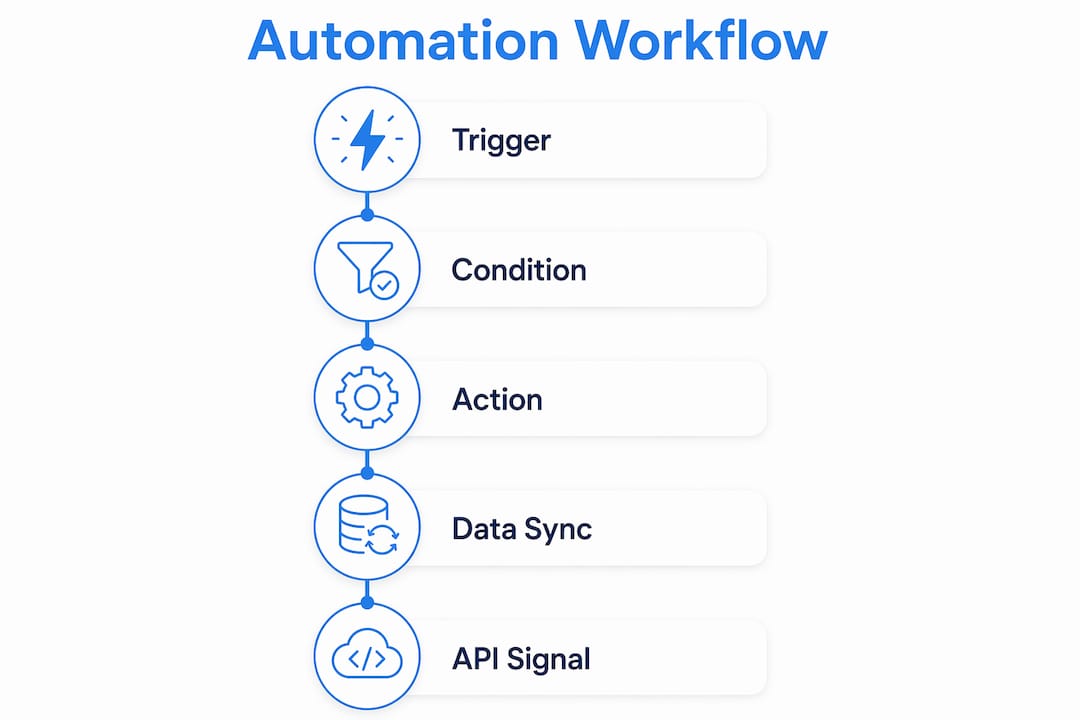
A practical example: a customer places an order (trigger). The order value exceeds £75 (condition). The system sends a branded confirmation email, updates the inventory database, and creates a shipping label automatically (action). No one pressed a button.
Common triggers and actions in ecommerce workflows include:
- Triggers: order placed, cart abandoned, stock level drops below threshold, customer signs up, payment fails, review requested
- Actions: send email or SMS, update CRM record, generate shipping label, reorder stock from supplier, apply discount code, flag order for manual review
What makes this genuinely powerful is real-time data synchronisation across connected systems. A single order event can simultaneously update your inventory database, log a deal in your CRM, create a VAT invoice in your accounting software, and push a tracking number to the customer. One well-documented automation pipeline integrating Stripe, a CRM, a shipping API, and an invoicing tool reduced order processing from 15–30 minutes manually to under 2 minutes, with 99.4% of orders completing without any human intervention.
The architecture behind this relies on webhooks and APIs. When an event occurs in one system, it sends a signal to the next. The automation platform receives that signal, checks the conditions you have set, and executes the defined response. For UK retailers using platforms like Shopify or WooCommerce, most of this connectivity is available out of the box or through third-party integration tools.

What are the real benefits of ecommerce automation?
The headline benefit is time. Ecommerce automation frees your team from the administrative layer of running a store so they can concentrate on supplier negotiations, product development, and customer relationships. But the operational gains go further than that.
Key benefits include:
- Error reduction: automated workflows apply the same rules to every order, eliminating the data-entry mistakes that creep in when humans process high volumes manually
- Scalability: a business handling 50 orders a day and one handling 5,000 can run on the same automated infrastructure without proportionally increasing headcount
- 24/7 operation: automations do not take breaks, which matters for UK retailers selling across time zones or running overnight flash sales
- Improved customer experience: faster order confirmations, real-time tracking updates, and personalised post-purchase sequences all increase customer loyalty without adding to your team’s workload
- Inventory accuracy: real-time stock tracking prevents overselling and reduces the cost of emergency restocking
- Cost control: fewer manual touchpoints means lower labour costs per order as volume grows
The scalability point is worth sitting with. A retailer running a Black Friday promotion can process thousands of orders through the same automated pipeline that handles a quiet Tuesday, with no additional staff and no degradation in accuracy or speed.
Which ecommerce tasks are best suited to automation?
Not every task benefits equally from automation. The best candidates are high-volume, repetitive, and rule-based. Here are the most common, roughly in order of impact:
- Inventory tracking and restocking: automated systems monitor stock levels in real time and trigger reorder requests when a SKU drops below a defined threshold, preventing stockouts without daily manual checks
- Order fulfilment: from payment confirmation to picking, packing, and shipping label generation, the entire fulfilment workflow can run without manual steps
- Abandoned cart recovery: a customer who leaves without purchasing can receive a timed sequence of reminder emails, with optional discount codes applied automatically based on cart value
- Customer email sequences: order confirmations, shipping notifications, delivery confirmations, and review requests all fire based on order status events
- Pricing adjustments: dynamic pricing tools update product prices based on demand signals, competitor data, or inventory levels, keeping margins intact without manual monitoring
- Customer segmentation and marketing: CRM automation groups customers by purchase history and behaviour, then triggers targeted campaigns without manual list management
- Returns processing: return requests logged automatically, inventory updated on receipt, and refunds or exchanges initiated without a staff member touching each case
- Sales reporting: daily or weekly digests of orders, revenue, and fulfilment status generated and delivered to your inbox or Slack channel on a schedule
Pro Tip: Start with abandoned cart recovery and order confirmation emails before tackling anything more complex. These two workflows typically deliver the fastest return and require the least integration work, making them the ideal proof of concept for a wider automation rollout.

Best practices for implementing ecommerce automation in the UK
The most common mistake UK businesses make with automation is treating it as a one-time setup. Gartner’s guidance on hyperautomation makes this explicit: automation requires continuous monitoring and adjustment to stay aligned with business goals, particularly as seasonal demand shifts and carrier reliability fluctuates.
A few principles that separate effective implementations from ones that quietly break:
- Define your business rules precisely before building anything. Vague conditions produce unpredictable results. “Send a reorder when stock is low” is not a rule; “send a reorder when stock drops below 20 units and the SKU has sold more than 50 units in the past 30 days” is.
- Orchestrate workflows across your full tech stack, not in isolation. The real gains come from connecting your storefront, warehouse management system, CRM, and accounting software into a unified workflow, not from automating each system independently.
- Build in error handling from the start. Robust pipelines use retry logic with exponential backoff for API failures, meaning a temporary outage at your shipping provider does not cascade into a customer-facing problem. AWS documents this pattern in their builders library as standard practice for reliable distributed systems.
- Review workflows quarterly. UK retail has pronounced seasonal peaks around Christmas, January sales, and bank holiday weekends. An automation calibrated for average order volumes in March may behave unexpectedly in November.
- Automate communication, not just operations. Many businesses automate their back-end processes but leave customer-facing communication manual. Email automation tied to order events is often where customers notice the difference most.
Automation does not replace your team. It removes the administrative layer so your people can do the work that actually requires judgement, creativity, and relationship-building. That distinction matters for staff buy-in as much as it does for operational planning.
What are the challenges and limitations of ecommerce automation?
Automation solves real problems, but it introduces its own set of complications that are worth understanding before you commit.
Integration complexity is the most common barrier. Connecting a Shopify storefront to a warehouse management system, a CRM, and an accounting platform requires either native integrations or custom API work. The more systems involved, the more points of potential failure.
Initial setup cost and time can be significant, particularly for businesses with legacy systems or non-standard processes. The payoff is real, but it rarely arrives in week one.
Over-automation is a genuine risk. Automating a broken process just makes the broken process run faster. If your order routing logic has exceptions that require human judgement, automating it without accounting for those exceptions creates errors at scale rather than preventing them.
Maintenance overhead is underestimated. Platform updates, API changes from third-party providers, and shifts in business rules all require someone to review and update automation workflows. A pipeline that worked perfectly in January may silently fail after a carrier updates their API in April.
Customer experience risks arise when automation fires at the wrong moment. An abandoned cart email sent to a customer who completed their purchase through a different device, or a restock notification for an item that is still out of stock, erodes trust quickly. Testing and monitoring are not optional extras.
For UK businesses specifically, carrier reliability and Royal Mail service changes can disrupt shipping automations that assume consistent API responses. Building in fallback logic and human escalation paths for critical failures is not over-engineering; it is standard practice.
Examples of ecommerce automation tools and software
The tools available in 2026 span a wide range, from platform-native features to dedicated automation platforms and enterprise-grade systems. The right choice depends on your tech stack, order volume, and how much custom logic your workflows require.
Platform-native automation is the starting point for most Shopify and WooCommerce merchants. Shopify Flow handles rule-based tasks like tagging high-risk orders, applying discounts, and triggering fulfilment workflows without any coding. WooCommerce achieves similar results through plugins and webhook configurations.
Workflow automation platforms such as n8n connect multiple systems through a visual interface, letting you build custom pipelines across Shopify, your CRM, shipping APIs, and accounting tools. These are particularly useful when your requirements go beyond what a single platform’s native tools can handle.
CRM and marketing automation tools manage customer segmentation, email sequences, and post-purchase communication. Cloud9’s CRM and marketing automation service integrates these capabilities directly with your ecommerce data, so customer records and campaign triggers stay in sync without manual exports.
AI-powered tools are increasingly embedded in ecommerce platforms for tasks like dynamic pricing, product recommendations, and fraud detection. The AI use cases that deliver the most consistent value in ecommerce tend to be those tied to specific, measurable outcomes: reducing cart abandonment, improving recommendation relevance, or flagging anomalous orders.
Inventory and fulfilment software handles the warehouse side, from real-time stock tracking and reorder triggers through to pick-and-pack workflows and shipping label generation. Systems in this category typically integrate with your storefront via API to keep product availability accurate across all sales channels.
Pro Tip: Before evaluating any tool, map the specific workflow you want to automate end to end. Knowing exactly which systems need to talk to each other, and what data needs to pass between them, will save you weeks of trial and error during implementation.
Cloud9 makes ecommerce automation practical for UK businesses
Running ecommerce automation well means connecting your storefront, CRM, marketing, and fulfilment systems into a single coherent operation, not bolting on tools one at a time and hoping they talk to each other. That is where most UK businesses stall: the individual tools exist, but the integration work to make them function as a unified system does not happen.

Cloud9 is a UK-based digital solutions partner that handles exactly this. Rather than leaving you to coordinate between a web developer, a CRM consultant, and a marketing agency, Cloud9 brings AI automation services, CRM integration, managed cloud infrastructure, and digital marketing under one roof. The result is an automation setup that is designed to work together from the start, not assembled from parts that need constant reconciliation.
If your business is at the point where manual processes are visibly limiting growth, or where you have tried individual tools but never achieved the joined-up operation you need, Cloud9’s team can assess your current setup and build a practical path forward. Get in touch at cloud9.agency to start the conversation.
Key takeaways
Ecommerce automation works best when it connects your entire operation through a single, well-designed system rather than a collection of isolated tools.
| Point | Details |
|---|---|
| Core logic | Every automation follows a trigger, condition, and action sequence that runs without manual input. |
| Speed gains | Integrated automation pipelines can reduce order processing from 15–30 minutes to under 2 minutes. |
| Best starting point | Abandoned cart recovery and order confirmation emails deliver the fastest return with the least integration complexity. |
| Biggest pitfall | Treating automation as a one-time setup; workflows need quarterly review to stay aligned with seasonal demand and system changes. |
| Cloud9’s role | Cloud9 integrates CRM, AI automation, and managed cloud services for UK businesses that need a joined-up system, not piecemeal tools. |
FAQ
What does ecommerce automation actually do?
Ecommerce automation uses software to handle repetitive, rules-based tasks such as order processing, inventory updates, customer emails, and abandoned cart recovery without manual effort. It runs these processes around the clock based on triggers and conditions you define.
Is AI replacing human staff in ecommerce?
No. Automation removes administrative and repetitive tasks so that staff can focus on higher-value work such as supplier relationships, customer service escalations, and product strategy. The goal is to free people from mundane work, not eliminate roles.
What are the main types of ecommerce automation tools?
The main categories are platform-native automation (such as Shopify Flow), workflow automation platforms that connect multiple systems, CRM and marketing automation tools, AI-powered pricing and recommendation engines, and inventory and fulfilment software.
How do I start automating my ecommerce operations?
Begin with a single, high-impact workflow such as abandoned cart emails or order confirmation sequences. Map the process end to end, identify which systems need to connect, and build from there once the first workflow is stable and tested.
What is the difference between ecommerce automation and general business automation?
Ecommerce automation is specifically wired into commerce systems: your catalogue, cart, checkout, payment processor, inventory, and customer data. General business automation covers broader operational tasks. The distinction matters because ecommerce automation tools are designed around commerce events and the specific data flows that online retail generates.