

Pick one measurable business outcome per quarter, then design every page, CTA, and tracking event to move that single metric. That is the whole framework. Everything else is execution detail.
Before you touch a template or brief an agency, run a one-day measurement sanity check: open GA4 alongside your CRM and count whether the same leads appear in both. If the numbers diverge significantly, your data is broken and any optimisation you run on top of it is guesswork.
First five tasks to start aligning your site to growth:
- Set one SMART growth metric for the current quarter (e.g. qualified demo requests, trial sign-ups, or inbound enquiries from a target sector)
- List the ten pages that already receive the most relevant traffic
- Confirm GA4 key events fire correctly and match CRM records
- Define one primary CTA per priority page, tied to the chosen metric
- Assign a single owner for the optimisation programme and a weekly review slot
Table of Contents
- Why your website may be costing you growth right now
- How to align your website with business growth goals: a 6-step framework
- What should you actually measure, and how do you set it up?
- High-impact changes you can make in the next 30 days
- How to connect your website to your CRM and paid channels
- How Cloud9 delivers a growth-aligned website programme
- What does a website alignment project actually cost and how long does it take?
- Key takeaways
- The thing most businesses get wrong about website growth
- Cloud9 can run this programme for your business
- Useful sources
- FAQ
Why your website may be costing you growth right now
A well-aligned website converts traffic into business outcomes. A misaligned one converts marketing spend into bounce rates.
The commercial risk is straightforward: if your pages do not reflect your current offer, your audience, or your sales process, every pound you spend on paid media or SEO drives visitors to a dead end. Website benefits extend well beyond visibility — credibility, lead generation, and support for paid media efficiency all depend on the site doing its job once visitors arrive.
Common symptoms of misalignment:
- High organic or paid traffic with low qualified lead volume
- Elevated bounce rates on service or product pages
- Messaging on landing pages that does not match the ad that sent the visitor there
- GA4 conversion counts that do not match CRM pipeline entries
- Sales team reporting that inbound leads are off-brief or poorly qualified
The message-match gap is the fastest to diagnose. Take your three top-performing paid keywords, click the ads yourself, and read the first sentence on the landing page. If the page does not immediately confirm the promise the ad made, visitors leave. That single test takes twenty minutes and often reveals the biggest conversion leak on the site.
Statistic callout: Website growth is a system of interdependent disciplines — performance, SEO, design and UX, conversion, retention, and accessibility. A weakness in any one area becomes a growth bottleneck, which means fixing the wrong thing first can leave the real constraint untouched.
Pro Tip: Run the message-match test across your top five paid keywords before your next campaign goes live. Screenshot the ad and the landing page hero side by side. If a colleague cannot tell they belong together in three seconds, rewrite the headline.
How to align your website with business growth goals: a 6-step framework
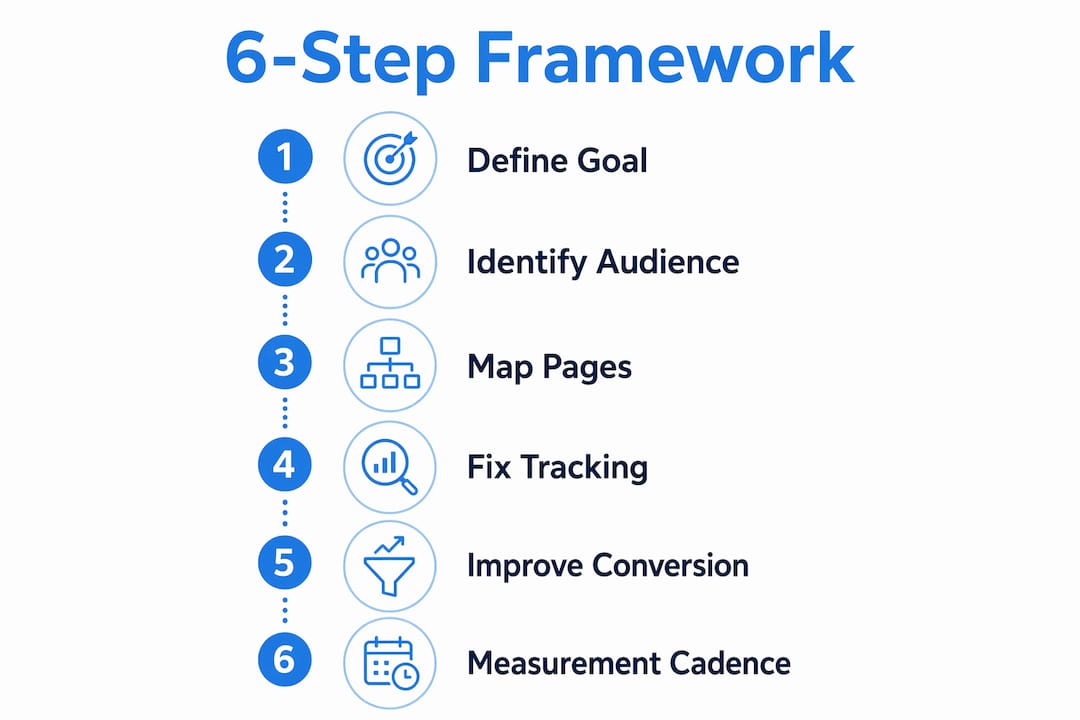
Website strategy should be defined before design. Goals determine which user actions and pages deserve priority — not the other way around. The six steps below give you a repeatable operating sequence.
Step 1: Define one measurable business goal
Write a single goal statement in this format: “Increase [metric] from [baseline] to [target] by [date].” Vague goals produce vague websites. SMART targets — specific, measurable, achievable, relevant, and time-bound — give every page a clear job to do. Examples: increase qualified demo requests by 30% in Q3; grow inbound enquiries from professional services firms by 20 per month by September.
Minimum outputs: goal statement, primary KPI, named owner, review date.
Step 2: Identify priority audiences and their journeys
Map who you are actually trying to reach and what they need to believe before they convert. For most UK SMEs, this means two or three buyer personas at most. Describe the job they are trying to do, the objection that stops them converting, and the page where that objection needs to be addressed.

Minimum outputs: two to three persona summaries, one journey map per persona showing entry point → key decision page → conversion action.
Step 3: Map key pages to business outcomes
This is where strategy becomes a page list. Use the outcome mapping framework to link each business priority to a page type and a primary metric:
| Business priority | Core page type | Primary metric |
|---|---|---|
| More qualified pipeline | Services / product pages | Qualified demo request rate |
| Lower cost per acquisition | Paid landing pages | Cost per qualified action |
| Faster sales cycle | Pricing / case study pages | Time from first visit to enquiry |
| Improved retention | Onboarding / support pages | Return visit rate, support ticket volume |
Minimum outputs: a list of the ten priority pages, the business outcome each serves, and the primary metric for each.
Step 4: Fix your instrumentation
Decisions made from bad data are worse than no decisions at all. Before running a single A/B test or rewriting a headline, audit your GA4 events: confirm key events fire on the correct actions, compare event counts to CRM records, and fix mismatches. Also check that Search Console and Google Ads are linked in GA4 Admin → Product Links.
Minimum outputs: confirmed event taxonomy, GA4-to-CRM reconciliation note, Search Console and Ads linked.
Step 5: Implement conversion improvements
Work through the priority page list from Step 3. For each page: confirm the CTA matches the goal, check the form length (remove every field you do not act on within 48 hours), add relevant social proof, and verify the page loads within the Core Web Vitals thresholds — LCP under 2.5 seconds, INP under 200ms, CLS under 0.1 at the 75th percentile.

Minimum outputs: updated CTA copy, shortened forms, performance scores confirmed, social proof added.
Step 6: Set a measurement and governance cadence
Assign one optimisation owner. Run a weekly insight review: what did the data show, what experiment is running, what decision was made. Log every experiment in a shared decision record so the team does not repeat tests or lose institutional knowledge when people change.
Minimum outputs: named owner, weekly review slot, decision log template.
Pro Tip: Concentrate effort on the top ten pages that already drive your chosen outcome rather than editing the whole site. Making those pages noticeably more effective typically delivers more growth than adding new low-traffic pages.
What should you actually measure, and how do you set it up?
The goal is a single source of truth that connects web behaviour to signed revenue or qualified pipeline. Without that link, you are optimising for vanity metrics.
Primary KPIs mapped to business goals:
- Qualified demo request rate — for B2B businesses with a sales-led motion
- Trial-to-paid conversion rate — for product-led or SaaS-adjacent businesses
- Cost per qualified action — for paid acquisition programmes
- Inbound enquiry quality score — for professional services firms tracking lead fit
- Return visit rate and support ticket deflection — for retention-focused programmes
Minimum analytics setup checklist:
- GA4 installed with key events marked (not just page views)
- Search Console linked via GA4 Admin → Product Links
- Google Ads linked for closed-loop attribution
- CRM integration confirmed: form submissions appear in both GA4 and CRM within minutes
- Server-side tagging considered where ad-blocker or cookie-consent rates are high
- Web analytics reviewed monthly against business pipeline data
Event-to-metric mapping:
| GA4 event | Metric it drives | Business meaning |
|---|---|---|
request_demo |
Qualified demo rate | Pipeline quality indicator |
form_submit (contact) |
Inbound enquiry volume | Top-of-funnel health |
begin_checkout |
Checkout initiation rate | Ecommerce funnel entry |
purchase |
Revenue conversion rate | Direct commercial outcome |
scroll_depth (75%) |
Content engagement rate | Content relevance signal |
file_download |
Lead magnet conversion | Mid-funnel engagement |
Before relying on any of these numbers for optimisation decisions, compare GA4 event counts to your CRM or payment records for the same period. A discrepancy of more than 10–15% means the tracking needs fixing first. The Google Search Central SEO starter guide is also worth reviewing for crawling and indexing fundamentals that affect whether your priority pages are even discoverable.
High-impact changes you can make in the next 30 days
Most measurable growth comes from improving pages that already have traffic, not from creating new ones. The following changes are low-risk, high-exposure, and do not require a redesign.
30-day quick wins:
- Fix message-match on paid landing pages. If the ad says “website design for professional services firms” and the page opens with a generic hero about “digital solutions,” rewrite the headline to mirror the ad. This single change typically lifts conversion rates on paid traffic.
- Shorten every form. Remove any field you cannot act on within 48 hours. Name, email, and one qualifying question is usually enough to start a conversation.
- Add one clear CTA per priority page. Multiple competing CTAs dilute attention. Pick the one action that serves your quarterly goal and make it the only prominent button.
- Compress images and check Core Web Vitals. LCP above 2.5 seconds costs you both rankings and conversions. Use PageSpeed Insights to identify the heaviest assets.
- Fix broken internal links. A crawl with Screaming Frog or Google Search Console’s Coverage report takes an hour and removes friction for both users and search engines.
- Add social proof to priority pages. A client logo strip, a short case study summary, or a review count near the CTA reduces hesitation at the decision point.
Before/after example — message-match:
Before: Hero headline reads “Digital solutions for modern businesses.” Ad keyword: “CRM integration for accountants.”
After: Hero headline reads “CRM and workflow integration for UK accountancy practices.” Conversion rate on that page increases because the visitor immediately knows they are in the right place.
Before/after example — form simplification:
Before: Seven-field form (name, email, phone, company, role, budget, message).
After: Three-field form (name, email, one qualifying question). Form completion rate rises because the barrier drops.
Pro Tip: Score each potential change by effort (low/medium/high) and by exposure (how many of your priority visitors see that page). Do low-effort, high-exposure changes first. A one-hour headline rewrite on your most-visited service page beats a week spent redesigning a page nobody lands on.
How to connect your website to your CRM and paid channels
Integrations are where web activity becomes sales action. Without them, your site generates data that nobody acts on.
Which integrations matter first:
- GA4 ↔ Search Console: reveals which organic queries drive which pages, so you can align content to the searches your buyers actually make
- GA4 ↔ Google Ads: closes the attribution loop so you know which campaigns produce qualified conversions, not just clicks
- Website forms ↔ CRM: every form submission should create or update a CRM record automatically, with source data attached
- Lead scoring in CRM: tag inbound leads by page visited, content downloaded, and form completed so sales prioritise correctly
- CRM and marketing automation: automates follow-up sequences based on the specific action a visitor took, rather than sending the same email to everyone
Decision criteria for integration choices:
When evaluating which integrations to tackle, weigh data accuracy (does the integration pass the right fields reliably?), latency (how quickly does a form submission appear in CRM?), maintenance overhead (who fixes it when it breaks?), and attribution fidelity (does it tell you which campaign or keyword produced the lead?).
Statistic callout: Treating analytics and marketing platforms as a single wired system — GA4, Search Console, and Google Ads connected — avoids the fragmented decision-making that causes teams to optimise for the wrong metric.
Integration checklist (minimum viable setup):
- Search Console linked to GA4
- Google Ads linked to GA4 with conversion actions imported
- CRM receives form data with UTM source, medium, and campaign fields
- Recommended improvement: server-side tagging or Enhanced Conversions to maintain attribution accuracy as browser privacy restrictions tighten
For teams exploring technology metrics and business performance in more depth, the connection between web data and financial outcomes is worth modelling before committing to a specific attribution approach.
How Cloud9 delivers a growth-aligned website programme
Cloud9 works with established UK businesses to run the full sequence: audit, roadmap, delivery, and ongoing optimisation. The approach is designed for organisations that want a single partner rather than four separate suppliers for design, hosting, analytics, and CRM.
What Cloud9 delivers across the programme:
- Website audit: technical performance, SEO health, conversion path review, and instrumentation check
- Roadmap: prioritised action plan tied to the client’s growth metric, with timeline and effort estimates
- Design and build: web design and development for established UK businesses, including page architecture, CTA design, and mobile optimisation
- Managed hosting and care: uptime monitoring, security, backups, and performance maintenance
- Analytics and tracking: GA4 setup, Search Console and Ads linking, event taxonomy, and CRM mapping
- CRM and automation: lead capture, scoring, and follow-up sequences connected to the website
- Ongoing optimisation: monthly insight review, A/B testing, and a decision record per experiment
Governance note: Cloud9 recommends a single named optimisation owner on the client side, a weekly insight cadence, and a shared decision log. That structure prevents the common failure mode where experiments are run, results are forgotten, and the same test is repeated six months later.
Cloud9 capability summary:
| Capability | What it covers |
|---|---|
| Audit and strategy | Technical, SEO, conversion, and instrumentation review |
| Design and build | Full redesign or focused page builds |
| Managed hosting | Uptime, security, backups, performance |
| Analytics setup | GA4, Search Console, Ads, CRM mapping |
| CRM and automation | Lead capture, scoring, nurture sequences |
| Ongoing optimisation | Monthly review, testing, decision record |
What does a website alignment project actually cost and how long does it take?
These are ballpark figures for UK SMEs. Actual costs vary with content volume, the number of integrations required, and whether bespoke development is needed.
Phase timelines and cost ranges:
- Audit and strategy (1–3 weeks): covers technical review, conversion path analysis, instrumentation check, and a prioritised roadmap. Typically £1,500–£4,000 depending on site size and complexity.
- Focused optimisation (4–8 weeks): targeted changes to priority pages, CTA updates, form simplification, performance fixes, and tracking corrections. Typically £3,000–£8,000.
- Redesign and rebuild (8–20+ weeks): full site redesign with new information architecture, content, and integrations. Typically £8,000–£30,000+ for established UK businesses, depending on scope. The website redesign guide covers what affects cost in detail.
- Ongoing optimisation (monthly): insight review, testing, content updates, and performance monitoring. Typically £800–£2,500 per month depending on the scope of activity.
What to ask a vendor before signing:
- Who is the named delivery lead and how available are they?
- What are the delivery milestones and how are they tracked?
- When is the testing window built into the schedule?
- How are scope changes handled and priced?
- What does handover look like and what documentation is provided?
A vendor who cannot answer these questions clearly before the project starts will not answer them clearly during it either.
Key takeaways
Aligning your website with business growth goals requires fixing your tracking first, then concentrating improvement effort on the ten pages that already drive your chosen outcome.
| Point | Details |
|---|---|
| Fix tracking before optimising | Compare GA4 event counts to CRM records; a 10–15% discrepancy means data is unreliable. |
| One metric per quarter | Pick a single SMART growth metric and design every priority page to move it. |
| Top ten pages first | Making your highest-traffic pages more effective delivers more growth than adding new low-value pages. |
| 30-day quick wins | Fix message-match, shorten forms, add one CTA per page, and compress images before planning a redesign. |
| Cloud9 as delivery partner | Cloud9 runs the full audit-to-optimisation programme for established UK businesses as a single managed engagement. |
The thing most businesses get wrong about website growth
There is a version of this conversation I have regularly with business owners who have just spent £15,000 on a new website and are frustrated that nothing changed. The site looks better. The bounce rate is roughly the same. Leads are not noticeably different in volume or quality.
The problem is almost never the design. It is that the brief was written around aesthetics and brand rather than around a specific commercial outcome. Nobody asked “which page needs to produce more qualified enquiries, and what does a visitor need to see to take that action?” They asked “can we make it look more modern?”
A website is an operational system, not a brochure. The disciplines that drive growth — performance, SEO, UX, conversion architecture, instrumentation, and retention — are interdependent. Improving one while ignoring the others produces marginal gains at best. The teams that see consistent growth from their websites are the ones that treat it as a programme with a named owner, a weekly cadence, and a decision log, not a project that ends at launch.
The other thing worth saying plainly: most businesses do not need more traffic. They need their existing traffic to convert better. A service page visited by a relevant audience that converts at a low rate produces a certain number of enquiries. Improving the conversion rate multiplies enquiries significantly without spending more on acquisition. That is where the leverage is, and it is almost always available before a redesign is necessary.
Cloud9 can run this programme for your business
If the framework above describes what your website needs but your team does not have the bandwidth to run it, Cloud9 delivers the whole sequence as a managed engagement: audit, growth roadmap, design and build, analytics wiring, CRM integration, and monthly optimisation.
Cloud9 works with established UK SMEs, professional services firms, and membership organisations that want one partner handling the full digital picture rather than coordinating four separate suppliers. The practical difference: your growth metric is agreed at the start, every deliverable is tied to it, and the monthly review keeps the programme honest.
To get started, review the web design and development service or read the website redesign guide to understand what a structured rebuild involves. If you are closer to the brief stage, the redesign brief preparation guide gives you a one-page template to bring to the first conversation. Cloud9 also covers digital marketing services and CRM and automation for businesses that need the full acquisition-to-retention loop.
Useful sources
These are the primary references used in this guide. Each is worth bookmarking for the specific task noted.
- GA4, Search Console and Google Ads integration guide — use this for the step-by-step wiring of GA4 to Search Console and Ads, and for the event taxonomy and data hygiene checklist.
- Business-aligned website optimisation framework — use this for the outcome-mapping template that links business priorities to page types and primary metrics.
- Website growth fundamentals — Webmatik — use this for the six-discipline audit model and for identifying which growth bottleneck to fix first.
- Google Search Central SEO starter guide — use this for crawling, indexing, and on-page fundamentals; particularly useful before a redesign to confirm the new site will be discoverable.
- How to build a website strategy — Duck.Design — use this for the planning sequence: goals, audience research, content direction, and information architecture before design begins.
- Website benefits summary — Wix — useful for building the internal business case for investment in alignment work.
FAQ
How do you align IT and your website with business goals?
Start by translating business goals into specific web metrics — for example, “grow qualified pipeline” becomes “increase demo request rate on the services page.” Then confirm your tracking captures those metrics accurately before making any changes.
What is an example of a business growth goal for a website?
A concrete example: “Increase qualified inbound enquiries from professional services firms by 20 per month by the end of Q3, measured by CRM records.” The goal names the metric, the audience segment, the target, and the deadline.
How can a website help a business grow?
A well-configured website generates credibility, qualified leads, and support for paid media efficiency — but only when pages are mapped to specific business outcomes and tracking connects web behaviour to pipeline. Without that mapping, traffic rarely translates to revenue.
What are the four types of alignment a website needs?
A growth-aligned website requires goal alignment (pages tied to business outcomes), audience alignment (messaging matched to buyer personas), technical alignment (performance and indexability meeting minimum thresholds), and data alignment (tracking that accurately reflects commercial activity). Weakness in any one of the four limits what the others can achieve.
How long does it take to align a website with growth goals?
A focused optimisation programme typically runs 4–8 weeks for priority page changes and tracking fixes. A full redesign takes 8–20+ weeks depending on scope. The audit and roadmap phase that precedes either usually takes 1–3 weeks.