

CRM adoption fails primarily because organisations treat it as a technology project rather than an organisational change. The three fastest fixes are active executive sponsorship, a minimum viable product (MVP) scoped to real workflows, and a named data owner before go-live. MIT Sloan Management Review puts it plainly: companies routinely over-invest in software and under-invest in the operational change needed to use it.
The root causes cluster into five groups: no clear strategy, absent or nominal sponsorship, poor user adoption and change management, degraded data quality, and excessive complexity. Industry practitioner estimates suggest roughly 60% of failures are people-related and 30% process-related, with software itself accounting for a small share.
Your one-week starter checklist:
- Ask every department head: “What daily task would the CRM make easier?” If nobody has an answer, you have a strategy problem.
- Confirm who the executive sponsor is and whether they have reviewed the CRM in the last fortnight.
- Identify your data owner — the person responsible for contact hygiene and field standards.
- List the three workflows the CRM must support on day one. Everything else is phase two.
- Set a 90-day adoption review date in the calendar now.
Pro Tip: Book a 30-minute diagnostic call with your project team before touching the platform configuration. The questions above will surface your dominant failure group faster than any audit.
Key takeaways
CRM adoption fails when organisations treat the platform as the solution rather than the people, process, and strategy work that makes it usable.
| Point | Details |
|---|---|
| People and process dominate | Roughly 60% of failures are people-related, 30% process-related, and only 6–10% due to the software itself; software is rarely the primary cause. |
| Executive behaviour is the lever | When leadership uses spreadsheets instead of the CRM, adoption decays regardless of training or incentives. |
| Month three is the critical window | Rollouts typically decline by month three; build a post-launch coaching programme before go-live. |
| MVP before full launch | A pilot scoped to one team and one process reduces risk and validates assumptions before they become expensive configurations. |
| Cloud9 for managed adoption | Cloud9 provides CRM setup, integration, and ongoing administration for UK businesses as a single managed partner. |
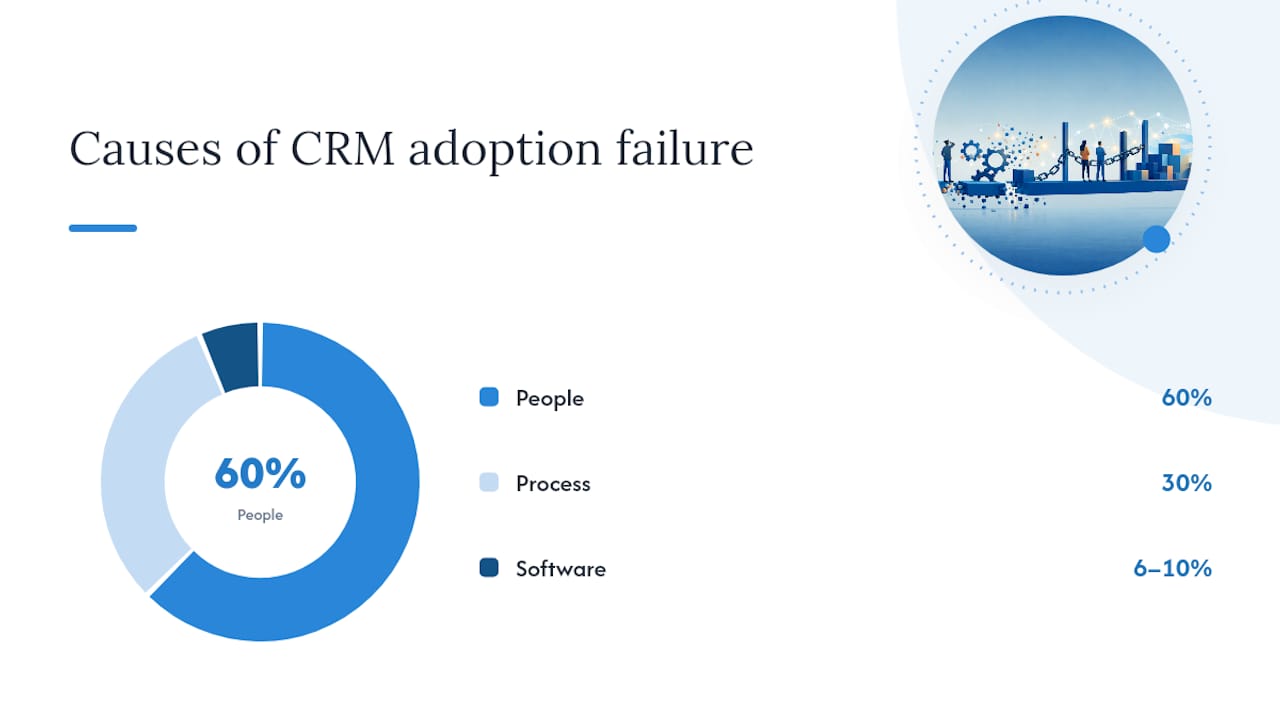
Table of Contents
- Which failure group is driving your adoption problem?
- How to set CRM objectives that actually guide decisions
- Who must sponsor the CRM, and what does real sponsorship look like?
- How to map real workflows before you configure anything
- Why a small pilot reduces risk more than a full launch
- Data quality and migration: avoiding ‘garbage in, garbage out’
- User adoption and change management: the work that wins projects
- Why over-customisation kills adoption and how to avoid it
- How to measure CRM success: KPIs, timelines, and budget
- Governance and continuous improvement: keeping the CRM alive
- Cloud9’s practical checklist and a UK recovery example
- Cultural and organisational resistance in UK workplaces
- Why poor communication causes CRM adoption failures
- Mobile and remote work compatibility: a practical requirement, not a nice-to-have
- Training methods that work for different user groups
- Common CRM software pitfalls and vendor selection mistakes
- How to use employee feedback to improve adoption iteratively
- The part most guides get wrong about CRM failure
- CRM adoption support from Cloud9
- Sources
- FAQ
Which failure group is driving your adoption problem?
Harvard Business Review analysis notes reported CRM failure or underperformance rates ranging from 18% to 69% across analyst studies, a spread that reflects how differently organisations define “failure.” Before you can fix the problem, you need to know which group owns it.
The five failure groups and their diagnostic questions:
- Strategy. Do you have 3–5 written CRM objectives tied to revenue, retention, or process efficiency? If not, this is your primary group.
- People. Did frontline users help define the requirements? Forrester found roughly 45% of organisations cite cultural resistance as a major barrier. If your team sees the CRM as surveillance, people is your group.
- Process. Does the CRM reflect how your team actually works, or how a manager thinks they work? Mismatched workflows produce workarounds within weeks.
- Data. Is your contact database clean, deduplicated, and owned by a named person? Poor data is the fastest way to destroy trust in a new system.
- Technology. Are users logging in to three separate tools to complete one task? Tool sprawl is a structural problem that training alone cannot cure.
Run these five questions in a single 20-minute session with your project team. The group that draws the most “no” answers is where you intervene first, and who you involve next: a strategy failure needs the commercial director; a people failure needs HR and line managers; a process failure needs operations; a data failure needs a data steward; a technology failure needs your IT lead or a managed services partner.
How to set CRM objectives that actually guide decisions
Vague aims — “improve customer relationships,” “increase sales visibility” — produce vague configurations. Every objective must be specific enough to tell you whether to build a feature or leave it out.
A practical SMART objective for each team:
- Sales: Increase pipeline stage accuracy to 90% within 60 days of go-live, measured by the percentage of deals with a next action and a close date.
- Service: Reduce average first-response time from 48 hours to 24 hours within 90 days, tracked via CRM ticket timestamps.
- Marketing: Achieve 80% contact record completeness (name, email, company, source) within the first quarter.
One-page strategy checklist:
- Audience: which teams and roles will use the CRM daily?
- Outcomes: what three business results must improve within six months?
- Success metrics: which leading and lag indicators will you track?
- Governance: who approves configuration changes and field additions?
- Scope boundary: what is explicitly out of scope for phase one?
Pro Tip: Write the scope boundary before you write the scope. Teams find it far easier to agree on what to exclude than to agree on what to include, and a written exclusion list is the single most effective guard against scope creep.
Treating CRM as a change programme rather than an IT deployment is the reframe MIT Sloan recommends to reduce failure rates. That reframe starts with objectives written in business language, not feature lists.
Who must sponsor the CRM, and what does real sponsorship look like?
Nominal sponsorship — a director who signed the purchase order and then disappeared — is one of the clearest predictors of failure. When leadership continues to use spreadsheets or separate dashboards, the CRM becomes optional and adoption decays quickly.
The four roles you need:
- Executive sponsor (C-suite or senior director): reviews adoption metrics monthly, resolves cross-departmental blockers, and uses the CRM dashboard as their primary reporting view.
- Programme lead (project manager or operations manager): owns the implementation plan, manages the vendor relationship, and escalates to the sponsor.
- Business champions (one per team): the go-to person for questions on their floor, attends weekly check-ins, and feeds user feedback upward.
- Admin owner (CRM administrator): manages field standards, user permissions, and data hygiene on an ongoing basis.
Meeting cadence and red flags:
- Weekly: programme lead and champions review adoption data and open issues.
- Monthly: executive sponsor reviews the adoption scorecard and removes blockers.
- Quarterly: full governance review including data quality and feature requests.
Red flags that sponsorship is nominal: the sponsor has not logged into the CRM in 30 days; decisions about field additions are made without governance sign-off; champions have no protected time for their CRM responsibilities.
How to map real workflows before you configure anything
The most common configuration mistake is building the CRM around how a manager thinks the team works. The result is a system that adds steps rather than removing them, and users route around it within a month.
Process-mapping checklist (run this before configuration begins):
- Shadow two or three frontline users for half a day each and note every tool they touch.
- Map the five most frequent customer interactions from first contact to close or resolution.
- Identify the three biggest sources of duplicate data entry in the current process.
- Note which steps currently happen outside any system (phone calls, sticky notes, WhatsApp).
Two quick-win workflows that reduce friction fast:
- Inbound lead routing. Connect your website contact form directly to the CRM so leads arrive with source, date, and assigned owner pre-populated. This removes the manual import step that most teams skip under pressure. Cloud9’s guide on integrating CRM with your business website covers the technical side of this.
- Follow-up task creation. Configure the CRM to auto-create a follow-up task when a deal stage advances. Teams that rely on memory for follow-ups lose deals silently.
Pro Tip: Limit required fields to five or fewer at go-live. Every additional mandatory field is a reason for a user to avoid logging a record. You can add fields in phase two once the habit of logging is established.
Why a small pilot reduces risk more than a full launch
Forbes Tech Council guidance is clear: limiting initial scope and iterating from real user feedback produces better adoption than a fully-featured launch. A pilot lets you validate assumptions before they become expensive configurations.
Pilot checklist:
- Scope: one team, one process, one reporting view.
- Target team: choose a team with a motivated champion and a clear, measurable workflow.
- MVP scope: the minimum set of fields, stages, and integrations needed to run that one process.
- Duration: four to six weeks, with a formal review at week three.
- Success criteria: set them before the pilot starts, not after.
Template success criteria:
- Adoption rate: 80% of target users logging at least one activity per week.
- Data completeness: 85% of records meeting the minimum field standard.
- Process adherence: 90% of deals or tickets progressing through the defined stages.
Decision gate at pilot end:
- Expand if all three criteria are met and the champion team is confident.
- Iterate if one criterion is missed but the root cause is identified and fixable within two weeks.
- Pause if two or more criteria are missed, or if the champion team has lost confidence. Return to the process-mapping stage.
Data quality and migration: avoiding ‘garbage in, garbage out’
Salesforce Hub guidance and practitioner reports converge on the same point: poor migration planning and the absence of a named data owner are the fastest routes to degraded data quality after go-live. Teams that discover dirty data in the new system lose trust in it within weeks.
Data migration checklist:
- Profile: audit your existing data sources. How many duplicate contacts exist? What percentage have a valid email address?
- Cleanse: deduplicate, standardise field formats (phone numbers, postcodes), and remove records inactive for more than three years.
- Map: document which source field maps to which CRM field, including transformation rules.
- Archive: move records that will not migrate to a separate archive, not the bin.
- Own: assign a named data owner before migration begins. This person signs off on the final dataset.
Test plan for migration runs:
- Run a sample migration of 200–500 records and validate against the field mapping document.
- Check for encoding errors, truncated fields, and missing required values.
- Define rollback criteria: if more than 5% of records fail validation, pause and investigate before proceeding.
GDPR note for UK practice: any migration of personal data must be documented under your UK GDPR record of processing activities. The data owner and your Data Protection Officer (or equivalent) must sign off before live migration. The ICO’s guidance on data migration is the primary reference for UK organisations.
User adoption and change management: the work that wins projects
Rework’s implementation guidance identifies a consistent failure pattern: rollouts appear to succeed at launch, then quietly decline by month three as teams revert to old habits and data quality degrades. The adoption programme must be designed to outlast the launch energy.
Training plan by user group:
- Sales: focus on pipeline management, activity logging, and mobile access. Deliver in short, role-specific sessions of 45–60 minutes. Avoid full-day classroom formats.
- Service: focus on ticket creation, SLA tracking, and escalation workflows. Pair training with live data from their own queue.
- Marketing: focus on list segmentation, campaign tracking, and lead source attribution. Link to email automation workflows from day one.
- Operations and management: focus on dashboards, adoption reporting, and governance. These users need less hands-on training and more context on what the data means.
Engagement tactics that build momentum:
- Run a two-hour launch workshop per team, not a company-wide webinar.
- Publish a “win of the week” — a real example of the CRM saving time or closing a deal — in your internal channel.
- Give champions a visible role: they answer questions publicly, which builds their credibility and reduces pressure on the project team.
Making CRM usage matter through accountability:
- Include CRM data completeness in team performance reviews from month two onwards.
- Managers should pull their weekly pipeline review from the CRM, not from a spreadsheet. When managers use the system, the team follows.
- Incentivise early adoption with small, visible recognition — not financial bonuses, which create gaming behaviour.
Pro Tip: Build a 90-day post-launch coaching calendar before go-live. Months two and three are when adoption either compounds or collapses. Targeted coaching in that window costs far less than a recovery project six months later.
Why over-customisation kills adoption and how to avoid it
Every custom field, every bespoke workflow, every non-standard integration adds maintenance debt. The platform that looked perfectly tailored at launch becomes a fragile, expensive system that nobody wants to touch eighteen months later.
Customisation decision matrix — ask these questions before building anything:
- Does this customisation serve a daily workflow for at least 30% of users?
- Can the same outcome be achieved with a native feature or a minor configuration change?
- Who will maintain this customisation when the original developer leaves?
- What is the cost of rebuilding it after a platform upgrade?
If the answer to question one is no, or the answer to question three is “nobody,” do not build it.
Integration priority checklist:
- Email and calendar sync (removes duplicate entry for the highest-frequency activity).
- Quoting or proposal tool (keeps deal value and status in one place).
- Finance or invoicing system (closes the loop between pipeline and revenue).
- Website forms (covered in the workflow section above).
Pro Tip: Set a rule: no new custom field without a governance sign-off and a named owner. A CRM with 200 fields that nobody fills in is worse than a CRM with 20 fields that everyone completes. Field proliferation is the silent killer of data quality.
How to measure CRM success: KPIs, timelines, and budget
HBR’s analysis points to a specific failure mode: organisations use CRM for inspection rather than process improvement, which reduces ROI and damages adoption. Measurement must drive behaviour change, not just reporting.
Leading indicators (measure weekly in months 1–3):
- Activity completeness: percentage of deals or tickets with a logged activity in the last seven days.
- Contact hygiene: percentage of records meeting the minimum field standard.
- Stage accuracy: percentage of pipeline deals with a valid next action and close date.
Lag indicators (measure monthly from month 3):
- Conversion rate by pipeline stage.
- Revenue per sales representative.
- Average first-response time for service tickets.
- Campaign attribution accuracy (percentage of closed deals with a tracked source).
Phase timeline and ownership:
| Phase | Typical duration | Lead |
|---|---|---|
| Discovery and strategy | 2–4 weeks | Programme lead and sponsor |
| Configuration and data migration | 4–8 weeks | CRM admin and IT lead |
| Pilot | 4 weeks | Champion team and programme lead |
| Full roll-out | 4–8 weeks | Programme lead and champions |
| Post-launch adoption programme | Months 2–5 | Champions and line managers |
Typical cost items to budget for:
- Platform licences (per user, per month).
- Integration development or middleware (one-off or ongoing subscription).
- Data cleansing and migration work (often underestimated by 50–100%).
- Training design and delivery.
- Ongoing CRM administration (internal resource or managed service).
Governance and continuous improvement: keeping the CRM alive
A CRM without governance becomes a legacy system within two years. The adoption scorecard, data hygiene reviews, and change control process are what separate a system that grows with the business from one that gets replaced.
Governance checklist:
- Roles documented: sponsor, programme lead, admin owner, champions.
- Change control process: no new fields, workflows, or integrations without a written request and sign-off.
- Naming conventions: agreed standards for deal stages, contact types, and campaign names.
- Release windows: configuration changes happen in defined windows, not ad hoc.
Quarterly review template:
- Adoption scorecard: login rates, activity completeness, data completeness by team.
- Data integrity: duplicate rate, records missing required fields, stale contacts (no activity in 90 days).
- Feature requests: review the backlog, prioritise by business value, and communicate decisions to champions.
- Governance audit: check that naming conventions and field standards are being followed.
Where data stewardship lives:
The admin owner runs the quarterly data audit. Line managers are accountable for their team’s completeness scores. The executive sponsor reviews the adoption scorecard and removes blockers. Without this three-level accountability, data hygiene becomes everyone’s problem and therefore nobody’s.
Cloud9’s practical checklist and a UK recovery example
Cloud9 works with established UK businesses on CRM setup, integration, and adoption recovery. The checklist below is what a discovery session typically covers.
Client-ready checklist (run in a single 90-minute session):
- Roles to invite: executive sponsor, programme lead, one champion per team, admin owner.
- Evidence to gather: current CRM login rates, number of active custom fields, last data audit date, and a list of tools the team uses alongside the CRM.
- One-week actions: confirm sponsor, name data owner, write three SMART objectives, list phase-one scope boundary.
Anonymised UK recovery example:
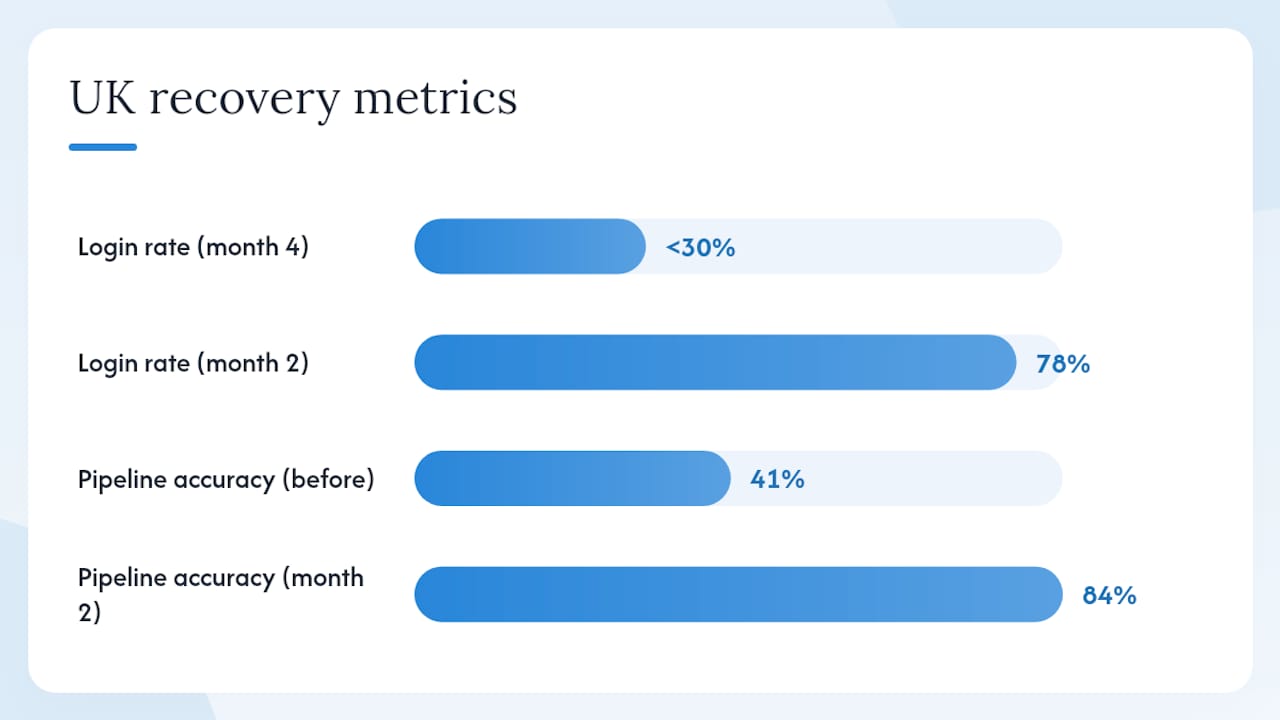
A professional services firm with 45 staff had deployed a CRM 18 months earlier. Login rates had fallen to under 30% of users by month four. The diagnosis: no named data owner, 140 custom fields (most empty), and the managing director using a separate spreadsheet for pipeline reviews.
Recovery steps over two months:
- Reduced active fields from 140 to 22, archiving the rest.
- Appointed a champion in each of the three revenue teams.
- Managing director moved pipeline reviews to the CRM dashboard.
- Ran four 45-minute role-specific training sessions.
- Introduced a weekly “win of the week” in the company Slack channel.
Measured improvements at month two: login rate rose to 78%, pipeline stage accuracy improved from 41% to 84%, and the data owner completed the first quarterly audit.
What Cloud9 typically delivers in a discovery workshop:
- A written diagnosis mapping your failure group (strategy, people, process, data, or technology).
- A prioritised two-month recovery plan with named owners and milestones.
- A configuration recommendation covering field rationalisation and integration priorities.
- A training plan template by user group.
You can see examples of Cloud9’s practical work at our work.
Cultural and organisational resistance in UK workplaces
UK workplace culture carries specific dynamics that affect CRM adoption in ways that generic implementation guides miss. Hierarchical deference means frontline staff often will not voice objections in a group setting, so resistance goes underground rather than surfacing in workshops. The result is polite compliance during training and quiet non-use afterwards.
A second pattern is the “we’re different” objection, common in professional services and membership organisations. Teams argue their client relationships are too nuanced for a system to capture. This is rarely true of the data itself, but it reflects a genuine anxiety about being measured and managed through a tool.
The practical fix is to involve frontline users in requirements gathering before configuration begins, as Forrester’s research shows that user involvement in defining functionality increases the chance the CRM delivers clear daily value. Run small-group sessions rather than all-hands workshops, and ask users to describe their worst daily friction point, not their ideal system. That framing produces honest answers.
Why poor communication causes CRM adoption failures
Most CRM projects communicate the launch but not the reason. A system announcement tells people what is changing; it does not tell them why it matters to their daily work or what happens if they do not use it. That gap is where resistance forms.
Effective communication for CRM adoption has three phases. Before launch, explain the business problem the CRM solves in terms of the team’s own pain points, not management’s reporting needs. During roll-out, publish regular progress updates that celebrate early wins and name the champions who drove them. After launch, communicate the adoption scorecard results openly, including where teams are struggling, which signals that leadership is paying attention and that the project is not being quietly abandoned.
The single most damaging communication failure is silence after month one. When updates stop, teams assume the project has been deprioritised and revert to old habits. A monthly internal update, even a short one, maintains the signal that CRM usage is expected and monitored.
Mobile and remote work compatibility: a practical requirement, not a nice-to-have
Field sales teams, remote account managers, and hybrid workers will not log activities if doing so requires a desktop browser. Mobile compatibility is not a feature to evaluate at the end of a vendor selection process; it is a baseline requirement that should be tested in the pilot.
The specific behaviours to test on mobile: logging a call note immediately after a meeting, updating a deal stage from a phone, and viewing a contact’s full history before a call. If any of these take more than three taps or require a desktop to complete, adoption among mobile users will be low regardless of training.
Remote work has added a second dimension: CRM data must be the single source of truth for distributed teams who cannot walk over to a colleague’s desk to ask about a deal. When remote workers maintain their own local notes or spreadsheets because the CRM is slow or incomplete, you get data fragmentation that is very difficult to reverse.
Training methods that work for different user groups
A single training session delivered to the whole company on launch day is one of the most reliable ways to produce low adoption. People learn in different contexts, at different speeds, and with different motivations. A sales manager and a marketing coordinator need different things from the same platform.
Formats that work by learning style and role:
- Hands-on learners (most sales users): short, task-based exercises using live data from their own pipeline. Fifteen minutes of doing beats an hour of watching.
- Conceptual learners (operations and management): a brief overview of how the system connects to business outcomes, followed by a dashboard walkthrough.
- Reference learners (service and admin users): a short written guide covering the five tasks they will perform every day, accessible in the CRM or a shared drive.
- Peer learners (common in UK SMEs): champion-led drop-in sessions where a trusted colleague answers questions in a low-pressure setting.
Avoid recording a single 90-minute video and calling it training. It will be watched once, partially, and never again. Short, role-specific clips of five to eight minutes each, covering one task at a time, are far more likely to be rewatched when a user gets stuck.
Common CRM software pitfalls and vendor selection mistakes
Choosing a platform before defining requirements is the most common vendor selection mistake. The result is a system selected for its feature list rather than its fit with the team’s actual workflows, and a configuration project that tries to bend the platform to match processes it was never designed for.
A related pitfall is selecting an enterprise platform for a 20-person team. Platforms built for large organisations carry administrative overhead, complex permission structures, and pricing models that assume a dedicated CRM administrator. For most UK SMEs, a mid-market platform configured well will outperform an enterprise platform configured poorly.
Vendor lock-in is a specific risk in the UK market. Before signing, confirm that you can export all your data in a standard format (CSV or JSON), that API access is included in your licence tier, and that the contract does not impose a multi-year commitment before you have validated adoption. A 12-month initial term with a break clause is a reasonable ask.
Finally, watch for platforms that require heavy customisation to perform basic functions. If the vendor’s sales engineer needs to build a custom object to handle your standard sales pipeline, the platform is not the right fit.
How to use employee feedback to improve adoption iteratively
Feedback collected and ignored is worse than no feedback mechanism at all. It signals to users that their input does not matter, which accelerates disengagement. The feedback loop must be visible: users need to see that their suggestions are reviewed, prioritised, and either acted on or explained.
A practical feedback cycle:
- After the first two weeks of go-live, run a five-question pulse survey per team. Ask: what is working, what is not, what is missing, what is confusing, and what would make you use the system more.
- Champions collate responses and present a summary at the weekly check-in.
- The programme lead categorises feedback into: fix now (configuration error), fix next sprint (backlog), and out of scope (with a written reason).
- Communicate the outcome of every batch of feedback to the team that raised it, within two weeks.
The most valuable feedback often comes from the users who are not logging in. A five-minute conversation with a non-user will surface the real objection faster than any survey. Champions are well-placed to have those conversations informally.
The part most guides get wrong about CRM failure
The conventional framing of CRM failure puts technology at the centre: wrong platform, poor integration, missing features. The data does not support that. With roughly 60% of failures people-related and 30% process-related, the platform is almost never the primary problem.
What most guides understate is the cost of the post-launch silence. Projects invest heavily in the run-up to go-live and almost nothing in months two through six, which is precisely when the adoption decision is made. The launch event is not the finish line; it is the starting gun for the harder work of embedding new habits.
The other underrated factor is the managing director’s own behaviour. When the MD pulls their weekly numbers from a spreadsheet rather than the CRM, every person in the business receives a clear signal: the CRM is optional. No training programme, no incentive scheme, and no champion network can overcome that signal. Executive behaviour is the most powerful adoption lever available, and it costs nothing to change.
*— Rob
CRM adoption support from Cloud9
Getting CRM adoption right is harder than the vendor demos suggest, and most UK businesses do not have a dedicated CRM project manager on staff. Cloud9 works with established SMEs, professional services firms, and membership organisations to set up, integrate, and embed CRM systems that teams actually use.
The practical difference Cloud9 brings is a joined-up approach: CRM configuration, website integration, email automation, and ongoing administration handled by one partner rather than three separate suppliers. That means your CRM and marketing automation setup connects directly to your lead capture, your email workflows, and your reporting from day one, without the coordination overhead that fragments most implementations.
A typical engagement starts with a discovery workshop (two to three hours), produces a written diagnosis and recovery plan within a week, and moves into configuration within a fortnight. To start a conversation, visit Cloud9’s CRM and marketing automation service page or get in touch directly to book a short diagnostic review.
Sources
- Why CRM — and how to fix it | MIT Sloan Management Review
- Why CRM projects fail — and how to make them more successful | HBR
- Common CRM implementation mistakes — and how to recover from each one | Rework resources
- CRM adoption: 8 reasons teams fail (and how to fix them) | Utiliko
- Five reasons companies struggle with CRM implementations | Forbes
- Why do CRM projects fail? — Salesforce Hub
FAQ
Why does CRM adoption fail in most organisations?
CRM adoption fails primarily because organisations treat it as a technology project rather than an organisational change, under-investing in people, process, and strategy. MIT Sloan and Forrester both identify cultural resistance and absent change management as the dominant causes.
How long does it take to recover a failing CRM implementation?
A focused recovery programme typically shows measurable improvement within two months: field rationalisation, champion appointments, and role-specific training can lift login rates and data completeness within eight weeks, as the anonymised UK example in this guide illustrates.
What is the single most important thing an executive sponsor must do?
Use the CRM as their primary reporting view. When leadership pulls pipeline data from a spreadsheet instead of the CRM, the system becomes optional for everyone below them.
How many custom fields should a CRM have at go-live?
Five or fewer required fields at go-live is a practical starting point. Every mandatory field that does not serve a daily workflow reduces the likelihood that users will log records at all.
How does Cloud9 help with CRM adoption?
Cloud9 provides CRM setup, integration with websites and email automation, and ongoing administration for UK businesses, combining configuration, training support, and managed services into a single engagement rather than requiring separate suppliers for each element.