

Systems integration is the engineering and IT process of connecting separate software applications, hardware modules and subsystems into a single, cohesive infrastructure so they share information and work together reliably. The primary business outcome is straightforward: less manual work, more accurate data, and faster decisions. Whether you are an IT manager evaluating middleware options, an operations director tired of re-keying data between platforms, or a business owner wondering why your CRM and accounts package never talk to each other, this guide covers the definition, the main approaches, the risks, and how to run a project from discovery to go-live.
Two reference points anchor the discipline. The IEEE Technology Navigator treats integration as an engineering activity centred on interface control, incremental assembly and formal verification. The SEBoK wiki frames it as combining separately developed modules so the assembled whole meets specified operational requirements. Both definitions converge on the same practical point: integration is not a one-off task but a lifecycle discipline. Cloud9 applies exactly this thinking when delivering integration projects for UK businesses.
One clarification worth making early: systems integration and data integration are related but not the same thing. Data integration focuses specifically on moving, transforming and consolidating data between stores (ETL pipelines, data warehouses, reporting feeds). Systems integration is broader; it connects entire applications and hardware components, including their processes, events and user interfaces, not just their data.
Key takeaways
Systems integration connects separate software and hardware into a unified infrastructure, reducing manual work, improving data accuracy, and enabling faster decisions across your business.
| Point | Details |
|---|---|
| Core definition | Systems integration joins separate applications and hardware so they share data and automate processes reliably. |
| Choose the right pattern | iPaaS and API-led integration suit most UK SMEs; ESB is for complex legacy estates only. |
| Plan for lifecycle, not just launch | API drift and vendor updates mean integrations require ongoing monitoring, versioning and maintenance. |
| Govern it from day one | Assign ownership, document interfaces, and apply UK GDPR data processing agreements before go-live. |
| Cloud9 as your integration partner | Cloud9 delivers discovery, build and managed integration services for established UK businesses. |
Table of Contents
- What does systems integration cover?
- What integration architectures are available to you?
- What are the real business benefits of systems integration?
- What challenges and risks should you plan for?
- How do you plan and deliver an integration project?
- Which technologies power systems integration?
- What do real integration projects look like?
- Who delivers integration projects and what skills do they need?
- What governance and best practices reduce long-term risk?
- UK-specific considerations for integration projects
- Why simplicity and lifecycle support matter more than architecture elegance
- Cloud9 handles integration so you do not have to manage it alone
- Sources
- FAQ
What does systems integration cover?
The scope of systems integration spans two overlapping traditions.
In engineering and systems engineering, integration means assembling hardware and software components that were developed separately and verifying that the combined system behaves correctly under real operating conditions. Defence, aerospace, industrial control and medical device sectors have used this discipline for decades, governed by standards such as ISO/IEC/IEEE 15288.
In IT and software, the term describes connecting business applications, cloud services and databases so data flows automatically and processes span multiple platforms without manual intervention. This is the context most UK SMEs and professional services firms encounter.
Common integration scenarios include:
- CRM to website: new web enquiries route directly into your CRM, triggering automated follow-up sequences without anyone copying and pasting.
- ERP to finance: sales orders in your ERP post automatically to your accounting system, eliminating duplicate entry and reconciliation errors.
- E-commerce to fulfilment: an online order triggers stock reservation, warehouse pick and courier booking in a single automated flow.
- IoT sensors to control systems: factory floor sensors feed real-time readings into a maintenance management platform, flagging anomalies before equipment fails.
- HR to payroll: a new starter record created in your HR system propagates to payroll, IT provisioning and directory services simultaneously.
- Marketing platform to analytics: campaign engagement data flows into your reporting stack, giving a single view of lead-to-revenue performance.
The table below shows where systems integration and data integration differ in practice, so you can choose the right approach for your project.
| Dimension | Systems integration | Data integration |
|---|---|---|
| Primary focus | Connecting applications, services and hardware | Moving and transforming data between stores |
| Typical output | Automated cross-system processes and events | Consolidated datasets, reports, data warehouses |
| Trigger model | Event-driven or API call in real time | Batch ETL or scheduled sync |
| Scope | Full application behaviour, UI, APIs, processes | Data records and schemas |
| When to choose | You need live process automation across platforms | You need consolidated reporting or analytics |
What integration architectures are available to you?
Choosing the right architectural pattern is one of the most consequential decisions in an integration project. Get it wrong and you accumulate technical debt that costs more to unwind than the original build. TechTarget’s integration reference identifies six main patterns, each with distinct trade-offs.
| Pattern | How it works | Strengths | Weaknesses | Best for |
|---|---|---|---|---|
| Point-to-point | Direct connection between each pair of systems | Fast to build, low initial cost | Becomes unmanageable beyond 4–5 systems; every change breaks multiple links | Small deployments with stable, limited connections |
| Hub-and-spoke | All systems connect to a central hub that routes messages | Centralised control; easier to add new spokes | Hub is a single point of failure; can become a bottleneck | Mid-size organisations with a clear central platform |
| Enterprise Service Bus (ESB) | Middleware layer handles routing, transformation and protocol translation | Flexible; can bridge legacy and modern systems | Complex to configure and maintain; high licensing cost | Large enterprises with heterogeneous legacy estates |
| API-led | Systems expose and consume standardised APIs; an API gateway manages access and policy | Reusable; developer-friendly; supports mobile and cloud | Requires API design discipline; governance overhead | Cloud-first organisations building for reuse |
| iPaaS | Cloud-hosted integration platform with pre-built connectors | Fast time to value; low infrastructure overhead | Vendor lock-in risk; ongoing subscription cost | SMEs and cloud-native stacks needing speed |
| Event-driven (pub/sub) | Systems publish events to a broker; subscribers react asynchronously | Decoupled; scales well; resilient to downstream failures | Harder to debug; eventual consistency requires careful design | High-volume, real-time or microservices environments |
For most UK SMEs, iPaaS or API-led integration delivers the best balance of speed, cost and maintainability. ESB makes sense only when you have a significant legacy estate that cannot expose modern APIs. Point-to-point is fine for two or three connections but becomes a liability the moment your technology stack grows.
What are the real business benefits of systems integration?
The commercial case for integration is well established. NetSuite’s analysis of integration benefits identifies improved data accuracy, process automation, faster reporting and a single operational view as the primary outcomes. In practice, those translate to five concrete gains.
- Reduced manual data entry: when systems share data automatically, staff stop re-keying records between platforms. That removes a category of human error and frees time for higher-value work.
- Improved data accuracy: a single source of truth means every system reads from the same record. Discrepancies between your CRM, finance system and marketing platform disappear.
- Faster reporting and decision making: integrated data flows mean dashboards update in near real time rather than waiting for overnight batch runs or manual exports.
- Automated cross-functional processes: order-to-cash, lead-to-opportunity and hire-to-retire workflows can span multiple systems without a person acting as the connector.
- Better customer experience: when your support team can see the full order history, billing status and communication log in one view, response quality improves and resolution times fall.
PwC’s strategic integration guidance adds a longer-term dimension: organisations that build reusable integration components rather than one-off fixes reduce technical debt and accelerate every subsequent project. The first integration is always the hardest; the fifth is much cheaper if you built the first one properly.
Computer notes that AI and automation are increasingly handling routine testing and data conflict resolution, which lowers the operational cost of running integrations for smaller organisations. That shift matters: integration is no longer a capability reserved for enterprises with large IT departments.
What challenges and risks should you plan for?
Integration projects fail more often than most vendors admit. The technical problems are usually solvable; the organisational ones are where projects stall.
Technical risks:
- Interface mismatch: two systems use different data formats, field names or encoding standards. Mapping errors here cause silent data corruption that surfaces weeks later.
- Stale data and record collisions: when two systems update the same record concurrently, you need explicit rules for which wins. Without them, data overwrites itself unpredictably.
- API drift: a SaaS vendor updates their API and your integration breaks overnight. Without version monitoring, you find out when users complain.
- Concurrency and throughput: high-volume event flows can overwhelm a poorly sized integration layer, causing queues to back up and data to arrive out of sequence.
- Maintenance burden: every integration you build is a dependency you must maintain. The IEEE Technology Navigator emphasises that interface control and verification criteria must be defined up front, not retrofitted.
Organisational risks:
- Unclear ownership: if no one owns the integration layer, no one monitors it, patches it or responds when it breaks.
- Vendor lock-in: some iPaaS platforms use proprietary connectors that make migration expensive. Evaluate exit costs before you sign.
- Technical debt: point-to-point integrations built quickly accumulate into a web of dependencies that becomes expensive to change.
- Change resistance: integration changes how people work. Staff who relied on manual processes may resist automation, especially if they were not involved in the design.
Security and compliance (UK context): any integration that moves personal data between systems must comply with the UK GDPR. That means documenting data flows in your Record of Processing Activities, ensuring data remains within approved jurisdictions (relevant when using US-hosted iPaaS platforms), and applying appropriate access controls at every integration endpoint. Data processing agreements with third-party vendors are mandatory where they process personal data on your behalf.
How do you plan and deliver an integration project?
A phased approach reduces risk and gives you natural checkpoints to validate scope before committing further budget.
-
Discovery and requirements (1–3 weeks for small projects; 4–8 weeks for complex ones): map every system involved, document current data flows, identify integration points, and define success criteria. Involve both technical and business stakeholders. Output: a requirements document and a high-level integration map.
-
Design and architecture (1–2 weeks / 3–6 weeks): choose your integration pattern, define data contracts for each interface, specify error handling and retry logic, and produce an interface control document. This is where you decide on middleware, API gateway, or iPaaS platform.
-
Build and integration (2–6 weeks / 8–20 weeks): develop connectors, configure the integration platform, build transformation logic and implement authentication. Use version control from day one.
-
Verification and testing (1–3 weeks / 4–8 weeks): run unit tests on individual connectors, integration tests across system pairs, and end-to-end tests covering full business processes. Test failure scenarios explicitly: what happens when a downstream system is unavailable? The SEBoK wiki frames incremental assembly and verification as non-negotiable steps in any integration lifecycle.
-
Deployment and cutover (1 week / 2–4 weeks): deploy to production with a rollback plan. Run parallel operation where possible so you can compare outputs before switching off the old process.
-
Monitoring and lifecycle management (ongoing): set up alerting for integration failures, monitor API response times, and schedule regular reviews of vendor API versions. Budget for this from the start.
Typical timelines:
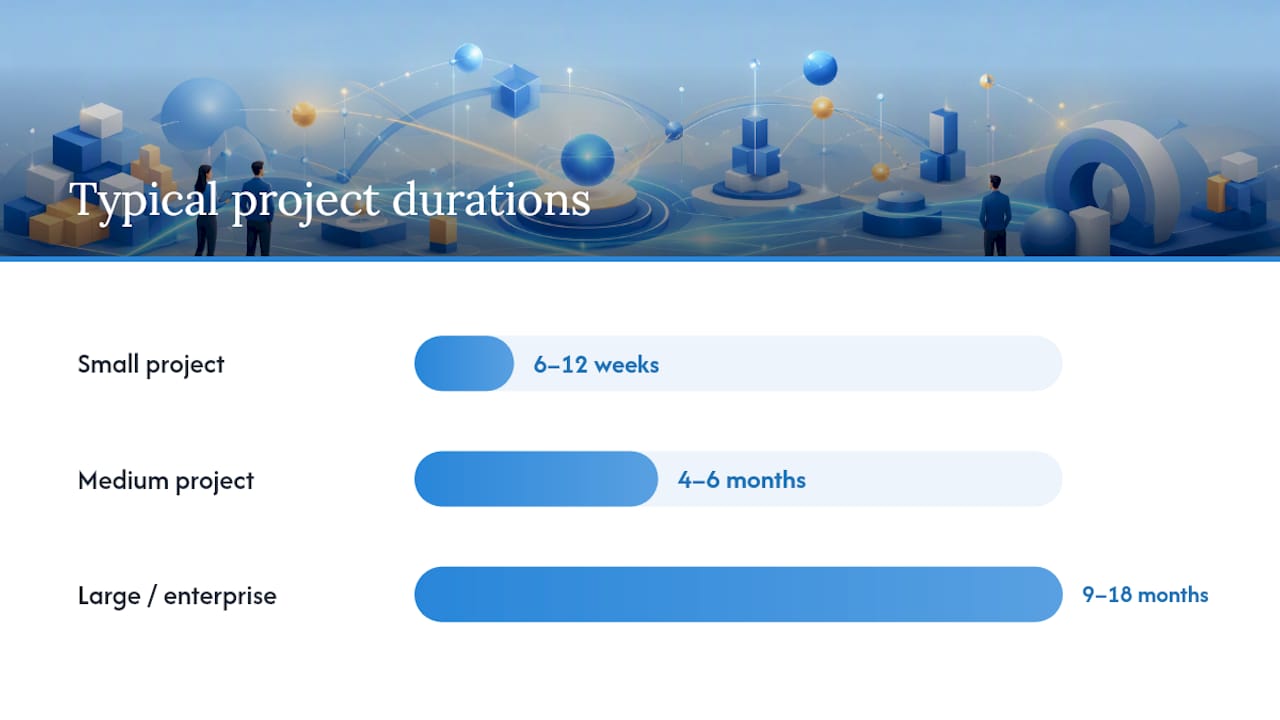
- Small project (2–3 systems, standard connectors): 6–12 weeks end to end.
- Medium project (4–8 systems, some custom logic): 4–6 months.
- Large or enterprise project (complex legacy, multiple workstreams): 9–18 months.
Cost drivers include iPaaS or middleware licensing, custom development effort, testing resource, data migration (if applicable) and ongoing monitoring and maintenance. Licensing costs for cloud integration platforms vary widely; get quotes based on your transaction volumes and connector count, not just headline pricing.
Pro Tip: Budget explicitly for API versioning maintenance from day one. SaaS vendors update APIs on their own schedules, and an unmonitored integration will break without warning. A small monthly retainer for lifecycle management is far cheaper than an emergency fix when a critical process goes down.
For a prescriptive phase-by-phase checklist, Cloud9 publishes a digital ecosystem integration checklist that maps directly to these phases.
Which technologies power systems integration?
The tool landscape is broad. The right choice depends on your scale, existing infrastructure and how much custom development you want to own.
- APIs and API management: REST and GraphQL APIs are the primary integration mechanism for modern SaaS platforms. An API gateway (such as AWS API Gateway, Azure API Management or Kong) adds security, rate limiting and observability. SAP Concur’s integration overview highlights APIs and connectors as the dominant method for automating data flows between business applications.
- Middleware and ESB: platforms such as MuleSoft, IBM App Connect and WSO2 handle protocol translation and complex routing for heterogeneous environments. Powerful, but they carry significant configuration and licensing overhead.
- Message brokers and queues: Apache Kafka, RabbitMQ and Azure Service Bus decouple producers from consumers, enabling asynchronous, high-volume event flows without tight coupling.
- iPaaS platforms: tools such as Make (formerly Integromat), Zapier, Boomi and Microsoft Power Automate offer pre-built connectors and low-code configuration. They suit SMEs and cloud-native stacks where speed matters more than fine-grained control.
- Integration testing tools: Postman and SoapUI cover API contract testing; purpose-built integration test frameworks validate end-to-end flows. Computer.org’s reporting notes that AI is increasingly automating routine test execution and conflict resolution, reducing the engineering effort required.
- Monitoring and observability: Datadog, Grafana, New Relic and Azure Monitor provide the visibility needed to detect integration failures before users do. Without observability, you are flying blind.
- AI automation tools: for UK businesses, managed AI automation services can handle routine data reconciliation, trigger-based workflows and internal knowledge routing without requiring a dedicated integration engineer.
Selection criteria for UK organisations: check that your chosen platform stores data within the UK or EEA (relevant for UK GDPR compliance), offers UK-based support, and provides clear SLAs for platform availability. Vendor lock-in is a real risk with proprietary connector ecosystems; favour platforms with open standards where possible.
What do real integration projects look like?
Abstract patterns become clearer with concrete examples. Here are six scenarios that cover the sectors Cloud9 works with most.
-
CRM to website lead routing (professional services): a law firm’s contact form submits to HubSpot, which scores the lead, assigns it to the right fee-earner and triggers a personalised email sequence. The integration challenge is field mapping and deduplication. Cloud9’s guide on CRM and website integration covers this pattern in detail. Typical technology: Zapier or native CRM webhook plus API.
-
E-commerce order flow through ERP (retail/wholesale): an order placed on a Shopify store triggers stock reservation in the ERP, a pick note in the warehouse management system and a courier booking via a carrier API. The challenge is handling partial fulfilments and returns. Technology: iPaaS connector or custom middleware. Cloud9’s ecommerce automation guide covers the automation layer in this flow.
-
Finance reconciliation (accountancy/professional services): invoices raised in a CRM or project management tool post automatically to Xero or QuickBooks, with payment status syncing back. The challenge is handling credit notes, multi-currency and VAT codes correctly. Technology: native accounting API plus transformation logic.
-
IoT sensor data into maintenance systems (manufacturing/facilities): temperature, vibration and pressure readings from factory equipment feed into a CMMS (computerised maintenance management system), which raises a work order when a threshold is breached. The challenge is data volume and latency. Technology: MQTT broker, Azure IoT Hub or AWS IoT Core feeding into a maintenance platform.
-
Membership database to communications platform (membership organisations): a membership renewal in the CRM triggers a welcome email, updates the member portal access level and posts a record to the finance system. The challenge is keeping membership status consistent across three systems in real time. Technology: event-driven integration via API or iPaaS.
-
HR to IT provisioning (any sector): a new employee record in an HR platform triggers Active Directory account creation, Microsoft 365 licence assignment and an onboarding checklist in a project tool. Technology: Microsoft Power Automate or a custom Azure Logic App.
Sector quick-reference:
- Retail and e-commerce: order management, inventory sync, returns automation.
- Professional services: CRM, billing, document management integration.
- Membership organisations: renewals, portal access, communications.
- Manufacturing and facilities: IoT, CMMS, ERP.
- Healthcare and regulated sectors: patient record systems, scheduling, compliance reporting.
Who delivers integration projects and what skills do they need?
Integration projects typically involve three or four distinct roles, and knowing who does what prevents gaps in accountability.
Systems integrator: the organisation or individual responsible for the overall integration programme. They manage vendor relationships, own the architecture decisions and carry programme risk. Gartner’s glossary notes that enterprises commonly engage external contractors for this role, with vendors taking a significant share of programme risk on complex projects.

Integration engineer: designs, builds and tests individual connectors and data flows. Requires hands-on skills in API design, message patterns, transformation logic and debugging.
Solution architect: defines the overall integration architecture, selects patterns and platforms, and ensures the design aligns with security, compliance and scalability requirements.
DevOps / platform engineer: manages the infrastructure on which integrations run, including CI/CD pipelines, monitoring stacks and deployment automation.
Skills checklist for hiring or contracting:
- API design and REST/GraphQL proficiency.
- Knowledge of at least one message broker (Kafka, RabbitMQ, Azure Service Bus).
- Experience with at least one iPaaS or middleware platform.
- Security: OAuth 2.0, API key management, data encryption in transit and at rest.
- Integration testing: contract testing, end-to-end test design, failure scenario coverage.
- UK GDPR awareness and data residency considerations.
- Project management: ability to run discovery workshops and produce interface control documents.
Five questions to ask a prospective integration supplier:
- How do you handle API versioning when a vendor updates their platform?
- What is your approach to integration testing, and can you show us a test plan from a previous project?
- How do you document interfaces, and what does handover look like at the end of the project?
- What monitoring do you put in place, and who responds when an integration fails at 2am?
- How do you manage data residency and UK GDPR compliance across the integration layer?
What governance and best practices reduce long-term risk?
The organisations that get the most from integration over time are those that treat it as an ongoing capability, not a series of one-off projects. PwC’s strategic integration guidance is explicit: building reusable integration components and an “integration fabric” reduces technical debt and accelerates future projects. That principle has practical implications.
Best practices:
- Interface control documents (ICDs): for every integration point, document the data contract, field mappings, error codes, retry logic and versioning policy. This is the single most effective way to reduce maintenance cost.
- API versioning policy: agree with your team and vendors how breaking changes are communicated and how long deprecated versions are supported. Without this, a vendor update silently breaks your integration.
- Reusable components: build connectors and transformation functions as shared assets rather than embedding logic in individual integrations. The second time you connect to the same platform, you reuse rather than rebuild.
- Incremental integration testing and CI/CD: automate integration tests and run them on every deployment. Catching a broken interface in a pipeline is far cheaper than catching it in production.
- Observability: instrument every integration with logging, alerting and performance metrics. Set thresholds for failure rates and latency so problems surface before users notice.
Governance checklist:
- Assign a named owner for each integration (not just the project team).
- Establish a change control process: no integration changes without a documented impact assessment.
- Maintain an integration register listing every connection, its owner, its SLA and its last review date.
- Apply least-privilege access controls at every API endpoint.
- Keep audit trails of data flows where UK GDPR or sector regulation requires them.
Standards and compliance: ISO/IEC/IEEE 15288 governs systems lifecycle processes including integration. The IEEE Technology Navigator recommends interface control and incremental testing as core verification activities. For UK organisations, the Information Commissioner’s Office (ICO) guidance on data sharing and processing agreements is the primary compliance reference for any integration that handles personal data.
UK-specific considerations for integration projects
UK organisations face a specific set of regulatory and procurement obligations that shape how integration projects should be scoped and contracted.
UK GDPR and data residency:
- Any integration that processes personal data must be covered by your Record of Processing Activities.
- When using US-hosted iPaaS platforms, check whether data leaves the UK or EEA and whether a UK International Data Transfer Agreement (IDTA) or equivalent safeguard is in place.
- Data processing agreements are required with any third-party vendor that processes personal data on your behalf, including integration platform providers.
- Consult a data protection solicitor or your Data Protection Officer before connecting systems that handle sensitive personal data (health records, financial data, HR data).
Commercial and procurement notes:
- For public sector and regulated organisations, supplier SLAs should specify uptime, incident response times and data handling obligations explicitly.
- Request evidence of ISO 27001 certification or equivalent from integration platform vendors; this is increasingly a standard expectation in UK procurement.
- Agree data deletion and portability terms before signing; exiting a proprietary integration platform can be expensive if this is not contractually defined.
Working with a UK-based integration provider:
A UK provider brings familiarity with ICO guidance, UK GDPR obligations and the commercial norms of UK procurement. Cloud9 works with established UK businesses to scope, build and manage integration projects, from initial discovery through to ongoing lifecycle support.
A typical Cloud9 engagement for a professional services firm involved connecting a CRM, a project management tool and an accounting platform. The discovery phase identified three redundant manual processes consuming roughly four hours of staff time per week. The integration was built using an API-led approach with a cloud-hosted iPaaS layer, with Cloud9 retaining monitoring and maintenance responsibility under a managed services agreement. The outcome was automated invoice creation, real-time project status visibility in the CRM and a single dashboard for finance reporting.
Questions to ask any prospective UK integration provider:
- Do you hold or work to ISO 27001 or Cyber Essentials standards?
- How do you handle UK GDPR compliance across the integration layer?
- What does your ongoing support and monitoring service include?
- Can you provide references from UK clients in a similar sector?
- How do you manage API versioning and platform updates over the contract term?
For a broader view of what digital integration delivers for UK business leaders, Cloud9’s guide to digital integration covers the strategic framing in more depth.
Why simplicity and lifecycle support matter more than architecture elegance
The integration projects that deliver lasting value are rarely the most technically sophisticated ones. They are the ones where someone took the time to define what “done” actually means for the business, chose the simplest architecture that met the requirements, and then stayed around to keep it running.
The failure mode I see most often is this: a business invests in a well-designed integration, it goes live, and then nobody owns it. Six months later, a SaaS vendor updates their API, the integration silently breaks, and staff quietly revert to copying data by hand. The technology was fine. The lifecycle plan was missing.
Cloud9’s approach is to treat integration as a managed service from the start, not a project with a handover date. That means monitoring, versioning, and a named contact when something breaks. For UK SMEs and professional services firms that do not have a dedicated integration engineer on staff, that ongoing support is often the difference between an integration that compounds value over time and one that becomes a liability.
The other point worth making: start with the business outcome, not the technology. The question is not “which iPaaS platform should we use?” It is “what manual process costs us the most, and what is the simplest integration that removes it?” Architecture follows from that answer, not the other way round.
Cloud9 handles integration so you do not have to manage it alone
Most UK businesses do not need a large internal integration team. They need a single partner who can scope the project honestly, build it to a standard that lasts, and keep it running without requiring constant attention from the client.
Cloud9 delivers exactly that: discovery and requirements workshops, architecture design, build and testing, and managed cloud services that cover ongoing monitoring, API versioning and incident response. The result is an integration that works on day one and keeps working as your platforms evolve.
Cloud9 works with SMEs, membership organisations and professional services firms across the UK. If you have systems that do not talk to each other, or a manual process that should be automated, the right starting point is a short discovery conversation. Get in touch with Cloud9 to discuss your integration requirements and find out what a managed approach would look like for your business.
Sources
- Systems integration
- System integration (IEEE Technology Navigator)
- Computer
- What is system integration? (TechTarget)
- 9 benefits of systems integration (NetSuite)
- System integration (Gartner glossary)
- System integration (SEBoK wiki)
FAQ
What is system integration in simple terms?
Systems integration means connecting separate software applications or hardware components so they share data and work together automatically, removing the need for manual data transfer between them.
What is an example of system integration?
A common example is connecting a CRM to a website so that every new enquiry form submission creates a contact record automatically, triggers a follow-up email and notifies the relevant team member, all without anyone copying data by hand.
What do systems integration engineers do?
A systems integration engineer designs and builds the connections between applications, defines data contracts and error-handling rules, tests that the integrated system behaves correctly under real conditions, and maintains those connections over time as platforms change.
What is another word for system integration?
The terms “application integration”, “enterprise integration” and “digital integration” are all used to describe the same discipline, depending on context. “Enterprise application integration” (EAI) is the formal term used in larger organisations.
How long does a systems integration project take?
A small project connecting two or three systems with standard connectors typically takes 6–12 weeks end to end. A medium project covering four to eight systems with custom logic runs 4–6 months, and a large enterprise programme can take 9–18 months.