

An internal AI assistant is a tool that answers employee questions and automates routine work by drawing directly on your company’s own documents, tickets, and systems. Get the governance right and it cuts the time staff spend hunting for answers; get it wrong and you’ve built an expensive rumour mill. The outcome that matters is verifiable speed: faster answers that people can actually check.
TL;DR:
- The most effective internal AI assistants use retrieval-augmented generation with source citations to ensure answer verifiability and trust.
- Starting with the three most-searched document types, like CRM records, ticketing systems, and policy files, improves indexing accuracy and relevance.
- Security controls must enforce existing access permissions, maintain detailed audit trails, and address data residency requirements to prevent sensitive information leaks.
- A pilot should last 4 to 8 weeks, focusing on a single team, and implement a review-first approach to build trust and enable iterative improvements.
- Managing expansion across departments requires a centralized platform with shared governance and regular maintenance to prevent agent sprawl and data silos.
Table of Contents
- How internal AI assistants add measurable value
- What architecture actually powers a knowledge assistant?
- How do you keep answers secure and auditable?
- What does a realistic pilot timeline look like?
- Avoiding agent sprawl as you scale
- When should you actually run a pilot?
- Getting your internal assistant off the ground properly
- Sources
- FAQ
How internal AI assistants add measurable value
The gain is time. Employees lose hours every week searching shared drives, pinging colleagues on Slack, or re-reading the same onboarding PDF because nobody could find it the first time. An assistant trained on your own knowledge base collapses that search into a single question, answered instantly and around the clock.
Different teams feel this differently:
- IT and service desk: first-line tickets get resolved from a knowledge base instead of queuing for a human, cutting average handling time.
- HR and onboarding: new starters ask policy questions directly rather than waiting on a busy HR inbox.
- Sales and customer-facing teams: reps pull pricing, contract terms, or product specs mid-call instead of promising to “come back to you.”
- Finance: staff query spend policy or invoice status without opening three different systems.
Metrics worth tracking from day one include time-to-answer, ticket deflection rate, and user satisfaction scores. One caveat matters across every use case: these tools are strongest at proposing actions and drafting text, not executing them unsupervised. A review-first workflow, where a human checks the draft before it goes anywhere, is what makes the productivity gain trustworthy rather than risky.
What architecture actually powers a knowledge assistant?
Most reliable internal assistants use Retrieval-Augmented Generation, or RAG. Instead of relying purely on what a language model was trained on, RAG pulls relevant passages from your actual documents at the moment of the query, then generates an answer grounded in that retrieved text. IBM’s explanation of RAG is worth reading in full, but the short version is this: architecture matters more than clever prompting, because a retrieval layer with clear provenance is what stops the assistant guessing.
Provenance means every answer carries a citation back to the source document, so a member of staff can check it rather than take it on faith. That single feature, more than any other, is what separates a genuinely useful AI knowledge assistant from a chatbot that sounds confident and is occasionally wrong.
Before connecting anything, prioritise your knowledge sources by how often people actually search them:
- CRM records (deal notes, account history)
- Ticketing systems and IT knowledge bases
- SharePoint, Google Drive or the intranet
- Code repositories for engineering teams
- Slack or Teams message history, where policy allows it
Storage choices matter too. Some organisations run a cloud-hosted vector store for speed and lower maintenance; others need an on-premise vector database for data residency reasons. Either way, indexing cadence and metadata tagging decide whether search results stay fresh. Databricks’ Knowledge Assistant documentation shows how citation display and subject-matter-expert feedback loops are built directly into a production system. For more complex workflows, agent orchestration, where a retriever, a researcher, and a writer agent each handle a distinct step, keeps the process auditable. A multi-agent example on GitHub demonstrates this pattern with a vector store preserving context between steps.
Pro Tip: Start indexing with your three most-searched document types, not your entire file server. A narrow, well-tagged index beats a comprehensive but messy one every time.
How do you keep answers secure and auditable?
Security is not a bolt-on feature here, it’s the foundation. An assistant that ignores existing access permissions will happily surface a salary spreadsheet to someone who should never see it, and that single failure can end the project before it starts.
The controls to insist on:
- Respect existing ACLs. The assistant should only ever surface what the individual asking already has permission to see, enforced through single sign-on and role-based views.
- Audit trails on every answer. Each response needs a logged citation trail back to its source document, not just a plausible-sounding paragraph.
- Data residency and encryption. Know where the vector store physically sits and whether that satisfies your sector’s requirements.
- Defined ownership roles. Someone owns the platform, someone owns each connected agent, subject-matter experts review answer quality, and a separate reviewer signs off before wider rollout.
Databricks’ permissioning model is a useful reference point for how these roles get built into a working system rather than left as a policy document nobody reads.
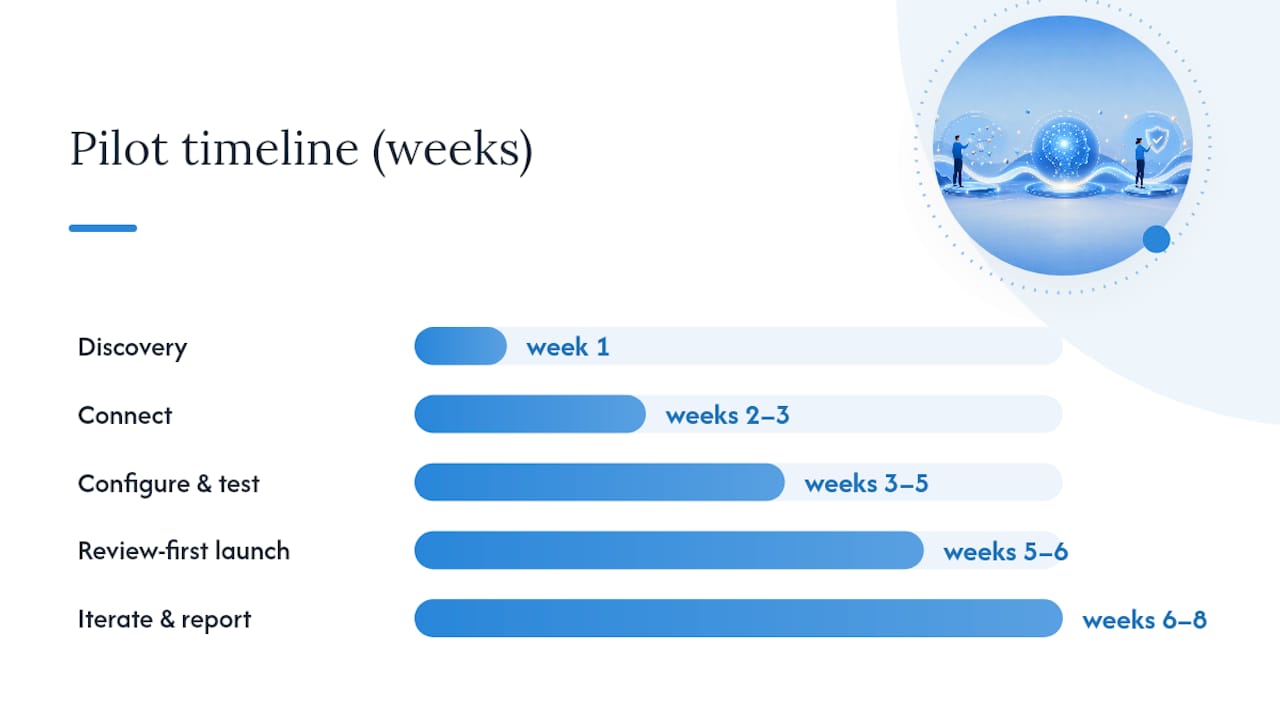
What does a realistic pilot timeline look like?
Run the pilot small, narrow, and measured, not company-wide on day one. A 4 to 8 week window is enough to prove or disprove value without committing serious budget.
- Discovery (week 1). Pick one team with frequent, repeatable questions and clean source documents, such as an IT helpdesk or HR policy team.
- Connect (weeks 2 to 3). Wire up the two or three data sources that actually matter, not every system in the business.
- Configure and test (weeks 3 to 5). Set citation display, permission rules, and draft response tone; test internally before any live user sees it.
- Review-first launch (weeks 5 to 6). Every answer gets checked by a subject-matter expert before the requester relies on it. This staged approach is what the human-in-the-loop research points to as the difference between pilots that build trust and ones that get abandoned.
- Iterate and report (weeks 6 to 8). Feed correction data back into the retrieval layer, then present time-to-answer, deflection rate, and satisfaction scores to stakeholders before deciding whether to scale.
Pro Tip: Present the pilot results as a comparison against the previous manual process, not against a theoretical perfect assistant. “a substantial improvement in speed compared to the old ticket queue” convinces a budget holder far more than an abstract accuracy score.
A well-run pilot such as this maps closely to a structured 8 to 12 week rollout for support teams, which gives a repeatable template if you want to run the same discipline on a customer-facing use case next.
Avoiding agent sprawl as you scale
The mistake most organisations make after a successful pilot is letting every department build its own assistant, on its own tools, with its own rules. Within a year you have five disconnected agents, five separate permission models, and five new data silos nobody centrally governs.

AWS’s guidance on managing agent sprawl makes the case plainly: treat the assistant as a platform, not a one-off project. Centralised indexing and governance sit underneath, while individual teams configure their own agent from shared, modular components rather than building from scratch.
Ongoing maintenance is real work, not a one-time setup cost:
- Regular index refresh as documents change or go stale
- Periodic retraining on feedback from subject-matter reviewers
- Permission reviews as staff move roles or leave
- Analytics-driven audits of which documents get flagged as unhelpful or wrong
Staffing this properly usually means a named platform owner plus ongoing budget for connector maintenance, not a single IT contractor who set it up and moved on. Cloud9’s 8 Point AI Search Visibility Checklist covers the indexing and metadata discipline this maintenance work depends on.
When should you actually run a pilot?
Run a pilot where questions are frequent, repeatable, and answerable from documents you already trust. Defer if your source documents are scattered, contradictory, or your permission structure is still a mess. No retrieval layer fixes bad source data.
Where Cloud9 typically adds most value is in exactly this gap: running the managed pilot, wiring the integrations properly the first time, and staying on as the governance layer once the novelty of week one has worn off.
— Rob
Getting your internal assistant off the ground properly
Building this in-house from scratch means stitching together a retrieval layer, connectors, permission logic, and ongoing governance, usually across three or four different specialist skill sets you don’t currently have on staff. A single partner can scope the pilot, connect your actual data sources, and stay on to manage it once it’s live.
Cloud9’s AI Automation Services cover exactly the ground this guide has walked through: a scoped pilot, integration with CRM and ticketing systems through CRM and Marketing Automation, and the Managed Cloud Services that keep the underlying infrastructure secure and maintained long after launch. If you’re weighing up conversational UX options for a customer-facing layer alongside your internal build, AmmarAI’s chat-bot resources are a useful partner reference too. For a practical example of what a working deployment looks like, see Cloud9’s internal knowledge assistant work. Get in touch through the Systems, Finance & Workflow Integration page to scope a pilot for your team.
Sources
- Retrieval-augmented generation | IBM
- Knowledge Assistant documentation | Databricks
- Human-in-the-loop approaches in AI deployment | PMC
- Managing AI agent sprawl across business units | AWS blog
FAQ
What are the top AI assistants for internal business use?
There’s no single fixed list, but the strongest options share three traits: RAG-based retrieval, citation display, and role-based permissions. Platform providers like Databricks’ Knowledge Assistant illustrate this pattern well, and some providers build equivalent internal assistants tailored to a company’s own systems.
How much does a personal AI assistant cost?
Costs vary hugely depending on scope, data sources connected, and whether it’s a consumer tool or an enterprise-grade deployment with governance built in. AI Automation Services pricing is available on request once a pilot is scoped.
Can ChatGPT be my personal assistant?
General-purpose tools like ChatGPT can help with drafting and quick lookups, but without a retrieval layer connected to your company’s own documents, it can’t answer questions grounded in your internal knowledge or cite a verifiable source.
What are the different types of AI assistants?
Broadly, there are consumer assistants for personal tasks, customer-facing support bots, and internal knowledge assistants built on RAG for company-specific data. This article focuses on the last category, the one decision-makers use to give teams verifiable answers from their own systems.
How long does an internal AI assistant pilot take?
A focused pilot typically runs 4 to 8 weeks, covering discovery, connecting two or three key data sources, review-first testing, and a results review before any decision to scale.