

A marketing automation workflow runs on a simple loop: a trigger fires, a condition checks who qualifies, and an action fires back automatically, whether that’s an email, a CRM update, or a task for a salesperson. Done properly, it saves your team hours every week and builds a measurable trail from first click to closed deal. This article gives you copyable templates, a design checklist, and a real 60 to 90 day pilot model to get one running.
TL;DR:
- Most workflows require the four parts of trigger, condition, action, and data update to function properly and avoid chaos.
- Building narrow, scenario-specific workflows is more maintainable and effective than creating complex, all-encompassing automation sequences.
- Proper implementation includes mapping data fields, verifying tracking, testing thoroughly, and monitoring KPIs like MQL to opportunity rate and pipeline impact.
- AI best enhances predictive scoring, subject-line optimization, content personalisation, and routing suggestions, not autonomous decision-making.
- UK marketers must ensure explicit consent, unsubscribe options, and records to comply with PECR laws and avoid legal breaches.
Table of Contents
- What is a marketing automation workflow?
- Marketing automation workflow examples you can copy
- How do you design an effective automation workflow?
- How do you implement and measure a workflow?
- Where does AI actually help inside a workflow?
- What pitfalls should you watch for, and what does UK consent law require?
- A 60 to 90 day pilot for B2B marketing automation
- When should you build in-house versus bring in a managed partner?
- Get your marketing automation workflows built properly
- Sources
- FAQ
What is a marketing automation workflow?
A marketing automation workflow is a sequence built from four parts: a trigger (something a contact does), a condition (a rule that filters or branches), an action (what the system does next), and a data update (what gets recorded so the next step knows what happened). Miss the fourth part and workflows drift into chaos. An email sends, nobody logs the response, and three other automations fire off the same contact with contradictory messages the following week.
Most workflows stitch together channels rather than living in one tool. A typical build touches:
- Email for nurture sequences, receipts, and re-engagement
- CRM for scoring, ownership, and pipeline stage changes
- Website behaviour for triggers like page views or form fills
- Paid ads for retargeting audiences built from workflow segments
- SMS and chat for time-sensitive nudges (delivery updates, abandoned cart reminders)
The business case isn’t really about saving marketers’ time, though that matters. It’s about consistency. A human sales rep might follow up with a hot lead in ten minutes or ten days depending on their diary. A workflow follows up in ten minutes every time. That consistency is what shows up in the numbers worth tracking: engagement rate on triggered sends versus batch campaigns, conversion lift between automated and manual follow-up, and pipeline value attributable to workflow-sourced leads rather than one-off outreach.
Get the terminology straight early, because “automated marketing processes” and “marketing automation workflows” get used interchangeably, but a process is the broader operational habit; a workflow is the specific, built sequence that executes it. You can have a lead nurture process with three different workflows underneath it for three different personas. That distinction matters when you’re auditing what’s actually running in your stack, because tools rarely surface it clearly on their own.
Marketing automation workflow examples you can copy
Each one lists the trigger, the key conditions, the action sequence, rough timing, and what to measure. Adapt the numbers to your sales cycle and audience size before you build.
-
Welcome and onboarding. Objective: turn a new sign-up into an active user or repeat buyer. Trigger: form submission or account creation. Conditions: segment by product interest if captured at signup. Actions: immediate confirmation email, day 2 educational email, day 5 feature highlight, day 10 check-in with a soft CTA. Timing: five touches over ten days. Metrics: open rate on email one (benchmark against your list average), activation rate (percentage who complete a defined first action). Fits in almost any email platform; no CRM logic required.
-
Lead nurture (top of funnel). Objective: move a cold download into a sales-ready state. Trigger: gated content download with no prior engagement. Conditions: exclude existing customers and active opportunities. Actions: send related content weekly for three weeks, then a case study, then a soft demo offer. Timing: four weeks. Metrics: click-through rate per email, score accumulation, conversion to marketing qualified lead (MQL). Belongs in CRM-based automation once you need to exclude existing pipeline.
-
Lead routing and scoring. Objective: get hot leads to the right rep within minutes, not days. Trigger: lead score crosses a defined threshold, or a high-intent action occurs (pricing page visit, demo request). Conditions: route by territory, company size, or product line; check for existing owner first. Actions: CRM task created, Slack or email alert to owner, lead record flagged “hot”, fallback owner assigned if no response in four hours. Timing: near-instant. Metrics: time-to-first-contact, MQL to opportunity conversion rate. This one genuinely needs CRM rules, not a simple email tool, because it depends on ownership logic.
-
Abandoned cart. Objective: recover revenue from carts left within a session. Trigger: items added to cart, checkout not completed within one hour. Conditions: exclude if purchase completed via another channel; cap at three emails. Actions: reminder email at one hour, incentive email at 24 hours, final notice at 72 hours. Timing: three days. Metrics: recovery rate (percentage of abandoned carts converted), revenue recovered per email sent.
-
Post-purchase nurture. Objective: reduce buyer’s remorse, encourage reviews, set up cross-sell. Trigger: completed purchase. Conditions: branch by product category for relevant follow-up content. Actions: order confirmation, delivery/usage tips at day 3, review request at day 10, complementary product suggestion at day 21. Timing: three weeks. Metrics: review submission rate, repeat purchase rate within 60 days.
-
Win-back. Objective: re-engage customers who’ve gone quiet. Trigger: no purchase or login within a defined inactivity window (commonly 90 to 180 days depending on purchase cycle). Conditions: exclude anyone already in an active nurture or support ticket. Actions: “we miss you” email, incentive offer, final “closing your account” style nudge if no response. Timing: two to three weeks. Metrics: reactivation rate, revenue per reactivated contact.
-
VIP or loyalty rewards. Objective: retain your highest-value segment. Trigger: customer crosses a lifetime spend or order-frequency threshold. Conditions: verify no outstanding complaints or refunds pending. Actions: tier upgrade notification, exclusive offer, early access to new releases. Timing: triggered continuously, no fixed end. Metrics: retention rate of VIP segment versus general customer base, average order value change.
-
Browse abandonment. Objective: capture interest before it cools, even without a cart action. Trigger: repeated views of a specific product or category page without adding to cart. Conditions: known contact only (requires cookie-to-contact matching); frequency cap to avoid feeling intrusive. Actions: single follow-up email or retargeting ad showing viewed items. Timing: within 24 hours of the browsing session. Metrics: click-back rate, assisted conversions.
-
Replenishment reminders. Objective: prompt reorders for consumable products. Trigger: time elapsed since purchase matches the product’s typical usage cycle. Conditions: skip if a reorder already occurred via subscription or another channel. Actions: reminder email with one-click reorder link. Timing: set per product (a 30-day supplement differs from a 90-day filter). Metrics: reorder rate, time between repeat purchases.
-
Re-engagement for dormant subscribers. Objective: clean your list while giving disengaged contacts one more chance. Trigger: no email opens or clicks in 120 to 180 days. Conditions: exclude recent customers or active leads. Actions: “still want to hear from us?” email, preference centre link, automatic suppression if no response. Timing: single touch with a 14-day response window. Metrics: re-engagement rate, list health improvement (deliverability, complaint rate).
Templates 1, 4, 5, and 9 run comfortably in entry-level automation apps built around single-channel email logic. Templates 3, 6, and 7 need CRM-level rules because they depend on ownership, lifetime value, or ticket status. Template 8 needs behavioural tracking infrastructure most small tools don’t offer out of the box, which is often where enterprise orchestration platforms earn their higher price tag.
How do you design an effective automation workflow?
Most badly performing workflows fail at the design stage, not the build stage. The fix starts with scope discipline: map one persona going through one scenario, not “the customer journey” as some abstract whole. NN/g’s guidance on journey mapping is blunt about this. A map tied to a specific business goal and a single persona produces changes teams actually act on; a map trying to cover every customer type at once produces a wall chart nobody references again.
Atlassian’s Team Playbook recommends running these as short, focused workshop sessions rather than sprawling multi-week projects. Get the right people in a room, walk through actions, emotions, and backstage processes for that one persona and scenario, and assign an owner to each handoff you uncover. A map without an assigned owner for each touchpoint rarely produces lasting change, because nobody’s job depends on fixing what the map revealed.
Once the journey is mapped, define your triggers, conditions, and fallback rules explicitly:
- Trigger: the exact event, not a vague description (“form fill on pricing page”, not “shows interest”)
- Condition: what must be true for the workflow to proceed, and what excludes a contact
- Fallback rule: what happens when nothing else matches, so contacts don’t silently vanish from the funnel
- Data update: what gets written back so downstream workflows know this one ran
Watch for the branching anti-pattern: a workflow that tries to handle every possible scenario in one flowchart, with a dozen conditional splits nested inside each other. It becomes unmaintainable within months. Build several narrower workflows instead of one workflow trying to be everything.
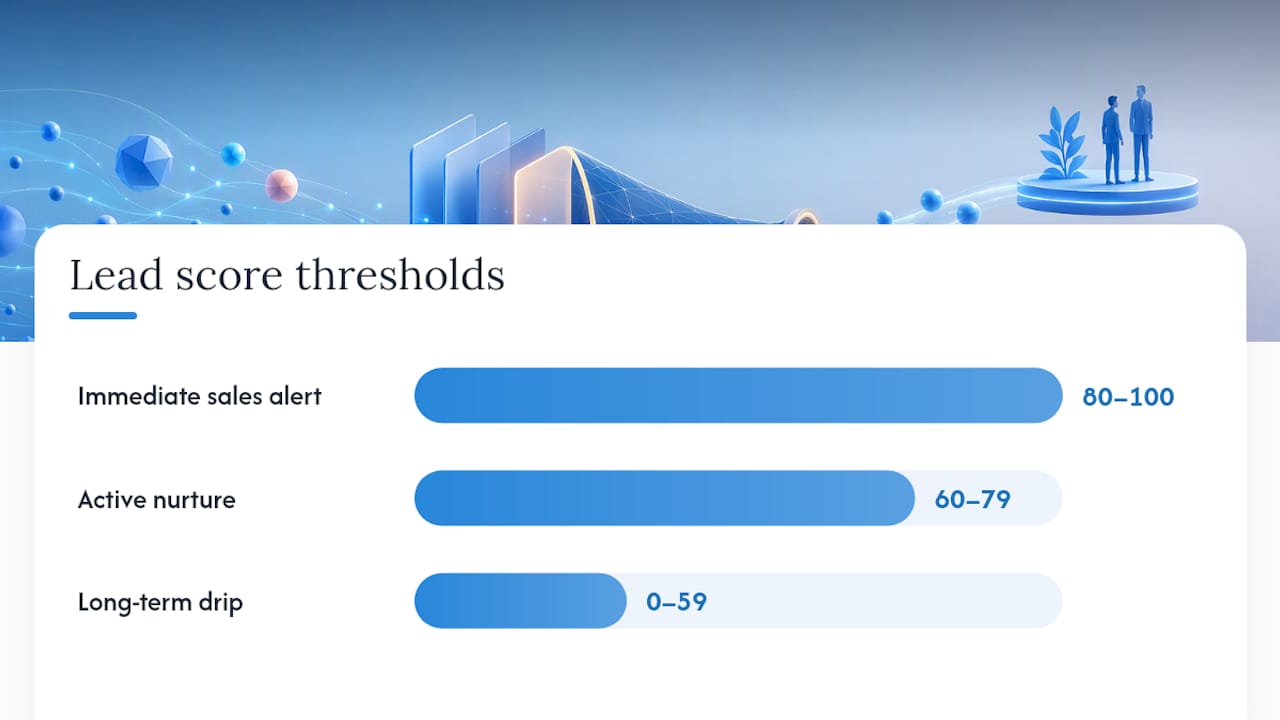
Lead scoring deserves its own discipline. Separate fit (does this contact match your ideal customer profile: industry, company size, role) from intent (are they actively behaving like a buyer: pricing page visits, demo requests, repeat email clicks). A practical B2B scoring framework treats these as separate axes rather than one blended number, because a perfect-fit contact with zero intent and a poor-fit contact with high intent need completely different follow-up. Map thresholds to specific actions: a combined score above roughly 80 might trigger an immediate sales alert, 60 to 79 keeps a contact in active nurture, and anything lower sits in long-term drip. Add decay to keep scores current, reducing the impact of old engagement over time, and include negative scoring for actions that signal disqualification (unsubscribes, bounced job titles, competitor domains).
Pro Tip: Build your first lead-scoring model with far fewer criteria than feels comprehensive. Five well-chosen signals that map cleanly to actions outperform twenty criteria nobody remembers the logic behind six months later.
How do you implement and measure a workflow?
Implementation is where good design either survives contact with reality or falls apart. Work through this checklist before anything goes live:
- Map your data fields. Confirm every field a workflow reads or writes exists in your CRM with consistent naming, and check for duplicate contact records that will split a single customer’s history across two profiles.
- Verify tracking. Confirm forms pass UTM parameters, cookies persist across sessions long enough to attribute behaviour correctly, and attribution rules are documented so nobody argues about which channel gets credit later.
- Set consent flags. Every contact record needs a clear, current marketing consent status before a single automated email goes near them.
- Test in staging. Run the full workflow against test contacts before it touches real customers, including every branch and fallback path.
- Check suppression lists. Confirm unsubscribed, bounced, and complained contacts are genuinely excluded, not just hidden from one view.
- Test the fallback owner. If a workflow routes to a human, confirm that person actually receives the alert and knows what to do with it.
- Set sending throttles. Cap volume so a trigger firing on 500 contacts at once doesn’t flood one inbox or exhaust an API rate limit.
- Build a monitoring runbook. Define alert thresholds (error rate, queue depth), assign someone to the error queue, and set a service level for how fast a broken workflow gets fixed.
On the AI adoption question specifically, Gartner’s own research found that 65% of CMOs expect AI to dramatically change their role within two years, which is a strong signal that the monitoring and governance layer around workflows matters more, not less, as automation gets smarter.
Once live, the KPIs worth reporting to stakeholders who don’t care about open rates are: MQL to opportunity conversion rate, pipeline value attributable to workflow-sourced leads, conversion velocity (how much faster leads move through stages compared with unautomated handling), and backlog or bounce rates in your fallback queues, which tell you how often the automation is quietly failing to handle a case.
Where does AI actually help inside a workflow?
AI earns its place in a workflow when it improves a prediction feeding into a rule your team already trusts, not when it’s making the final call unsupervised. The practical uses worth building now:
- Predictive lead scoring, where a model reads patterns across CRM, product usage, and engagement data to flag likely buyers earlier than manual scoring would catch them
- Subject-line and send-time optimisation, testing variants automatically within an email tool
- Content personalisation, swapping blocks of an email or landing page based on segment or behaviour
- Routing assistance, suggesting which rep a lead should go to based on historical win patterns
The pattern that works reliably: AI model output feeds a score or a field, and a deterministic workflow rule acts on that score. The AI never directly executes an irreversible action. Relational machine learning approaches that read connected CRM, billing, and support data can surface richer signals than a flat spreadsheet-style score ever will, catching things like a colleague at the same company already engaging with your product.
Keep a calibration window before trusting any model fully: log its recommendations without acting on them until its precision holds up against real outcomes. And keep a human review gate on anything touching compliance, refunds, or account closure. AI recommending a discount is fine to automate; AI deciding who gets removed from a compliance list unsupervised is not.
What pitfalls should you watch for, and what does UK consent law require?
Three anti-patterns account for most workflow failures teams report: branch explosion (one workflow trying to handle every scenario, becoming unmaintainable), scoring without action (a lead score that doesn’t map to any defined next step, so it just sits there as a vanity number), and no assigned owner (a workflow nobody’s job depends on maintaining, which quietly breaks and stays broken).
Governance fixes are unglamorous but essential: keep version control on your workflow logic, assign a named owner to each live workflow, maintain a rollback plan for when a change breaks something, and log every change with a date and reason.
For UK marketers, consent isn’t optional detail, it’s the difference between a legal campaign and a PECR breach. ICO guidance is clear that marketing emails generally require explicit, informed consent. The soft opt-in exception applies only in narrow circumstances, typically an existing customer relationship where the recipient had a clear chance to opt out at the point of collection. Build these into every workflow from day one:
- Explicit consent captured and timestamped at the point of collection
- A working unsubscribe link on every automated send, honoured immediately
- Records showing when and how consent was given, kept for as long as you’re marketing to that contact
A 60 to 90 day pilot for B2B marketing automation
A phased pilot removes most of the risk that stops businesses from starting. Cloud9 structures its 60 to 90 day pilot around four stages rather than a single big-bang launch:
- Discovery and mapping — scoping the single persona and scenario worth automating first, following the same focused-mapping principle NN/g and Atlassian both recommend
- Rapid build — constructing the priority workflows (typically lead routing and nurture first, since they show measurable impact fastest)
- Test and optimise — staging tests, fallback checks, and a short live monitoring window before scaling volume
- Handover and measurement — reporting against the KPIs agreed at the start, with the workflow logic documented so an internal team can maintain it
Businesses running this kind of phased pilot typically see the clearest early gains in two places: how fast a hot lead reaches the right person, and how consistently a nurture sequence keeps a cold lead warm without manual chasing. The qualitative gain matters just as much: marketing and sales stop arguing about who dropped a lead, because the workflow’s data trail shows exactly what happened and when.
This approach leans on the same principle running through this whole article: scope narrow, build one thing properly, measure it honestly, then expand.
When should you build in-house versus bring in a managed partner?
Complexity is the real decider, not budget. If your workflow touches three or more systems (CRM, ads, finance, a website form provider), if consent and governance need documented ownership, or if you need results inside a fiscal quarter rather than after months of internal learning, a managed partner earns its cost through speed alone.
Simple, single-channel campaigns, where the goal is your team learning the tools rather than hitting a revenue target this quarter, are worth building in-house. You’ll make mistakes, but they’re cheap ones on a small list.
If you’re leaning towards a managed route, start with a scoped pilot rather than a full platform migration. If you’re building internally, start with journey mapping for one persona before you touch a single automation tool.
— Rob
Get your marketing automation workflows built properly
If you’ve read this far and recognise your own set-up in the pitfalls section, branch explosion, scores with no action attached, workflows nobody owns, that’s usually the moment to bring in help rather than keep patching it. Cloud9’s CRM and marketing automation service exists specifically for established businesses that need routing, scoring, and nurture working together as one system rather than three disconnected tools fighting each other.
What makes the difference isn’t more automations, it’s fewer, better-built ones with clear ownership and a measurement plan attached from day one. That’s the exact structure behind Cloud9’s 60 to 90 day pilot: discovery and mapping, a rapid build of your priority workflows, a proper testing window, then handover with the KPIs you actually asked for. No lock-in beyond the pilot itself, and no guesswork about whether it worked, because the numbers are agreed upfront.
If your current stack is a patchwork of half-built automations and manual follow-up gaps, get in touch to scope a discovery session and see whether a pilot fits your sales cycle.
Sources
For deeper reading on the frameworks referenced above: NN/g on journey mapping, Atlassian’s mapping playbook, ICO’s direct marketing guidance, and Gartner’s CMO survey on AI. For a step-by-step SMB checklist, see Marketing Automation Checklist for SMBs.
- Customer journey maps: when and how to create them – NN/g
- Customer journey mapping play – Atlassian Team Playbook
- Direct marketing and privacy and electronic communications guidance – ICO
- Gartner: survey on AI impact for CMOs – press release
FAQ
What is a marketing automation workflow?
A marketing automation workflow is a sequence built from a trigger, a condition, and an action, designed to run without manual intervention once it’s live. It typically also writes data back to a CRM or email platform so subsequent workflows know what already happened to that contact.
What are examples of automated workflows?
Common examples include welcome series, lead nurture sequences, abandoned cart recovery, post-purchase follow-up, and win-back campaigns for dormant customers. Each pairs a specific trigger, such as a cart being left idle for an hour, with a defined set of actions and a timeline.
What are the top marketing automation tools?
Tool choice depends on complexity: simple single-channel email sequences run fine in entry-level automation apps, while lead routing, scoring, and multi-channel journeys typically need CRM-level automation. Cloud9 builds and manages these systems directly through its CRM and marketing automation service rather than reselling a single fixed tool, so the platform is matched to what the business actually needs.
What are some examples of marketing automation?
Beyond email sequences, marketing automation covers lead scoring and routing, ad retargeting audiences built from behavioural triggers, SMS delivery reminders, and chat-based qualification flows. The common thread is a trigger, a rule, and an action running without someone manually starting each step.
How much does Cloud9’s marketing automation pilot cost?
Pricing for Cloud9’s CRM and marketing automation work, including the 60 to 90 day pilot, isn’t published and depends on the scope of systems involved. Current details are available directly on the pilot programme page.