

An email retention policy for UK organisations must tie every retention period to a documented business purpose that can be justified under UK GDPR, then operationalise that schedule in your records systems. Emails should be retained by content and purpose, not by default, with record-worthy messages moved out of mailboxes and into corporate systems. The immediate next step is straightforward: run an inventory of your email estate and map each category to a documented retention period.
TL;DR:
- Most UK organisations should inventory their email estate and map each category to a documented, purpose-based retention period aligned with legal and operational needs.
- Email records must be stored in corporate systems like SharePoint or case management platforms, not simply left within mailboxes, to maintain provenance and searchability.
- Retention periods vary by category and legal obligation, with examples ranging from a few days for junk mail to several years for HR or financial records, depending on purpose and regulation.
- Microsoft 365 retention controls should be implemented via Purview policies and labels, with thorough testing on a small group before organisation-wide deployment to ensure compliance.
- Regular review, staff training, and a clear process for handling legal holds, FOI requests, and leavers are essential to maintaining an effective and defensible email retention framework.
Table of Contents
- What to include in a UK email retention policy
- How long to keep emails: setting retention periods that stand up to scrutiny
- Technical controls: Microsoft 365 (Purview) and mailbox vs item-level retention
- Implementing the policy: practical workflow and responsibilities
- Handling holds, FOI and subject access requests
- Retention schedule template and quick checklist
- Cloud 9 perspective: why a joined-up managed approach reduces retention risk
- How Cloud 9 can help
- Sources
- FAQ
What to include in a UK email retention policy
A defensible email retention policy starts with scope and ownership. Name who is accountable for the policy (usually a data protection lead or IT manager), who can authorise exceptions, and which mailboxes and systems the policy covers.
The policy then needs to say, in plain terms, which emails count as business records. According to National Archives guidance, records include decisions, directives, policies, financial communications and audit evidence, and these should be captured into corporate information-management systems rather than left in a personal inbox. Trivial, duplicate, spam and transient messages fall outside that definition and can be deleted without ceremony.
A working policy usually covers:
- Which categories of email are records (contracts, HR decisions, financial approvals, audit trails)
- How trivial, personal and junk mail should be handled and by when
- Where record emails must be stored once identified (a shared system, not a mailbox)
- How the policy links to the wider information-management schedule and any sector-specific legal duties
- Who reviews and updates the policy, and how often
The location question matters more than most policies admit. Outlook and Exchange are communication tools, not archives: the National Archives is explicit that email is a format, not a record type, and that value sits in the information and its business context. Storing a contract negotiation purely as a chain of emails means losing the surrounding paperwork, version history and related correspondence. Moving that thread into SharePoint, a case management system or a document management platform keeps it searchable and preserves provenance, which matters when someone asks for it in three years.
Finally, cross-reference the email policy against your broader retention schedule and any sector rules that apply, whether that’s financial services record-keeping, healthcare data rules or statutory tax obligations. An email policy that contradicts your main records schedule creates confusion and, eventually, deletion of something you needed to keep.
How long to keep emails: setting retention periods that stand up to scrutiny
There is no single correct answer to “how long should we keep emails,” and any policy that claims one is guessing. UK GDPR’s storage limitation principle requires that personal data isn’t kept longer than necessary for the purpose it was collected for. The ICO’s guidance on storage limitation is clear that there are no fixed statutory time limits for most categories: organisations must set standard periods, document their justification and review them regularly.
That justification is the test that matters. A retention period is acceptable when it’s tied to a documented purpose, applied consistently and revisited on schedule, not when it matches a number picked from a template.
Some categories do have statutory or sector anchors worth building around:
- Tax and accounting records generally need to be kept for HMRC purposes
- Employment-related records often need to be retained to cover tax and social-security obligations, reviewed at leaver stage
- Healthcare and financial services correspondence may carry sector-specific retention rules on top of general data protection duties
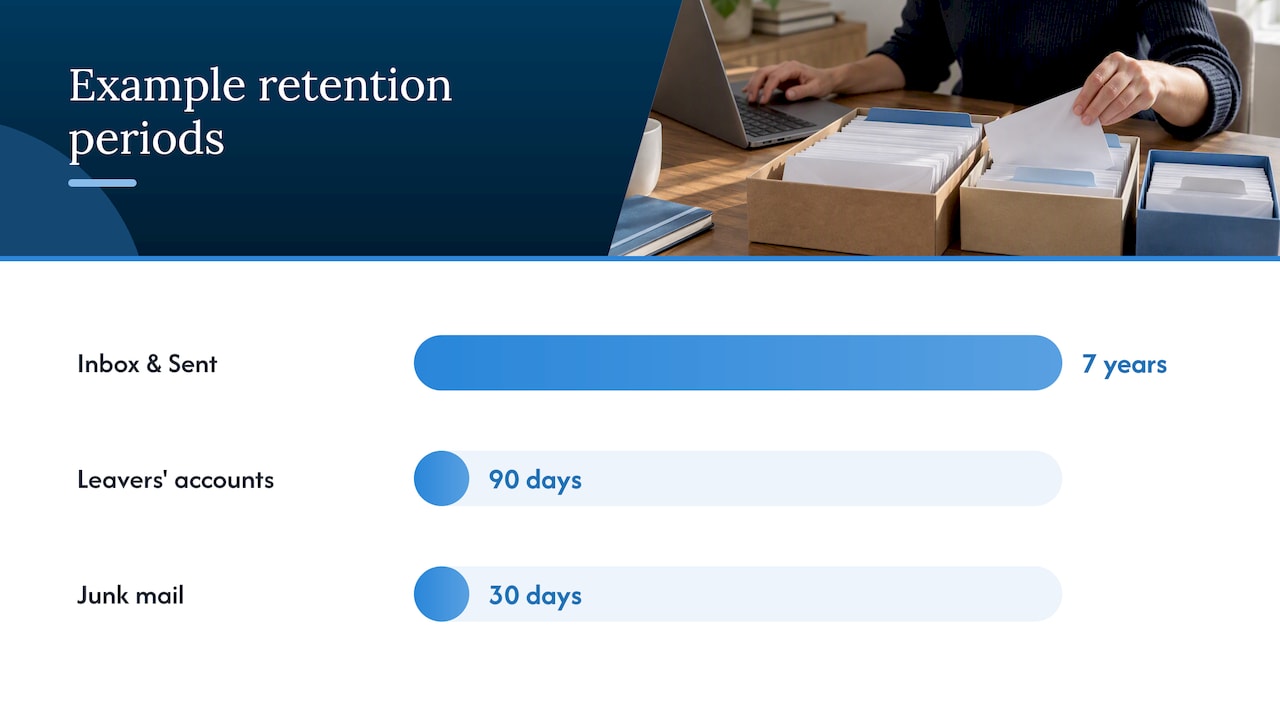
Public-sector examples illustrate the range rather than a template to copy wholesale. Nottinghamshire County Council’s email retention standard sets 7 years for inbox and sent items, 30 days for junk mail and 90 days for leavers’ accounts, but these figures are schedule-driven for that organisation’s context and aren’t a universal benchmark for a private business.
Document, for every category, the purpose, the trigger event that starts the clock (contract end, employee departure, financial year close) and a review date. Where data is no longer needed but you want to keep the underlying insight, anonymisation or deletion at the trigger point is the safer default over indefinite retention “just in case.”
Technical controls: Microsoft 365 (Purview) and mailbox vs item-level retention
Most UK organisations run email through Microsoft 365, which means the retention schedule has to translate into Microsoft Purview settings, not just a policy document.
Purview offers two mechanisms:
- Retention policies apply at container level, covering an entire Exchange mailbox, SharePoint site or similar location with a single set of rules.
- Retention labels apply at item level, letting you mark individual emails or documents for different treatment within the same mailbox.
Microsoft’s own documentation is explicit that you cannot build a single retention policy that covers every Microsoft 365 location: Exchange, SharePoint, OneDrive and Teams each need to be selected deliberately, and some locations are excluded from a policy unless you add them. Retention covers received, sent and draft mail, and Microsoft calculates months as 30 days and years as 365 days, which affects exactly when something expires against a schedule written in calendar terms.
Recoverable Items is the part that catches people out: content under a hold can remain recoverable even after a user deletes it, which is useful for legal holds but confusing if you haven’t tested it. Before rolling out organisation-wide, test shared mailboxes, delegated access, attachments inside retained threads, and what happens when two overlapping rules apply to the same mailbox.
Pro Tip: Pilot your Purview policy on one department’s mailboxes for a month before rolling it out everywhere, and check the eDiscovery search results match what you expect to find.
Map each schedule row to a specific policy or label, and note which Microsoft 365 locations it applies to. Our checklist for Microsoft Teams governance decisions covers similar admin scoping questions that overlap with Purview location selection.
Implementing the policy: practical workflow and responsibilities
Turning a retention policy from a document into something that actually runs is a sequence, not a single project.
- Inventory your email estate. List mailboxes, shared mailboxes, distribution lists and any related systems (CRM, finance, case management) that hold email-derived records.
- Map categories to purposes and legal requirements. For each type of email, note why you keep it and which law or contract obliges retention.
- Draft the schedule. Build rows with category, purpose, statutory anchor, retention period, trigger event, repository and named reviewer.
- Define exceptions and holds. Decide who can pause deletion for litigation, FOI requests or investigations, and how that’s recorded.
- Configure the technical controls. Set up Purview policies and labels that match the schedule, choosing container or item-level control as appropriate.
- Pilot and test. Run the configuration against one team or mailbox set, checking search, recoverability and hold behaviour before wider rollout.
- Communicate and train. Tell staff what counts as a record, what they can delete themselves, and where records should be filed.
- Audit and review. Check periodically that the schedule is being followed, and revisit periods as legal requirements or business needs change.
- Handle leavers and account closures. Set a clear process for reviewing a departing employee’s mailbox against the schedule before deletion or archiving.
The National Archives’ guidance on managing email supports this sequence closely, recommending induction training, repeated reminders, and either quotas or automatic deletion rules for personal mailboxes so records don’t quietly accumulate outside the schedule. For firms managing client-facing correspondence, our guide to email automation for professional firms covers how transactional email records intersect with CRM storage, which is often where step three gets complicated in practice.
Handling holds, FOI and subject access requests
Retention schedules need an escape valve for legal and regulatory demands that override the normal deletion clock.
- Suspend scheduled deletion as soon as litigation, an FOI request or a subject access request is received or reasonably anticipated.
- Use Microsoft 365’s eDiscovery search and export tools to identify and preserve relevant mail across mailboxes, including shared and delegated accounts.
- Record the scope of each hold (which mailboxes, date range, subject matter) and name an owner responsible for it.
- Agree in advance who can approve a hold and who can lift it once the matter is closed.
- Keep held records accessible and searchable, not just preserved: a hold that nobody can query when a request lands defeats its purpose.
Subject access requests deserve a specific note. Employment law commentary points out that receiving an email doesn’t automatically make the entire message the requester’s personal data. This means SAR responses often require a review of context rather than a blanket export of every message mentioning someone’s name, which is a point worth building into your SAR handling process alongside the retention schedule.
Retention schedule template and quick checklist
A workable retention schedule is a table, not a paragraph of prose. Each row should carry enough detail that someone outside the compliance team could apply it correctly.
| Category | Business purpose | Retention period | Repository |
|---|---|---|---|
| Signed contracts | Legal and contractual obligation | Contract term plus statutory limitation period | Document management system |
| Financial approvals | Tax and audit requirement | Per statutory financial record rules | Finance system, not mailbox |
| HR decisions | Employment law and dispute defence | Employment term plus review at leaver stage | HR system |
| Routine correspondence | Operational reference | Short, purpose-defined period | Shared mailbox or archive |
| Junk and spam | None | Immediate or automatic deletion | Deleted automatically |
Before rollout, work through this checklist:
- Inventory of mailboxes and related systems completed
- Schedule rows drafted and approved by data protection lead
- Purview labels or policies configured to match each row
- Staff training delivered on what to keep, what to delete and where to file
- Audit and review dates set in the calendar, not left open-ended
Legacy mailboxes are usually the hardest part. Rather than applying new rules retrospectively to years of accumulated mail, it’s often faster to migrate the genuine records into a governed repository and let the rest expire under the new schedule.
Cloud 9 perspective: why a joined-up managed approach reduces retention risk
Most retention policies fail quietly, not dramatically. Nobody deletes anything on purpose and nothing gets audited, so mailboxes grow indefinitely and the organisation loses track of what it’s actually holding.
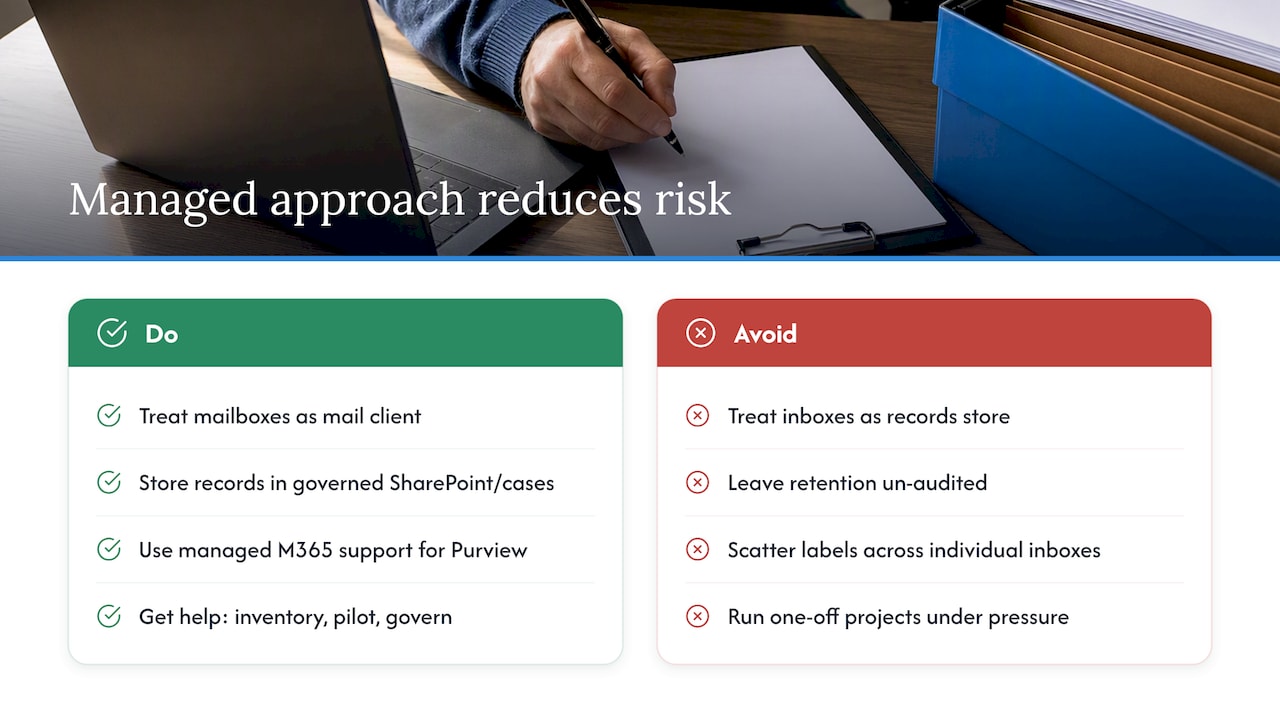
We think the fix starts with treating mailboxes as a mail client, not a records store. Contracts, HR decisions and financial approvals belong in governed SharePoint sites or case systems where retention labels can be applied consistently, not scattered across individual inboxes. Managed Microsoft 365 support makes the technical side less error-prone: testing overlapping Purview rules, applying labels correctly and managing legal holds all become routine tasks rather than one-off projects done under pressure.
Support can help with the parts organisations tend to underestimate: the initial inventory, drafting the schedule itself, piloting the Purview configuration, and keeping governance running once the novelty wears off.
— Rob
How Cloud 9 can help
Getting the schedule right on paper is only half the job. The other half is configuring Microsoft 365 so it actually behaves the way your policy says it should, and keeping it that way as staff, systems and regulations change.
Cloud 9 offers Microsoft 365 support for UK organisations that need help setting up Purview retention policies, testing them against real mailboxes, and fixing the gaps that only show up once you look closely. If you’re moving legacy mailboxes into a governed repository as part of the rollout, our cloud migration support is built for exactly that. For a wider view of what ongoing managed support covers, our services page lists the full range. If you’d like a scoping conversation about a retention pilot for your organisation, get in touch through Systems, Finance & Workflow Integration.
Sources
- Managing emails – The National Archives
- Principle (e): Storage limitation | ICO
- Automatically retain or delete content by using retention policies | Microsoft Learn
- Email retention standard — Nottinghamshire County Council
This article is general information, not a substitute for advice from a qualified lawyer. Consult a qualified legal professional about your own circumstances before acting on anything here.
FAQ
What are the legal requirements for document retention in the UK?
UK GDPR’s storage limitation principle requires that personal data, including document and email records, isn’t kept longer than necessary for its documented purpose, as set out in ICO guidance. Beyond that general principle, specific sectors carry their own statutory retention duties, such as tax and employment record rules, so a single organisation-wide figure rarely covers every document type correctly.
What is the recommended email retention policy?
There’s no single recommended period; the ICO’s position is that organisations must set standard periods per category and be able to justify them by purpose. A workable policy ties each email category to a business reason, a trigger event and a review date, rather than applying one duration to every mailbox.
What is the 7 year retention policy?
Some organisations set a 7-year retention period for certain email categories, such as inbox and sent items in Nottinghamshire County Council’s published standard. That figure reflects one council’s documented schedule rather than a universal legal requirement, and private organisations should set their own period based on their actual statutory obligations.
Do email addresses fall under GDPR?
Yes: an email address that identifies a living individual, whether directly or in combination with other information, counts as personal data under UK GDPR and falls within the storage limitation principle. Employment law commentary also notes that receiving an email doesn’t automatically make the entire message someone’s personal data, which matters when responding to subject access requests.