

AI can now remove most of the manual work from CRM data entry, but it should start as a supervised pilot, not a full switch-over. The right first move is a 30 to 60 day trial on one team, with every AI-drafted record going through human approval and mapping straight into structured fields rather than free-text notes. Build in ICO compliance checks from day one, and treat a managed partner such as Cloud 9 as one sensible route if you lack the internal capacity to run this safely.
TL;DR:
- Match input type to extraction method: forms can write directly, scans need OCR, and people should review fields extracted from calls or free form emails.
- Map data into canonical CRM fields and picklists, with duplicate checks, idempotent writes, and audit logs; notes alone cannot support reliable reporting.
- Run a single team pilot for 30 to 90 days; review accuracy at day 30, track time saved, and audit records weekly before monthly checks.
- Record lawful bases separately for model training and deployment, complete a DPIA for likely high risk processing, and let people challenge significant automated decisions.
- Choose native CRM agents for faster setup, API integrations for clearer error handling, or middleware when several sources feed one CRM, and keep rollback ready.
Table of Contents
- How AI automates CRM data entry: technologies and when to use them
- A repeatable 5-step workflow: capture, extract, map, approve, sync
- Integration and field mapping: patterns that actually work in production
- Data governance and UK compliance: ICO guidance, DPIAs and automated decision-making
- How to pilot, validate and scale AI CRM data entry safely
- Expected time savings and typical pilot length
- Challenges and limitations of AI in CRM data entry
- Best practices for training AI models on CRM-specific data
- Security and privacy best practices beyond UK law
- Comparing AI tools and platforms for CRM data entry
- User adoption strategies and change management
- Future trends and innovations in AI-powered CRM data entry
- Buy or build: when a managed service is the sensible option
- How Cloud 9 helps with a pilot you can actually run
- FAQ
- Sources
How AI automates CRM data entry: technologies and when to use them
Before picking a tool, sort your inputs by shape. That single decision determines which AI technique applies and how much risk you are carrying.
- Structured inputs, such as web forms and dedicated signup fields, arrive already labelled and are the safest candidates for direct, zero-touch writes into the CRM.
- Semi-structured inputs, including business cards, invoices and scanned documents, need optical character recognition (OCR) to pull out names, numbers and dates before they can be mapped.
- Unstructured inputs, such as sales calls, voicemails and free-form emails, need speech-to-text plus natural language understanding (NLU) or a large language model (LLM) to summarise and extract fields.
Each shape carries a different error profile. OCR struggles with poor scans and handwriting. Speech-to-text degrades with accents, background noise and overlapping speakers. LLM summarisation can miss a detail buried in a long thread or infer a fact that was never actually stated.
The output format matters just as much as the extraction method, and using tools like AccountCraft helps ensure structured customer data fields and GDPR-compliant consent management. Writing captured data into structured fields, picklists, dates, currency and numeric fields, is what lets you forecast pipeline, filter by segment and build dashboards later. A transcript dumped into a notes field might save a rep some typing, but it is not queryable, not reportable, and does nothing for your sales operations function six months from now. Scope your project around structured output from the start, not as an afterthought.
A repeatable 5-step workflow: capture, extract, map, approve, sync
Whatever tool or vendor you choose, the underlying workflow should look the same. Use this sequence to brief an internal team or to question a supplier during procurement.
- Capture: record calls, archive inbound emails and log form submissions, with clear rules on what gets kept, for how long, and who can access the raw recording.
- Extract: an AI agent produces a summary and a first pass at structured fields from the raw capture, flagging anything it is uncertain about.
- Map: route extracted values into canonical CRM fields, applying picklists, date formats and duplicate-matching logic rather than leaving anything as loose text.
- Approve: a human reviews the draft record before it writes to the CRM, through an approval queue, a Slack message or an email link, with changes logged.
- Sync: the approved record writes to the CRM using an idempotent operation, so a retry never creates a duplicate, with every write captured in an audit log.
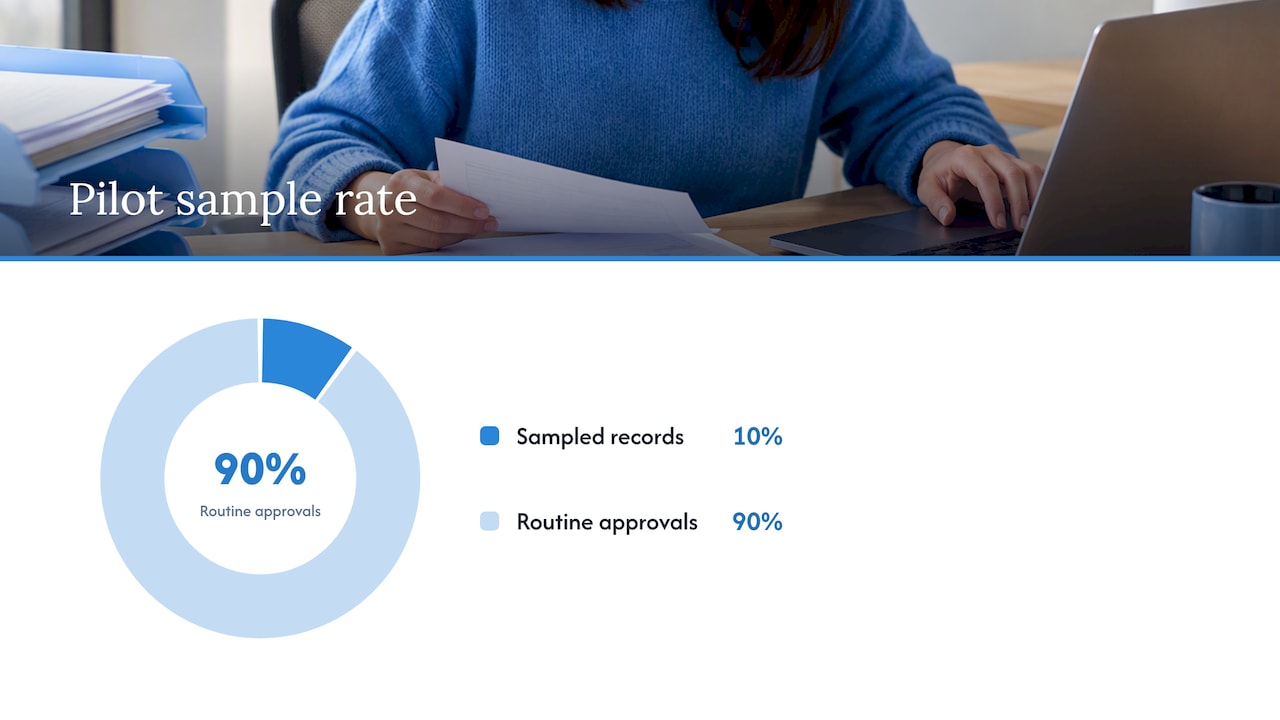
The step most teams skip is measuring what happens after approval becomes routine. Reps start waving records through without reading them, and a wrong field value sits in the CRM unnoticed for weeks. This is sometimes called silent automation failure, and it is the main reason phased autonomy, not a straight switch to full automation, matters so much.
Pro Tip: Keep a sample of every tenth AI-drafted record aside for a second human check during the first month, even after reps start approving quickly; it is the cheapest way to catch silent automation failure before it compounds.
Before you start, assemble a small pilot pack: a mapped-field table showing source to destination, a sample of ten real records run through the workflow by hand, and an approval log template. These become your evidence trail as well as your training material.
Integration and field mapping: patterns that actually work in production
Three integration patterns dominate live deployments, each with a different trade-off between speed and control.
- Native CRM agents sit inside the CRM itself, using its own automation layer. They are quick to configure but give you limited visibility into why a mapping failed.
- API or iPaaS syncs connect the AI layer to the CRM through its API or a middleware platform. They offer the clearest error handling and logging, at the cost of more setup work.
- Middleware companion agents run alongside the CRM, handling extraction and validation before a single clean write. They suit businesses with several source systems feeding one CRM.
Field mapping is where most pilots quietly go wrong. Set a canonical field list before you extract a single record: one agreed format for dates, one normalised currency field, one picklist per category, so “West Midlands” and “west mids” never end up as two different values. Custom objects need their own mapping table rather than being forced into a standard field that does not fit the data.
Three safeguards separate a reliable deployment from a fragile one: duplicate detection before any write, idempotent writes so a retried sync cannot double a record, and an audit trail that timestamps every change and its source. Monitoring dashboards that flag a sudden spike in failed writes or low-confidence extractions let your operations team catch a broken mapping before it reaches a hundred records instead of ten.
Data governance and UK compliance: ICO guidance, DPIAs and automated decision-making
Any CRM automation that profiles contacts or influences decisions about them sits inside data protection law, and it pays to treat this as a design constraint rather than a late-stage compliance check.
The ICO requires a Data Protection Impact Assessment (DPIA) wherever processing is likely to create high risk to individuals, and expects organisations to document the lawful basis for each stage of processing separately. Training a model and running it in deployment are not the same processing activity, and the lawful basis for each can differ.
Where automated decisions carry a legal or similarly significant effect, guidance on automated decision-making and profiling sets out obligations under Article 22: give people meaningful information about the logic involved, and offer a route to contest an outcome.
Fairness checks across the AI lifecycle, dataset review, model evaluation and post-deployment monitoring, help mitigate bias and discrimination risks, and organisations should request this documentation from any AI supplier before deployment.
ICO, Annex A: Fairness in the AI lifecycle
In practice, that means a short checklist before go-live: document the lawful basis for each processing stage, keep training data and live deployment data clearly separated, build in a way for a contact to ask how a decision about them was reached, and run sample quality checks across different customer groups to catch bias introduced through proxies such as postcodes. Set a retention and decommissioning policy for the data and the model itself, and bake supplier documentation requirements, covering data provenance, accuracy benchmarks and audit log capability, into any contract with an off-the-shelf AI provider.
How to pilot, validate and scale AI CRM data entry safely
Run the pilot on one sales team or one product line, not the whole business. Cap the record volume so a mistake stays small, and instrument every metric from day one rather than trying to reconstruct them later.
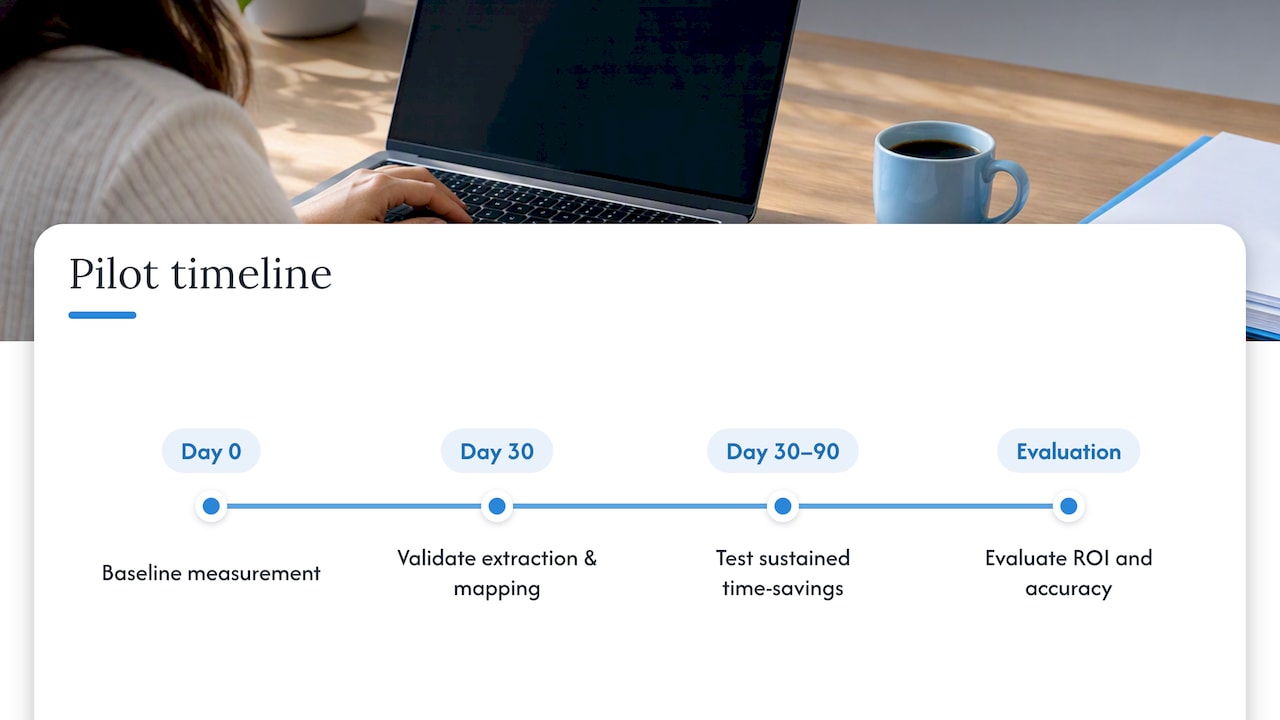
A 30 to 90 day window works well: a 30-day checkpoint to review accuracy against a set gate, and up to 90 days to decide whether background, unsupervised sync is safe to switch on for routine structured inputs.
| Pilot metric | Suggested target range |
|---|---|
| Field accuracy on approved records | High enough to sustain trust before removing human review |
| Time saved per rep per week | Noticeable within the first 30 days or the pilot is not working |
| Acceptable error rate before rollback | Low enough that a single miss does not reach downstream reports |
| Records auto-approved without edit | Rising steadily as confidence in the model grows |
Keep a rollback plan ready: a single switch to route everything back to manual entry if the error rate spikes. Give reps a short training session on what the AI drafts and does not draft, and set a recurring audit, weekly at first, then monthly, where someone outside the sales team spot-checks a sample of synced records against the original source.
Expected time savings and typical pilot length
The honest answer on return on investment is that it depends heavily on how messy your current process is, so frame the pilot around measuring your own numbers rather than importing someone else’s benchmark.
A 30 to 90 day pilot gives you a realistic read: the first 30 days surface whether the extraction and mapping actually fit your data, and the following weeks show whether time saved per rep holds up once the novelty wears off. Reps typically notice the biggest saving on the most repetitive tasks, post-call logging and form-to-contact creation, long before any saving shows up in reporting quality.
Treat the pilot as the ROI calculation itself. Track hours spent on manual entry before you start, compare it to hours spent reviewing AI drafts during the pilot, and only then decide whether the licence or project cost is worth paying for at scale. A pilot that shows strong time savings but poor field accuracy is not a win, because the hours saved on entry get spent later cleaning bad data out of reports.
Challenges and limitations of AI in CRM data entry
AI extraction fails in predictable ways, and knowing the pattern helps you design around it rather than being surprised by it.
Transcription errors creep in with accents, overlapping speakers or poor call quality, producing a plausible-looking but wrong name or figure. Summarisation can quietly invent a detail that was never said, particularly on long or rambling calls. Field mapping breaks when a picklist value does not exist yet, when a date format assumption is wrong, or when a duplicate check misses a near-match because of a typo in a surname.
Data quality issues compound over time rather than appearing all at once. An AI agent trained on clean recent data can start drifting as customer language, product names or regional terms shift, and nobody notices until a report looks odd months later. The fix is the same discipline recommended throughout this guide: human review during the pilot, structured field mapping instead of notes, and a recurring audit cadence once the system is live, rather than treating go-live as the finish line.
Best practices for training AI models on CRM-specific data
Generic language models are not trained on your product names, your sales terminology or your customer shorthand, so the first job is feeding the system examples that match what your team actually says and writes.
Start with a representative sample of real calls, emails and forms, not a curated set of easy cases, since the pilot needs to be tested against the messy inputs it will face in production. Build your canonical field list and picklists before training begins, so the model learns to extract toward the structure you actually need rather than free text that has to be remapped later.
Review extraction accuracy by input type separately, since a model that performs well on clean web forms can still perform poorly on noisy call transcripts. Keep a feedback loop where every human correction during approval feeds back into refining the extraction rules or retraining the model, rather than being a one-off fix. Retrain or re-tune periodically as your product range, terminology or customer base shifts, since a model accurate today can drift within a few months of launch.
Security and privacy best practices beyond UK law
Compliance with data protection law is the floor, not the ceiling, for a CRM AI deployment, and a few practical habits reduce risk regardless of which jurisdiction you operate in.
Encrypt data in transit and at rest, and limit which systems and staff can access raw call recordings or unredacted email content, rather than giving broad access by default. Apply the principle of least privilege to any AI agent itself: it should only be able to write to the fields it is meant to update, not have blanket access to the whole CRM record.
Keep an audit trail of every automated write, who or what made it, and when, so a security review or a customer query about their data can be answered quickly. Set a clear data retention schedule for raw recordings and extracted drafts, and decommission access and delete data once it is no longer needed for the purpose it was collected for. When evaluating any third-party AI vendor, ask for their own security certifications and incident response process before signing, since your exposure includes theirs.
Comparing AI tools and platforms for CRM data entry
The practical choice is less about which named tool wins and more about which integration pattern and field-mapping discipline a platform supports.
Native CRM-embedded automation suits a business that wants speed and is willing to accept less visibility into failures, since configuration happens inside the CRM’s own interface. API or iPaaS-based platforms suit a business with the technical capacity to build clearer error handling and logging, at the cost of a longer setup. Middleware companion agents suit a business pulling data from several source systems, calls, forms, email, into one CRM, since they can centralise extraction and validation before a single clean write.
Rather than ranking named products, score any option against the same checklist: does it support writing to structured fields, not just notes; does it offer an audit log and idempotent writes; does it provide documentation on training data and accuracy you can show a compliance reviewer; and does it support a phased rollout with human approval before full automation. A platform that fails any of these is a weaker choice regardless of its marketing claims.
User adoption strategies and change management
The best field mapping in the world fails if reps quietly route around the system, so adoption planning deserves the same attention as the technical build.
Involve a handful of reps from the pilot team in defining what “good” looks like before launch, rather than presenting the tool as finished. Reps who feel the system was built with their workflow in mind are more likely to actually use the approval queue rather than bypass it. Make the approval step genuinely fast, a one-click confirm for a correct draft, since a clunky review process pushes people back to manual entry out of frustration.
Communicate clearly what the AI does and does not decide: it drafts, a human approves, and nothing writes to the CRM unseen during the pilot. Share early wins, time saved on a specific repetitive task, with the wider team to build momentum before a wider rollout. Keep a visible channel for reps to flag a bad extraction, and treat every flag as pilot data rather than a nuisance, since those reports are exactly what tunes the system for your business.
Future trends and innovations in AI-powered CRM data entry
The direction of travel is toward agents that handle more of the extraction-to-sync pipeline end to end, while human oversight moves from reviewing every record to supervising exceptions and edge cases.
Expect tighter integration between meeting intelligence tools and CRM platforms, where a call summary, action items and structured field updates all appear in one pass rather than through separate tools stitched together. Confidence scoring is likely to become more granular, letting a system auto-approve a high-confidence structured update while routing only uncertain extractions to a human, rather than treating every record the same way.
Regulatory attention on automated decision-making is unlikely to loosen, so the organisations that build DPIA-ready documentation and audit trails into their pilots now will find scaling easier later than those who treat governance as an afterthought. The practical takeaway for a sales or operations leader is to build today’s pilot on the assumption that oversight requirements will tighten, not relax, so a human-in-the-loop design is not just a cautious starting point but a durable one.
Buy or build: when a managed service is the sensible option
Building this internally makes sense when you have engineering capacity, a modern CRM with a solid API, and someone who can own compliance documentation long-term. For many established businesses, none of those three hold.
A managed partner tends to reduce risk and speed deployment when you are working with a legacy CRM that needs custom integration work, a small or stretched internal engineering team, or regulatory exposure that makes DPIA and audit-trail work a genuine burden rather than a quick task.
Whichever route you choose, ask the same questions:
- Can you show a mapped-field table and a sample approval log before go-live?
- What is your rollback plan if the error rate spikes mid-pilot?
- Who owns the DPIA and the supplier documentation review?
How Cloud 9 helps with a pilot you can actually run
We run CRM and marketing automation projects for businesses that want the time savings of AI-driven data entry without carrying the integration and compliance work alone. Our CRM and Marketing Automation service covers field mapping, integration with your existing CRM, and the governance documentation a DPIA review will ask for.
A typical engagement runs as a structured pilot: we scope one team or one process, map fields to your CRM’s structure, build the approval workflow, and report back against the accuracy and time-saved metrics agreed at the start. You get a working pilot, an audit trail, and a clear view of whether to scale before committing further budget.
- We handle the integration work, so your team is not learning an API mid-project.
- We build the field mapping and approval queue around your existing CRM rather than asking you to replace it.
- We document the compliance groundwork your DPIA review will need.
Get in touch to scope a pilot through our CRM and Marketing Automation page.
FAQ
Can you create a CRM with AI?
AI can help populate and maintain an existing CRM far more effectively than it can build one from scratch. Most deployments add an AI layer, extraction, mapping and approval, on top of an established platform rather than generating a new CRM system.
What is CRM in data entry?
In this context, CRM data entry means capturing details from calls, emails and forms and writing them into the correct structured fields inside a customer relationship management system. Done well, it feeds accurate reporting and forecasting rather than just filling in notes.
Can AI do a data entry job?
AI can handle most of the routine extraction and field-filling work, particularly for structured inputs like web forms, but unstructured inputs such as calls and emails should go through human approval until accuracy is proven over a pilot period. A phased rollout, starting with drafts and moving to background sync only for high-confidence inputs, is the safer path.
How can AI be used in CRM?
AI is commonly used for call transcription and summarisation, email parsing, OCR on scanned documents, and mapping all of that into structured CRM fields. The practical value comes from writing to picklists, dates and numeric fields rather than dumping text into a notes field, since that is what makes the data usable for reporting later.
Do I need a DPIA before deploying AI in my CRM?
A DPIA is required where the processing is likely to create a high risk to individuals, which commonly applies to profiling or automated decisions with a legal or similarly significant effect, as set out in ICO guidance. It is worth completing one during the pilot stage rather than after full rollout, since the documentation is easier to produce while the system is small.