Identity-first sequencing wins every well-run tenant to tenant migration. Use Microsoft’s native Migration Orchestrator for mailboxes and OneDrive when your scope is straightforward, but budget for a partner or third-party tool the moment SharePoint sites or Teams channels are in play. A mail-only move between two small tenants can succeed with native tools alone. A full-workload merger involving shared Teams data almost never can.
TL;DR:
- Correct identity mapping, including copying ExchangeGUID and proxy addresses, is essential to prevent mail delivery failures after migration.
- Native Migration Orchestrator handles mailboxes, OneDrive, chats, and meetings but cannot migrate shared Teams channels or SharePoint sites without third-party tools.
- Migration should follow the sequence: move identities first, then mail and files, and finally collaboration endpoints, with pilot batches of 20 to 50 users.
- Proper preparation involves validating licenses, DNS updates, and identifying legal holds or retention policies to avoid blocking issues.
- Large-scale migrations require months of planning and execution, making it critical to resource appropriately and set realistic timelines based on workload complexity.
Table of Contents
- What is tenant to tenant migration and why does sequencing matter?
- Which migration approach fits your scenario?
- What must you check before any data moves?
- How should workloads be sequenced during migration?
- What are the identity mapping and domain transfer rules that break migrations?
- Should you rely on native tools or bring in a partner?
- What does the cutover weekend actually look like?
- What are the most common migration blockers?
- How does Cloud 9 support tenant migration projects?
- The identity-first argument holds, but the timeline advice usually doesn’t
- Get hands-on support for your Microsoft 365 migration
- Sources
- FAQ
What is tenant to tenant migration and why does sequencing matter?
Tenant to tenant migration is the process of moving users, mailboxes, files, and Teams data from one Microsoft 365 tenant into another, without downgrading security or losing continuity of email and collaboration. It happens whenever two Microsoft 365 environments need to become one, or one needs to become two.
Three business events drive almost every project: mergers and acquisitions, divestitures where a business unit spins out into its own tenant, and internal consolidation after a rebrand or multi-tenant reorganisation. Each has a different risk profile. An acquisition usually pushes everything one direction into a surviving tenant. A divestiture has to split identities, mailboxes, and shared files cleanly, often under a tight separation deadline set by legal agreements.
Regardless of the trigger, the sequencing rule doesn’t change: identities move first, then mail and files, then collaboration endpoints. Get that order wrong and you end up with duplicate accounts, broken permissions, or mail bouncing between tenants for days. Microsoft’s own tenant-to-tenant migration guidance treats identity strategy, workload dependencies, and licensing as the core planning pillars, and that framing holds regardless of which tools you end up using.
Which migration approach fits your scenario?
Three models cover almost every real-world project, and picking the wrong one is the most expensive mistake IT teams make early on.
- Single-event cutover: everything moves in one weekend. Low tolerance for delay, high risk if something stalls mid-batch, best suited to small tenants (a few hundred mailboxes or fewer).
- Phased or batched migration: users move in waves over weeks or months, grouped by department, geography, or licence readiness. This is the default for medium and large organisations because it spreads help desk load and lets you fix issues in wave one before wave five ships.
- Tenant split or divestiture migration: a subset of users, mailboxes, and data leave the source tenant for a brand-new target, often under legal separation deadlines. Azure resource transfers and Power Platform environment moves frequently ride alongside this model.
Native Migration Orchestrator handles all three reasonably well for mail and OneDrive. Third-party tools earn their cost when SharePoint sites, Teams channels, or complex reporting requirements enter the picture, which is common in regulated mergers.
What must you check before any data moves?
Skipping prerequisites is the single biggest cause of stalled cutover weekends. Work through this before scheduling anything:
- Build an identity inventory and draft the identity mapping CSV, mapping every source user to a target UPN.
- Validate the CSV format and confirm every entry is unique, no duplicate proxy addresses, no typos in UPNs.
- Confirm Cross-Tenant User Data Migration licences are purchased and assign the correct target licence plan to each migrating user.
- Plan domain and DNS timing, including MX record TTL reduction, temporary UPN suffixes, and when domain verification needs to happen in the target tenant.
- Set up admin roles, register the required applications, and establish any organisational relationships or trusts between source and target tenants.
- Identify litigation holds, retention policies, and eDiscovery cases that will block a mailbox move, and plan remediation or release before scheduling that batch.
- Define a pilot group and write down explicit rollback criteria before you touch production data.
Holds are the quiet killer here. A mailbox under litigation hold or an active retention policy can block a move outright, and finding that out mid-cutover is far more expensive than checking it in week one.
How should workloads be sequenced during migration?
Identity has to land first. Everything else depends on the target user object existing with the correct attributes before content can attach to it.
- Mailboxes move before Teams meetings and chats, because Teams data references the mailbox identity to reconstruct conversation history.
- Teams channels and SharePoint sites need separate handling entirely. The Migration Orchestrator moves mailboxes, OneDrive, Teams chats, and Teams meetings, but shared data stays behind in the source tenant.
- OneDrive and SharePoint permission mapping needs checking before migration, particularly around long file paths, since path-length limits can silently fail a document move.
- Keep pilot batches small, typically 20 to 50 users spanning several departments, so you catch permission or licensing issues before they hit thousands of mailboxes.
Batch size after the pilot depends on throughput testing, but most teams settle on a moderate number of mailboxes per wave once the pilot proves clean.
What are the identity mapping and domain transfer rules that break migrations?
Target MailUser objects must carry the exact ExchangeGUID, ArchiveGUID, and LegacyExchangeDN (x500) proxy addresses copied from the source mailbox. This is the single most cited requirement in Microsoft’s cross-tenant mailbox migration documentation, and skipping it causes silent mail delivery failures after cutover.
Never assign a mailbox licence to a target user before the ExchangeGUID has been written. Licensing too early locks a mailbox into an empty state, and practitioners repeatedly flag this as one of the two rules that most often trips up first-time migration teams. Fixing it means unlicensing, waiting for the change to propagate, then re-running the identity stamp.
Domain transfer follows a strict order: remove the domain from the source tenant, add and verify it in the target, then update MX and Autodiscover records. Temporary UPN suffixes buy you breathing room while DNS propagates. For tenants synced via Azure AD Connect, on-premises identities need their sync scope adjusted before cutover, or you risk the connector fighting the migration.
Should you rely on native tools or bring in a partner?
Migration Orchestrator supports Exchange mailboxes, OneDrive, Teams chats, and Teams meetings in dependency-ordered batches. It does not touch Teams channels or SharePoint sites at all, full stop. That gap is the deciding factor for most projects.
Cross-Tenant User Data Migration licensing is a per-user, one-time fee assigned in the target tenant before migration begins, and every user in scope needs it. Beyond that licence cost, native tools are free to use for supported workloads.
Third-party tools and migration partners earn their fee on three fronts: delta sync (so you’re not stuck with one-shot copies), full-fidelity SharePoint site and Teams channel migration, and audit-grade reporting that regulated mergers often require. A reasonable decision checklist: if your scope is mailbox-and-OneDrive only, native likely suffices. If SharePoint, Teams channels, or compliance reporting matter, budget for a partner. Internal Microsoft 365 expertise depth is the third variable, since even simple scopes benefit from experienced hands during cutover weekend.
What does the cutover weekend actually look like?
A cutover runbook needs firm sign-offs before anyone touches production. Confirm the pilot batch was clean, confirm licences are assigned in the target, and confirm DNS TTLs have already been lowered days in advance.
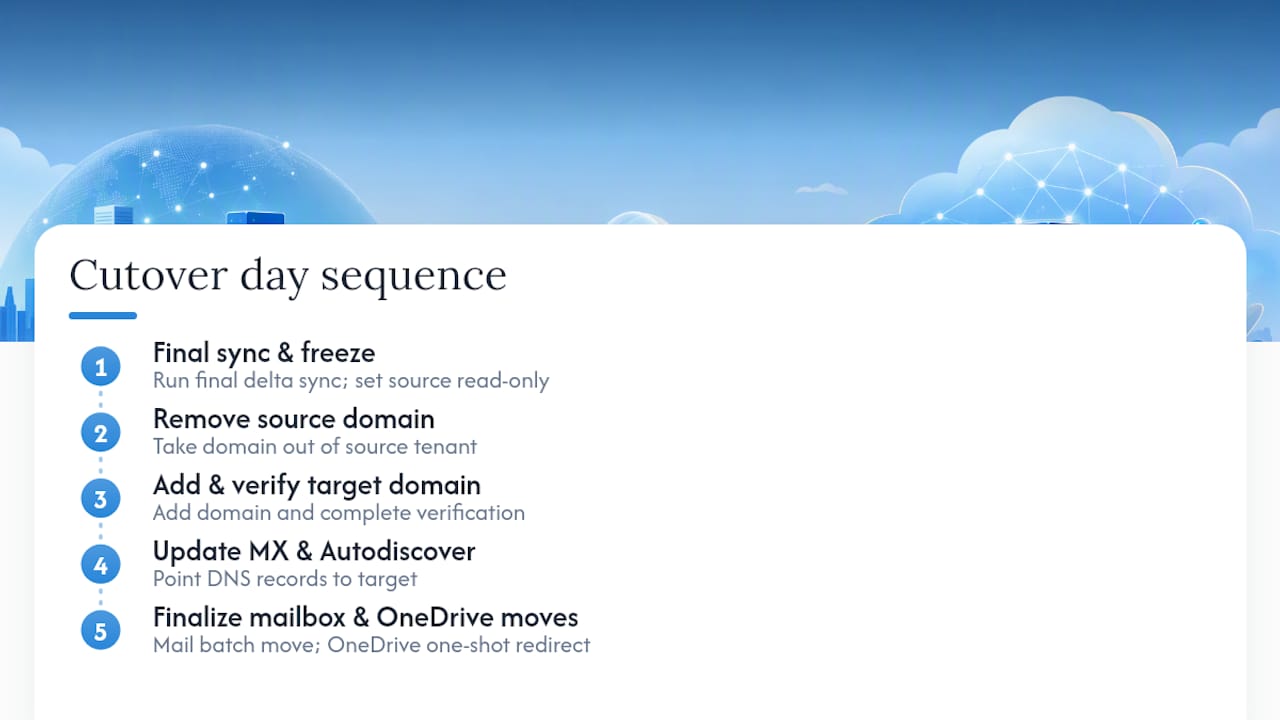
The sequence on the day: run the final delta sync, set the source mailbox or OneDrive to read-only, remove the domain from the source tenant, add and verify that domain in the target, update MX and Autodiscover DNS records, then complete the mailbox batch move. OneDrive migrations don’t support incremental passes, so the final OneDrive move is a one-shot copy with a redirect left on the source account, which matters when you’re timing the freeze window.
Post-cutover validation covers mail flow both directions, Global Address List accuracy, Teams sign-in and chat history, and SharePoint link integrity. Staff a command centre with an identity lead, a mail flow lead, and a help desk escalation point, all reachable for the full weekend.
Pro Tip: Run a full validation pass on a handful of VIP mailboxes an hour after cutover completes, not the morning after. Catching a proxy address mismatch on Saturday evening is a fix. Catching it Monday morning is a crisis.
Timeline ranges vary sharply by scale. Practitioner write-ups covering enterprise-scale migrations report that a full migration of around 5,000 users commonly runs four to nine months end to end, driven by pilot iteration, batch throughput, and how many workloads beyond mail are in scope.
What are the most common migration blockers?
Missing ExchangeGUID stamps or premature licensing top the list of stuck mail moves, and the fix is always the same: unlicense, verify the identity mapping CSV, restamp, then re-license.
OneDrive and SharePoint site name collisions happen when the target tenant auto-provisions a OneDrive for a user before migration runs. Disable auto-provisioning in the target before you start, because an existing empty site blocks the move outright.
Legal holds and active eDiscovery cases silently block mailbox moves. Surface every hold during the pre-migration checklist, not during cutover week, since releasing or working around a hold can take legal sign-off you don’t want to be chasing on a Friday.
x500 and LegacyExchangeDN mismatches cause delivery failures after cutover, showing up as bounced messages to recently migrated users. Copying the full proxy address set, not just the primary SMTP address, prevents this. When Teams channels or SharePoint sites genuinely cannot move natively, that’s the trigger to bring in third-party tooling rather than attempting a manual copy.
How does Cloud 9 support tenant migration projects?
Cloud 9 works with established businesses through managed Microsoft 365 support, and that includes helping plan and execute tenant to tenant migrations alongside ongoing cloud migration support. A typical engagement runs through assessment, a pilot batch, hands-on cutover weekend support, and a formal handover into ongoing management, following the same phased structure covered in Cloud 9’s seven-phase Microsoft 365 migration playbook.
Before hiring any migration partner, ask direct questions: which workloads their process covers natively versus with third-party tooling, how they handle identity mapping validation, their rollback plan if a batch fails, and what audit trail they provide for compliance sign-off.
The identity-first argument holds, but the timeline advice usually doesn’t
Most guidance on tenant migration gets the sequencing right and the scheduling wrong. Identity-first, mail-before-collaboration, licence-after-mapping: none of that is controversial, and any competent migration engineer will tell you the same thing. Where advice consistently misleads IT decision-makers is timeline expectation. Vendors selling migration tools love to imply a weekend cutover scales to any organisation size. It doesn’t. A 200-user mailbox-only move genuinely can happen in a weekend. A 5,000-user move touching SharePoint, Teams channels, and Power Platform environments is a multi-month programme, and pretending otherwise sets IT leadership up to under-resource the project from day one.
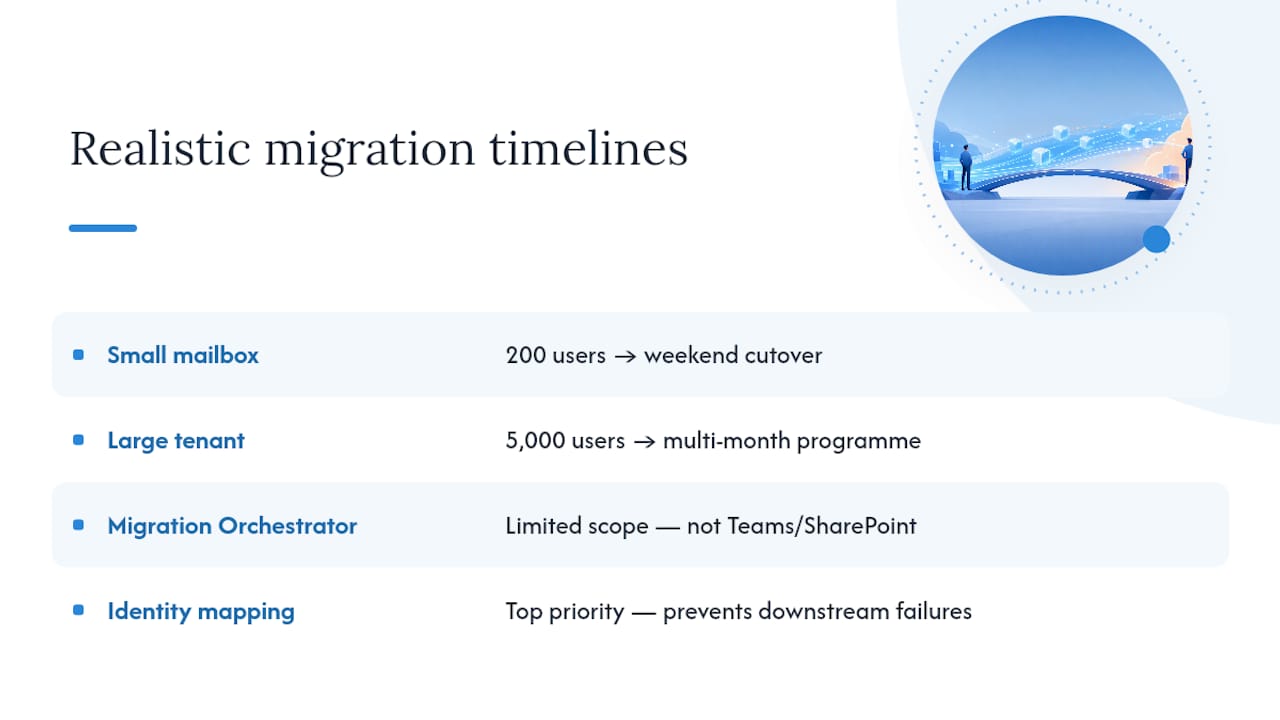
The bigger blind spot is treating the native Migration Orchestrator as a complete solution rather than what it actually is: an excellent, free tool for a defined slice of the problem. Teams channels and SharePoint sites sit outside its remit entirely, and no amount of clever PowerShell changes that. The organisations that plan well decide their SharePoint and Teams strategy before cutover week, not during it.
If there’s one thing to prioritise above all else, it’s the identity mapping CSV. Every downstream failure this article covers, stuck mail, NDRs, broken Teams history, traces back to an identity attribute that was wrong, missing, or applied in the wrong order.
— Rob
Get hands-on support for your Microsoft 365 migration
Managed Microsoft 365 migration support is available for established businesses that prefer to delegate identity mapping, licensing sequencing, and cutover weekend to an experienced team. This includes accountability for the entire migration runbook, beyond what automated tools cover.
Delivery typically runs through an assessment of your current tenant and workload scope, a pilot batch to validate identity mapping and permissions, dedicated support through the cutover weekend itself, and a handover into ongoing Microsoft 365 support once your users are settled in the new tenant. If a merger, divestiture, or consolidation is on your roadmap, start with a discovery conversation through Cloud 9’s cloud migration support page and get a scoped plan before you commit to a cutover date.
FAQ
What is tenant to tenant migration?
It’s the process of moving users, mailboxes, files, and collaboration data from one Microsoft 365 tenant to another, typically driven by a merger, divestiture, or internal consolidation, and it requires identity mapping before any content can move safely.
How much does the Cross-Tenant User Data Migration licence cost?
Microsoft charges a per-user, one-time licensing fee for Cross-Tenant User Data Migration, assigned in the target tenant before migration begins; exact current pricing should be confirmed directly with Microsoft or your licensing reseller, since published rates change.
What is Microsoft 365 tenant to tenant migration?
It’s the specific process of relocating Microsoft 365 workloads, mailboxes, OneDrive, Teams chats and meetings, between two separate Microsoft 365 tenants, using either the native Migration Orchestrator or third-party tooling for workloads it doesn’t cover, such as SharePoint sites and Teams channels.
What does the native Migration Orchestrator not move?
It excludes shared Teams channels and SharePoint sites entirely, along with some Power Platform items, so any project involving those workloads needs a third-party tool or migration partner alongside the native process.
Can Cloud 9 help plan and run a tenant to tenant migration?
Yes. Cloud 9 offers managed Microsoft 365 migration support covering assessment, pilot testing, cutover weekend execution, and post-migration handover for businesses planning a tenant move.