

Digital client onboarding is the process of integrating new clients into your business using online tools and automated workflows, replacing paper forms, manual emails, and in-person admin. The industry term for this practice is “digital client onboarding,” and it covers everything from e-signatures and digital intake forms to automated payment collection and CRM integration. Research shows processing time drops by 60% compared to traditional methods, with completion achievable within 24–48 hours. That figure alone explains why established businesses across the UK are rethinking how they bring new clients on board. Get it right, and you reduce costs, retain more clients, and free your team from repetitive admin.
What is digital onboarding for clients, and why does it matter?
Digital client onboarding is defined as the structured use of web-based tools to collect information, obtain agreements, process payments, and schedule work with new clients, all without manual intervention. It replaces the traditional sequence of posted contracts, chased signatures, and manually entered data with a single, connected workflow.

The importance of client onboarding cannot be overstated. 74% of clients abandon a purchase or engagement if the process feels too difficult. That is not a marginal drop-off. It means nearly three in four potential clients will walk away if your onboarding creates friction. Businesses that treat onboarding as an afterthought are losing clients they have already paid to acquire.
Structured onboarding programmes also produce measurable retention gains. Organisations with structured onboarding retain 82% of new clients beyond one year, compared to just 52% without. That 30-percentage-point gap represents real revenue. Digital onboarding is the mechanism that makes structured programmes repeatable and consistent at scale.
What are the core components of the digital client onboarding process?
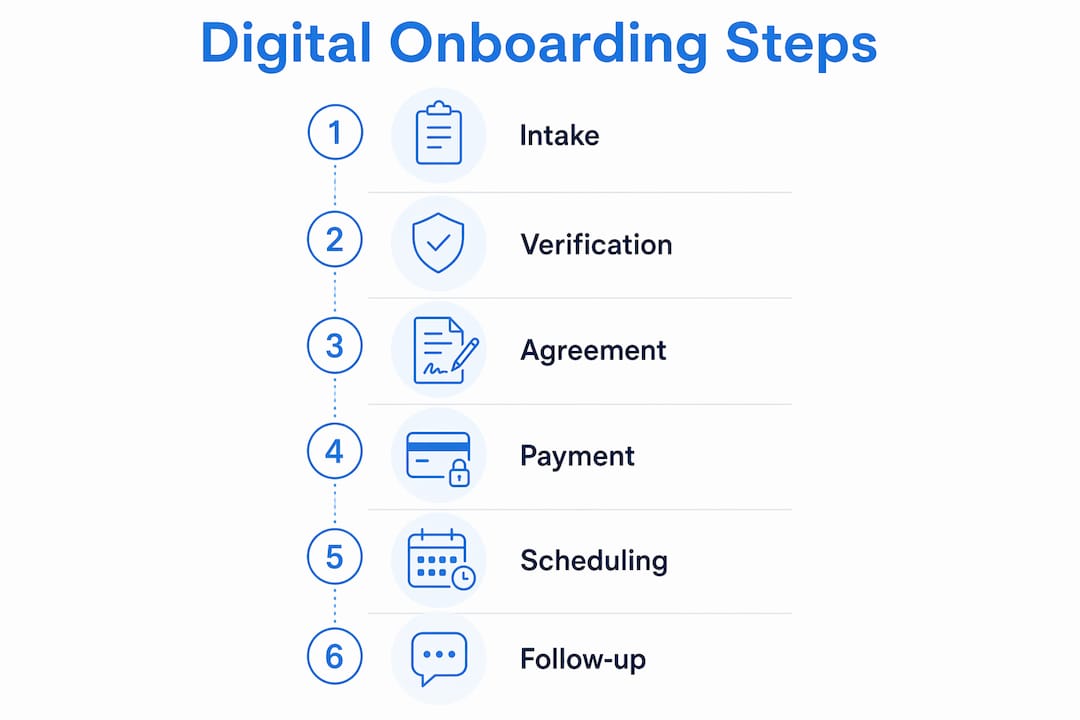
A well-designed digital client onboarding process follows a clear sequence. Each stage builds on the last, and automation handles the handoffs so your team does not have to.
-
Digital intake form. The client completes a structured form capturing their contact details, project requirements, and any compliance information. This replaces the back-and-forth email exchange that typically precedes a new engagement.
-
Contract and e-signature. Once intake is complete, the system sends a contract automatically. The client signs digitally, and the signed document is stored and timestamped without anyone printing or scanning a thing.
-
Payment or deposit collection. An integrated payment gateway collects the initial fee or deposit immediately after signing. Separating this step from the contract stage creates unnecessary friction and drop-off.
-
Kickoff meeting scheduling. The client books a time directly from a calendar link embedded in the workflow. No email chains, no double-booking.
-
CRM and backend sync. All data collected flows automatically into your CRM and marketing automation platform. This means your team has full context before the first meeting and no one asks the client to repeat themselves.
-
Automated task triggers. Each completed stage triggers the next. Contracts do not go out until intake is done. Payment is not requested until the contract is signed. This sequential logic creates a clean audit trail and prevents errors.
-
Welcome sequence and guidance. Once all steps are complete, an automated welcome sequence begins. This keeps the client engaged between signing and starting work.
Pro Tip: Deliver your entire onboarding flow through a single link. Fragmented workflows using multiple separate links are the leading cause of client drop-off. One URL, one session, one completed onboarding.
What are the main benefits of digital onboarding for businesses?
The benefits of digital onboarding are measurable and compound over time. The gains show up in three areas: time, cost, and client retention.
- Time savings. Digital onboarding reduces administrative time per client from 10 hours to approximately 3 hours. That is a 70% reduction in the manual effort your team expends per new client.
- Cost reduction. The same efficiency gain translates to a saving of approximately $175 per onboarding in labour costs. Across 50 new clients a year, that is a material operational saving.
- Faster completion. Processing time falls by 60%, with most onboarding completable within 24–48 hours rather than days or weeks.
- Higher retention. Structured digital programmes produce an 82% one-year retention rate versus 52% for unstructured approaches. Retention is where the real financial return sits.
- Reduced abandonment. Removing friction from the process directly addresses the 74% abandonment risk that complicated onboarding creates.
- Compliance and accuracy. Automated compliance checks such as KYC and AML reduce manual errors and cut the administrative cost of regulatory requirements.
Stat to remember: Businesses with structured onboarding retain 30 percentage points more clients at the one-year mark. That gap does not close without a deliberate process behind it.
The cost argument alone justifies the investment for most SMEs. But the retention argument is the one that changes how you think about onboarding. It is not an admin task. It is a growth lever.
How does good workflow design reduce client churn?
Workflow design is where most digital onboarding implementations fail. Businesses digitise their existing process without questioning whether that process was well designed in the first place.
The most common mistake is fragmentation. Sending a client a DocuSign link, then a separate payment link, then a Calendly link, then a welcome email creates four separate moments where they can drop off. A single-link, unified onboarding flow solves this by presenting every step in one session. The client does not need to find anything. They just follow the flow.
Linear, task-driven onboarding portals outperform open dashboards for completion rates. When a client logs in and sees a checklist with three items, they complete it. When they see a dashboard with eight sections, they close the tab. Simplicity is not a design preference. It is a conversion strategy.
Internal coordination matters just as much as the client-facing design. Team synchronisation before onboarding begins prevents clients from repeating information to different team members. Nothing signals disorganisation faster than a client being asked the same question twice. Brief your team on each new client before the kickoff call, using the data your intake form already captured.
Pro Tip: Build your onboarding portal so that each step only becomes visible once the previous one is complete. This is not just good UX. Automation triggered by stage completion creates a verifiable audit trail, which matters for compliance in regulated industries.
Post-onboarding engagement is the most overlooked element of the entire process. The gap between a client completing paperwork and starting work is where confidence drops and doubt creeps in. An automated sequence of guidance, resources, and check-ins during that gap keeps the client engaged and reduces early churn. Think of it as the bridge between “signed” and “started.”
What technologies enable effective digital onboarding?
The right technology stack for digital onboarding does not need to be complex. It needs to be connected.
Core tools every onboarding workflow needs
Digital forms and e-signature platforms handle data collection and contract execution. The key requirement is that they trigger the next step automatically rather than relying on a team member to notice a completed form.
Integrated payment gateways collect fees within the same flow. Separating payment into a different system or a different session creates unnecessary friction and delays.
Appointment scheduling tools embedded directly in the workflow remove the email negotiation from kickoff meeting booking entirely.
AI automation services connect these tools and trigger actions based on completion events rather than fixed schedules. This is the layer that turns a collection of tools into an actual workflow.
Supporting technologies that improve the experience
AI chatbots and knowledge assistants answer client questions during onboarding without requiring a team member to respond. A client completing their intake form at 9pm on a Sunday can get an immediate answer to a question about what documents they need.
CRM integration ensures every piece of client data collected during onboarding flows into your central system. This is what makes internal coordination possible and prevents the “please repeat your requirements” problem.
Automated compliance checks, including KYC and AML verification, are particularly important for financial services, legal, and regulated professional firms. Automating these checks reduces errors and speeds up a stage that often creates significant delays in manual processes.
The most effective platforms combine several of these capabilities in one system rather than requiring separate subscriptions and manual data transfers between tools. Digital integration across your business systems is what separates a functional onboarding workflow from a genuinely efficient one.
Key takeaways
Digital client onboarding is the single most impactful process change an established business can make to improve retention, reduce admin costs, and create a consistent client experience at scale.
| Point | Details |
|---|---|
| Define the process clearly | Digital onboarding replaces manual admin with connected online tools covering intake, contracts, payment, and scheduling. |
| Retention is the real return | Structured onboarding produces 82% one-year retention versus 52% without, a gap that directly affects revenue. |
| Single-link flows prevent drop-off | Fragmented multi-link processes are the leading cause of client abandonment during onboarding. |
| Automation must be sequential | Trigger each stage only when the previous one is complete to maintain compliance and a clean audit trail. |
| Post-onboarding engagement matters | Automated guidance after paperwork is complete reduces early churn and builds client confidence before work begins. |
Why most businesses are still getting onboarding wrong
Most business owners I speak with think of onboarding as the paperwork stage. Get the contract signed, collect the deposit, book the meeting. Done. That framing is exactly why so many onboarding processes leak clients.
The paperwork is the minimum. What clients are actually evaluating during onboarding is whether your business is organised, professional, and worth trusting with their money. A clunky process with three separate links, a chased signature, and a manually sent invoice tells them something about how you operate. It is not a reassuring message.
The businesses that get this right treat onboarding as the first delivery. The experience of becoming a client should feel as considered as the service itself. That means a single, clean flow. It means your team already knows who the client is before the kickoff call. It means the client receives something useful, not just a receipt, once the admin is done.
The technology to do this well is not expensive or complex. What holds most businesses back is not budget. It is the assumption that their current process is “good enough.” The 74% abandonment rate for difficult onboarding processes suggests it rarely is.
Digital onboarding is also a competitive differentiator in regulated industries, where clients are accustomed to slow, paper-heavy processes. Being the firm that completes onboarding in 24 hours rather than two weeks is a genuine advantage. It signals capability before you have delivered a single piece of work.
— Rob
How Cloud9 helps UK businesses build better onboarding workflows
Cloud9 works with established UK businesses that are ready to replace fragmented, manual client processes with connected digital systems.
Cloud9’s CRM and marketing automation services build the backbone of an effective onboarding workflow, connecting intake forms, contracts, payments, and scheduling into a single client journey. The team also designs and deploys AI automation that triggers each onboarding stage sequentially, creating audit trails and removing manual handoffs. For businesses that need a client-facing portal or a redesigned website to host their onboarding flow, Cloud9’s web design and development service delivers that too. One partner, one integrated system, and a process your clients will notice from day one.
FAQ
What is digital client onboarding?
Digital client onboarding is the process of integrating new clients using online tools such as digital forms, e-signatures, automated payments, and scheduling, replacing manual paper-based methods. It reduces processing time by approximately 60% compared to traditional approaches.
How long does digital onboarding take?
A well-designed digital onboarding process can be completed within 24–48 hours. This compares to several days or weeks for manual onboarding workflows that rely on posted documents and chased approvals.
What are the biggest risks of poor onboarding design?
The primary risk is client abandonment. Research shows 74% of clients will leave a process they find too difficult. Fragmented workflows with multiple separate links are the most common cause of drop-off.
What software features does digital onboarding require?
Effective digital onboarding requires digital intake forms, e-signature capability, integrated payment collection, appointment scheduling, and CRM integration. Automation that triggers each stage upon completion of the previous one is what connects these tools into a working workflow.
Does digital onboarding help with compliance?
Automated compliance checks, including KYC and AML verification, reduce manual errors and administrative costs. Sequential automation also creates a timestamped audit trail, which is particularly valuable for regulated professional firms.