

Drip email marketing is a strategy that sends a pre-written sequence of automated emails to contacts based on their behaviour or a set schedule, rather than blasting the same message to everyone at once. Sign up for a software trial, and you might receive a welcome email immediately, a feature walkthrough two days later, and a conversion nudge on day seven. That is a drip campaign. As defined by Wikipedia’s drip marketing entry, it is a communication strategy that delivers targeted, pre-written messages over a specific period, triggered by actions or time. UK organisations running these campaigns must do so in line with UK GDPR and PECR, and Cloud9 works with established businesses to build compliant, measurable sequences from the ground up.
Key takeaways
Drip email marketing works because it delivers the right message at the right moment, automatically, based on what a contact has actually done rather than when a marketer happens to be free to send.
| Point | Details |
|---|---|
| Core definition | Drip campaigns are automated, sequenced emails triggered by behaviour or time, not manual sends. |
| Best first use case | A 3–5 email welcome sequence delivers the strongest early engagement and is the easiest to measure. |
| Top KPIs to track | Monitor delivery rate, open rate, CTR, conversion rate, and revenue per recipient from day one. |
| UK legal must-dos | Obtain valid consent or confirm soft opt-in applies; store proof; include a working unsubscribe in every email. |
| Cloud9 next step | Cloud9 provides managed drip campaign setup and CRM integration for established UK businesses. |
Table of Contents
- Why run drip campaigns? Core benefits and expected outcomes
- Drip email examples: eight use cases with mini templates
- How to set up a drip campaign: a step-by-step checklist
- Best practices for cadence, personalisation, and deliverability
- Which KPIs should you track for drip campaigns?
- Which tools and integrations work best for UK businesses?
- How much does a drip campaign cost?
- UK legal essentials: UK GDPR and PECR for drip campaigns
- Troubleshooting and optimising underperforming campaigns
- How Cloud9 approaches drip campaigns: a practical UK checklist
- What actually matters when you plan a drip campaign
- Cloud9’s drip campaign and automation services
- Sources
- FAQ
Why run drip campaigns? Core benefits and expected outcomes
One-off newsletters have their place, but they cannot replicate the precision of a sequence that responds to what a contact actually does. HubSpot’s drip marketing guide frames drip campaigns as a way to maintain contact with prospects and customers by guiding them along the buyer journey through targeted, automated messages. That framing captures the core appeal: the right message, to the right person, at the right moment.
The practical benefits break down clearly:
- Lead nurturing: contacts who are not ready to buy receive relevant content over time rather than a single pitch they ignore.
- User onboarding: new customers or trial users get step-by-step guidance that reduces churn and support queries.
- Re-engagement: lapsed contacts receive a targeted sequence before you remove them from your list.
- Lifetime value: post-purchase sequences surface upsells, renewals, and referral prompts at natural moments.
- Scalable personalisation: once built, a sequence runs without manual involvement, meaning a team of two can follow up with thousands of contacts consistently.
The efficiency argument is straightforward. A manually managed follow-up process breaks down the moment volume grows. Automated campaigns, by contrast, run without manual intervention once configured, freeing teams to focus on strategy rather than individual sends.
Statistic callout: Statista tracks automated email marketing conversion rates worldwide, providing benchmarking data that organisations can use to set realistic performance targets for their own drip sequences.
One UK-specific note: because drip campaigns collect and process personal data to trigger sends, recordkeeping and consent management are not optional extras. They are built into the legal framework from day one.
Drip email examples: eight use cases with mini templates
The table below covers the most common drip sequences, with a subject line idea, the intent behind each email, suggested timing, and whether the use case is more common in B2B or B2C contexts. Mailchimp’s drip campaign glossary and HubSpot both highlight welcome and abandoned-cart sequences as the easiest starting points for teams new to automation.
For ecommerce-triggered flows such as abandoned cart and post-purchase, the trigger is a site event rather than a time delay, which means your ESP must be connected to your ecommerce platform to fire correctly.
Pro Tip: Welcome emails consistently deliver the strongest engagement of any sequence type. HubSpot’s analysis shows early-sequence welcome emails produce the highest open rates, making them the best first experiment for any team starting with drip.
How to set up a drip campaign: a step-by-step checklist
Setting up a drip campaign is less about the tool and more about the thinking that precedes it. Rush the planning and you end up with a technically functional sequence that nobody opens.
- Define your goal and target metric. Be specific: “increase trial-to-paid conversion” or “recover 15% of abandoned carts.” A vague goal produces a vague sequence.
- Map the customer journey and segmentation rules. Identify where contacts enter the sequence, what behaviour or data point qualifies them, and what outcome you want at the end. Segment by lifecycle stage, product interest, or source.
- Choose your triggers. Behavioural triggers fire on a specific action (page visit, form submission, purchase). Time-based triggers fire after a set interval. Most effective sequences combine both: an immediate behavioural trigger followed by time-delayed follow-ups.
- Write the content and subject lines. Each email should have a single purpose. Use personalisation tokens (first name, company, product viewed) where your data supports them. Avoid over-personalising with data the contact did not knowingly share.
- Build the automation in your ESP or CRM. Connect your email platform to your website events, CRM, or ecommerce platform. Integrating your CRM with your website is the step most teams underestimate, and it is where sequences most commonly break.
- QA and test before launch. Check every link, confirm tracking parameters (UTMs) are firing, verify the unsubscribe flow works, and send test emails across devices. Confirm that suppression lists are active so existing customers do not receive prospect sequences.
Trigger vs time delay: a quick decision guide
- Use a behavioural trigger when the contact’s action signals clear intent (cart abandonment, pricing page visit, demo request).
- Use a time delay when you want to pace content delivery regardless of activity (onboarding steps, course lessons).
- Use both when you want to accelerate or pause the sequence based on engagement (skip to email 4 if the contact clicks; wait if they do not open).
Pro Tip: Keep your first sequence to 3–5 emails. Platforms like Mailchimp and Klaviyo both recommend short initial sequences to reduce drop-off and make measurement cleaner. You can always extend once you have data.
Best practices for cadence, personalisation, and deliverability
Cadence
Welcome sequences can move quickly: an immediate email, one at day two, one at day five. Cart recovery sequences compress further, with the first email sent within an hour of abandonment. Re-engagement sequences, by contrast, should space emails two weeks apart to avoid accelerating the unsubscribe.

Personalisation
Tokens (first name, company name, product viewed) are table stakes. The more meaningful layer is dynamic content blocks that change based on segment: a B2B contact sees a case study; a B2C contact sees a product image. Personalised email campaigns consistently outperform generic sends on click-through rate, and the gap widens as list size grows. Avoid progressive profiling that asks for too much data too early; collect it across multiple touchpoints instead.
Deliverability
Authenticate your sending domain with SPF and DKIM records. Without them, your emails are more likely to land in spam regardless of content quality. Monitor your sender reputation through tools like Google Postmaster Tools or your ESP’s built-in dashboards. Clean your list regularly: contacts who have not opened in six months should move to a re-engagement sequence before you remove them entirely.
Content
One email, one call to action. Subject lines under 50 characters tend to display fully on mobile. Preview text is not decoration; treat it as a second subject line. A/B test one variable at a time: subject line length, send time, or CTA button copy. Running two variables simultaneously makes it impossible to attribute the result.
Pro Tip: Test send time by splitting your list 50/50 between Tuesday 10 AM and Thursday 2 PM for a fortnight. The winning time slot often varies by industry and audience age group. Statista’s data on email usage by age shows meaningful differences in when different demographics check email, which should inform your timing tests.
Which KPIs should you track for drip campaigns?
Tracking the wrong metrics is worse than tracking nothing, because it creates false confidence. The metrics below map to specific campaign goals.
| Metric | Definition | Worked example |
|---|---|---|
| Delivery rate | Emails delivered divided by emails sent | 9,800 delivered ÷ 10,000 sent = 98% |
| Open rate | Unique opens divided by delivered emails | 2,450 opens ÷ 9,800 = 25% |
| Click-through rate (CTR) | Unique clicks divided by delivered emails | 490 clicks ÷ 9,800 = 5% |
| Conversion rate | Conversions divided by delivered emails | 98 purchases ÷ 9,800 = 1% |
| Revenue per recipient | Total revenue ÷ emails delivered | £4,900 revenue ÷ 9,800 = £0.50 per recipient |
| Unsubscribe rate | Unsubscribes divided by delivered emails | 49 unsubscribes ÷ 9,800 = 0.5% |
| Bounce rate | Bounces divided by sent emails | 200 bounces ÷ 10,000 = 2% |
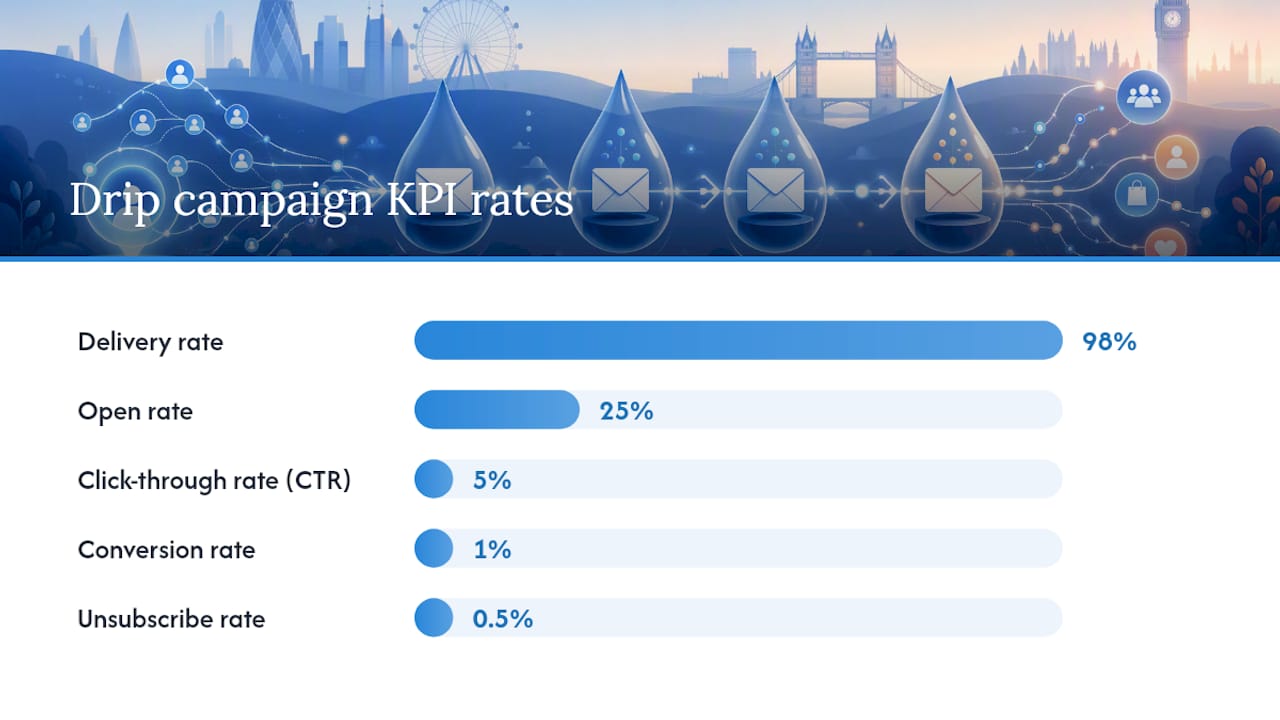
Attribution matters. Drip sequences involve multiple touches, so last-click attribution understates the value of early emails in the sequence. Use UTM parameters on every link and, where your analytics platform supports it, set up multi-touch attribution to see which emails in the sequence contribute to conversion. Web analytics connected to your ESP gives you the clearest picture.
For goal alignment: open rate and CTR indicate engagement; conversion rate and revenue per recipient indicate commercial impact.
Which tools and integrations work best for UK businesses?
The ecosystem splits into three broad categories: entry-level ESPs, CRM platforms with built-in automation, and enterprise marketing suites. The right choice depends on list size, technical resource, and how tightly you need to connect email to other systems.
Mailchimp is the most widely used entry-level ESP globally and is fully available in the UK. Its automation builder handles welcome sequences, abandoned-cart flows (with an ecommerce integration), and basic behavioural triggers. It suits smaller lists and teams without a dedicated developer. Mailchimp’s own documentation covers drip campaign setup in detail.
Klaviyo is built specifically for ecommerce and handles complex behavioural triggers natively, including product-view sequences and predictive send-time optimisation. It integrates directly with Shopify, WooCommerce, and Magento, making it a strong choice for UK ecommerce businesses running post-purchase and recommendation flows. Klaviyo’s drip campaign guide explains how automated sequences run without manual involvement once configured.
Zapier sits between tools rather than being an ESP itself. It connects your ESP to your CRM, ecommerce platform, or internal tools via webhooks and pre-built integrations, which is useful when your chosen ESP does not have a native connector for a system you already use.
MoEngage is a customer engagement platform that supports multi-channel drip sequences (email, push, SMS, in-app), and is used by larger organisations that need to orchestrate messaging across channels from a single platform.
When evaluating any tool, check for: event tracking capability, API access for custom triggers, data residency options (relevant for UK GDPR compliance), and the quality of pre-built automation templates. Cloud9’s CRM and marketing automation service covers the selection, integration, and ongoing management of these platforms for established UK businesses.
How much does a drip campaign cost?
Cost depends almost entirely on how you build and manage the campaign, not just which tool you choose.
DIY with an ESP: Most ESPs charge on a contact or email-volume basis. Entry-level tiers are often free up to a contact threshold, with paid plans scaling from roughly £10–£50 per month for small lists. As lists grow into the tens of thousands, monthly costs rise accordingly. The real cost at this level is time: writing, building, testing, and optimising sequences takes meaningful hours that have an opportunity cost.
In-house automation with a mid-tier platform: Organisations with a dedicated marketing or operations person often move to a more capable platform and manage everything internally. Platform costs rise, but the team gains more sophisticated segmentation and reporting. Integration work (connecting the ESP to a CRM or ecommerce platform) typically requires developer time, either in-house or contracted.
Agency-managed campaigns: A managed service covers strategy, copywriting, build, integration, testing, and ongoing optimisation. Setup fees vary by complexity; monthly retainers reflect the ongoing management and reporting workload. The tradeoff is cost versus speed and expertise: an experienced agency can build and launch a compliant, well-structured sequence faster than most in-house teams starting from scratch.
Key cost drivers to factor into any budget:
- List size and send frequency (directly affects ESP tier)
- Number of sequences and their complexity (branching logic costs more to build)
- Personalised content production (dynamic content blocks require more copywriting)
- Integration work (connecting ESP to CRM, ecommerce, or analytics platforms)
- Ongoing optimisation and reporting (often underbudgeted)
UK legal essentials: UK GDPR and PECR for drip campaigns
Running drip campaigns in the UK means operating under two overlapping frameworks: UK GDPR (which governs how you collect and process personal data) and PECR (the Privacy and Electronic Communications Regulations, which govern the sending of electronic marketing messages). Getting this wrong is not just a compliance risk; it damages sender reputation and list quality.
Core checklist:
- Lawful basis: for marketing emails to new prospects, consent is the standard lawful basis under PECR. Consent must be freely given, specific, informed, and unambiguous. Pre-ticked boxes do not count.
- Soft opt-in: existing customers who purchased a similar product or service can be emailed about related offers without fresh consent, provided they were given a clear opportunity to opt out at the point of data collection and in every subsequent email. This is the “soft opt-in” rule under PECR.
- Privacy notice: your sign-up forms must link to a privacy notice that explains what data you collect, why, how long you keep it, and who you share it with.
- Unsubscribe mechanism: every marketing email must include a working unsubscribe link. Honour opt-outs promptly; UK GDPR does not specify a deadline but the ICO expects requests to be acted on without undue delay.
- Recordkeeping: store proof of consent (timestamp, source, wording of the consent request) so you can demonstrate compliance if challenged.
- Retention schedules: do not hold personal data longer than necessary. Define a retention period for inactive contacts and apply it consistently.
- DPIA triggers: if your drip sequences involve large-scale profiling, sensitive data categories, or systematic monitoring of behaviour, a Data Protection Impact Assessment may be required before you launch.
Pro Tip: The ICO’s website (ico.org.uk) publishes detailed guidance on PECR and direct marketing, including worked examples of when soft opt-in applies. Bookmark the direct marketing guidance section; it is updated regularly and is the authoritative source for UK-specific questions.
For any sequence that uses behavioural data (page visits, purchase history, email engagement) to personalise content, document your data flows and confirm your ESP’s data residency settings. UK GDPR requires that personal data transferred outside the UK is subject to appropriate safeguards.
Troubleshooting and optimising underperforming campaigns
Low open rates, poor conversions, and deliverability problems each have different root causes. Diagnosing the right one before making changes saves weeks of misdirected effort.
- Isolate the problem layer. Is the issue deliverability (emails not reaching the inbox), engagement (emails reaching the inbox but not being opened), or conversion (emails being opened but not driving action)? Each requires a different fix.
- Deliverability issues: check SPF and DKIM authentication, review bounce rates by type (hard vs soft), and look at your spam complaint rate. A rate above 0.1% will damage your sender reputation. Warm up new sending domains gradually rather than sending at full volume immediately.
- Low open rates: test subject lines (length, personalisation, urgency), review send timing, and check whether your sender name is recognisable. A subject line that works for a welcome email will not necessarily work for a re-engagement email six weeks later.
- Low click-through rates: the email is being opened but the CTA is not compelling. Review CTA placement (above the fold performs better on mobile), button copy, and whether the email has a single clear purpose. Multiple CTAs in one email typically reduce overall clicks.
- Poor conversion: the click happened but the landing page did not convert. This is often a page problem rather than an email problem. Check that the landing page matches the email’s promise and that the form or checkout flow is frictionless.
- Stale lists: contacts who have not engaged in 90 days should enter a re-engagement sequence before you continue sending. If they do not respond to a re-engagement flow, remove them. Sending to unengaged contacts harms deliverability for everyone on your list.
For measurement, use cohort analysis where possible: compare contacts who entered the sequence in a given week against those who entered the following week, rather than mixing all contacts into a single aggregate. It gives you a cleaner read on whether changes to the sequence are actually working. Refer back to the KPIs section for the specific metrics to track at each stage.
How Cloud9 approaches drip campaigns: a practical UK checklist
Cloud9 works with established UK businesses to design, build, and manage drip sequences that are technically integrated, GDPR-compliant, and tied to measurable outcomes. The approach follows a consistent delivery structure.
Cloud9 delivery checklist:
- Discovery: audit existing email data, consent records, and current automation setup. Identify gaps in data quality or integration before building anything.
- Journey mapping: define the customer lifecycle stages relevant to the business, map entry points and exit conditions for each sequence, and agree on the target metric for each campaign.
- Build: write email content and subject lines, configure automation logic in the chosen ESP or CRM, and set up personalisation tokens and dynamic content blocks.
- Integration: connect the ESP to the client’s CRM, ecommerce platform, or website event tracking. This is where CRM and marketing automation capability matters most; a sequence that cannot receive accurate trigger data will not perform.
- Testing: full QA across devices and email clients, link checking, UTM verification, unsubscribe flow testing, and suppression list confirmation.
- Launch and optimisation: monitor delivery rate, open rate, and conversion in the first two weeks. Adjust timing or subject lines based on early data before the sequence reaches its full audience.
Anonymised client scenario: A UK-based professional services firm was following up with inbound enquiries manually, with inconsistent response times and no structured nurture process. Cloud9 mapped a five-email nurture sequence triggered by form submission, integrated with the firm’s CRM, and launched within six weeks of the discovery session. The firm moved from ad hoc follow-up to a consistent, measurable process with tracked conversion at each stage.
Pro Tip: The most common mistake Cloud9 sees in new drip setups is building the sequence before confirming the data quality. If your contact records are incomplete or your consent records are missing, no amount of clever automation will fix the underlying problem. Start with a data audit.
What actually matters when you plan a drip campaign
Most articles about drip email marketing focus on the mechanics: triggers, timing, subject lines. Those things matter, but they are secondary to a question most teams skip entirely: does the sequence serve the contact, or does it serve the sender?
The campaigns that perform consistently well are the ones built around what the contact needs at each stage, not around what the business wants to say. A welcome sequence that immediately pitches a paid upgrade is not a welcome sequence; it is a sales email wearing a welcome badge. Contacts notice, and they unsubscribe.
Privacy by design is not just a legal obligation in the UK; it is a quality signal. Sequences built on clean, consented data with clear unsubscribe paths tend to have better deliverability, lower complaint rates, and longer list lifespans. The compliance work and the performance work point in the same direction.
For anyone ready to act: start with a three-email welcome sequence, measure it for four weeks, and optimise before building anything more complex. The data from that first sequence will tell you more about your audience than any amount of planning.
Cloud9’s drip campaign and automation services
Most established UK businesses already have the raw ingredients for effective drip campaigns: a contact list, a CRM, and a website generating events. What they lack is the joined-up system that connects those ingredients and the time to build sequences that are properly tested and compliant.
Cloud9 provides CRM and marketing automation as a managed service, covering everything from initial data audit and journey mapping through to sequence build, integration, testing, and ongoing optimisation. There is no need to manage a separate ESP, a separate CRM, and a separate analytics tool independently. Cloud9 connects them into a single, coherent system and manages the technical layer so your team focuses on strategy and content.
For businesses starting out, Cloud9 typically begins with a discovery session to assess your current data, consent records, and automation setup, then proposes a pilot sequence with clear success metrics. To find out what that looks like for your business, get in touch with the Cloud9 team via the digital marketing services page.
Sources
- Drip marketing — Wikipedia
- Drip marketing: Everything You Need to Know + 3 Examples — HubSpot Blog
- What is a drip campaign? | Mailchimp
- What is a Drip Campaign? – Klaviyo
- What is Drip Marketing? Campaign Tips & Strategies | Salesforce
- Automated email marketing conversion rates worldwide — Statista
This article is general information, not a substitute for advice from a qualified lawyer. Consult a qualified legal professional about your own circumstances before acting on anything here.
FAQ
What is drip email marketing in simple terms?
Drip email marketing is a method of sending a series of automated emails to contacts based on their actions or a set schedule, rather than sending a single broadcast to everyone. Each email in the sequence is triggered by a specific event or time delay, as defined in Mailchimp’s drip campaign glossary.
What does a drip campaign actually do for a business?
It maintains consistent, relevant contact with prospects and customers without manual effort, guiding them from initial interest through to purchase or renewal. Salesforce describes drip marketing as a way to build relationships and move leads along the funnel through targeted content delivered over time.
Can you give an example of a drip email campaign?
A straightforward example is an abandoned-cart sequence: a contact adds items to their basket but does not check out, triggering an email one hour later, a follow-up at 24 hours, and a final reminder at 72 hours, each with a link back to their basket.
How much does a drip email campaign cost in the UK?
Costs range from a few pounds per month on a self-managed ESP for small lists, up to a monthly retainer for a fully managed agency service covering strategy, build, integration, and optimisation. The main cost drivers are list size, sequence complexity, and the level of integration required with your CRM or ecommerce platform.
Is drip email marketing covered by UK GDPR and PECR?
Yes. Any email marketing to UK contacts must comply with both UK GDPR (governing data collection and processing) and PECR (governing the sending of electronic marketing). You need a valid lawful basis, typically consent for new prospects or soft opt-in for existing customers, and every email must include a working unsubscribe mechanism.